Configuring Q-in-Q (802.1ad) on Arista

Lately I’ve been playing around with some Arista Networks switches (nice switches, not a fan of the Cisco-style CLI) and was having issues with the configuration of Q-in-Q for VLANs (802.1ad or double tagging). There is an interesting little gotcha for the port configuration on those puppies:

interface Ethernet1
switchport access vlan 500
switchport mode dot1q-tunnel

This will tag the packet with an outer VLAN tag of 500, while leaving the inner tag untouched.

UPC Ireland – Tiers of Service and NAT

The 120Mbps Tier

As a long time and very happy UPC customer (120Mb unlimited package) I was quite pleased with the service offered – to local speedtest server 10ms RTT, 118Mbps down, 10Mbps up, generous ‘fair-use’ limits and most importantly a public IP address.

Ideally, I’d like to use my own modem/router but instead I’m stuck with the Thompson TWG870, though to be fair it’s not the worst in the world. Not sure when, if ever, the firmware has ever been updated but all the important settings are at least accessible.

The 60Mbps Tier

With a new job I’m based in Limerick at least some of the time so made the decision to put in the basic package (60Mbps, 30Gb cap) and not bother with TV service. Installation was fine but no self-install so ended out having to sit at home for the scheduled installation window… 09:00 – 18:00 – they do make it easy for themselves.

Once installed and the tech out the door I had a poke at the new box. This one seems to be infamous as the Technicolor 7200 – clearly one of the cheapest cable modem/Wireless APs ever built. Prettier interface but fewer configuration options. Also issues with the WiFi connections to a Mac (not the only router to have this problem to be fair – I blame Apple).

Horizon WiFree

Interestingly the default internal IP range for the network is 192.168.1.0/24. When I tried to switch it to the more conventional 192.168.1.0/24 I was told that that address range is already in use. It seems that Horizon Wi-Free is configured to use the 192.168.1.0/24 subnet and that portion of the configuration is hidden away somewhere with the only options being to turn it on or off.

Public IPs

As I stated above something I love about the service I had was the public IP address. Making full use of the options that gives you I have a number of self-hosted ‘cloud’ services running on a Linux box I keep running – file store, VPN, Media Library, Document backup, etc. For the new gaff I have a RaspberryPi B+ that I use to run RASPBMC and a few other small services, but just by default had intended to make that internet accessible – sadly it was not to be.

It seems that the lowest tier of UPC has you running through a NAT system at some point. So while I have the port forwarding setup on the router, nothing reaches the Pi. It also seems to have some very aggressive ageing of flows running – had to set SSH keepalives to <60 seconds or the connections were constantly dropping. Poking at the IP address my connections seem to be originating from I see that there are two different pools in use (not unexpected in any case e.g. Dublin vs. rest of country).

Lowest Tier (60Mbps)


[colinmac@thor][~]=> dig +answer -x 188.141.a.b

; <<>> DiG 9.8.4-rpz2+rl005.12-P1 <<>> +answer -x 188.141.a.b
;; global options: +cmd
;; Got answer:
;; ->>HEADER<<- opcode: QUERY, status: NOERROR, a.bid: 22797
;; flags: qr rd ra; QUERY: 1, ANSWER: 1, AUTHORITY: 0, ADDITIONAL: 0

;; QUESTION SECTION:
;115.82.141.188.in-addr.arpa.   IN      PTR

;; ANSWER SECTION:
115.82.141.188.in-addr.arpa. 86389 IN   PTR     188-141-82-115.dynamic.upc.ie.

;; Query time: 15 msec
;; SERVER: 89.101.160.5#53(89.101.160.5)
;; WHEN: Tue Aug 26 09:04:24 2014
;; MSG SIZE  rcvd: 88

Notice the Pointer Record has the dynamic.upc.ie

Middle Tier (120Mbps)


[colinmac@thor][~]=> dig +answer -x 109.255.x.y

; <<>> DiG 9.8.4-rpz2+rl005.12-P1 <<>> +answer -x 109.255.x.y
;; global options: +cmd
;; Got answer:
;; ->>HEADER<<- opcode: QUERY, status: NXDOMAIN, id: 54912
;; flags: qr rd ra; QUERY: 1, ANSWER: 0, AUTHORITY: 1, ADDITIONAL: 0

;; QUESTION SECTION:
;7.123.255.109.in-addr.arpa.    IN      PTR

;; AUTHORITY SECTION:
255.109.in-addr.arpa.   600     IN      SOA     ns1.upc.biz. hostmaster.chello.at. 2010071503 86400 7200 2592000 7200

;; Query time: 33 msec
;; SERVER: 89.101.160.5#53(89.101.160.5)
;; WHEN: Tue Aug 26 09:05:04 2014
;; MSG SIZE  rcvd: 111

Whereas for the higher tier we have the Start Of Authority record pointing back towards the older chello and our nameserver is sitting within a biz domain.

Will add more to this post later 🙂

Logging IRC Chats

I like to keep track of some of the developers chat in the #opencontrail IRC but wanted it logged to my linux server so I installed the IRSSI CLI IRC client and use that to record everything going on so I can review later.

irssi
/set nick flat_planet
/set autolog on
/set autolog_path ~/irclogs/$tag/$0/%Y-%m-%d.log
/connect irc.freenode.net
/join #opencontrail

Either run this in a screen or leave the terminal running and the output of the chat log will be stored in
~/irclogs/freenode/#opencontrail/YYYY-MM-DD.log

Since this also logs people coming and going a grep -v 'has joined|has quit|has left' can make the whole thing more readable

OpenContrail – Service Chaining

This post is to cover one of the most (to my mind) interesting and powerful features of OpenContrail at the moment which is the service chaining. As part of the NVF approach we are looking to virtualise services (read boxes) that are already part of current networks.

The basic idea is to get away from services as appliances e.g. Firewall, Load Balancer, DPI, etc. are added to the network as boxes/appliances – when more capacity is required you add bigger boxes, and when you hit the largest size of box available from the vendor you either buy more or wait for the ‘next-generation’ platform to be released.

While there are good reasons for the box/appliance approach:

  • Simpler troubleshooting for TAC
  • Tested and verified performance levels – will do X pps for average packet size of Y
  • Easy scoping of scale – we have N Mbps of traffic, what do we need to DPI this at the current levels of growth

if we are going down the SDN/NFV route obviously this approach will not work anymore since you have a virtualised appliance living somewhere in a data center, and ideally there is no contention/undercapacity where that appliance is living. As the demands scale up more appliances are activated to handle the new load, and as demand drops resources can be released back into the pool.

Traditional Service Chains

Standard network deployments consist of service chains, though they are not very flexible or dynamic. Consider the path a typical webserver would take to reach the Internet. From the internet, through a gateway towards a firewall (typically providing NAT services). From there through a Load Balancer and then to the server farm. Typically each link in the chain is a logically separated path e.g. a VLAN.

traditional service chain

Dynamic Service Chaining

The more ideal approach is to have the different services e.g. Firewall, NAT, etc. provided on virtualised appliances that can also be hosted in our data center and scaled as required. These services can be added and removed from the traffic path as required, either by the customer or the hosting provider. Consider the use case of having vCPE [virtualised Customer Premises Equipment] – a simple box is installed on the customer site and all configuration and services and be added and removed in the Data Center.

One potential offer could be of a basic unfiltered connection, with firewall and DPI as a basic services package for €N per month, with other optional services on top of that. A simple web front end could effectively provide an ‘app store’ for network services, with pre-packaged services available for quick and easy deployment.

service chaining - outlineService Chaining in Contrail

Network Policies allow the tenant to define what traffic is allowed to flow between which networks. As part of the policy configuration a set of service instances can also be included, to be applied in the order in which they are configured e.g. svc1, svc2, svc3 will have Network A -> svc1_vm -> svc2_vm -> svc3_vm -> Network B, with the reverse path also created automatically.

This is achieved through manipulation (automatically) of the BGP Next-Hops between the created routing instances (also automatic).

service chaining - using the routing instancesService Instance

The Service Instance is simply a virtual machine that is providing the service. A most basic example would be a linux VM acting as a router between two virtual networks (not required of course since policies can do this for us, but any service that a linux server can provide can be chained). The convention is that there is a Left interface attached to the source network and a right interface attached to the destination network. We typically also include a 3rd interface on a Management interface to allow for the service VMs to be managed out-of-band of the traffic flow.

Configuring Service Chaining

This requires 3 elements:

  1. Service Template
  2. Service Instance
  3. Service Policy

 Service Template

The service templates are defined within the Domain and can be used, and re-used, across Projects as many times as required. Main points for Template configuration are:

Service type – main types are:

  • transparent – used for non-routed L2 services e.g. L2 Firewall
  • In-Network – provides gateway services and the traffic is routed e.g. HTTP Proxy, NAT, LB
  • In-Network NAT – same as In-Network but the return traffic doesn’t need to be routed back to the source network

Image – the GLANCE VM image that is used to provide the service

Service Instance

The service instance is the actual instantiation of the template. The main point is to add the correct virtual networks to the interfaces e.g. VN_source to Left interface and VN_destination to the Right interface.

Service Policy

The service policy allows the traffic between the virtual networks and instructs the system to chain that traffic through the service instances  – in-order.

Signalware Failing to start – nrplinker failure

I did a controlled shutdown of one of my OMNI/Signalware boxes, but when  fired it back up omni was refusing to run. The message indicated was:

+------+  go.omni  /main/sw9/86
| INFO |  Wed Jun  4 09:00:10 XXX 2014
+------+  OMNI_HOME=/PATH/ulcm
SHM=<User ID>
+------+
| INFO |  Starting nrplinker process.
+------+
nrplinker: Wed Jun  4 09:00:11 2014 Service Started.
nrplinker: Wed Jun  4 09:00:11 2014 Write error in load file /PATH/ulcm/tmp/LoadPoint.nrp
+------+
| INFO |  Starting sam_daemon.
+------+

Waiting for sam_daemon start completion../PATH/ulcm/bin/go.omni: line 467: 26194 Bus error               (core dumped) $OMNI_HOM
E/bin/usam_daemon TRACE_FILE usam_trace


+-------+  Script Aborted!
| ERROR |  SAM daemon terminated unexpectedly.
+-------+

It turns out that the / partition was full.

[siguser@hostname ~]$ /PATH/ulcm/bin/nrplinker
nrplinker: Wed Jun 4 09:15:33 2014 Service Started.
nrplinker: Wed Jun 4 09:15:33 2014 Write error in load file /PATH/ulcm/tmp/LoadPoint.nrp
[siguser@hostname ~]$ echo "" > /PATH/ulcm/tmp/LoadPoint.nrp
-bash: echo: write error: No space left on device
[siguser@hostname ~]$ df -h
Filesystem Size Used Avail Use% Mounted on
/dev/mapper/vg00-lv_root
9.7G 9.7G 0 100% /

Clear up some space (delete old OMNI logs) and we were back in business.


/etc/hosts and Signalware – DFdaemon issues

While doing an install of Signalware’s SIGTRAN stack (SignalWare 9.0 SP6) I had big problems getting it to actually work. The menu install process ran as expected, but the node wasn’t commissioned and therefore the go.omni process wouldn’t start, as the DFconvert step was failing.

It turns out the root cause was a problem with DFdaemon (this is a service that has something to do with maintaining the file system used by Ulticom). The service was running, but when I tried DFdaemon_status it was timing out.

Eventually killed off the service (init kept restarting it) by commenting out the contents of the init file and kill -15 1 a few times, and ran it manually in debug mode:

root@server init]# DFdaemon -d
16:49:11  0 DFdaemon::main           : using port 10600
16:49:11  0 Platform                 : ************* CE_c *************
Name:   server
mCeIndex:       0
mLanCount:      0
Current LAN index:      0
Current status: DOWN
Synchronization status: SYNC_REQD
Pending status request list:
EMPTY

oluCEList:      8
OluCe 0:
OluCe 0:
OluCe 0:
OluCe 0:
OluCe 0:
OluCe 0:
OluCe 0:
OluCe 0:
-------------

16:49:11  0 MessageQueue::MessageQue :
16:49:11  0 UDPmsgQueue_c::UDPmsgQue : Recv buffer : 524288
16:49:11  0 UDPmsgQueue_c::UDPmsgQue : Send buffer : 524288
16:49:11  0 DFfileList_c::initEntrie : reach the end of /opt/apps/ulcm/sls0479/dffile

16:49:11  0 UDPmsgQueue_c::startComm :
16:49:11  0 UDPmsgQueue_c::MessageQu : begin thread
16:49:11  0 global                   : DFdaemon started
16:49:11  0 DFtaskQueue_c::main      : begin thread
16:49:11  0 UDPmsgQueue_c::MessageQu : begin thread
16:49:11  0 SDFS::main               : begin thread
16:49:11  0 DFfileList_c::main       : begin thread
16:49:11  0 HealthCheck::main        : begin thread
16:49:11  0 HealthCheck::main        : wakeup before sleep
16:49:11  0 SDFS::main               : wakeup before sleep(1000)
16:49:11  0 HealthCheck::main        : wakeup after sleep
16:49:11  0 HealthCheck::main        : wakeup before sleep
16:49:12  0 SDFS::main               : wakeup after sleep
16:49:12  0 HealthCheck::main        : wakeup after sleep
16:49:12  0 HealthCheck::main        : wakeup before sleep
16:49:12  0 SDFS::main               : wakeup before sleep(1000)
16:49:12  0 HealthCheck::main        : wakeup after sleep
16:49:12  0 HealthCheck::main        : wakeup before sleep
16:49:13  0 HealthCheck::main        : wakeup after sleep
16:49:13  0 HealthCheck::main        : wakeup before sleep
16:49:13  0 SDFS::main               : wakeup after sleep
16:49:13  0 SDFS::main               : wakeup before sleep(1000)
16:49:13  0 HealthCheck::main        : wakeup after sleep
...
16:49:40  0 HealthCheck::main        : wakeup after sleep
16:49:40  0 HealthCheck::main        : wakeup before sleep
16:49:40  0 SDFS::main               : wakeup after sleep
16:49:40  0 SDFS::main               : wakeup before sleep(1000)
16:49:40  0 UDPmsgQueue_c::MessageQu : Received message from unknown sender, IP address: ::ffff:127.0.0.1    <<---- DFdaemon_status
16:49:40  0 HealthCheck::main        : wakeup after sleep
16:49:40  0 HealthCheck::main        : wakeup before sleep
16:49:41  0 HealthCheck::main        : wakeup after sleep
16:49:41  0 HealthCheck::main        : wakeup before sleep
16:49:41  0 SDFS::main               : wakeup after sleep
16:49:41  0 SDFS::main               : wakeup before sleep(1000)
16:49:41  0 HealthCheck::main        : wakeup after sleep
16:49:41  0 HealthCheck::main        : wakeup before sleep

It seems that for some reason the localhost entry for IPv6 was causing a problem. The entry that was part of the server build looked like this:

127.0.0.1   localhost localhost.localdomain localhost4 localhost4.localdomain4
::1         localhost

It should be like this:

127.0.0.1   localhost localhost.localdomain localhost4 localhost4.localdomain4
::1         localhost localhost.localdomain localhost6 localhost6.localdomain6

With that DFconvert ran and the rest of the process was fine.

Internet of Things – Potential Architectures & Drawbacks

The Internet-of-Things or IoT (terrible name since everyone knows that IoT stands for Inter-operability Testing) seems to be quite the buzzword around lately – replacing the previous version which of course was Machine-to-Machine [M2M]. Nest and other home telemetry/automation tools seem to be quite the cliche-du-jour for the digirati.

Consider what Nest actually does – local (in house) temperature compared with external (nearest location/airport) temperature and a few interesting algorithms to handle temperature differentials, learn preferences, awareness of presence and away type scenarios. Of course  given that it seems to automatically download updates, I’m sure it’s logging and submitting lots of information ‘to improve the product’

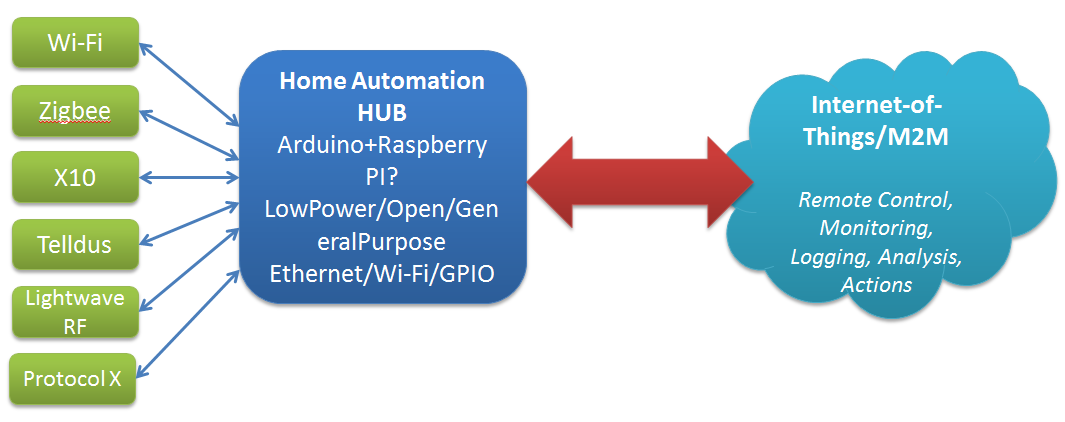
Likewise, we have hubs finally coming onstream to try and manage all the possible combinations of hardware and software for home sensors and everything else (or so they promise).

Think home sensors/lightbulbs/whatever – currently we have a plethora of specs to choose from for household comms and telemetry: X10, Zigbee, Z-Wave, Lightwave RF. Telldus, etc. Currently each manufacturer has their own choice of spec, controller software, etc.

Fortunately the Open Source/Open Hardware groups are are already experimenting with options to handle this – a good example is the Home Automation Hub (HAH) project which sets out to turn an Orange Livebox router into a home automation server, with an extra bit of hardware that – like the TellStick – allows it to control a range of gadgetry, and even keep an eye on energy consumption too. Likewise the dovado routers I’ve raved about before have the beginnings of some interesting Home Automation features with integration with Telldus sticks and the use of GPS to determine sunrise and sunset times for the location.

Open Source Open Hardware Hub

Home Hub - Internet of ThingsKey features as I see them are:

  • Compact
  • Reliable
  • Minimum Downtime
  • Low power
  • Open

Publish & Subscribe

So, assuming that we can get all these sensors talking to our hub, and that data recording (and potentially taking local actions based on that – heating, lighting, etc.) what do we do with it.

The hobbiest answer is to put it up on a website for your own entertainment. The more interesting options are open to the hub provider, and I see a few possible approaches here:

  1. Act as a relationship broker: making partnerships with different consumers of the telemetry e.g. allow the hub to submit information of the users choice to projects of their interest e.g. SmartCities, utility providers, etc.
  2. Act as a centralised clearing house: store all users data, sell it in bulk (users are the product) and plan to be bought at some point by Google/IBM/whoever
  3. Act as a centralised broker – grouping your users according to, for example, energy usage patterns and negotiating (optional) bulk deals from utility providers. For example, contacting the Power company and saying here is aggregate usage data for 30k ‘night owls’ – can we get a special deal, since they are offsetting the base load cost, but not adding to peak loads.


Providers/Website subscribing to the date

Decoding TCAP in Wireshark

Just jotting this down as a quick note, as I had some problems getting Wireshark (not it’s fault) to decode a SIGTRAN trace I was working on.

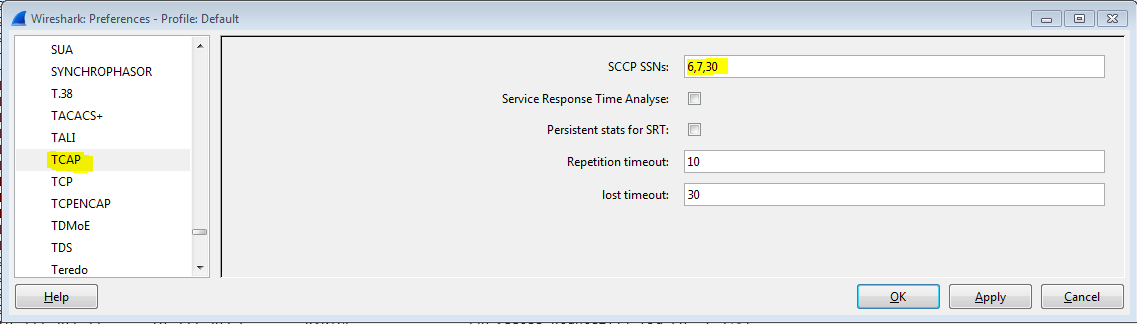
Normally you have to configure TCAP to know what Subsystem Numbers [SSN] to handle on the SCCP layer e.g. 7 for VLR, 8 for MSC, etc. and this is done under Edit -> Preferences -> Protocols -> TCAP

TCAP SSN Config

Unfortunately my trace had a bug – there was no SSN in the response message so Wireshark was only decoding up to the SCCP layer.

SSN Not Present

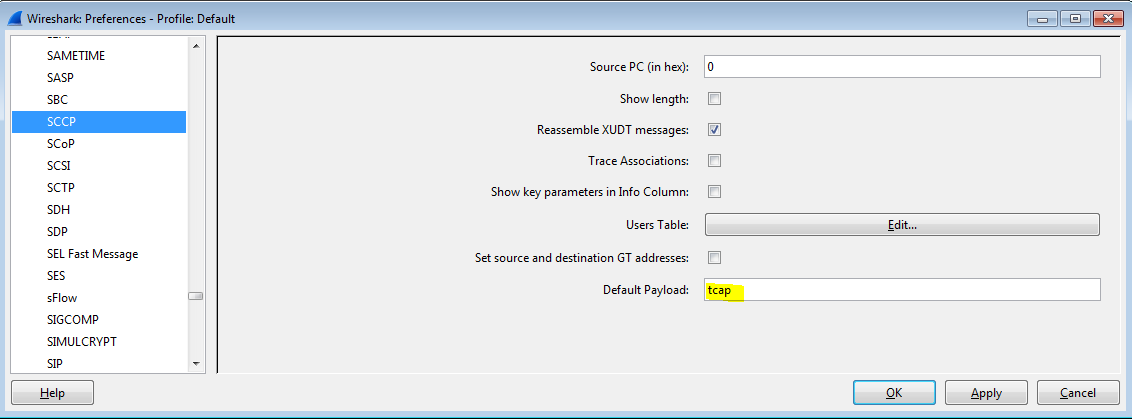
You can handle this case by instructing SCCP to decode as TCAP by default.

SCCP Default Payload