
Remote Monitoring and Internet Access for Old Suburban and Rural Locations
I’ve had an ongoing project to put in Internet Access and also a remotely accessible security camera for a holiday home in the middle of nowhere in the West of Ireland, and this page gives the details of this completed project.
Overview
The house in question is old (very thick stone walls) and is in a very rural location (wireline access is never going to happen) so the basics of adding internet access is a challenge.
Also, given that the house is a holiday house an internet viewable (but secure) external camera is required. Additionally, the camera should alert via email if there is anyone around the place or if it is tampered with.
The house already has a standard, independent alarm system so this is more for peace of mind and keeping an eye to the place as much as anything else.
Hardware
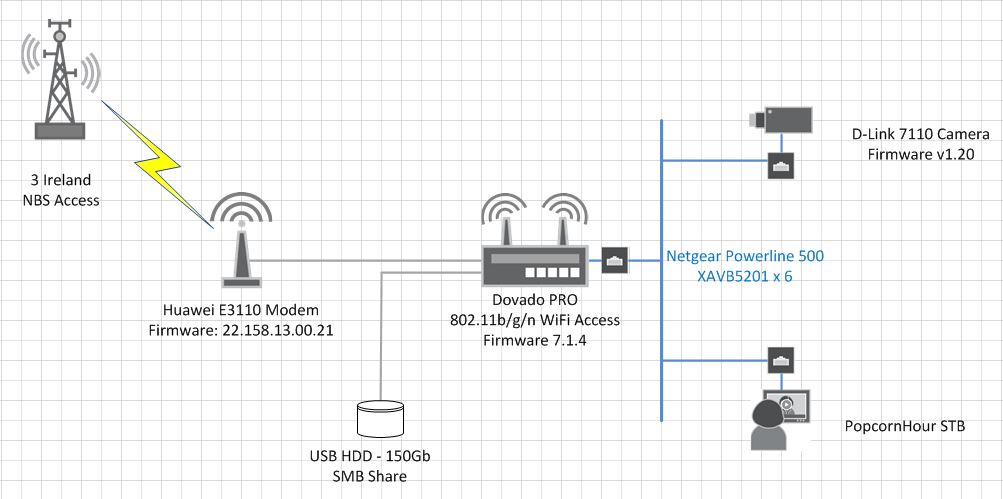
To start with I’ll list the hardware used in the project, then go into why each piece was selected, what it was used for, and any major pros and cons that I hit along the way.
- Huawei E3131 3G USB Dongle
- Dovado Pro 4G/3G USB Router
- Netgear Powerline 500MBps Adaptor – XAVB5201
- D-Link DCS-7110 Fixed Outdoor Day & Night IP Camera
- Generic USB HDD – 150Gb (was lying in the bottom of a drawer)
Huawei E3131 3G USB Dongle
This is the cheapest dongle that 3 Ireland provide, but it has the benefits that it offers good performance and allows an external antenna to be connected if I had needed that.
Pros: No issues to report with this really – did what it was supposed to, and worked well with the router.
Cons: SMS doesn’t work with the router – minor issue to be honest.
Dovado Pro 4G/3G USB Router
To be honest this is the first networking product (besides an unmanaged switch) that I’ve bought in a while that delivers everything it promised and more. To be honest the Pro product from Dovado’s stable is probably overkill in this case (I don’t expect LTE coverage in this location any time soon), but I’d used this router before and been highly impressed by it I decided to go for it again.
In terms of Mobile Broadband Router capabilities it supports a wide range of modems (including the E3131) and has excellent features for maintaining uptime (SmartUSB and Connection Tracker), notification (SMS and EMail), and remote access – more on the used features and configuration later.
Pros: Too many to list to be honest – advanced configuration options, and some features I’ve only seen on higher end commercial products or heavily hacked (OpenWRT) Cable/DSL routers.
Cons: Minor really – need to have a general idea of how it should be configured first – powerful product makes for many configuration options but there is a wizard to get the basics up and running. SMS doesn’t work with E3131 modem.
Netgear Powerline 500MBps Adaptor – XAVB5201
The house has very thick walls so WiFi is always a challenge, and when combined with an external IP camera (and possibly additional cameras later) an additional networking options was required. In the past I’ve use Devolo products (the excellent DLAN 200 AV+ are currently in use at home) but these were onsale at Argos (€30 per pair) so can’t really go wrong there.
Pros: Work out of the box more or less as expected. Compact which is nice, as it means other devices power adaptors can be in neighbouring sockets.
Cons: Overall throughput is nowhere near 500Mbps (and each adaptor has a 100Mbps interface) and it can be a bit fussy about getting the key exchange going.
D-Link DCS-7110 Fixed Outdoor Day & Night IP Camera
This camera was expensive but was one of the few available that hit all the requirements e.g.
- IP Based Camera
- Day/Night Monitoring
- External
- Motion Detection and E-Mail Alerts
- Tamper Detection and E-Mail Alerts
- Record to SMB/FTP Based Server
After a bit of muttering and clicking the setup was relatively painless, but a big pain is the requirement for Active X plugin and IE8 for the configuration of the motion detection zones. While I understand that this is no longer a product that D-Link are actively working on I would expect at least an update to bring it into the modern age. Also higher resolution would be nice and getting the huge cable through a wall would require a serious drill and a massive bit – not quite what they were thing of there!
Pros: Powerful configuration options, excellent controls, seems quite weatherproof so far
Cons: Whoever is responsible for the IE8/ActiveX requirement for configuration should be shot, cable is waaay too thick to get through a wall without an oil derrick sized drill and bit.
System Setup & Configuration
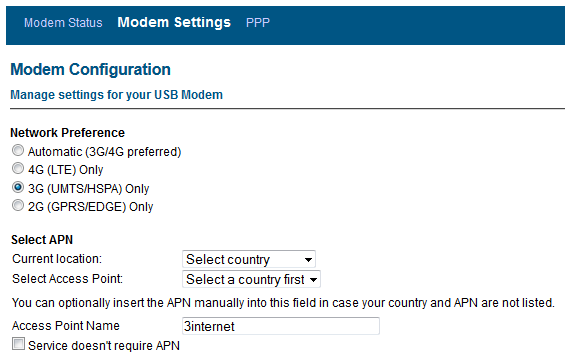
 Internet Access:
3G Internet Access is provided courtesy of 3 Ireland and the National Broadband Scheme – fortunately we fall within the areas covered by the scheme, so for €20 per month we get a 40Gb data allowance. This should be more then enough 🙂 Neither Vodafone nor O2/Telefonica have good reception here so that was a big help – project would not even be viable otherwise.
As a bonus, all broadband users (3internet APN) get a public IP address rather then being NAT-ed like most other MBB providers (Vodafone, O2, etc.) so remote access is easily accomplished through Dynamic DNS. Most Operators and their standard APNs can be navigated to using the drop down menus, which is helpful if you aren’t sure what APN you are on.
Simply plug the modem into the router, configure the modem settings, and we were up and running with basic access.
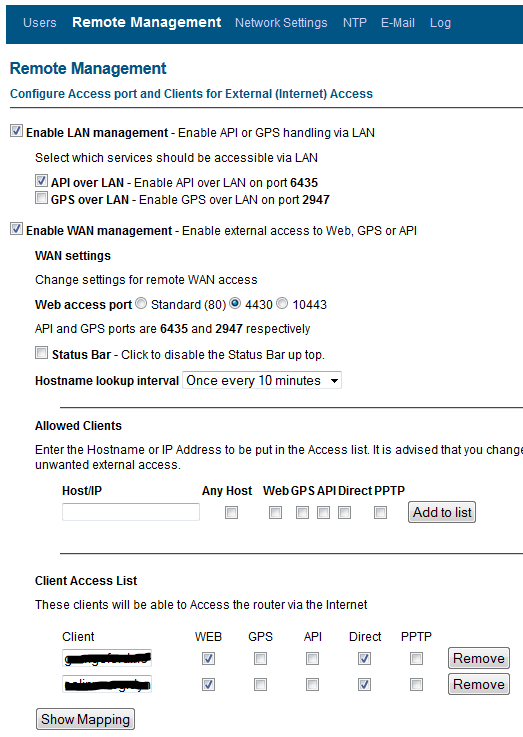
 Remote Management via WAN
This is usually not an option as making a router accessible for remote administration on the WAN is generally asking for trouble (my usual policy is to disable Remote Management via both WiFi and WAN) as you generally have to allow access from everywhere or on some better routers you can provide a whitelist of IP addresses for remote management.
Unfortunately I don’t have any systems with static public IP addresses assigned. Generally speaking my home broadband connection provides a public IP that rarely changes, but there is no guarantee. Fortunately the good people at Dovado have considered this and allow for the whitelisted accessors to be either IP addresses or domain names so I give the addresses that my DDNS keeps updated and everything works fine. Simple idea that should be implemented by a lot more vendors!
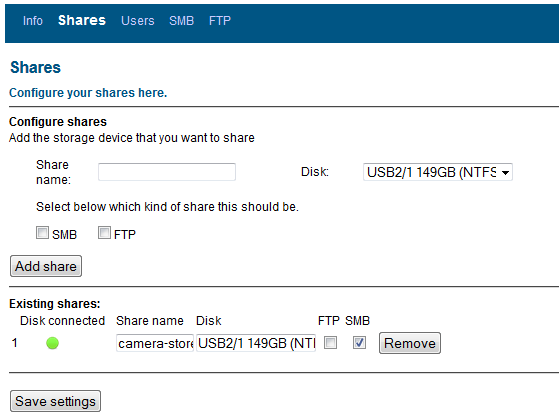
 NAS Storage
The camera needs some Network Attached Storage to record it’s video. Since at this point I’m not inclined to buy more hardware I was fortunate in that the router will host a USB HDD and provide both SMB and FTP shares on a per-user account basis. I had an old 150Gb USB HDD gathering dust in the bottom of a drawer, so formatted this (NTFS), and added it as a share.
 Camera Configuration
Camera configuration was slightly complicated by the fact that some elements require the use of IE8+ActiveX Plugin so be sure to set newer versions of Internet Explorer to ‘Compatibility Mode’. Most things work fine in Firefox, but not the configuration of the motion detection zones.
Main configuration points are:
- Auto switch between Day/Night Mode
- Tamper Detection Enabled – E-Mail alert with pre/post pictures if anything is detected
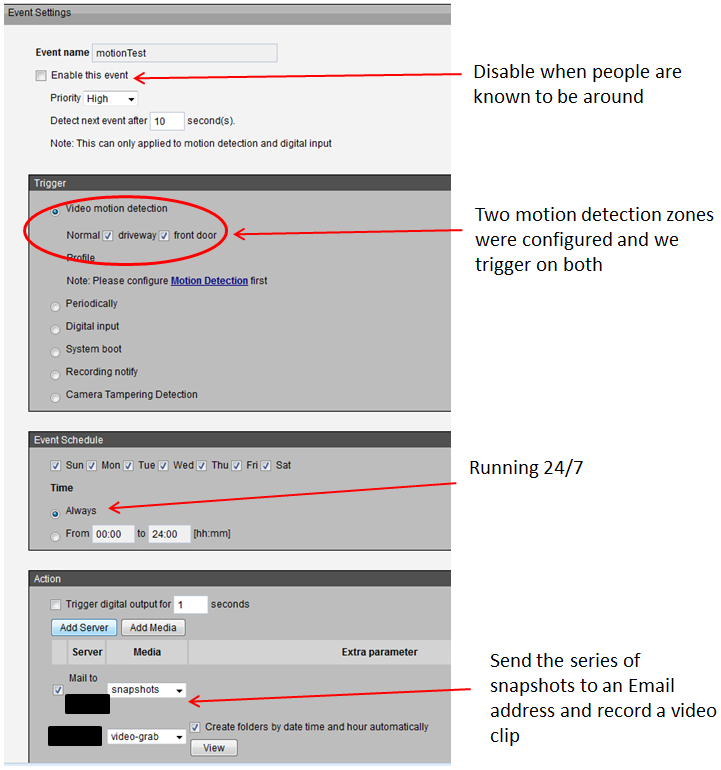
- Motion Detection Enabled – E-Mail alert if motion is detected coming up the driveway or at the front door
- Continuous recording – record to SMB HDD, 100Gb space allocated (~12 days). Camera takes care of rotating the files.
- NTP Sync (pool.ntp.org) – Ensure accurate time stamping of video
- Change of default user account and password
Documentation is not the best for the camera around the key area of ‘Event Settings’ but key points to remember are to configure ‘Tamper Detection’ and ‘Motion Detection’ first
Then configure your Servers – this is basically a destination to which the camera can send video or a notification e.g. SMTP server, SMB storage, Syslog server, etc.
Then configure the ‘Media Settings’ – this is basically telling the camera to maintain in it’s internal memory a certain number of snapshots or a short video segment, to be used in the event trigger itself.
The last step is the ‘Event Settings’ – where we tie together the event, the action to be taken and the media used for that action. Example would be if motion is detected, send snapshots (3 before event detection, 10 after the trigger point) to an E-Mail address, and send a 20sec video clip to the SMB server.
 Camera Network Access
Since the camera is external to a house with very thick walls (on the garage overlooking the property) WiFi access is impossible, so the Powerline Ethernet adaptors were used to connect the camera to the router. This is close to zero configuration as the adapters create a transparent Ethernet bridge.
Port Forwarding
Since the router is acting as a DHCP server, I have it configured to assign a static IP to the camera based on it’s MAC address. It then has port forwarding configured to go from a high random port on the internet to the camera at port 443 (HTTPS). Unfortunately the ACL for this is IP Address based only – would be better if it had the same approach as the Remote Management.
Finally
Everything works as well as expected – a few little niggles with the different products but very happy overall given the situation. The performance isn’t bad either (though variable) but getting minimum of 3Mbps downlink and 500kbps uplink with ~60ms ping time.


