This little project is a combination of a few of the example code, specifically UDP NTP Client and SD-Datalogger. What I’m aiming for is that I can log the values from a bunch of sensors periodically into a log file, and periodically upload the file to a server for graphing/processing.
Some obvious questions that would occur as to why and do it this way rather then pushing each sensor reading up to the server/website:
- Real-time sensor information is not required, but high-resolution of data may be
- I don’t want to assume that network connectivity is always available
- Constantly pushing tiny chunks of data to a server is a bad idea if you are using mobile (2G/3G) networks – from a network perspective this results in high signalling load relative to the data volume
- Battery life – aiming for low cost, low power sensor platform – I suspect that the WiFi Shield/GSM shield is a bit thirsty
- Need to see if that can be turned on and off on a timer
I’m planning to update this page with different sections and notes as I continue to experiment, and blog posts for specific problems seen. Also thinking of adding this to github for version control, etc.
Maintaining ‘true’ time without an RTC
Building a data logger without an RTC Shield poses an interesting challenge since, for me, a key thing is to log the data with a timestamp. My thinking is to use the UDP NTP module to get the epoch time and then try and maintain that time internally as best I can.
Given that I don’t want the app to be chatty in networking terms, I essentially have to maintain an internal count of the time e.g. increment my epoch time counter every 1000msec. Obviously this has problems in terms of accuracy since it relies on non-blocking calls in the main loop, and short loop execution time to ensure that we can update every 1sec.
Since this is a poor man’s RTC there will be some drift, but if I assume we get network connectivity periodically (for data log upload) then we can resync via NTP.
  timer_3 -= deltaMillis;
  if( timer_3 <= 0 ){
    timer_3 += TIMER_INTERVAL_3; // This is 30mins
    delta_epoch = e_time;
    e_time = get_epoch_time();
    Serial.print("Clock drift: ");
    Serial.println( (e_time - delta_epoch) ); // negative drift will be a huge number
  }
In a very simple setup the clock drift has been averaging around +1 second every 30mins which I consider acceptable.
Initializing SD card...card initialized.

Clock drift: 2

Clock drift: 1

Clock drift: 1

Clock drift: 1

Clock drift: 1

Clock drift: 1

Clock drift: 1

Clock drift: 1

Clock drift: 0

Clock drift: 1

Clock drift: 1

Clock drift: 1

Clock drift: 1
Sensor Charts
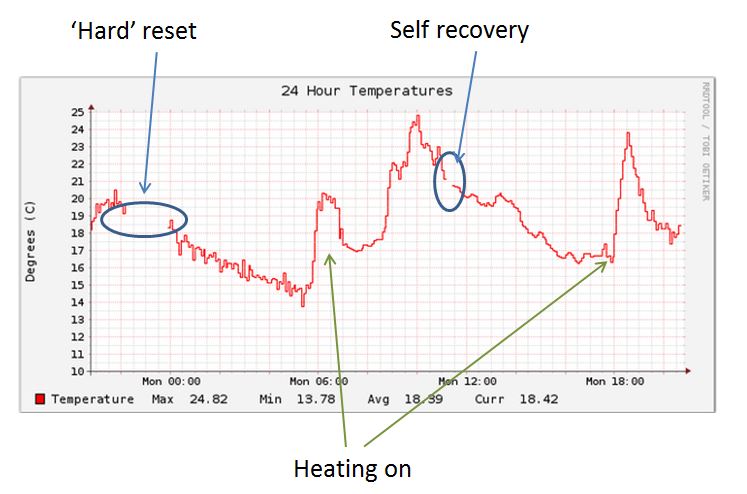
I now have a very basic system up and running with 2 sensors feeding information to a website every 60 seconds and RRD graphing. Those charts are here.
To stop the whole world pushing data into this page I’ve got some basic security based around HTTP Header enrichment and shared secret validation – check out this post for the details.
Ethernet Shield Issues
I’ve had a number of issues with the ‘standard’ Ethernet shield dying on me 🙁 This of course makes a network logged system unusable since once it goes down, it stays down even though the rest of the program is working perfectly as far as I and the serial monitor can tell. This seems to be a widely known issue with the W5100 Ethernet chip. I’ve added some code to try and get the Arduino to get itself back on track in the event of issues, but while it has helped it seems that I will have to build in a software triggered hardware reset.
  // No need for any delay loops as the Ethernet.begin seems to go into an interrup type rechecking
  // for about 60seconds. If the connection comes up during that window we seem to complete as soon
  // as link diagnostics are happy
  while ( Ethernet.begin(mac) == 0){
    Serial.print("DHCP Failure - No IP. Reset counter: ");
    resetCounter++;
    Serial.println(resetCounter);
    if (resetCounter >= 6 ){
         Serial.println("Initiating software reboot...");
         delay(1000);
         software_Reboot();
    }
    if (resetCounter >=5 ) {resetEthernetShield();}
  }

  delay(1000); // give the shoed a second to initialise
Everytime there is a failure the resetCounter is incremented. The first 5 times, the resetEthernetShield() function is called (below), the 6th and final time we trigger the watchdog timer and reset the board (though this doesn’t seem to always reset the W5100 chipset unfortunately.
// Reboot the whole thing - in theory.
// An actual hardware interrupt to power would be better
void software_Reboot(){

  wdt_enable(WDTO_15MS);
  while(1){  }
}

// Soft shield reset - no idea if this helps much
void resetEthernetShield(){

  Serial.println("Resetting Ethernet Shield...");

  client.stop();
  delay(1000);

  Ethernet.begin(mac);
  delay(1000);
}
Based on the performance of this code, a software triggered power interrupt to the Ethernet shield is going to be required as the final application would be ‘off-site’ so it must be able to recover fast and on it’s own.