Monthly Archives: February 2014

Multiple interfaces in CentOS

I had an issue with CentOS6.4 – two network interfaces were configured eth0 - 10.x.y.z and eth1 - 192.168.x.y. eth0 is being used for SSH access, but as soon as eth1 was brought up the node became unreachable from anything except the local subnet.

Source was 10.x.y.230 and they are on the same switch:

[root@controller etc]# ping 10.x.y.234
PING 10.3.8.234 (10.x.y.234) 56(84) bytes of data.
64 bytes from 10.x.y.234: icmp_seq=1 ttl=64 time=1.33 ms
64 bytes from 10.x.y.234: icmp_seq=2 ttl=64 time=0.298 ms
64 bytes from 10.x.y.234: icmp_seq=3 ttl=64 time=0.277 ms
64 bytes from 10.x.y.234: icmp_seq=4 ttl=64 time=0.270 ms

But ping from any other subnet and nothing… Turns out that you have to be very specific when configuring the default gateway in /etc/sysconfig/network. It seems that both the default gateway and the gateway interface are required, to get the route added properly.

[root@node-2 ~]# cat /etc/sysconfig/network
NETWORKING=yes
HOSTNAME=node-2.fqdn.net
GATEWAY=10.x.y.1
GATEWAYDEV=eth0

And now our route is correctly added

[root@node-2 ~]# route
Kernel IP routing table
Destination     Gateway         Genmask         Flags Metric Ref    Use Iface
10.x.y.0        *               255.255.255.0   U     0      0        0 eth0
192.168.1.0     *               255.255.255.0   U     0      0        0 eth1
link-local      *               255.255.0.0     U     1002   0        0 eth0
link-local      *               255.255.0.0     U     1003   0        0 eth1
default         10.x.y.1        0.0.0.0         UG    0      0        0 eth0

Growing your Contrail system

As I’ve been experimenting with OpenStack/Contrail I’ve had occasion to add in a new compute node (vRouter). Since documentation for adding any nodes to an already running system seems a bit thin on the ground, I thought I’d share some of the things I’ve seen to help others along the way.

Base Configuration for New Contrail Nodes

To add any new node there are a few steps you should take to speed things along.

  1. Base host configuration
    • Install CentOS6.4 on the host – simplest way is to install off the current ISO (currently builder-386-x86_64-DVD.iso) though RPM packages are also available
    • Configure networking e.g. hostname, IP addresses, DNS, etc.
  2. Update your testbed.py (located in /opt/contrail/utils/fabfile/testbeds/ ) file on the configuration node, and make sure that your new node is reachable from the config node.
    • Add the OAM IP address
    • Add the new host to the all_hosts parameter
    • Configure the roles of the new host
    • Add the new node into env.hostnames
    • Add the new node into env.ostypes
  3. Run the fab command to provision the new node (this varies depending on the type of node you want to configure (see below)

Provisioning different node types

This assumes that the previous steps have been completed, in some way shape or form. All the commands here should be issued on the Configuration Node, from the /opt/contrail/utils/ directory

New Compute Node (vRouter)

fab add_vrouter_node:[email protected]

where a.b.c.d is the OAM/MGMT address of the new node and root is the user account.

New controller node

fab install_control_node:[email protected]
fab setup_control_node:[email protected]

This required me to manually add the new control node as a BGP peer in the Contrail WebUI as a final step. I suspect that the command fab prov_control_bgp is also required, but not sure at the moment. Also, when configuring be sure that the name for the node matches the FQDN from earlier steps.

Complete fab <command> set for Contrail

add_images
add_static_route                             Add static route in the node...
add_vrouter_node                             Adds one/more new compute no...
agent_restart
all_command
all_crash
all_ping
all_reboot
all_reimage
all_version
api_restart
attach_logs_cores                            Attach the logs, core-files,...
backup_install_repo                          Backup contrail install repo...
backup_install_repo_node                     Backup contrail install repo...
bash_autocomplete_systemd
cfgm_status
check_and_kill_zookeeper
check_ssh
compute_crash
compute_provision
compute_reboot
compute_status
config_demo
contrail_version
control_crash
control_restart
control_status
copy
copy_dir
copy_install_pkgs
create_bond                                  Crete the bond interface bas...
create_install_repo                          Creates contrail install rep...
create_install_repo_node                     Creates contrail install rep...
create_ovf
database_restart
database_status
demo_fixup
detach_vrouter_node                          Detaches one/more compute no...
get_cassandra_logs
install_and_setup_all                        Installs and provisions all ...
install_cfgm                                 Installs config pkgs in all ...
install_cfgm_node                            Installs config pkgs in one ...
install_collector                            Installs analytics pkgs in a...
install_collector_node                       Installs analytics pkgs in o...
install_contrail                             Installs required contrail p...
install_control                              Installs control pkgs in all...
install_control_node                         Installs control pkgs in one...
install_database                             Installs database pkgs in al...
install_database_node                        Installs database pkgs in on...
install_deb_all                              Installs any deb in all node...
install_img_agent
install_interface_name                       Installs interface name pack...
install_interface_name_node                  Installs interface name pack...
install_openstack                            Installs openstack pkgs in a...
install_openstack_node                       Installs openstack pkgs in o...
install_pkg_all                              Installs any rpm/deb package...
install_pkg_node                             Installs any rpm/deb in one ...
install_rpm_all                              Installs any rpm in all node...
install_vrouter                              Installs vrouter pkgs in all...
install_vrouter_node                         Installs vrouter pkgs in one...
install_webui                                Installs webui pkgs in all n...
install_webui_node                           Installs webui pkgs in one o...
install_without_openstack                    Installs required contrail p...
net_list
prov_control_bgp
prov_encap_type
prov_external_bgp
prov_metadata_services
prov_vmware_compute_vm
reboot_node
reimage_and_setup_test
remove_startup_files
reset_config                                 Reset api-server and opensta...
restart_cfgm                                 starts the contrail config s...
restart_collector                            starts the contrail collecto...
restart_control                              starts the contrail control ...
restart_database                             startops the contrail databa...
restart_openstack                            startops the contrail openst...
restart_openstack_compute                    startops the contrail openst...
restart_vrouter                              starts the contrail compute ...
restart_webui                                starts the contrail webui se...
run_sanity
run_setup_demo
schema_restart
setup_all                                    Provisions required contrail...
setup_all_debian                             Provisions required contrail...
setup_all_with_images
setup_cfgm                                   Provisions config services i...
setup_cfgm_node                              Provisions config services i...
setup_collector                              Provisions collector service...
setup_collector_node                         Provisions collector service...
setup_control                                Provisions control services ...
setup_control_node                           Provisions control services ...
setup_database                               Provisions database services...
setup_database_node                          Provisions database services...
setup_interface                              Configure the IP address and...
setup_openstack                              Provisions openstack service...
setup_openstack_node                         Provisions openstack service...
setup_test_env
setup_vrouter                                Provisions vrouter services ...
setup_vrouter_node                           Provisions vrouter services ...
setup_webui                                  Provisions webui services in...
setup_webui_node                             Provisions webui services in...
setup_without_openstack                      Provisions required contrail...
start_clients
start_servers
start_traffic
start_vnc
stop_cfgm                                    stops the contrail config se...
stop_collector                               stops the contrail collector...
stop_control                                 stops the contrail control s...
stop_database                                stops the contrail database ...
stop_glance_in_compute
stop_vrouter                                 stops the contrail vrouter s...
stop_webui                                   stops the contrail webui ser...
sudo_cmd
tar_logs_cores
test
uninstall_contrail                           Uninstall contrail and opens...
uninstall_database
uninstall_database_node
update_keystone_log                          Temporary workaround to upda...
upgrade
upgrade_all                                  Upgrades all the contrail rp...
upgrade_api_venv_packages
upgrade_cfgm                                 Upgrades config pkgs in all ...
upgrade_cfgm_node                            Upgrades config pkgs in one ...
upgrade_collector                            Upgrades analytics pkgs in a...
upgrade_collector_node                       Upgrades analytics pkgs in o...
upgrade_contrail                             Upgrades all the  contrail p...
upgrade_control                              Upgrades control pkgs in all...
upgrade_control_node                         Upgrades control pkgs in one...
upgrade_database                             Upgrades the contrail databa...
upgrade_database_node                        Upgrades database pkgs in on...
upgrade_openstack                            Upgrades openstack pkgs in a...
upgrade_openstack_node                       Upgrades openstack pkgs in o...
upgrade_pkgs                                 Upgrades the pramiko and pyc...
upgrade_pkgs_node                            Upgrades the pramiko/pcrypto...
upgrade_rpm_all                              Upgrades any rpm in all node...
upgrade_rpm_cfgm                             Upgrades any rpm in cfgm nod...
upgrade_rpm_collector                        Upgrades any rpm in collecto...
upgrade_rpm_compute                          Upgrades any rpm in compute ...
upgrade_rpm_control                          Upgrades any rpm in control ...
upgrade_rpm_database                         Upgrades any rpm in database...
upgrade_rpm_openstack                        Upgrades any rpm in openstac...
upgrade_rpm_webui                            Upgrades any rpm in webui no...
upgrade_venv_packages
upgrade_vrouter                              Upgrades vrouter pkgs in all...
upgrade_vrouter_node                         Upgrades vrouter pkgs in one...
upgrade_webui                                Upgrades webui pkgs in all n...
upgrade_webui_node                           Upgrades webui pkgs in one o...
upgrade_without_openstack                    Upgrades all the  contrail p...
verify_cfgm
verify_collector
verify_compute
verify_control
verify_database
verify_openstack
verify_webui
virsh_cleanup
virsh_cmd
wait_till_all_up                             Waits for given nodes to go ...
zoolink                                      Creates /usr/bin/zookeeper l...

New Toy – Arduino Uno

Hey,

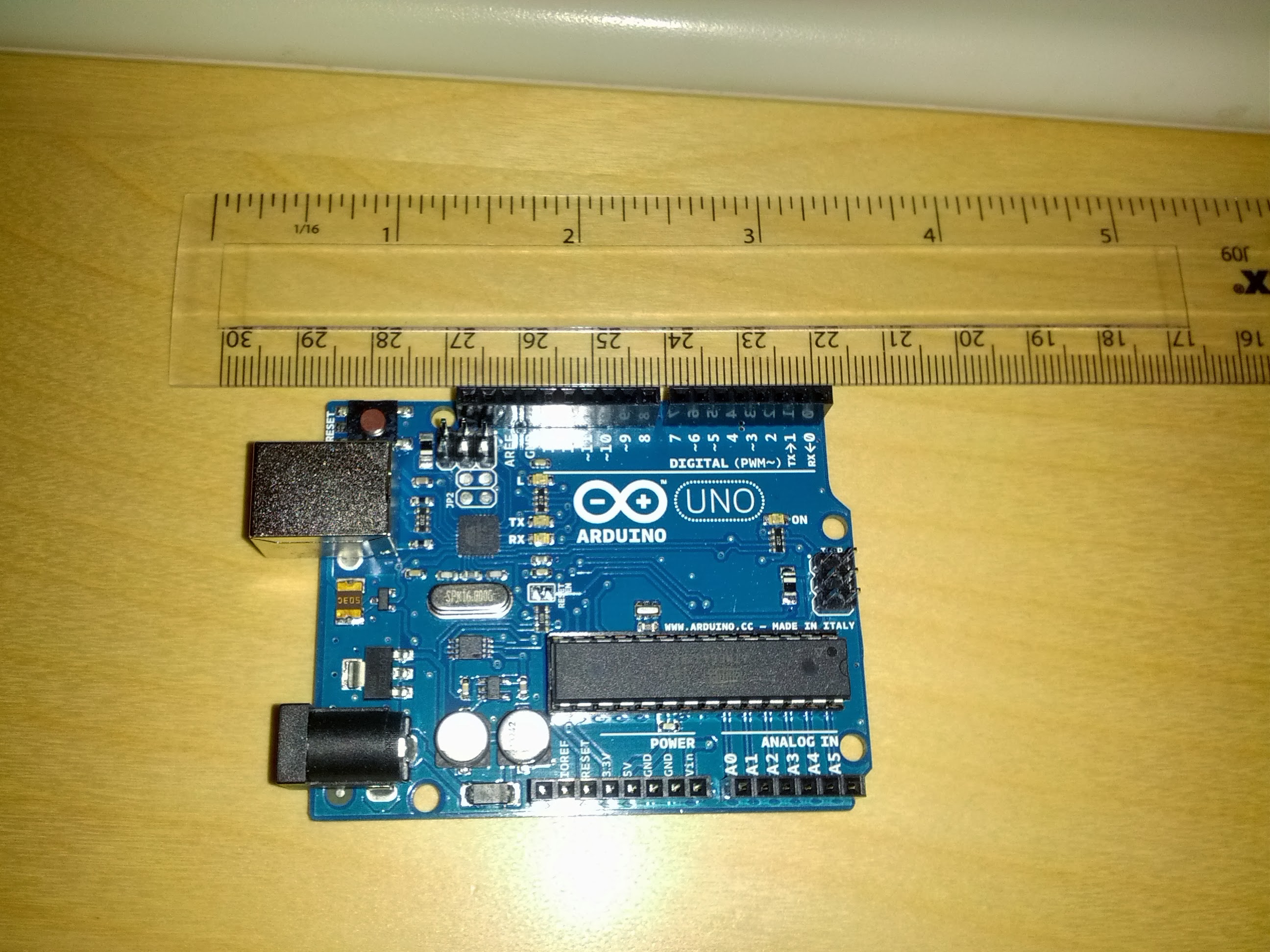
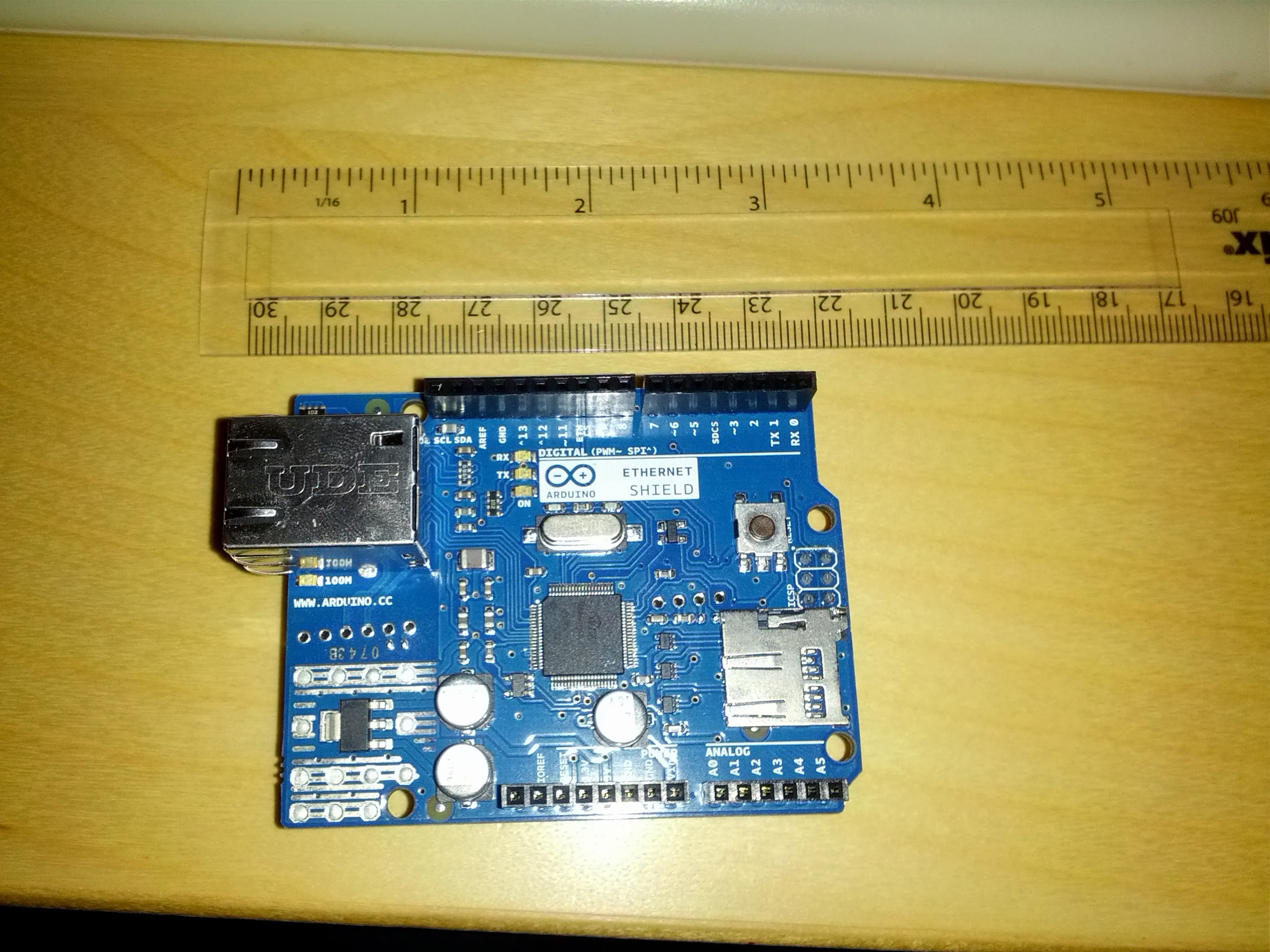
As I mentioned on another page I’d ordered an Arduino Uno and Ethernet Shield as an small side project, and they arrived today – great job Farnells for next working day delivery!

Arduino Uno - Rev 3

Arduino Ethernet Shield

Of course, I didn’t bother to read all the directions and soon found out that the connection is a USB Type B connector – last time I used one of those was about 6 years ago in a big external HDD 🙂

Quick trip to PC World solved that, and grabbed a 4GB microSD card to increase storage.

Got the development environment installed without any issue, and the Uno grabbed COM11 – loaded in the blink template and bingo – working without a hitch.

Started playing with that a bit to create a very simple morse code SOS program.

void loop() {
  x = 0;
  while ( x < 3 ) {
    digitalWrite(led, HIGH);   // turn the LED on (HIGH is the voltage level)
    delay(500);               // wait for a half second
    digitalWrite(led, LOW);    // turn the LED off by making the voltage LOW
    delay(500);               // wait for a half second
    x++;
  }
  x = 0;
  while ( x < 3 ) {
    digitalWrite(led, HIGH);   // turn the LED on (HIGH is the voltage level)
    delay(1000);               // wait for a second
    digitalWrite(led, LOW);    // turn the LED off by making the voltage LOW
    delay(500);               // wait for a half second
    x++;
  }
  x = 0;
  while ( x < 3 ) {
    digitalWrite(led, HIGH);   // turn the LED on (HIGH is the voltage level)
    delay(500);               // wait for a half second
    digitalWrite(led, LOW);    // turn the LED off by making the voltage LOW
    delay(500);               // wait for a half second
    x++;
  }
  delay(2000); // wait 2 secs
}

Clearly I need to get back to coding – was just thinking that if you add in functions this is a good example of many programmatic structures in a very short, easy to follow example (also need to get this blog indenting code correctly) [Edit – fixed. Turns out the editor has a copy-as-html feature which is nice].

Looking forward to getting the network shield up and running tomorrow, but just to tired to jump into it now.

Using KVM on top of ESXi

KVM and VMware

I’ve been playing with SDN, VMs etc. in a lab. Given that I don’t have a load of servers lying around I tend to use VMs (so nested virtualisation) on ESXi. As I learned the hard way there are a few little details you have to watch if you want to use the KVM hypervisor.

ESXi5.1 (or later)

Virtualized HV is fully supported for virtual hardware version 9 VMs on hosts that support  Intel VT-x and EPT or AMD-V and RVI.

Virtual Hardware

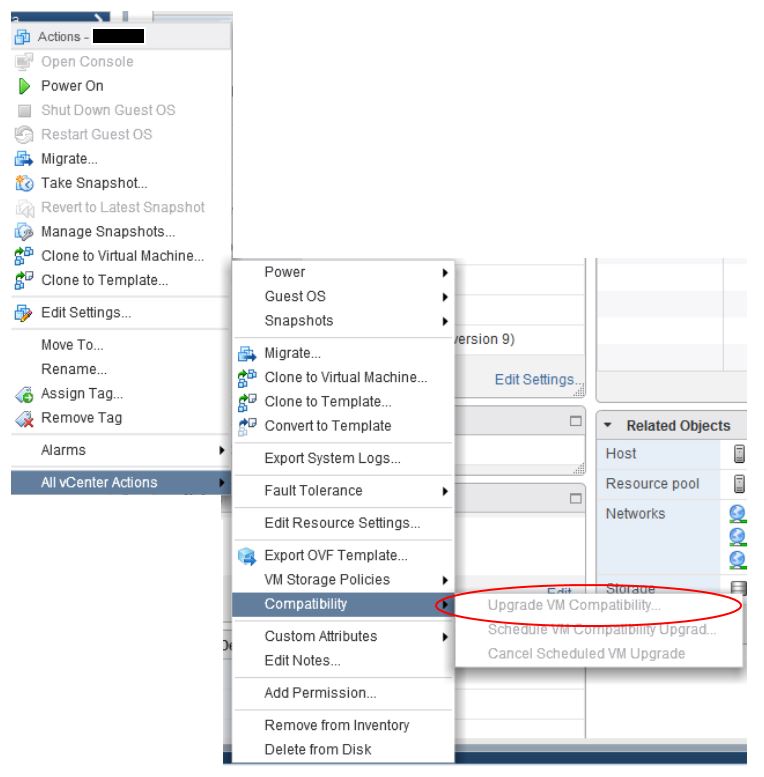
Something I learned the hard way was that the VMs I created have virtual hardware VM version 8 by default. This was the default under ESXi 5.0 and doesn’t support virtualised HVs. Using the Web Client stop the VM and upgrade the hardware to VM Version 9 (or later)

vm-hardware-upgrade

vSphere Web Client – Exposing Hardware Virtualisation

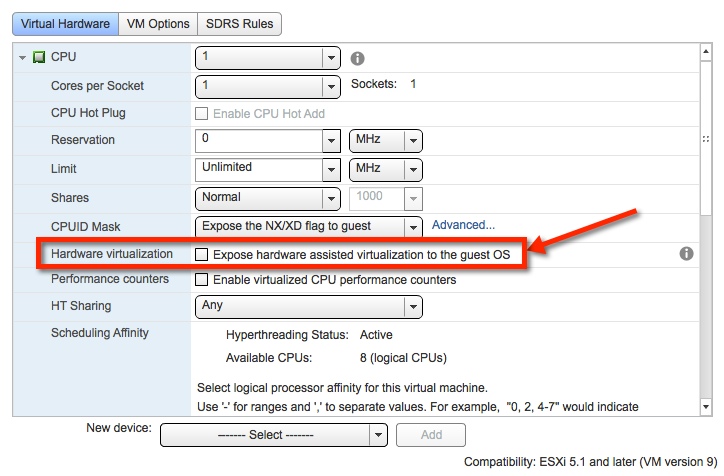
With vSphere 5.1 you cannot create a new VM in the Windows vSphere client and allow the virtualization features of the processor to be presented.  So you will want to use the web client to create the shell not the windows client. This seems to be the way it will stay going forward – only the web client will have all the features shown.

Check the ‘Expose hardware virtualisation to Guest OS’ box under the CPU settings.

webClient_virtual_hardwareAnd that should do it – your Guest OS will now be able to run KVM hypervisor (or any other one of your choice)

One Step Forward and Two Steps Sideways

A day of challenges and frustrations today

some as a result of my own carelessness, others because of the nature of a shared lab environment, and others still because technology hates us sometimes

A slow but steady start – sometimes the nested hypervisor matters

My aim was to get Contrail/OpenStack running for some testing today. Given that I don’t have a few baremetal servers lying around, I did what most people do, and decided to run my hosts on VMware (great tool). This can occasionally cause issues as I discovered later, but is great to get a few machines up and running in a hurry. I don’t really have issue with the idea of running Cloud Computing services on a virtualised environment, though a few did roll their eyes 🙂

I decided (having previously played with single-node installation) to go for a 3 machine setup, 2 compute nodes and 1 controller/openstack services. The reason for this was to have the compute hosts on physically separated machines to allow me to capture wire traffic between VMs and get a feel for the underlay networking and test some things there. Initial install went smoothly, as did installation of images onto Glance – word to the wise, make sure you have a large enough partition for the images! I ended up having to add a new partition to store a large image:

Filesystem Size Used Avail Use% Mounted on
/dev/mapper/VolGroup-lv_root
12G   5.5G 5.6G 50%   /
tmpfs     12G   0    12G   0%   /dev/shm
/dev/sda1 485M  37M  423M  9%   /boot
/dev/sdb1 30G   7.2G 21G  26%   /mnt/glance-storage

Stopping glance, copying the contents across to /mnt/glance-storage and editing /etc/glance/glance-api.conf to point to the new location, followed by restarting glance.

# ============ Filesystem Store Options ========================
#Directory that the Filesystem backend store
# writes image data to
filesystem_store_datadir = /mnt/glance-storage/

Large images enabled I then tried to fire up a tiny CIRROS image, to no avail. Fortunately, and surprisingly, /var/log/nova/conpute.log (on the compute node) offered a clue:

libvirtError: internal error no supported architecture for os type ‘hvm’

This rather helpful error indicates that the libvirt through which we control the OpenStack hypervisor is not available to run. Contrail aims to use KVM as the default hypervisor, though getting KVM to run when the base OS is hosted on ESXi requires a little more attention then I expected – next post. As a quick workaround, I simply told nova to use QEMU instead by modifying /etc/nova/nova.conf and specifying the libvirt type.

network_api_class = nova.network.quantumv2.api.API
libvirt_vif_driver = contrail_vif.contrailvif.VRouterVIFDriver
libvirt_type=qemu

A quick restart of nova services and we were in business 🙂 or so I thought

The attack of the larger then m1.tiny instance

OpenStack has the concept of virtual machine flavors – these essentially define the capacity of a VM in terms of CPU, Memory, Disk Space, etc.

The default flavors are:

  • m1.tiny (1 VCPU/0 GB Disk/512 MB RAM)
  • m1.small (1 VCPU/20 GB Disk/2048 MB RAM)
  • m1.medium (2 VCPU/40 GB Disk/4096 MB RAM)
  • m1.large (4 VCPU/80 GB Disk/8192 MB RAM)
  • m1.xlarge (8 VCPU/160 GB Disk/16384 MB RAM)

Imagine my surprise when it turned out that only a tiny instance could be booted. In the end the cause was obvious, in that the flavors causing issues were those allocated disk space.
The compute hosts require sufficient local storage to hold the virtual machine disk space (root and ephemeral – this is not the VM image in glance e.g. the OS) for all their running instances. This was a problem as I just allocated initial disks of ~24Gb to my compute hosts (datastore space can be limited in a shared lab, and wars have been fought over less).

Nova (compute service) actually stashes the running disk images in /var/lib/nova/instances/<instance-id>. The parameter which I think governs this path is set in /etc/nova/nova.conf  (I believe this to be state_path = /var/lib/nova though the documentation is fuzzy on that) though rumours reached me that very bad things happen to those who play with the paths in nova.conf 🙁

Apparently the preferred approach is to create a huge local disk partition (or just allocated a big disk) and mount it at /var/lib/nova – so that’s what I did

Filesystem Size Used Avail Use% Mounted on
/dev/mapper/VolGroup-lv_root
12G  3.5G 7.5G  32%  /
tmpfs      12G  0    12G   0%   /dev/shm
/dev/sda1  485M 37M  423M  9%   /boot
/dev/sdb1  99G  4.2G 90G   5%   /var/lib/nova

And added it into /etc/fstab so it survives the many reboots that a lab requires

/dev/sdb1 /var/lib/nova ext3 defaults 1 2

And with that instances of all sizes could roam freely 🙂

More on getting KVM working as the hypervisor in the next post!

First Post

Hi,

This is my first blog post, in my first blog. Basically using this to keep track of some testing and various experiments I’m doing with different networking technologies like Mobile Packet Core, and Software Defined Networking.

You might find some of my stuff useful, or at least avoid the many missteps I tend to make as I go.

Cheers

flowsheet