Category Archives: Information Technology

Remote Desktop Protocol [RDP] and OS X

So, I had occasion to try and connect to a windows machine from my Mac. As a long time windows user, my default goto for this is of course Microsoft’s Remote Desktop Protocol. And as luck would have it, OS X/macOS ships with a client called Remote Desktop Connection for Mac (version 2.1.1 build 110309) though from the copyright notices this looks like it hasn’t been touched since 2010… and that is the problem.

On attempting to connect to anything half way recent e.g. Server 2012, Win10, etc. you are thrown the very helpful error “Remote Desktop Connection cannot verify the identity of the computer that you want to connect to. Try reconnecting to the Windows-based computer, or contact our administrator.”

It turns out that Microsoft improved the security of RDP (always a good thing) to make use of something called Network Level Authentication [NLA]. This happened the same time Windows moved from Terminal Services to Remote Desktop Services.

What’s the difference? When connecting to a Terminal Server, a user starts a session and types in their credentials. When using an RD Session Host server, a user typically enters credentials into a client-side dialog box. NLA forces the client computer to present user credentials for authentication before the server will create a session for that user.

Because of that process, it’s sometimes called “front authentication.” Servers that are running Windows Server 2008/Vista or later, and clients running Windows XP SP3 or later, support NLA. Because NLA relies on a technology called Credential Security Support Provider [CredSSP] Protocol, if you’re using a Remote Desktop Protocol [RDP] client for another OS, you’ll need a client that supports NLA.

Microsoft Remote Desktop Connection Client for Mac doesn’t.

Fortunately there is an alternative that does. Via the AppStore, search for ‘Microsoft Remote Desktop’ – Version 8.0.36 (Build 27228) is what I have today. Install this, try and connect to your Windows machine (Win10 for me) and you are in business.


Jumping from Windows 7 to Windows 10

In summary – surprisingly painless

I’ve been running Windows 7 since it went RTM and was very happy with it. It was reliable, everything just worked, and it wasn’t too much of a resource hog. I completely bypassed Windows 8/8.1 as this is a desktop/gaming PC so a touch interface is of 0 interest to me.

The Upgrade

I prefer to do a clean install of a new OS, and that was my plan in this case. Unfortunately, Microsoft in their infinite wisdom decided that there would be no way to convert your Win7 key to a Windows 10 one directly even though I’m entitled to the “free” upgrade. Given that I’d bought a shiny new SSD to install everything on, this was a little inconvenient.

To be fair to Microsoft, the upgrade was a little slow but no issues encountered. Everything just worked post upgrade. Though since this system had been running for a few years there was a bit of cruft to deal with. At this point I extracted the windows 10 product key, and rolled the change back to Windows 7.

Upgrade customers are entitled to rollback to Windows 7 for a month, so use it if you need it 🙂

The Clean Install

In possession of a valid product key, I then installed the new SSD and installed Windows 10 (64-bit International). Again, very smooth process – definitely the easiest Windows install I’ve ever had to do. No device drivers of any kind required, everything was just automagically identified, and drivers installed while I was still in the process of turning off all the creepy bits.

Minor Issues (and they are very minor)

  • Cortana requires that you be in the UK. Region set to Ireland (the accents aren’t that different guys!) disables here
  • Libraries are disabled by default – easy to turn back on, but why disable a great feature
  • Settings are now spread between two panels – a settings one, and the proper control panel. One management space please.
  • Start Menu – haven’t used the Start Menu/Programs list since Vista went live. Don’t use it in Windows 10 so no change. Windows key + name of file or program… job done

Conclusion

Easy upgrade, very slick clean install. As long as you turn off all the creepy phone-home telemetry, it’s a worthwhile upgrade.

E-Mail Server Setup and Configuration

Having your own mail server is very useful, though surprisingly hard to configure. Generally speaking there are actually two components in a standard linux mail server install. There is the Mail Transfer Agent [MTA] and the Mail Delivery Agent [MDA]. For this install I’ll be using Postfix as the MTA and Dovecot as the MDA

The MTA handles relaying mail between different servers. It decides what to do with email from the outside world, and whether a particular user is allowed to send email using your server. It handles both incoming and outgoing SMTP. Postfix hands off local delivery (that is, the actual saving of the mail files on the server) to Dovecot’s Local Mail Transfer Protocol service (LMTP). Postfix also lets Dovecot take care of authentication before users are allowed to send email from the server.

The MDA is the part that end-users interact with. There are two main protocols in use by the MDA, POP3 and/or IMAP (each have a secure variant, and have different pros/cons). For this setup I’m ignoring the options and just configuring IMAPS – this is basically IMAP over an SSL/TLS connection (and won’t be using SSL). The IMAP/POP3 server handles requests from users who want to log in and check their email. Dovecot’s LMTP service functions as the Mail Delivery Agent (MDA) by saving mail files on the server. Dovecot also handles all authorization.

Basic Requirements

  • A domain name – in this case flat-planet.net
  • A hostname for the server e.g. mail.flat-planet.net
  • An SSL certificate for the server hostname – see this post on the process for this

DNS Configuration

A specific type of DNS record is used for e-mail. This is known as the Mail Exchange [MX] record. The characteristic payload information of an MX record is the fully qualified domain name of a mail host and a preference value. The host name must map directly to one or more address record (A, or AAAA) in the DNS, and must not point to any CNAME records.

Section 10.3 of RFC 2181 states:

10.3. MX and NS records

The domain name used as the value of a NS resource record, or part of the value of a MX resource record must not be an alias. Not only is the specification clear on this point, but using an alias in either of these positions neither works as well as might be hoped, nor well fulfills the ambition that may have led to this approach. This domain name must have as its value one or more address records. Currently those will be A records, however in the future other record types giving addressing information may be acceptable. It can also have other RRs, but never a CNAME RR.

Searching for either NS or MX records causes “additional section processing” in which address records associated with the value of the record sought are appended to the answer. This helps avoid needless extra queries that are easily anticipated when the first was made.

Additional section processing does not include CNAME records, let alone the address records that may be associated with the canonical name derived from the alias. Thus, if an alias is used as the value of an NS or MX record, no address will be returned with the NS or MX value. This can cause extra queries, and extra network burden, on every query.

But since I’m hosting on a residential connection I don’t have a static IP, and so I’m using a CNAME record (not an uncommon practice, even among people who have static IPs and should know better).

Colin:~ $ dig flat-planet.net MX

; <<>> DiG 9.8.3-P1 <<>> flat-planet.net MX
;; global options: +cmd
;; Got answer:
;; ->>HEADER<<- opcode: QUERY, status: NOERROR, id: 32916
;; flags: qr rd ra; QUERY: 1, ANSWER: 1, AUTHORITY: 0, ADDITIONAL: 0

;; QUESTION SECTION:
;flat-planet.net.        IN    MX

;; ANSWER SECTION:
flat-planet.net.    1799    IN    MX    10 mail.flat-planet.net.

;; Query time: 68 msec
;; SERVER: 192.168.1.1#53(192.168.1.1)
;; WHEN: Sat Dec 27 12:05:18 2014
;; MSG SIZE  rcvd: 54

Colin:~ $ dig mail.flat-planet.net MX

; <<>> DiG 9.8.3-P1 <<>> mail.flat-planet.net MX
;; global options: +cmd
;; Got answer:
;; ->>HEADER<<- opcode: QUERY, status: NOERROR, id: 16794
;; flags: qr rd ra; QUERY: 1, ANSWER: 1, AUTHORITY: 1, ADDITIONAL: 0

;; QUESTION SECTION:
;mail.flat-planet.net.        IN    MX

;; ANSWER SECTION:
mail.flat-planet.net.    1402    IN    CNAME    colinmacg.no-ip.info.

;; AUTHORITY SECTION:
no-ip.info.        59    IN    SOA    nf1.no-ip.com. hostmaster.no-ip.com. 2107200777 600 300 604800 600

;; Query time: 117 msec
;; SERVER: 192.168.1.1#53(192.168.1.1)
;; WHEN: Sat Dec 27 12:05:39 2014
;; MSG SIZE  rcvd: 132

At this point a 3rd query is required to resolve the no-ip.info domain to the actual IP address.

It should be noted that the mail will be considered more likely to be spam (by spamassassin, amongst others) as the reverse DNS lookup on the IP address will show it as belonging to your ISP rather then your domain, but that alone is generally not enough.

Postfix

Postfix has two main config files: main.cf, which specifies what you would think of as config options, and master.cf, which specifies the services postfix should run.

master.cf

Here we have the smtp daemon enabled, and we are directing it through SpamAssassin as our content filter

# ==========================================================================
# service type private unpriv chroot wakeup maxproc command + args
# (yes) (yes) (yes) (never) (100)
# ==========================================================================
smtp inet n - - - - smtpd
      -o content_filter=spamassassin

...

spamassassin unix - n n - - pipe user=debian-spamd argv=/usr/bin/spamc -f -e /usr/sbin/sendmail -oi -f ${sender} ${recipient}

main.cf

Main points here are:

  • Add in our cert and key for TLS
  • Enable TLS
  • Disable SSLv2 and SSLv3 – these are deprecated anyway, and with POODLE (CVE-2014-3566) we should explicitly disable these.
  • The use of Mail Directories rather then the default
  • Configuring the use of SASL
  • Locking down smtpd and the HELO command
# TLS parameters
smtpd_tls_cert_file=/etc/ssl/certs/mail-cert.crt
smtpd_tls_key_file=/etc/ssl/private/mail-key.key
smtpd_use_tls=yes
smtpd_tls_session_cache_database = btree:${data_directory}/smtpd_scache
smtp_tls_session_cache_database = btree:${data_directory}/smtp_scache
smtpd_tls_protocols = !SSLv2, !SSLv3

home_mailbox = Maildir/
mailbox_transport = lmtp:unix:private/dovecot-lmtp

# SASL  begins here
smtpd_sasl_type = dovecot
smtpd_sasl_path = private/auth
smtpd_sasl_auth_enable = yes
broken_sasl_auth_clients = yes
smtpd_sasl_security_options = noanonymous
smtpd_sasl_local_domain = flat-planet.net
smtpd_tls_auth_only = yes

smtpd_recipient_restrictions =
     permit_sasl_authenticated,
     permit_mynetworks,
     reject_unauth_destination

smtpd_helo_required = yes
smtpd_helo_restrictions =
     permit_mynetworks,
     permit_sasl_authenticated,
     reject_invalid_helo_hostname,
     reject_non_fqdn_helo_hostname,
     reject_unknown_helo_hostname
check_helo_access hash:/etc/postfix/helo_access

Dovecot

Dovecot allows users to log in and check their email using POP3 and IMAP. In this section, you’ll configure Dovecot to force users to use SSL when they connect so that their passwords are never sent to the server in plain text. Users will have to connect using the standard SSL ports – 993 for IMAP and 995 for POP3 – and only those ports. Dovecot’s LMTP service will function as the MDA and store incoming messages in the proper locations on the server. Dovecot will also be handling all user authentication for mail. In this case I’m only worried about IMAP over SSL/TLS.

Dovecot 2 uses a number of different configuration files. The primary configuration file contains a few directives, and then several inclusions of other configuration files. This helps to separate different configuration parameters logically so they’re not all grouped together in one file. This is a major change from Dovecot 1, where virtually everything was configured in the same file.

For my setup the following files are modified (in /etc/config/dovecot/conf.d):

  • 10-auth.conf
  • 10-mail.conf
  • 10-master.conf
  • 10-ssl.conf
  • 20-lmtp.conf
  • 90-sieve.conf

10-auth.conf

Some configuration for Sieve and LMTP later on. We need it to strip the domain from the username and look that part up:

auth_username_format = %Ln

10-mail.conf

Rather then using mbox, I prefer the Maildir approach so modify the file like so:

#mail_location = mbox:~/mail:INBOX=/var/mail/%u
mail_location = maildir:~/Maildir

10-master.conf

Set Dovecot to listen to authentication requests from Postfix over unix sockets rather then network ports, and enable the imaps listener. I’m not opening IMAP to external networks so I’ll leave it enabled for now and disable once I’m sure all is working:

service imap-login {
  inet_listener imap {
    port = 143
  } 
  inet_listener imaps {
    port = 993
    ssl = yes
  }

service auth { 
        unix_listener /var/spool/postfix/private/auth { 
                    mode = 0660 
                    user = postfix 
                    group = postfix 
        } 
}
service lmtp {
        unix_listener /var/spool/postfix/private/dovecot-lmtp {
                    mode = 0666
 }
}

10-ssl.conf

Here I enable SSL, point it towards the keys (the < is not a typo) and disable the ciphers and protocols I don’t want running (SSLv2 and v3).

# SSL/TLS support: yes, no, required. <doc/wiki/SSL.txt>
ssl = yes
...
ssl_cert = </etc/ssl/certs/mail-cert.crt
ssl_key = </etc/ssl/private/mail-key.key

...

# SSL protocols to use
ssl_protocols = !SSLv3
...
# SSL ciphers to use
ssl_cipher_list = ALL:!LOW:!SSLv2:!SSLv3:!EXP:!aNULL

20-lmtp.conf

Configure LMTP to allow the recipient address to include the detail of the mail folder you want to put it in, and to enable the sieve plugin (more on that later).

# When recipient address includes the detail (e.g. user+detail), try to save
# the mail to the detail mailbox. See also recipient_delimiter and
# lda_mailbox_autocreate settings.
lmtp_save_to_detail_mailbox = yes

protocol lmtp {
# Space separated list of plugins to load (default is global mail_plugins).
     mail_plugins = $mail_plugins sieve
     postmaster_address = [email protected]
}

90-sieve.conf

Configuration for sieve to allow sorting of the SpamAssassin tagged mails.

plugin {
# The path to the user's main active script. If ManageSieve is used, this the
# location of the symbolic link controlled by ManageSieve.
     sieve = ~/.dovecot.sieve

...
     recipient_delimiter = +

SpamAssassin

SpamAssassin is a perl based e-mail filtering solution. It  uses a variety of spam-detection techniques, that includes DNS-based and fuzzy-checksum-based spam detection, Bayesian filtering, external programs, blacklists and online databases.

As usual, install with:

sudo apt-get update
sudo apt-get install spamassassin

The configure with the file /etc/spamassassin/local.cf and restart. Main configurations is:

  • Rewrite the subject line to include the SPAM score
  • Modify the headers only – don’t change the body
  • Set the required score for something to be marked as SPAM (default is 5)
  • Tell it to use Bayesian statistical analysis and enable auto-learning
rewrite_header Subject [***** SPAM _SCORE_ *****]
report_safe 0
required_score 3.0
use_bayes 1
bayes_auto_learn 1

And set ENABLED to 1 in /etc/defaults/spamassassin and restart:

sudo service spamassassin start

 Filtering and Sieve

Install lmtp and sieve

sudo apt-get update
sudo apt-get install dovecot-sieve dovecot-lmtp

Restart Postfix and Dovecot

sudo service postfix reload
sudo service dovecot reload

Add the filter to your home folder in ~/.dovecot.sieve

require ["fileinto"];
# Move spam to spam folder
if header :contains "X-Spam-Flag" "YES" {
         fileinto "Spam";
         # Stop here so that we do not reply on spams
         stop;
}

When SpamAssassin marks emails as Spam it adds X-Spam-Flag: YES to the headers. This rule checks the headers and sends mail to the spam folder if that flag exists.

Does it work?

Apparently so – a fake FedEX mail was intercepted and placed in the SPAM folder. From looking at the mail header I can see the SpamAssassin analysis:

X-Spam-Flag: YES
X-Spam-Level: **********
X-Spam-Status: Yes, score=10.3 required=3.0 tests=HTML_FONT_SIZE_LARGE,
HTML_MESSAGE,KB_DATE_CONTAINS_TAB,MIME_HTML_ONLY,MISSING_MID,     RCVD_IN_BL_SPAMCOP_NET,RCVD_IN_BRBL_LASTEXT,RCVD_IN_XBL,RDNS_NONE,TAB_IN_FROM
autolearn=no version=3.3.2
X-Spam-Report:
* 1.2 RCVD_IN_BL_SPAMCOP_NET RBL: Received via a relay in bl.spamcop.net
* [Blocked - see <http://www.spamcop.net/bl.shtml?211.54.17.252>]
* 1.6 RCVD_IN_BRBL_LASTEXT RBL: RCVD_IN_BRBL_LASTEXT
* [211.54.17.252 listed in bb.barracudacentral.org]
* 0.7 RCVD_IN_XBL RBL: Received via a relay in Spamhaus XBL
* [211.54.17.252 listed in zen.spamhaus.org]
* 3.8 KB_DATE_CONTAINS_TAB KB_DATE_CONTAINS_TAB
* 0.4 TAB_IN_FROM From starts with a tab
* 0.0 HTML_MESSAGE BODY: HTML included in message
* 0.0 HTML_FONT_SIZE_LARGE BODY: HTML font size is large
* 1.1 MIME_HTML_ONLY BODY: Message only has text/html MIME parts
* 0.1 MISSING_MID Missing Message-Id: header
* 1.3 RDNS_NONE Delivered to internal network by a host with no rDNS

UPC – Moving House and Cable TV ‘No Signal’

I recently moved from Dublin to Limerick and brought my UPC kit with me – simple change of address and should have been no hassle. While the broadband worked fine, the set-top box was reporting ‘No Signal’. Being a networking guy when I have a piece of equipment (in this case Cisco/UPC-branded Mediabox ) reporting ‘No Signal’ I assume there is a L1 problem, and that it isn’t actually getting a signal.

Turns out I was wrong.

You are warned when moving that you may have to enter an activation code from time to time, which UPC helpfully list here. Turns out that different regions are using different frequency blocks, and once the initial setup is done and the activation code entered the device only scans the set of frequencies it was using previously, not the full possible range.

The solution: A Factory Reset

All DVR settings, etc. are preserved, but the device will re-initialise and scan the full set of channels. Once it does that it will find the signal and prompt you for the activation code. Enter the one appropriate to your region and you are sorted.

UPC Ireland – Tiers of Service and NAT

The 120Mbps Tier

As a long time and very happy UPC customer (120Mb unlimited package) I was quite pleased with the service offered – to local speedtest server 10ms RTT, 118Mbps down, 10Mbps up, generous ‘fair-use’ limits and most importantly a public IP address.

Ideally, I’d like to use my own modem/router but instead I’m stuck with the Thompson TWG870, though to be fair it’s not the worst in the world. Not sure when, if ever, the firmware has ever been updated but all the important settings are at least accessible.

The 60Mbps Tier

With a new job I’m based in Limerick at least some of the time so made the decision to put in the basic package (60Mbps, 30Gb cap) and not bother with TV service. Installation was fine but no self-install so ended out having to sit at home for the scheduled installation window… 09:00 – 18:00 – they do make it easy for themselves.

Once installed and the tech out the door I had a poke at the new box. This one seems to be infamous as the Technicolor 7200 – clearly one of the cheapest cable modem/Wireless APs ever built. Prettier interface but fewer configuration options. Also issues with the WiFi connections to a Mac (not the only router to have this problem to be fair – I blame Apple).

Horizon WiFree

Interestingly the default internal IP range for the network is 192.168.1.0/24. When I tried to switch it to the more conventional 192.168.1.0/24 I was told that that address range is already in use. It seems that Horizon Wi-Free is configured to use the 192.168.1.0/24 subnet and that portion of the configuration is hidden away somewhere with the only options being to turn it on or off.

Public IPs

As I stated above something I love about the service I had was the public IP address. Making full use of the options that gives you I have a number of self-hosted ‘cloud’ services running on a Linux box I keep running – file store, VPN, Media Library, Document backup, etc. For the new gaff I have a RaspberryPi B+ that I use to run RASPBMC and a few other small services, but just by default had intended to make that internet accessible – sadly it was not to be.

It seems that the lowest tier of UPC has you running through a NAT system at some point. So while I have the port forwarding setup on the router, nothing reaches the Pi. It also seems to have some very aggressive ageing of flows running – had to set SSH keepalives to <60 seconds or the connections were constantly dropping. Poking at the IP address my connections seem to be originating from I see that there are two different pools in use (not unexpected in any case e.g. Dublin vs. rest of country).

Lowest Tier (60Mbps)


[colinmac@thor][~]=> dig +answer -x 188.141.a.b

; <<>> DiG 9.8.4-rpz2+rl005.12-P1 <<>> +answer -x 188.141.a.b
;; global options: +cmd
;; Got answer:
;; ->>HEADER<<- opcode: QUERY, status: NOERROR, a.bid: 22797
;; flags: qr rd ra; QUERY: 1, ANSWER: 1, AUTHORITY: 0, ADDITIONAL: 0

;; QUESTION SECTION:
;115.82.141.188.in-addr.arpa.   IN      PTR

;; ANSWER SECTION:
115.82.141.188.in-addr.arpa. 86389 IN   PTR     188-141-82-115.dynamic.upc.ie.

;; Query time: 15 msec
;; SERVER: 89.101.160.5#53(89.101.160.5)
;; WHEN: Tue Aug 26 09:04:24 2014
;; MSG SIZE  rcvd: 88

Notice the Pointer Record has the dynamic.upc.ie

Middle Tier (120Mbps)


[colinmac@thor][~]=> dig +answer -x 109.255.x.y

; <<>> DiG 9.8.4-rpz2+rl005.12-P1 <<>> +answer -x 109.255.x.y
;; global options: +cmd
;; Got answer:
;; ->>HEADER<<- opcode: QUERY, status: NXDOMAIN, id: 54912
;; flags: qr rd ra; QUERY: 1, ANSWER: 0, AUTHORITY: 1, ADDITIONAL: 0

;; QUESTION SECTION:
;7.123.255.109.in-addr.arpa.    IN      PTR

;; AUTHORITY SECTION:
255.109.in-addr.arpa.   600     IN      SOA     ns1.upc.biz. hostmaster.chello.at. 2010071503 86400 7200 2592000 7200

;; Query time: 33 msec
;; SERVER: 89.101.160.5#53(89.101.160.5)
;; WHEN: Tue Aug 26 09:05:04 2014
;; MSG SIZE  rcvd: 111

Whereas for the higher tier we have the Start Of Authority record pointing back towards the older chello and our nameserver is sitting within a biz domain.

Will add more to this post later 🙂

OpenContrail – Service Chaining

This post is to cover one of the most (to my mind) interesting and powerful features of OpenContrail at the moment which is the service chaining. As part of the NVF approach we are looking to virtualise services (read boxes) that are already part of current networks.

The basic idea is to get away from services as appliances e.g. Firewall, Load Balancer, DPI, etc. are added to the network as boxes/appliances – when more capacity is required you add bigger boxes, and when you hit the largest size of box available from the vendor you either buy more or wait for the ‘next-generation’ platform to be released.

While there are good reasons for the box/appliance approach:

  • Simpler troubleshooting for TAC
  • Tested and verified performance levels – will do X pps for average packet size of Y
  • Easy scoping of scale – we have N Mbps of traffic, what do we need to DPI this at the current levels of growth

if we are going down the SDN/NFV route obviously this approach will not work anymore since you have a virtualised appliance living somewhere in a data center, and ideally there is no contention/undercapacity where that appliance is living. As the demands scale up more appliances are activated to handle the new load, and as demand drops resources can be released back into the pool.

Traditional Service Chains

Standard network deployments consist of service chains, though they are not very flexible or dynamic. Consider the path a typical webserver would take to reach the Internet. From the internet, through a gateway towards a firewall (typically providing NAT services). From there through a Load Balancer and then to the server farm. Typically each link in the chain is a logically separated path e.g. a VLAN.

traditional service chain

Dynamic Service Chaining

The more ideal approach is to have the different services e.g. Firewall, NAT, etc. provided on virtualised appliances that can also be hosted in our data center and scaled as required. These services can be added and removed from the traffic path as required, either by the customer or the hosting provider. Consider the use case of having vCPE [virtualised Customer Premises Equipment] – a simple box is installed on the customer site and all configuration and services and be added and removed in the Data Center.

One potential offer could be of a basic unfiltered connection, with firewall and DPI as a basic services package for €N per month, with other optional services on top of that. A simple web front end could effectively provide an ‘app store’ for network services, with pre-packaged services available for quick and easy deployment.

service chaining - outlineService Chaining in Contrail

Network Policies allow the tenant to define what traffic is allowed to flow between which networks. As part of the policy configuration a set of service instances can also be included, to be applied in the order in which they are configured e.g. svc1, svc2, svc3 will have Network A -> svc1_vm -> svc2_vm -> svc3_vm -> Network B, with the reverse path also created automatically.

This is achieved through manipulation (automatically) of the BGP Next-Hops between the created routing instances (also automatic).

service chaining - using the routing instancesService Instance

The Service Instance is simply a virtual machine that is providing the service. A most basic example would be a linux VM acting as a router between two virtual networks (not required of course since policies can do this for us, but any service that a linux server can provide can be chained). The convention is that there is a Left interface attached to the source network and a right interface attached to the destination network. We typically also include a 3rd interface on a Management interface to allow for the service VMs to be managed out-of-band of the traffic flow.

Configuring Service Chaining

This requires 3 elements:

  1. Service Template
  2. Service Instance
  3. Service Policy

 Service Template

The service templates are defined within the Domain and can be used, and re-used, across Projects as many times as required. Main points for Template configuration are:

Service type – main types are:

  • transparent – used for non-routed L2 services e.g. L2 Firewall
  • In-Network – provides gateway services and the traffic is routed e.g. HTTP Proxy, NAT, LB
  • In-Network NAT – same as In-Network but the return traffic doesn’t need to be routed back to the source network

Image – the GLANCE VM image that is used to provide the service

Service Instance

The service instance is the actual instantiation of the template. The main point is to add the correct virtual networks to the interfaces e.g. VN_source to Left interface and VN_destination to the Right interface.

Service Policy

The service policy allows the traffic between the virtual networks and instructs the system to chain that traffic through the service instances  – in-order.

/etc/hosts and Signalware – DFdaemon issues

While doing an install of Signalware’s SIGTRAN stack (SignalWare 9.0 SP6) I had big problems getting it to actually work. The menu install process ran as expected, but the node wasn’t commissioned and therefore the go.omni process wouldn’t start, as the DFconvert step was failing.

It turns out the root cause was a problem with DFdaemon (this is a service that has something to do with maintaining the file system used by Ulticom). The service was running, but when I tried DFdaemon_status it was timing out.

Eventually killed off the service (init kept restarting it) by commenting out the contents of the init file and kill -15 1 a few times, and ran it manually in debug mode:

root@server init]# DFdaemon -d
16:49:11  0 DFdaemon::main           : using port 10600
16:49:11  0 Platform                 : ************* CE_c *************
Name:   server
mCeIndex:       0
mLanCount:      0
Current LAN index:      0
Current status: DOWN
Synchronization status: SYNC_REQD
Pending status request list:
EMPTY

oluCEList:      8
OluCe 0:
OluCe 0:
OluCe 0:
OluCe 0:
OluCe 0:
OluCe 0:
OluCe 0:
OluCe 0:
-------------

16:49:11  0 MessageQueue::MessageQue :
16:49:11  0 UDPmsgQueue_c::UDPmsgQue : Recv buffer : 524288
16:49:11  0 UDPmsgQueue_c::UDPmsgQue : Send buffer : 524288
16:49:11  0 DFfileList_c::initEntrie : reach the end of /opt/apps/ulcm/sls0479/dffile

16:49:11  0 UDPmsgQueue_c::startComm :
16:49:11  0 UDPmsgQueue_c::MessageQu : begin thread
16:49:11  0 global                   : DFdaemon started
16:49:11  0 DFtaskQueue_c::main      : begin thread
16:49:11  0 UDPmsgQueue_c::MessageQu : begin thread
16:49:11  0 SDFS::main               : begin thread
16:49:11  0 DFfileList_c::main       : begin thread
16:49:11  0 HealthCheck::main        : begin thread
16:49:11  0 HealthCheck::main        : wakeup before sleep
16:49:11  0 SDFS::main               : wakeup before sleep(1000)
16:49:11  0 HealthCheck::main        : wakeup after sleep
16:49:11  0 HealthCheck::main        : wakeup before sleep
16:49:12  0 SDFS::main               : wakeup after sleep
16:49:12  0 HealthCheck::main        : wakeup after sleep
16:49:12  0 HealthCheck::main        : wakeup before sleep
16:49:12  0 SDFS::main               : wakeup before sleep(1000)
16:49:12  0 HealthCheck::main        : wakeup after sleep
16:49:12  0 HealthCheck::main        : wakeup before sleep
16:49:13  0 HealthCheck::main        : wakeup after sleep
16:49:13  0 HealthCheck::main        : wakeup before sleep
16:49:13  0 SDFS::main               : wakeup after sleep
16:49:13  0 SDFS::main               : wakeup before sleep(1000)
16:49:13  0 HealthCheck::main        : wakeup after sleep
...
16:49:40  0 HealthCheck::main        : wakeup after sleep
16:49:40  0 HealthCheck::main        : wakeup before sleep
16:49:40  0 SDFS::main               : wakeup after sleep
16:49:40  0 SDFS::main               : wakeup before sleep(1000)
16:49:40  0 UDPmsgQueue_c::MessageQu : Received message from unknown sender, IP address: ::ffff:127.0.0.1    <<---- DFdaemon_status
16:49:40  0 HealthCheck::main        : wakeup after sleep
16:49:40  0 HealthCheck::main        : wakeup before sleep
16:49:41  0 HealthCheck::main        : wakeup after sleep
16:49:41  0 HealthCheck::main        : wakeup before sleep
16:49:41  0 SDFS::main               : wakeup after sleep
16:49:41  0 SDFS::main               : wakeup before sleep(1000)
16:49:41  0 HealthCheck::main        : wakeup after sleep
16:49:41  0 HealthCheck::main        : wakeup before sleep

It seems that for some reason the localhost entry for IPv6 was causing a problem. The entry that was part of the server build looked like this:

127.0.0.1   localhost localhost.localdomain localhost4 localhost4.localdomain4
::1         localhost

It should be like this:

127.0.0.1   localhost localhost.localdomain localhost4 localhost4.localdomain4
::1         localhost localhost.localdomain localhost6 localhost6.localdomain6

With that DFconvert ran and the rest of the process was fine.

Internet of Things – Potential Architectures & Drawbacks

The Internet-of-Things or IoT (terrible name since everyone knows that IoT stands for Inter-operability Testing) seems to be quite the buzzword around lately – replacing the previous version which of course was Machine-to-Machine [M2M]. Nest and other home telemetry/automation tools seem to be quite the cliche-du-jour for the digirati.

Consider what Nest actually does – local (in house) temperature compared with external (nearest location/airport) temperature and a few interesting algorithms to handle temperature differentials, learn preferences, awareness of presence and away type scenarios. Of course  given that it seems to automatically download updates, I’m sure it’s logging and submitting lots of information ‘to improve the product’

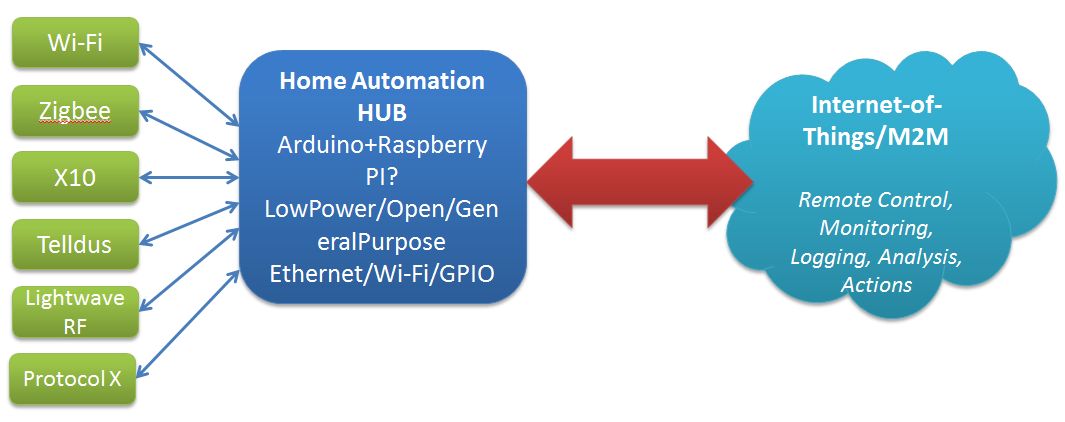
Likewise, we have hubs finally coming onstream to try and manage all the possible combinations of hardware and software for home sensors and everything else (or so they promise).

Think home sensors/lightbulbs/whatever – currently we have a plethora of specs to choose from for household comms and telemetry: X10, Zigbee, Z-Wave, Lightwave RF. Telldus, etc. Currently each manufacturer has their own choice of spec, controller software, etc.

Fortunately the Open Source/Open Hardware groups are are already experimenting with options to handle this – a good example is the Home Automation Hub (HAH) project which sets out to turn an Orange Livebox router into a home automation server, with an extra bit of hardware that – like the TellStick – allows it to control a range of gadgetry, and even keep an eye on energy consumption too. Likewise the dovado routers I’ve raved about before have the beginnings of some interesting Home Automation features with integration with Telldus sticks and the use of GPS to determine sunrise and sunset times for the location.

Open Source Open Hardware Hub

Home Hub - Internet of ThingsKey features as I see them are:

  • Compact
  • Reliable
  • Minimum Downtime
  • Low power
  • Open

Publish & Subscribe

So, assuming that we can get all these sensors talking to our hub, and that data recording (and potentially taking local actions based on that – heating, lighting, etc.) what do we do with it.

The hobbiest answer is to put it up on a website for your own entertainment. The more interesting options are open to the hub provider, and I see a few possible approaches here:

  1. Act as a relationship broker: making partnerships with different consumers of the telemetry e.g. allow the hub to submit information of the users choice to projects of their interest e.g. SmartCities, utility providers, etc.
  2. Act as a centralised clearing house: store all users data, sell it in bulk (users are the product) and plan to be bought at some point by Google/IBM/whoever
  3. Act as a centralised broker – grouping your users according to, for example, energy usage patterns and negotiating (optional) bulk deals from utility providers. For example, contacting the Power company and saying here is aggregate usage data for 30k ‘night owls’ – can we get a special deal, since they are offsetting the base load cost, but not adding to peak loads.


Providers/Website subscribing to the date