
Category Archives: Projects

Self-Hosted Nightscout & xDrip

I’ve recently had multiple issues with the official Dexcom G7 app on my phone, and after they broke the BYOD version of the app, I decided to move in another direction.

xDrip

As of 2025.08.08, xDrip now supports the G7 directly. Just two notes here. Follow the instructions to the letter, and ignore the screenshots – the options to select are Dex, and use the 4 digit bluetooth pairing code as the Transmitter ID.
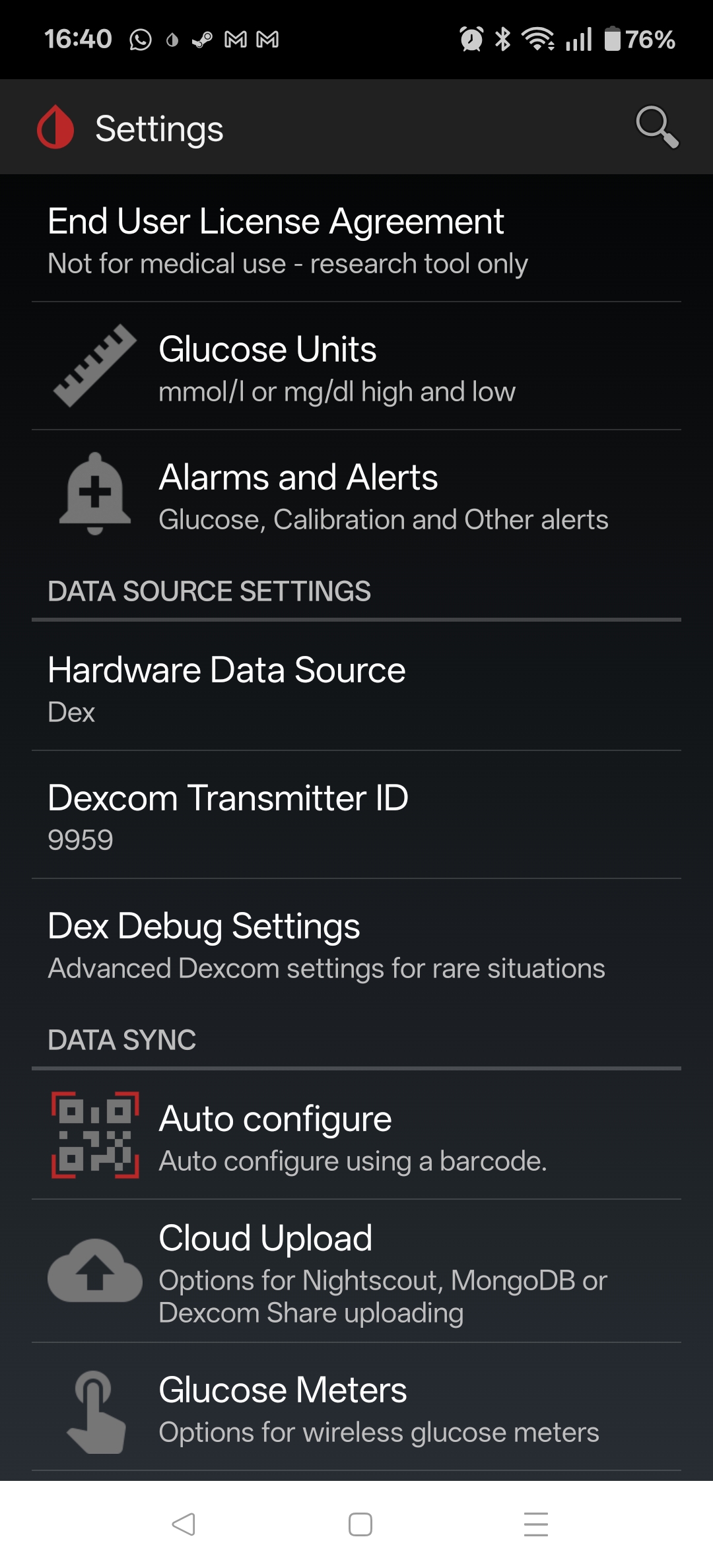
With xDrip working well, I then decided to get Nightscout up and running to act as a replacement for the Clarity reports.

Nightscout

Nightscout depends on MongoDB as the backend storage, so my docker-compose.yml file starts a nightscout-mongodb service. The main change here from other examples is that the bitnami containers are now under bitnamilegacy, since its no longer being maintained – not a huge concern since its completely internal to the nightscout docker network.

  nightscout-mongodb:                                   # SERVICE_NAME - used by the "depends_on:" to make sure the database it running before things try to use it
    image: bitnamilegacy/mongodb:latest                       # Other options "image: mongo:latest" will need adjustments in other places such as "volumes:" mounts
    container_name: nightscout-mongodb                  # called in Nightscout's MONGODB_URI. General good practice to be the same as SERVICE_NAME but not required
    environment:
      - PUID=1000                                               # Not necessary, but sets the USER who runs the container as not root
      - PGID=1000                                               # Not necessary, but sets the USER who runs the container as not root
      - TZ=Europe/Dublin                                       # Refer to {nightscout-app}
      - MONGO_INITDB_ROOT_USERNAME=mongodbpoweruser             # May be necessry if importing from another database or doing management on the database
      - MONGO_INITDB_DATABASE=auth                              # May be optional, hard to find documaentation about it
      - MONGO_INITDB_ROOT_PASSWORD=mongoRootPassword03          # Will probably never be needed, I set it the same as MONGODB_ROOT_PASSWORD
      - MONGODB_ROOT_USER=mongodbpoweruser                      # I'm not sure what the differences are but is usually set the same as MONGO_INITDB_ROOT_USERNAME
      - MONGODB_ROOT_PASSWORD=mongoaRootPassword02              # I'm not sure what the differences are but is usually set the same as MONGO_INITDB_ROOT_PASSWORD
      - MONGODB_USERNAME=nightscout01                           # Username called in Nightscout's MONGODB_URI - I set to just "Nightscout"
      - MONGODB_PASSWORD=mongoPassword01                        # Password called in Nightscout's MONGODB_URI
      - MONGODB_DATABASE=nightscout02                           # Database called in Nightscout's MONGODB_URI - I set to just "Nightscout"
      - MONGODB_PORT_NUMBER=27017                               # DEFAULT[27017] - Port each MongoDB will use inernally 27017:<<MONGODB_PORT_NUMBER>>
    #ports:                                                  # Only needed to access database externally. If all parts are in the same stack/network removal or # suggested
    #  - 27017:27017                                             # DEFAULT[27017:27017] - <<EXTERNAL PORT>>:<<MONGODB_PORT_NUMBER>>
    volumes:
      - ./database:/bitnami/mongodb:rw        # /LOCATION/ON/YOUR/SYSTEM:/CONTAINER/LOCATION - for "mongo:latest" use ":/data/db"
      - ./log:/var/log:rw                         # Refer to {nightscout-app}
      - /etc/localtime:/etc/localtime:ro                        # Refer to {nightscout-app}
    restart: always                                             # Refer to {nightscout-app}
    networks:
      - nightscout
    healthcheck:                                                # OPTIONAL: This adds a Healthcheck to the container. Instead of just saying `[Running]` it will say `[Healthy]` if it is unhealthy it should restart
      test: ["CMD", "sh", "-c", "mongosh --eval 'db.runCommand(\"ping\")' || exit 1", "||", "bash", "-c", "kill -s 15 1 && sleep 10 && kill -s 9 1"]
      interval: 10s
      timeout: 10s
      retries: 3
      start_period: 20s

Nightscout itself is can be completely configured from the docker-compose file, but the most important parameters are below. Be sure to update (and keep secret) the API_SECRET. I’ve set it to use unsecured/HTTP, as I’ll terminate the HTTPS using trafik (more on this later).

      - TZ=Europe/Dublin                                        # Use your Time Zone from https://wikipedia.org/wiki/List_of_tz_database_time_zones
      - API_SECRET=myAPIsecret123                               # In xDrip: REST-API > Base URL= "<<API_SECRET>>@<<BASE_URL>>/api/v1/"
      - MONGODB_URI=mongodb://nightscout01:mongoPassword01@nightscout-mongodb:27017/nightscout02
      - INSECURE_USE_HTTP=true                                  # DEFAULT[false] - Set this to "true", unless you have your own SSL provided internally, if you wish to access without reverse Proxy
      - BASE_URL=https://nightscout.my.domain               #URL of your Nightscout site accessed outside the local network
      - DISPLAY_UNITS=mmol/L                                    # DEFAULT[mg/dl] - CHOICES: "=mg/dl" | "=mmol" "=mmol/L" (same thing either works)
      - AUTH_DEFAULT_ROLES=denied                               # DEFAULT[readable] - CHOICES: "readable" | "denied" | <<Or any valid role name>>

That is enough to get the local service up, running and reachable, but I also wanted it to be accessible via the interwebs. I could just tailscale it, but since I have a public IP and self-host other services, I decided to open it up.

Traefik

I’m using Trafeik to do two things – (1) SSL Termination, and (2) Rate-Limiting connections to the service.

SSL Termination

Its worth taking a look at the Traefik configuration in detail, as I found most of the online examples a bit obscure, or not quite covering my use case, which is that I have wildcard certs for my domain already, and wanted to use those.

  traefik:
    image: traefik:latest
    container_name: traefik
    restart: always
    command:
      - --providers.docker.network=nightscout
      - --entryPoints.https1337.address=:1337
      - --providers.docker=true
      - --providers.file.directory=/etc/traefik/dynamic
      - --providers.file.watch=true
    ports:
      - "1337:1337"
    volumes:
      - /var/run/docker.sock:/var/run/docker.sock:ro
      - ./traefik/dynamic/tls.yml:/etc/traefik/dynamic/tls.yml
      - ./traefik/certs:/certs           # Your wildcard certs here
    labels:
      - "traefik.enable=true"
    networks:
      - nightscout

So to begin with we are creating a service called traefik, using the latest image, and allowing it to alwas restart. Then in the commands we are doing the following;

  • Setting the provider network to be our defined nightscout network
  • Creating a https entry point on port 1337 (default nightscout port)
  • Setting docker as a provider of config
  • Setting it watching the directory /etc/traefik/dynamic for what is known as “dynamic config” – this contains a tls,yml file were we actually point it at our certificate and key

Then we are exposing port 1337 to the outside world, mounting the volumes – specifically the tls.yml file, and the certs directory where our certificate and key are located. The rest is just the required label, and the mapping to the nightscout network that the whole service is running on.

The tls.yml file is fairly straightforward – any issues with this file or the certs themselves and traefik will default to using a self-signed cert.

tls:
  stores:
    default:
      defaultCertificate:
        certFile: /certs/fullchain.cer
        keyFile: /certs/certificate.key

Finally we need to label our nightscout service to put traefik in front of it, as follows;

    labels:
      - "traefik.enable=true"
      - "traefik.http.routers.netscout.rule=Host(`nightscout.my.domain`)"
      - "traefik.http.routers.netscout.entrypoints=https1337"
      - "traefik.http.routers.netscout.tls=true"
      - "traefik.http.services.netscout.loadbalancer.server.port=1337"

Main points are to create a http router called nightscout, enable TLS, give the domain, and map the entrypoint defined earlier. This is all you need to provide HTTPS connectivity on port 1337, terminated by traefik, and then forwarded to the nightscout-app service.

Rate Limiting

Given that I’m planning on exposing this port to the bad bad internet, it makes sense to rate limit it. Thankfully this is just a few extra lines in the labels assigned to the nightscout-app service.

      - "traefik.http.middlewares.netscout-ratelimit.ratelimit.average=10"
      - "traefik.http.middlewares.netscout-ratelimit.ratelimit.burst=5"
      - "traefik.http.routers.netscout.middlewares=netscout-ratelimit@docker"

CloudFlare

Interestingly, even after opening up the ports on my router, I was unable to connect. After trying a few things, it eventually came to mind that possibly CloudFlare was doing something funny, since it sits between my public domain name, and my dynamic domain.

It turns out that CloudFlare will proxy/inspect all HTTP/HTTPS traffic (orange-clouded) but only for a limited set of ports, (443, 2053, 2083, 2087,2096,8443) unless you have CloudFlare Spectrum or setup Cloudflare Tunnel / Argo Tunnel to create a secure tunnel between your origin server and the CloudFlare proxy.

Alternatively, if you want to serve HTTPS on a non-standard port but do not want to use Spectrum or Tunnel, you must set the DNS record (subdomain) to “grey cloud” (DNS only), which disables the proxy, so Cloudflare does not interfere with that traffic.

TODO

Try moving the external port to one of those listed above and see if I can keep CF between me and the rest of the world.

Heatmiser / Heatmaster UH1 Underfloor Heating

Just a collection of notes and files for now related to a ~2005 vintage UH1 underfloor heating system.

Will reorganise once I’ve had a chance to do more work on it

Getting OpenALPR Working on RPi

As yet another side project I wanted to make use of my RPi camera + ANPR software to try and track down whoever is fly-tipping in my local estate. Since they dump their rubbish basically in full view of my living room, I’m looking to catch them in the act.

Attempt 1 – using the Raspbian packages (spoiler alert, it didn’t work)

Boring package install

sudo apt install openalpr openalpr-daemon openalpr-utils libopenalpr-dev
pip3 install openalpr picamera numpy
sudo apt-get install libatlas-base-dev

Get a test image wget http://plates.openalpr.com/ea7the.jpg

alpr -c us ea7the.jpg
Error opening data file /usr/share/openalpr/runtime_data/ocr/lus.traineddata
Please make sure the TESSDATA_PREFIX environment variable is set to your "tessdata" directory.
Failed loading language 'lus'
Tesseract couldn't load any languages!
Segmentation fault

Not good – so this is based on tesseract in the background. Looking around I see that the training data lives in tessdata, which is a subdirectory of ocr

/usr/share/openalpr/runtime_data/ocr/tessdata $ ls
lau.traineddata leu.traineddata lgb.traineddata lkr2.traineddata lkr.traineddata lsg.traineddata lus.traineddata
pi@raspberrypi:/usr/share/openalpr/runtime_data/ocr/tessdata $ mv ./* ../
pi@raspberrypi:/usr/share/openalpr/runtime_data $ tesseract --tessdata-dir /usr/share/openalpr/runtime_data/ocr/ --list-langs
Please make sure the TESSDATA_PREFIX environment variable is set to your "tessdata" directory.
List of available languages (7):
lau
leu
lgb
lkr
lkr2
lsg
lus

Ok, still not really making sense. Lets assume that OpenALPR is putting wrappers around the language so “us” becomes “lus” when fed to tesseract

pi@raspberrypi:/usr/share/openalpr/runtime_data/ocr $ tesseract -l lus ~/ea7the.jpg ./openalpr/runtime_data/config/us.conf
Error, could not create TXT output file: No such file or directory

Now that is more promising

alpr -c us ea7the.jpg
plate0: 10 results
- EA7THE confidence: 91.0578
- EA7TBE confidence: 84.133
- EA7T8E confidence: 83.0083
- EA7TRE confidence: 82.7869
- EA7TE confidence: 82.5961
- EA7TME confidence: 80.2908
- EA7TH6 confidence: 77.0045
- EA7THB confidence: 75.5779
- EA7TH confidence: 74.6576
- EA7TB6 confidence: 70.0797

Now lets take our python bindings for a spin

Python 3.7.3 (default, Dec 20 2019, 18:57:59)
[GCC 8.3.0] on linux
Type "help", "copyright", "credits" or "license" for more information.
import json
from openalpr import Alpr
alpr = Alpr("us", "/etc/openalpr/openalpr.conf", "/usr/share/openalpr/runtimedata")
Traceback (most recent call last):
File "", line 1, in
File "/home/pi/.local/lib/python3.7/site-packages/openalpr/openalpr.py", line 91, in init
self._initialize_func = self._openalprpy_lib.openalpr_init
File "/usr/lib/python3.7/ctypes/init.py", line 369, in getattr
func = self.getitem(name)
File "/usr/lib/python3.7/ctypes/init.py", line 374, in getitem
func = self._FuncPtr((name_or_ordinal, self))
AttributeError: /usr/lib/libopenalpr.so.2: undefined symbol: openalpr_init

Much Google time later and it seems that this is down to the pre-build python bindings not matching the version of the package that I’ve installed. Fsck it anyway

pi@raspberrypi:~/.local/lib/python3.7/site-packages $ pip3 show openalpr
Name: openalpr
Version: 1.1.0
Summary: OpenALPR Python Bindings
Home-page: http://www.openalpr.com/
Author: Matt Hill
Author-email: [email protected]
License: UNKNOWN
Location: /home/pi/.local/lib/python3.7/site-packages
Requires:
Required-by:

Attempt 2 – Build from master

Use git to clone from the master

Install the required packages

sudo apt-get install build-essential
sudo apt-get install cmake git libgtk2.0-dev pkg-config libavcodec-dev libavformat-dev libswscale-dev
sudo apt-get install libopencv-dev libtesseract-dev git cmake build-essential libleptonica-dev
sudo apt-get install libcurl4-openssl-dev
sudo apt-get install liblog4cplus-dev

Build and install OpenAPNR and the python bindings

cd openalpr/src
mkdir build
cd build
cmake -DCMAKE_INSTALL_PREFIX:PATH=/usr -DCMAKE_INSTALL_SYSCONFDIR:PATH=/etc ..
make
sudo make install
cd ../bindings/python
sudo python3 setup.py install

Now we can make progress

pi@raspberrypi:~ $ python3
Python 3.7.3 (default, Dec 20 2019, 18:57:59)
[GCC 8.3.0] on linux
Type "help", "copyright", "credits" or "license" for more information.
>>> import locale
>>> locale.setlocale(locale.LC_ALL, 'C')
'C'
>>> from openalpr import Alpr
>>> alpr = Alpr("us", "/etc/openalpr/openalpr.conf", "/usr/share/openalpr/runtime_data")
>>> import json
>>>
>>> results = alpr.recognize_file("/home/pi/ea7the.jpg")
>>>
>>> print(json.dumps(results, indent=4))
{
    "version": 2,
    "data_type": "alpr_results",
    "epoch_time": 1589218326623,
    "img_width": 636,
    "img_height": 358,
    "processing_time_ms": 234.429916,
    "regions_of_interest": [
        {
            "x": 0,
            "y": 0,
            "width": 636,
            "height": 358
        }
    ],
    "results": [
        {
            "plate": "EA7THE",
            "confidence": 91.05777,
            "matches_template": 0,
            "plate_index": 0,
            "region": "",
            "region_confidence": 0,
            "processing_time_ms": 59.747936,
            "requested_topn": 25,
            "coordinates": [
                {
                    "x": 208,
                    "y": 157
                },
                {
                    "x": 393,
                    "y": 157
                },
                {
                    "x": 393,
                    "y": 245
                },
                {
                    "x": 208,
                    "y": 245
                }
            ],
            "candidates": [
                {
                    "plate": "EA7THE",
                    "confidence": 91.05777,
                    "matches_template": 0
                },
                {
                    "plate": "EA7TBE",
                    "confidence": 84.132973,
                    "matches_template": 0
                },

Hive Motion Sensor and OpenHab2

Recently I’ve started adding ZigBee based devices to my home automation solution – specifically I’ve added the Husbzb-1 stick to my setup. This has the benefit of combining both a Z-Wave and Zigbee controller in the same physical device, so I get to be agnostic as to the devices I add.

My next step was to try out a Hive Motion Sensor, for no other reason then there was one in the local store and a quick Google showed that it was Zigbee based.

This device is interesting in terms of form factor – suits what I was planning quite well, and the channels it provides;

  • Motion Intrusion (_intrusion) – Switch
  • Temperature (_temperature) – Number:Temperature
  • Tamper (_tamper) – Switch
  • Motion Presence (_motion) – Switch
  • Low Battery (_iaslowbattery) – Switch
  • Battery Voltage (_batteryvoltage) – Number
  • Illuminance (_illuminance) – Number

So I actually ended up with more then I expected since neither the illuminance nor the temperature are referenced in any documentation that I can find. I’ve no clue what the difference between Motion Intrusion and Motion Presence are though – both seem to trigger at the same time… will update when I learn more.

The other interesting thing is that on the very first trigger, the state is updated from NULL to ON for presence (_intrusion and _motion), but the sensor itself never seems to trigger a state change to OFF. In order to handle this, I’ve defined an item, subscribed to the _motion channel, and then a rule to reset it back to off after 5 mins.

var Timer vFrontDoor_holdDown  = null

rule "Reset Front Door trigger"
when
    Item FrontDoorMotion changed to ON
then
    if(vFrontDoor_holdDown === null || vFrontDoor_holdDown.hasTerminated){
        vFrontDoor_holdDown = createTimer(now.plusMinutes(5), [| 
            postUpdate(FrontDoorMotion, OFF)
            vFrontDoor_holdDown = null
        ])
    }
    else{
        vFrontDoor_holdDown.reschedule(now.plusMinutes(5)) 
    }
end

Hass.io and a custom relay

While I’m currently OpenHab based, I was looking into Hass.io as an option, but that does leave the challenge of getting my WiFi controlled relays to work correctly.

This turns out to be fairly simple in the end, by using the platform command-line option + CURL

switch:
   - platform: command_line
     switches:
        relay1:
          command_on: '/usr/bin/curl -X GET http://&lt;ip address>/relay/on'
          command_off: '/usr/bin/curl -X GET http://&lt;ip address>/relay/off'
          command_state: '/usr/bin/curl -X GET http://&lt;ip address>/relay/state'
          value_template: '{{ value == "ON" }}'
          friendly_name: My Relay

Wifi Controlled Relay and OpenHab

Items used:

  • LOLIN D1 mini V3.1.0 (ESP8266)
  • LOLIN Relay Shield V2.0.0
// Load Wi-Fi library
#include <ESP8266WiFi.h>

// Replace with your network credentials
const char* ssid     = "mySSID";
const char* password = "VerySecret";

// Set web server port number to 80
WiFiServer server(80);

// Variable to store the HTTP request
String header;

// Auxiliary variables to store the current output state
String relayState = "OFF";
// we will have the relay on 5
const int relay = 5;


void setup() {
  Serial.begin(115200);
  // Initialize the output variables as outputs
  pinMode(relay, OUTPUT);
  // set the relay off by default
  digitalWrite(relay, LOW);
  pinMode(LED_BUILTIN, OUTPUT);     // Initialize the LED_BUILTIN pin as an output
  // we match the LED state to the relay state
  digitalWrite(LED_BUILTIN, HIGH);  // High is off, low is on

  // Connect to Wi-Fi network with SSID and password
  Serial.print("Connecting to ");
  Serial.println(ssid);
  WiFi.begin(ssid, password);
  while (WiFi.status() != WL_CONNECTED) {
    delay(500);
    Serial.print(".");
  }
  // Print local IP address and start web server
  Serial.println("");
  Serial.println("WiFi connected.");
  Serial.println("IP address: ");
  Serial.println(WiFi.localIP());
  server.begin();
}
void loop(){
  WiFiClient client = server.available();   // Listen for incoming clients

  if (client) {                             // If a new client connects,
    Serial.println("New Client.");          // print a message out in the serial port
    String currentLine = "";                // make a String to hold incoming data from the client
    while (client.connected()) {            // loop while the client's connected
      if (client.available()) {             // if there's bytes to read from the client,
        char c = client.read();             // read a byte, then
        Serial.write(c);                    // print it out the serial monitor
        header += c;
        if (c == '\n') {                    // if the byte is a newline character
          // if the current line is blank, you got two newline characters in a row.
          // that's the end of the client HTTP request, so send a response:
          if (currentLine.length() == 0) {
            // HTTP headers always start with a response code (e.g. HTTP/1.1 200 OK)
            // and a content-type so the client knows what's coming, then a blank line:
            client.println("HTTP/1.1 200 OK");
            client.println("Content-type:text/plain");
            client.println("Connection: close");


            // turns the GPIOs on and off
            if (header.indexOf("GET /relay/on") >= 0) {
              Serial.println("Relay on");
              relayState = "ON";
              digitalWrite(LED_BUILTIN, LOW);  // High is off, low is on
              digitalWrite(relay, HIGH);
            } else if (header.indexOf("GET /relay/off") >= 0) {
              Serial.println("Relay off");
              relayState = "OFF";
              digitalWrite(relay, LOW);
              digitalWrite(LED_BUILTIN, HIGH);  // High is off, low is on
            }
            else if (header.indexOf("GET /relay/status") >= 0) {
              Serial.print("Sending status: ");
              Serial.println(relayState);
              
              client.println();
              client.print(relayState);
              client.println();
              
            }
            client.println();
            break;
          } else { // if you got a newline, then clear currentLine
            currentLine = "";
          }
        } else if (c != '\r') {  // if you got anything else but a carriage return character,
          currentLine += c;      // add it to the end of the currentLine
        }
      }
    }
    // Clear the header variable
    header = "";
    // Close the connection
    delay(1);
    client.stop();
    Serial.println("Client disconnected.");
    Serial.println("");
  }
}        
  

Now for the OpenHab side

Here, I’m making use of the HTTP binding (and the REGEX mapping), and we basically have 3 calls we need to handle

  • On
  • Off
  • Status

And so our items definition is simple to handle those 3 cases:

Switch MyRelay "MyRelay" <switch> ( gSwitches, gRelay ) { http=">[ON:GET:http://<IP Address>/relay/on] >[OFF:GET:http://<IP Address>/relay/off] <[http://<IP Address>/relay/status:10000:REGEX((.*))]"}

And that is basically it – I can now control the on/off of my relays, and check on the current status.

Conclusion / Finishing Thoughts

Some obvious points to consider are:

  • Lack of security – anything that can reach the IPs of the relays can manipulate their state
  • Lack of rate limiting – a follow up from the 1st point is that we don’t do any cooldowns or rate limiting to prevent accident or maliciousness from repeatedly toggling the relays, potentially damaging the relay and worse, the appliance
  • Updating the relays – requires them to be disconnected and connected via USB to a PC/programmer

OpenWeatherMap and OpenHab

With the end of the YahooWeather API, I signed up for some API keys from OpenWeatherMap’s free tier, but had real trouble getting the default weather binding to work. After many wasted hours puzzling over the following error message, I eventually found this thread.

[ERROR] [nal.provider.AbstractWeatherProvider] - OPENWEATHERMAP[home]: Can't retreive weather data: Invalid API key. Please see http://openweathermap.org/faq#error401 for more info.

The error is correct, but uninformative – the issue is that default binding is calling on the “paid for” API rather then the free one, so yes my free API key is invalid for the API call I’m making. Unfortunately that is less then informative when testing your API keys in a browser and receiving valid JSON!!

The solution for me was to add org.openhab.binding.weather-1.13.0-SNAPSHOT.jar to my addons directory, then using the following weather.items I was up and running:

Group gWeather

// atmosphere
Number   Humidity		  "Humidity [%d %%]"	 (gWeather) {weather="locationId=home, type=atmosphere, property=humidity"}
Number   Visibility		  "Visibility [%.2f km]" (gWeather) {weather="locationId=home, type=atmosphere, property=visibility"}
Number   Visibility_Mph   "Visibility [%.2f mi]" (gWeather) {weather="locationId=home, type=atmosphere, property=visibility, unit=mph"}
Number   Pressure		  "Pressure [%.2f mb]"   (gWeather) {weather="locationId=home, type=atmosphere, property=pressure"}
Number   Pressure_Inches  "Pressure [%.2f in]"   (gWeather) {weather="locationId=home, type=atmosphere, property=pressure, unit=inches"}
String   Pressure_Trend   "Pressuretrend [%s]"   (gWeather) {weather="locationId=home, type=atmosphere, property=pressureTrend"}
Number   Ozone            "Ozone [%d ppm]"		 (gWeather) {weather="locationId=home, type=atmosphere, property=ozone"}
Number   UV_Index         "UV Index"              (gWeather){weather="locationId=home, type=atmosphere, property=uvIndex, scale=0"}

// clouds
Number   Clouds   "Clouds [%.0f %%]"  (gWeather) {weather="locationId=home, type=clouds, property=percent"}

// condition
String   Condition        "Condition [%s]"     (gWeather) {weather="locationId=home, type=condition, property=text"}
String   Condition_ID     "Condition id [%s]"  (gWeather) {weather="locationId=home, type=condition, property=id"}
DateTime ObservationTime  "Observation time [%1$td.%1$tm.%1$tY %1$tH:%1$tM]"  (gWeather) {weather="locationId=home, type=condition, property=observationTime"}
DateTime LastUpdate       "Last update [%1$td.%1$tm.%1$tY %1$tH:%1$tM]"      (gWeather)  {weather="locationId=home, type=condition, property=lastUpdate"}
String   CommonId         "Common id [%s]"     (gWeather) {weather="locationId=home, type=condition, property=commonId"}
Image    LocalCurrentConditionIcon "Icon" (gWeather) { weather="locationId=home, type=condition, property=icon-id" }

// precipitation
Number   Rain          "Rain [%.2f mm/h]"  (gWeather) {weather="locationId=home, type=precipitation, property=rain"}
Number   Rain_Inches   "Rain [%.2f in/h]"  (gWeather) {weather="locationId=home, type=precipitation, property=rain, unit=inches"}
Number   Snow          "Snow [%.2f mm/h]"  (gWeather) {weather="locationId=home, type=precipitation, property=snow"}
Number   Snow_Inches   "Snow [%.2f in/h]"  (gWeather) {weather="locationId=home, type=precipitation, property=snow, unit=inches"}
Number   Precip_Probability   "Precip probability [%d %%]"  (gWeather) {weather="locationId=home, type=precipitation, property=probability"}
// new total property in 1.8, only Wunderground
Number   Precip_Total         "Precip total [%d mm]"  (gWeather) {weather="locationId=home, type=precipitation, property=total"}
Number   Precip_Total_Inches  "Precip total [%d in]"  (gWeather) {weather="locationId=home, type=precipitation, property=total, unit=inches"}

// temperature
Number   Temperature      "Temperature [%.2f °C]"      (gWeather) {weather="locationId=home, type=temperature, property=current"}
Number   Temperature_F    "Temperature [%.2f °F]"      (gWeather) {weather="locationId=home, type=temperature, property=current, unit=fahrenheit"}
Number   Temp_Feel        "Temperature feel [%.2f °C]" (gWeather) {weather="locationId=home, type=temperature, property=feel"}
Number   Temp_Feel_F      "Temperature feel [%.2f °F]" (gWeather) {weather="locationId=home, type=temperature, property=feel, unit=fahrenheit"}
Number   Temp_Dewpoint    "Dewpoint [%.2f °C]"         (gWeather) {weather="locationId=home, type=temperature, property=dewpoint"}
Number   Temp_Dewpoint_F  "Dewpoint [%.2f °F]"         (gWeather) {weather="locationId=home, type=temperature, 
property=dewpoint, unit=fahrenheit"}
// min and max values only available in forecasts
Number   Temp_Min         "Temperature min [%.2f °C]"  (gWeather) {weather="locationId=home, type=temperature, property=min"}
Number   Temp_Min_F       "Temperature min [%.2f °F]"  (gWeather) {weather="locationId=home, type=temperature, property=min, unit=fahrenheit"}
Number   Temp_Max         "Temperature max [%.2f °C]"  (gWeather) {weather="locationId=home, type=temperature, property=max"}
Number   Temp_Max_F       "Temperature max [%.2f °F]"  (gWeather) {weather="locationId=home, type=temperature, property=max, unit=fahrenheit"}
String   Temp_MinMax      "Min/Max [%s °C]"            (gWeather) {weather="locationId=home, type=temperature, property=minMax"}
String   Temp_MinMax_F    "Min/Max [%s °F]"            (gWeather) {weather="locationId=home, type=temperature, property=minMax, unit=fahrenheit"}

// wind
Number   Wind_Speed           "Windspeed [%.2f km/h]"   (gWeather) {weather="locationId=home, type=wind, property=speed"}
Number   Wind_Speed_Beaufort  "Windspeed Beaufort [%d]" (gWeather) {weather="locationId=home, type=wind, property=speed, unit=beaufort"}
Number   Wind_Speed_Knots     "Windspeed [%.2f kn]"     (gWeather) {weather="locationId=home, type=wind, property=speed, unit=knots"}
Number   Wind_Speed_Mps       "Windspeed [%.2f mps]"    (gWeather) {weather="locationId=home, type=wind, property=speed, unit=mps"}
Number   Wind_Speed_Mph       "Windspeed [%.2f mph]"    (gWeather) {weather="locationId=home, type=wind, property=speed, unit=mph"}
String	 Wind_Direction       "Wind direction [%s]"     (gWeather) {weather="locationId=home, type=wind, property=direction"}
Number   Wind_Degree          "Wind degree [%.0f °]"    (gWeather) {weather="locationId=home, type=wind, property=degree"}
Number   Wind_Gust            "Wind gust [%.2f km/h]"   (gWeather) {weather="locationId=home, type=wind, property=gust"}
Number   Wind_Gust_Beaufort   "Wind gust Beaufort [%d]" (gWeather) {weather="locationId=home, type=wind, property=gust, unit=beaufort"}
Number   Wind_Gust_Knots      "Wind gust [%.2f kn]"     (gWeather) {weather="locationId=home, type=wind, property=gust, unit=knots"}
Number   Wind_Gust_Mps        "Wind gust [%.2f mps]"    (gWeather) {weather="locationId=home, type=wind, property=gust, unit=mps"}
Number   Wind_Gust_Mph        "Wind gust [%.2f mph]"    (gWeather) {weather="locationId=home, type=wind, property=gust, unit=mph"}
Number   Wind_Chill           "Wind chill [%.2f °C]"    (gWeather) {weather="locationId=home, type=wind, property=chill"}
Number   Wind_Chill_F         "Wind chill [%.2f °F]"    (gWeather) {weather="locationId=home, type=wind, property=chill, unit=fahrenheit"}

OpenHab – Boost Button on the Basic UI

While I’ve been adding simple on/off controls and rules controlling timers for my heating, I noticed something that was missing was the idea of a 1+ hour boost button, so I decided to create one.

The standard pattern for building this type of thing is to create a “dummy” Switch – one not bound to any channel, and make use of that + timers in the rules to handle the off transition. In my sitemap however, I was aiming to have a push button type setup, rather then a toggle.

One pattern I found for this made use of an additional dummy Switch to store the state, and use the “visibility” options in the sitemap to show the “on” or “running” buttons depending on that state. While nice, I prefer not to have a second dummy variable, so I don’t 🙂

Define the item

First I define the “dummy” switch:

Group gVirtual

Switch HeaterTimer "1 Hour Boost" <temperature> (gHeating, gVirtual, gSwitches)

The rules

Then I define my rules for this switch:

var Timer boostTimer = null

rule "One Hour Heat On"
when
    Item HeaterTimer received command
then
    Heating.sendCommand(ON)
    postUpdate(HeaterTimer, ON)
    if(boostTimer === null || boostTimer.hasTerminated){
        boostTimer = createTimer(now.plusHours(1), [| 
            Heating.sendCommand(OFF)
            postUpdate(HeaterTimer, OFF)
            boostTimer = null
        ])
    }
    else{
        boostTimer.reschedule(now.plusHours(1)) // if pressed a second time keep it on for another hour from now
    }
end

So what I’m doing here is triggering on the HeaterTimer receiving a command, then I turn the heating on, and update the state of HeaterTimer to ‘On’.

If the timer is equal to null, or has ended, I create a timer set at 1 hour from now, and when the timer triggers I switch the heating off, update the state, and set the timer to null.

If we have an command, and the timer is already running e.g. I pushed the button again, then I reschedule to 1 hour from now.

Now for the sitemap

   Frame label="Heating" {
      Switch item=HeaterTimer mappings=[ON="Boost"] icon="fire-off" visibility=[HeaterTimer == OFF, HeaterTimer == "NULL"]
      Switch item=HeaterTimer mappings=[ON="Running"] icon="fire-on" visibility=[HeaterTimer == ON]

   }

This is where it gets a little interesting.

The first switch is showing an ON/Boost button, with the icon in the off state. This is only visible if the HeatingTimer is OFF, or equal to “NULL”.

Why the second/NULL check?

When the “dummy” switch is created, it is created with a null state – my persistence config will restore the state if we ever reload, but for the very first time, we need to handle the lack of ON/OFF state. You could update the sitemap after the first time you use it to remove the NULL comparison as it will only be used once. The other option is to only add the visibility options after you run for the first time.

The second switch should be obvious now – we have a “Running” button, that if you push it, will add 1 hour from now (remember the rules) to the timer.

Migrating from OpenELEC 6.0.3 to 7.0.1

More of a note to myself but I was doing a major version upgrade of OpenELEC for the first time and hit a few snags, so wanted to note these is case anyone else hits the same issues.

Basic setup, and potential issues;

  1. OpenELEC 6.0.3 running on a RPi3
  2. Media server is accessible via SMB
  3. Video database is on the MySQL server rather then locally
  4. Using TV Headend as a PVR client

OpenELEC 6.0.3 running on a RPi3

OpenELEC will not automatically upgrade to a major new release for fear of breaking things. You are expected to trigger this yourself. The process is fairly straightforward to be honest.

To upgrade, copy the update file (.tar) for the platform you are using into the /storage/.update/ directory and reboot, then when it is up and running, reboot a second time.

Note: I’m assuming you have a backup before you start this 🙂

Media server is accessible via SMB

No problems with this part actually. The SMB configuration was done through OpenELEC (and stored in /storage/.kodi/userdata/sources.xml) so this was preserved through the upgrade.

Video database is on the MySQL server rather then locally

This part caused some problems, as I’d forgotten that I had the permissions for kodi locked down. When starting up the ‘Film’ and ‘TV Shows’ categories weren’t visible.
/storage/.kodi/userdata/advancedsettings.xml was unchanged, so didn’t expect any problems in terms of client config:

  <videodatabase>
    <type>mysql</type>
    <host>192.168.1.x</host>
    <port>3306</port>
    <user>kodi</user>
    <pass>MySecretPassword</pass>
  </videodatabase>

Taking a look at the kodi log file (stored in /storage/.kodi/temp/kodi.log) I could see where things were going wrong.

18:42:19   9.573155 T:1963802624   ERROR: Unable to open database: MyVideos99 [1044](Access denied for user 'kodi'@'192.168.1.%' to database 'MyVideos99')
18:42:19   9.591171 T:1963802624   ERROR: Unable to open database: MyVideos98 [1044](Access denied for user 'kodi'@'192.168.1.%' to database 'MyVideos98')
18:42:19   9.611773 T:1963802624   ERROR: Unable to open database: MyVideos97 [1044](Access denied for user 'kodi'@'192.168.1.%' to database 'MyVideos97')
18:42:19   9.636495 T:1963802624   ERROR: Unable to open database: MyVideos96 [1044](Access denied for user 'kodi'@'192.168.1.%' to database 'MyVideos96')
18:42:19   9.657456 T:1963802624   ERROR: Unable to open database: MyVideos95 [1044](Access denied for user 'kodi'@'192.168.1.%' to database 'MyVideos95')
18:42:19   9.676188 T:1963802624   ERROR: Unable to open database: MyVideos94 [1044](Access denied for user 'kodi'@'192.168.1.%' to database 'MyVideos94')
18:42:19   9.705974 T:1963802624  NOTICE: Old database found - updating from version 93 to 99
18:42:19   9.711560 T:1963802624   ERROR: SQL: Can't create database for copy: 'MyVideos93' (1044)
18:42:19   9.716779 T:1963802624   ERROR: Unable to copy old database MyVideos93 to new version MyVideos99

The number that Kodi tags to the end of the database name e.g. MyVideos93, 93 indicates the database version. Part of the upgrade involves upgrading the database to whatever revision we are now on. Kodi will do this for you, but creates it as a new database which means that it has to have permissions to do so.

The base permissions I granted by default weren’t sufficient for this:

mysql> show grants for 'kodi'@'192.168.1.%' ;
+-----------------------------------------------------------------------------------------------------+
| Grants for [email protected].%                                                                                   |
+-----------------------------------------------------------------------------------------------------+
| GRANT USAGE ON *.* TO 'kodi'@'%' IDENTIFIED BY PASSWORD '*xxxx' |
| GRANT ALL PRIVILEGES ON `MyVideos93`.* TO 'kodi'@'192.168.1.%'                                                 |
+-----------------------------------------------------------------------------------------------------+

Granted full permissions to Kodi.

mysql> GRANT ALL PRIVILEGES ON *.*  TO 'kodi'@'192.168.1.%' ;
Query OK, 0 rows affected (0.00 sec)
mysql> flush privileges;
Query OK, 0 rows affected (0.00 sec)

mysql> show grants for 'kodi'@'192.168.1.%';
+------------------------------------------------------------------------------------------------------------------------+
| Grants for [email protected].%                                                                                            |
+------------------------------------------------------------------------------------------------------------------------+
| GRANT ALL PRIVILEGES ON *.* TO 'kodi'@'192.168.1.%' IDENTIFIED BY PASSWORD '*xxxx' |
| GRANT ALL PRIVILEGES ON `MyVideos93`.* TO 'kodi'@'192.168.1.%'                                                         |
+------------------------------------------------------------------------------------------------------------------------+
2 rows in set (0.00 sec)

Now restart the RPi, and the new database was created and the data migrated across.

...
18:51:37   9.850684 T:1963544576   ERROR: Unable to open database: MyVideos99 [1049](Unknown database 'MyVideos99')
18:51:37   9.869744 T:1963544576   ERROR: Unable to open database: MyVideos98 [1049](Unknown database 'MyVideos98')
18:51:37   9.899451 T:1963544576   ERROR: Unable to open database: MyVideos97 [1049](Unknown database 'MyVideos97')
18:51:37   9.926645 T:1963544576   ERROR: Unable to open database: MyVideos96 [1049](Unknown database 'MyVideos96')
18:51:37   9.944409 T:1963544576   ERROR: Unable to open database: MyVideos95 [1049](Unknown database 'MyVideos95')
18:51:37   9.971253 T:1963544576   ERROR: Unable to open database: MyVideos94 [1049](Unknown database 'MyVideos94')
18:51:37   9.997427 T:1963544576  NOTICE: Old database found - updating from version 93 to 99
18:51:52  25.252617 T:1963544576  NOTICE: Attempting to update the database MyVideos99 from version 93 to 99
18:52:26  59.282043 T:1963544576  NOTICE: Running database version TV29
18:52:26  59.287502 T:1963544576  NOTICE: Running database version Epg11
...

Then I locked it back down again, but with a slight improvement, as Kodi doesn’t seem to delete the older DB by default.

mysql> REVOKE ALL PRIVILEGES, GRANT OPTION FROM 'kodi'@'192.168.1.%';
Query OK, 0 rows affected (0.02 sec)

mysql> flush privileges;
Query OK, 0 rows affected (0.00 sec)

mysql> show grants for 'kodi'@'192.168.1.%';
+-----------------------------------------------------------------------------------------------------+
| Grants for [email protected].%                                                                            |
+-----------------------------------------------------------------------------------------------------+
| GRANT USAGE ON *.* TO 'kodi'@'192.168.1.%' IDENTIFIED BY PASSWORD '*xxxx' |
+-----------------------------------------------------------------------------------------------------+

mysql> GRANT ALL ON `MyVideos%`.* TO 'kodi'@'192.168.1.%' IDENTIFIED BY 'kodi';
Query OK, 0 rows affected (0.02 sec)

mysql> flush privileges;
Query OK, 0 rows affected (0.02 sec)

mysql> show grants for 'kodi'@'192.168.1.%';
+---------------------------------------------------------------------------------------------------------------+
| Grants for [email protected].%                                                                                   |
+---------------------------------------------------------------------------------------------------------------+
| GRANT USAGE ON *.* TO 'kodi'@'192.168.1.%' IDENTIFIED BY PASSWORD '*xxxx' |
| GRANT ALL PRIVILEGES ON `MyVideos%`.* TO 'kodi'@'192.168.1.%'                                                 |
+---------------------------------------------------------------------------------------------------------------+

And that was that.

Using TV Headend as a PVR client

Minor problem here. The automatic update to a newer client version was failing, and the older client was crashing. Uninstalled the old one, did an install of the newer release, and it was back up and running (existing config was preserved).


WordPress Migration Complete

I’ve just migrated the blog from the Raspberry Pi to a VM hosted on my linux server. Migration went smoothly enough through the use of Duplicator and Search & Replace. Mails work as do all the usual plugins.

Don’t think there are any broken links adn I haven’t spotted anything obviously wrong, but let me know if you spot something that looks like it isn’t working.