Category Archives: Arduino

Wifi Controlled Relay and OpenHab

Items used:

  • LOLIN D1 mini V3.1.0 (ESP8266)
  • LOLIN Relay Shield V2.0.0
// Load Wi-Fi library
#include <ESP8266WiFi.h>

// Replace with your network credentials
const char* ssid     = "mySSID";
const char* password = "VerySecret";

// Set web server port number to 80
WiFiServer server(80);

// Variable to store the HTTP request
String header;

// Auxiliary variables to store the current output state
String relayState = "OFF";
// we will have the relay on 5
const int relay = 5;


void setup() {
  Serial.begin(115200);
  // Initialize the output variables as outputs
  pinMode(relay, OUTPUT);
  // set the relay off by default
  digitalWrite(relay, LOW);
  pinMode(LED_BUILTIN, OUTPUT);     // Initialize the LED_BUILTIN pin as an output
  // we match the LED state to the relay state
  digitalWrite(LED_BUILTIN, HIGH);  // High is off, low is on

  // Connect to Wi-Fi network with SSID and password
  Serial.print("Connecting to ");
  Serial.println(ssid);
  WiFi.begin(ssid, password);
  while (WiFi.status() != WL_CONNECTED) {
    delay(500);
    Serial.print(".");
  }
  // Print local IP address and start web server
  Serial.println("");
  Serial.println("WiFi connected.");
  Serial.println("IP address: ");
  Serial.println(WiFi.localIP());
  server.begin();
}
void loop(){
  WiFiClient client = server.available();   // Listen for incoming clients

  if (client) {                             // If a new client connects,
    Serial.println("New Client.");          // print a message out in the serial port
    String currentLine = "";                // make a String to hold incoming data from the client
    while (client.connected()) {            // loop while the client's connected
      if (client.available()) {             // if there's bytes to read from the client,
        char c = client.read();             // read a byte, then
        Serial.write(c);                    // print it out the serial monitor
        header += c;
        if (c == '\n') {                    // if the byte is a newline character
          // if the current line is blank, you got two newline characters in a row.
          // that's the end of the client HTTP request, so send a response:
          if (currentLine.length() == 0) {
            // HTTP headers always start with a response code (e.g. HTTP/1.1 200 OK)
            // and a content-type so the client knows what's coming, then a blank line:
            client.println("HTTP/1.1 200 OK");
            client.println("Content-type:text/plain");
            client.println("Connection: close");


            // turns the GPIOs on and off
            if (header.indexOf("GET /relay/on") >= 0) {
              Serial.println("Relay on");
              relayState = "ON";
              digitalWrite(LED_BUILTIN, LOW);  // High is off, low is on
              digitalWrite(relay, HIGH);
            } else if (header.indexOf("GET /relay/off") >= 0) {
              Serial.println("Relay off");
              relayState = "OFF";
              digitalWrite(relay, LOW);
              digitalWrite(LED_BUILTIN, HIGH);  // High is off, low is on
            }
            else if (header.indexOf("GET /relay/status") >= 0) {
              Serial.print("Sending status: ");
              Serial.println(relayState);
              
              client.println();
              client.print(relayState);
              client.println();
              
            }
            client.println();
            break;
          } else { // if you got a newline, then clear currentLine
            currentLine = "";
          }
        } else if (c != '\r') {  // if you got anything else but a carriage return character,
          currentLine += c;      // add it to the end of the currentLine
        }
      }
    }
    // Clear the header variable
    header = "";
    // Close the connection
    delay(1);
    client.stop();
    Serial.println("Client disconnected.");
    Serial.println("");
  }
}        
  

Now for the OpenHab side

Here, I’m making use of the HTTP binding (and the REGEX mapping), and we basically have 3 calls we need to handle

  • On
  • Off
  • Status

And so our items definition is simple to handle those 3 cases:

Switch MyRelay "MyRelay" <switch> ( gSwitches, gRelay ) { http=">[ON:GET:http://<IP Address>/relay/on] >[OFF:GET:http://<IP Address>/relay/off] <[http://<IP Address>/relay/status:10000:REGEX((.*))]"}

And that is basically it – I can now control the on/off of my relays, and check on the current status.

Conclusion / Finishing Thoughts

Some obvious points to consider are:

  • Lack of security – anything that can reach the IPs of the relays can manipulate their state
  • Lack of rate limiting – a follow up from the 1st point is that we don’t do any cooldowns or rate limiting to prevent accident or maliciousness from repeatedly toggling the relays, potentially damaging the relay and worse, the appliance
  • Updating the relays – requires them to be disconnected and connected via USB to a PC/programmer

Winter is here – getting the heating just right…

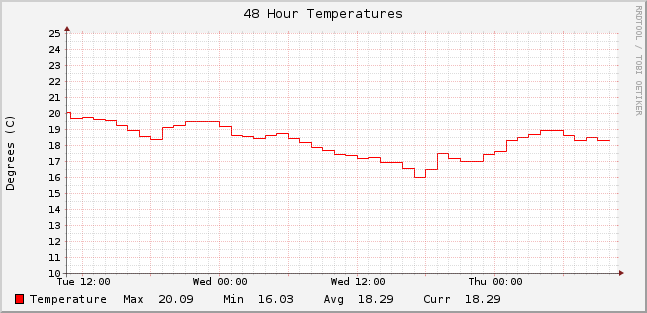
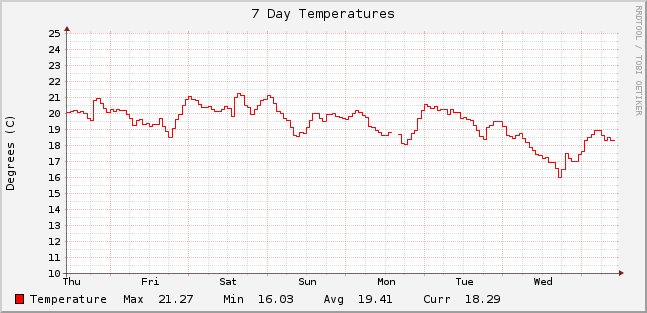
Got home yesterday evening and found the living room on the chilly side! Fortunately I can tell if it is just me 🙂 or if the room is actually getting colder (maybe the lads living in the apartment below turned off the heat).

Over the last two days, a definite drop in the average temperature:
temp-48-201411107 day chart shows it a bit cleaner so time to dial the storage heaters up a notch or two!

temp-168-20141211

Internet of Things – Potential Architectures & Drawbacks

The Internet-of-Things or IoT (terrible name since everyone knows that IoT stands for Inter-operability Testing) seems to be quite the buzzword around lately – replacing the previous version which of course was Machine-to-Machine [M2M]. Nest and other home telemetry/automation tools seem to be quite the cliche-du-jour for the digirati.

Consider what Nest actually does – local (in house) temperature compared with external (nearest location/airport) temperature and a few interesting algorithms to handle temperature differentials, learn preferences, awareness of presence and away type scenarios. Of course  given that it seems to automatically download updates, I’m sure it’s logging and submitting lots of information ‘to improve the product’

Likewise, we have hubs finally coming onstream to try and manage all the possible combinations of hardware and software for home sensors and everything else (or so they promise).

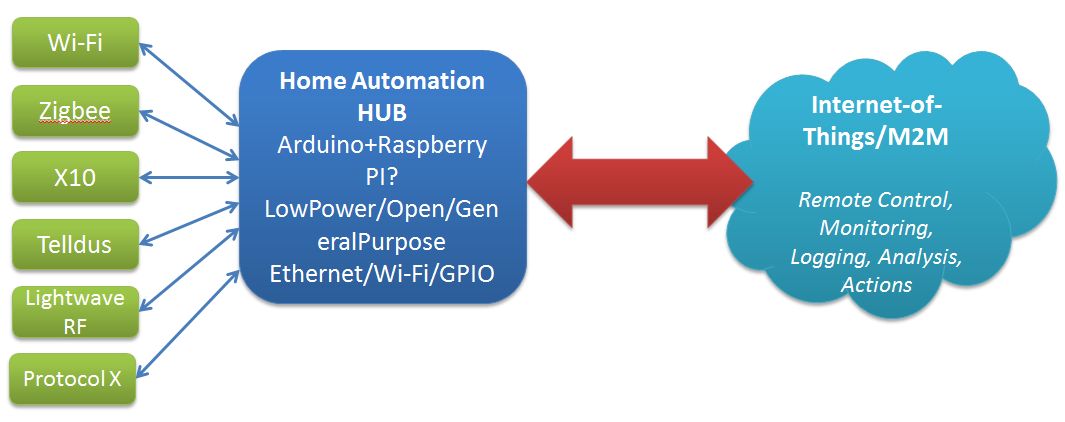
Think home sensors/lightbulbs/whatever – currently we have a plethora of specs to choose from for household comms and telemetry: X10, Zigbee, Z-Wave, Lightwave RF. Telldus, etc. Currently each manufacturer has their own choice of spec, controller software, etc.

Fortunately the Open Source/Open Hardware groups are are already experimenting with options to handle this – a good example is the Home Automation Hub (HAH) project which sets out to turn an Orange Livebox router into a home automation server, with an extra bit of hardware that – like the TellStick – allows it to control a range of gadgetry, and even keep an eye on energy consumption too. Likewise the dovado routers I’ve raved about before have the beginnings of some interesting Home Automation features with integration with Telldus sticks and the use of GPS to determine sunrise and sunset times for the location.

Open Source Open Hardware Hub

Home Hub - Internet of ThingsKey features as I see them are:

  • Compact
  • Reliable
  • Minimum Downtime
  • Low power
  • Open

Publish & Subscribe

So, assuming that we can get all these sensors talking to our hub, and that data recording (and potentially taking local actions based on that – heating, lighting, etc.) what do we do with it.

The hobbiest answer is to put it up on a website for your own entertainment. The more interesting options are open to the hub provider, and I see a few possible approaches here:

  1. Act as a relationship broker: making partnerships with different consumers of the telemetry e.g. allow the hub to submit information of the users choice to projects of their interest e.g. SmartCities, utility providers, etc.
  2. Act as a centralised clearing house: store all users data, sell it in bulk (users are the product) and plan to be bought at some point by Google/IBM/whoever
  3. Act as a centralised broker – grouping your users according to, for example, energy usage patterns and negotiating (optional) bulk deals from utility providers. For example, contacting the Power company and saying here is aggregate usage data for 30k ‘night owls’ – can we get a special deal, since they are offsetting the base load cost, but not adding to peak loads.


Providers/Website subscribing to the date

Sensitive Sensors

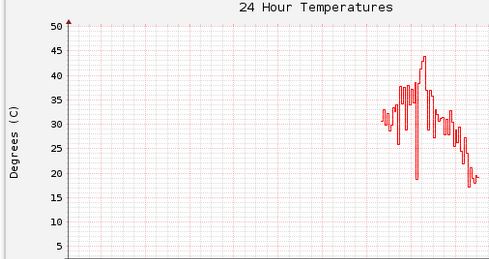
As I finally got my Arduino reading the temperature sensor, and sending the values to this page consistently I noticed that the values were quite ‘jittery’ – the issue being that I was basically grabbing a single read from the sensor every 60 seconds, and then firing it on. Since this was a single read any issues affecting the sensor at the instant of the read could throw off the value significantly.

temperature_jitterAs you can see in the above chart we can have massive changes in the read temperature without any major changes (that I could tell) in the the actual physical environment – anything between 5 and 20 degrees between samples.

I decided that a better approach would be to average the sensor values over a time and use that as the value sent to the server. The code below shows how I’ve done that:

float readTempAvg(){
  static float buff[12];
  static int index = 0;
  static float sum = 0;
  static int count = 0;

  sum -= buff[index];
  buff[index] = (analogRead(A0) / 9.31);
  sum += buff[index];

  index = ( (index + 1) % 12 );

  if( count < 12 ){
    count++;
  }

  return( sum / count);
}

The sum-=buff[index] has the value that is about to be overwritten in the buffer removed from the sum. This means that sum is always kept up to date. Small improvement to this code would be to define a buffer size at the start and replace all the ‘magic’ const 12 that is in the code.

Following this change I’m getting much smoother temperature readings – generally +/-1 degree or less every 60 seconds.

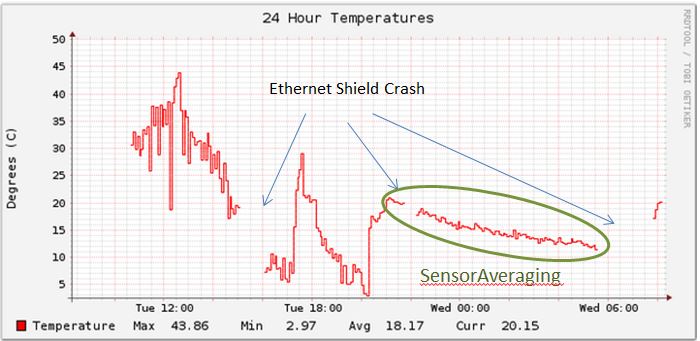
temperature_newAlgorithmNext step is to try and sort out the Ethernet Shield crashes.

Securing simple telemetry submission with HTTP Header Enrichment

As part of an ongoing side project involving my newly acquired Arduino, I’ve been thinking about datalogging, and specifically network based data logging – the goal being to have all the sensor data available for analysis, graphing, etc. I’ve decided to do this on my own server to get familiar with RRD, and PHP again rather then using a Web-based service like Xively.

Also given that Google values a thermostat company, Nest,  at $3.2bn the temperature and other sensor data is clearly valuable in someone’s mind 🙂

As I sketched up a very simple GET submission of the data to a PHP page, it occurred to me that I didn’t want just anybody to be able to submit sensor data. So the question is ‘How can I allow a very simple datalogger to send in data, but block all others?’. For me one possible approach is HTTP Header Enrichment.

HTTP Header Enrichment is most commonly used by mobile operators to add interesting custom fields to HTTP Header requests, usually at the GGSN or just after in the Services Gateway. The typical application is to add the MSISDN or IMSI to HTTP requests going to internal self-service portals so that sign-in is not required from a mobile device.

Typical format used for this is X-something. This is not a formal requirement, as RFC2616 basically allows most things to be used in the headers, but was borrowed from RFC2047 Section 5 (since deprecated). This is a convention, not a requirement but it is one that I will use here.

Basically the approach is to have the server side code check for the custom header, and its value and if it matches what the client sends, then log the data. If not, then return HTTP 404 – Page Not Found.

<?php
$auth_key="my_shared_secret";

if($auth_key == $_SERVER['HTTP_X_AUTH_KEY']){

// Code to handle sensor data

}
else {
   error_log("Auth Key Incorrect. Received value was $_SERVER['HTTP_X_AUTH_KEY']\n");
   header('HTTP/1.0 404 Not Found');
   exit;
}
>

$_SERVER is an array containing information such as headers, paths, and script locations. The entries in this array are created by the web server. There is no guarantee that every web server will provide any of these; servers may omit some, or provide others not listed here. HTTP_ is also added automatically as a prefix, and the hyphens (-) are replaced with underscores (_).

So on the client (arduino side) the code segment looks like:

   client.print("GET /path/file.php?t=");
   client.print(t1);
   client.print("&v=");
   client.print(v1);
   client.println(" HTTP/1.1");
   client.println("User-agent: Arduino Uno");
   client.println("Host: flat-planet.net");
   client.println("X-AUTH-KEY: my_shared_secret");
   client.println("Accept: text/html"); 
   client.println();

so we are sending X-AUTH-KEY and that is available to the server as HTTP_X_AUTH_KEY. As long as they match, all will work fine, and remember that X-AUTH-KEY can be anything, just ensure that it is meaningful for you.

New Toy – Arduino Uno

Hey,

As I mentioned on another page I’d ordered an Arduino Uno and Ethernet Shield as an small side project, and they arrived today – great job Farnells for next working day delivery!

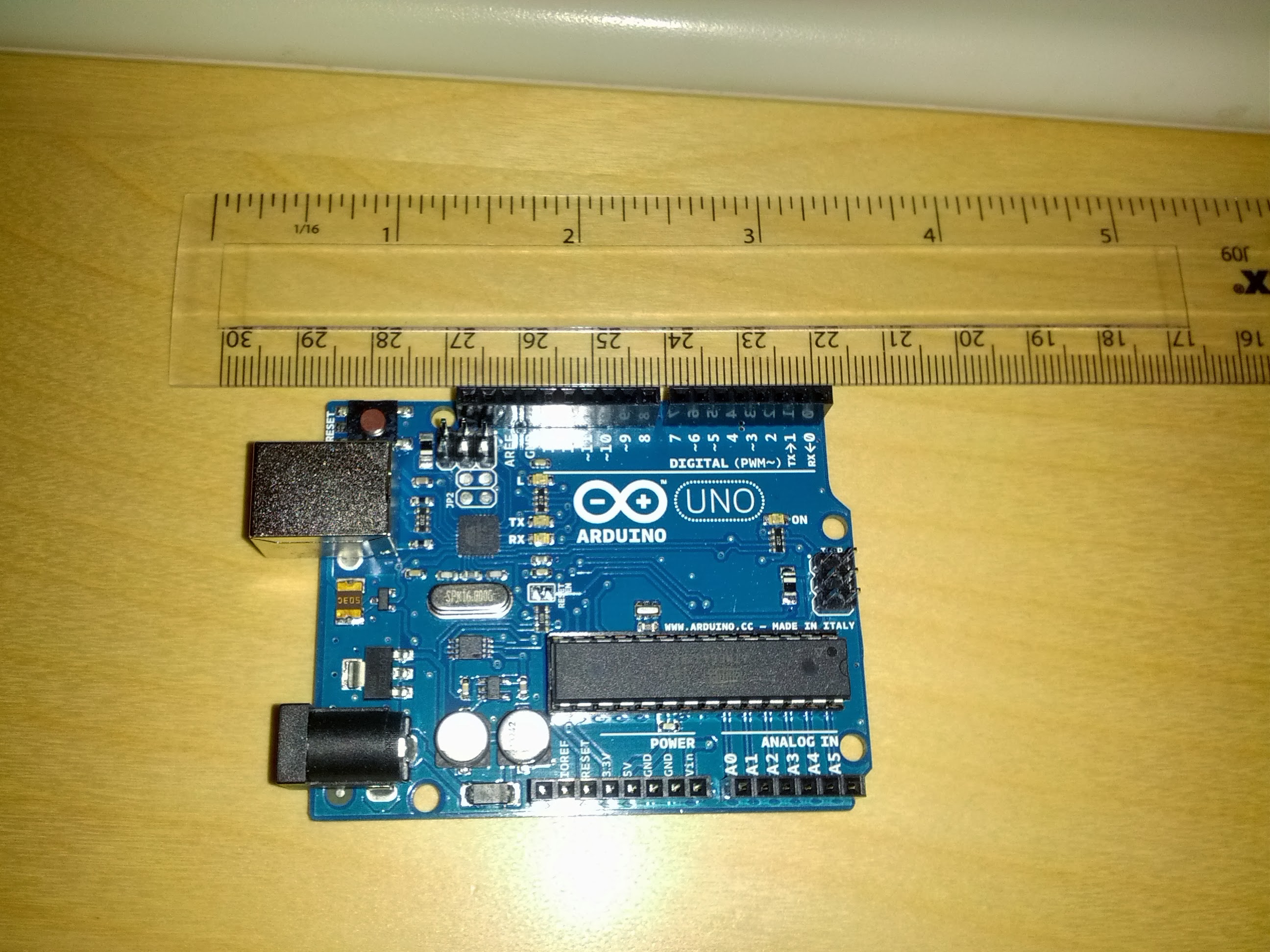
Arduino Uno - Rev 3

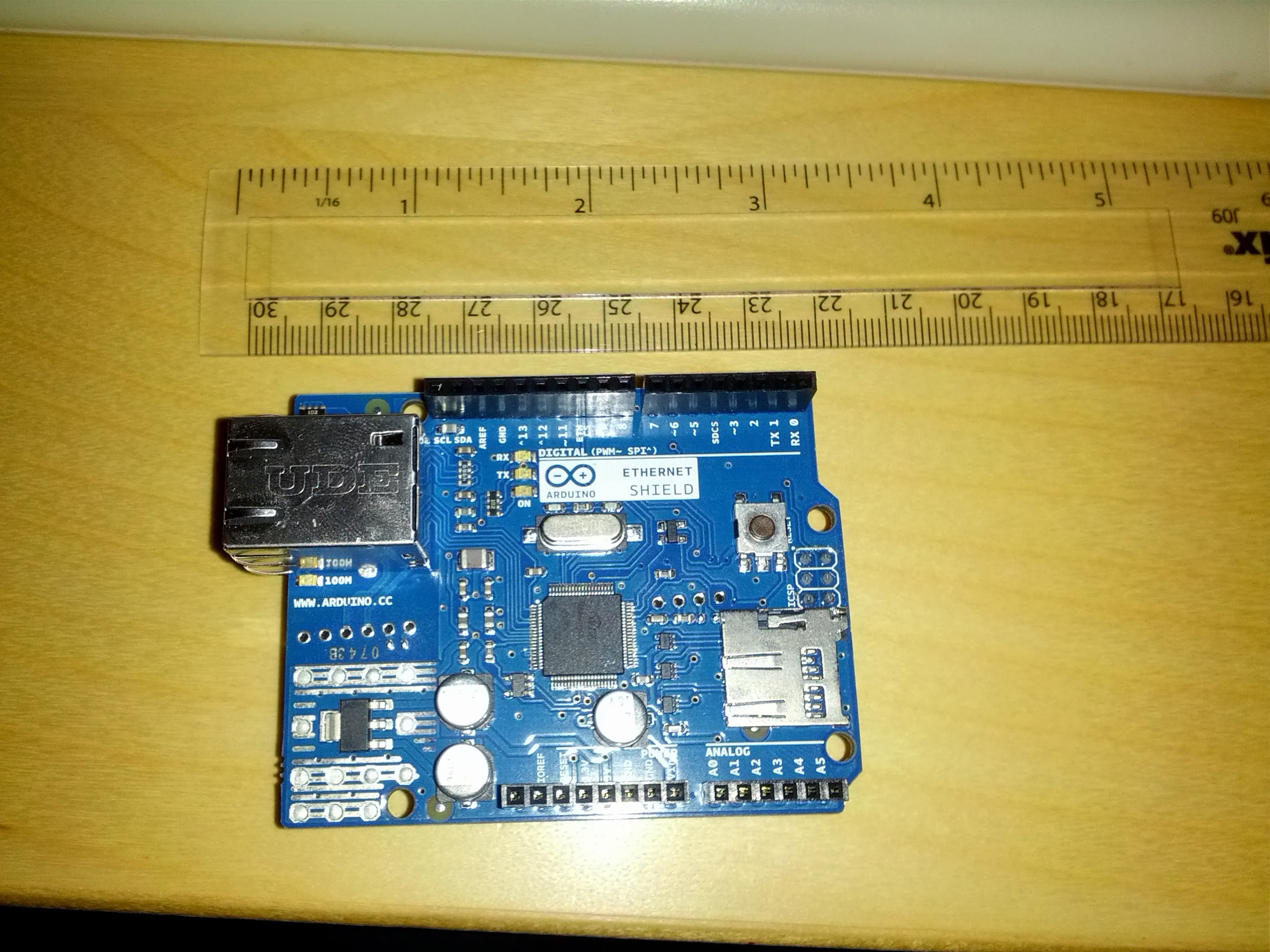
Arduino Ethernet Shield

Of course, I didn’t bother to read all the directions and soon found out that the connection is a USB Type B connector – last time I used one of those was about 6 years ago in a big external HDD 🙂

Quick trip to PC World solved that, and grabbed a 4GB microSD card to increase storage.

Got the development environment installed without any issue, and the Uno grabbed COM11 – loaded in the blink template and bingo – working without a hitch.

Started playing with that a bit to create a very simple morse code SOS program.

void loop() {
  x = 0;
  while ( x < 3 ) {
    digitalWrite(led, HIGH);   // turn the LED on (HIGH is the voltage level)
    delay(500);               // wait for a half second
    digitalWrite(led, LOW);    // turn the LED off by making the voltage LOW
    delay(500);               // wait for a half second
    x++;
  }
  x = 0;
  while ( x < 3 ) {
    digitalWrite(led, HIGH);   // turn the LED on (HIGH is the voltage level)
    delay(1000);               // wait for a second
    digitalWrite(led, LOW);    // turn the LED off by making the voltage LOW
    delay(500);               // wait for a half second
    x++;
  }
  x = 0;
  while ( x < 3 ) {
    digitalWrite(led, HIGH);   // turn the LED on (HIGH is the voltage level)
    delay(500);               // wait for a half second
    digitalWrite(led, LOW);    // turn the LED off by making the voltage LOW
    delay(500);               // wait for a half second
    x++;
  }
  delay(2000); // wait 2 secs
}

Clearly I need to get back to coding – was just thinking that if you add in functions this is a good example of many programmatic structures in a very short, easy to follow example (also need to get this blog indenting code correctly) [Edit – fixed. Turns out the editor has a copy-as-html feature which is nice].

Looking forward to getting the network shield up and running tomorrow, but just to tired to jump into it now.