Category Archives: Uncategorized

Windows 10 – Converting To UEFI

Background

With Windows 10 preparing to shuffle off this mortal coil, I’m trying to decide how to handle it. Based on the Windows 11 hardware requirements (TPM, and an unsupported CPU i7-6800k/Broadwell-E) I’m likely going to move to Zorin OS. But I’m planning on dual-booting as a transition (as well as if I hit any issues gaming), so eventually Zorin will be the main driver, and the Win10 image just for emergencies.

Unfortunately I’ve running Win10 since the beginning, so its a little rough around the edges. The main thing to change is move from MBR to the shiny UEFI compatible GPT boot partition.

Unfortunately the handy mbr2gpt.exe tool was hitting the “OS Not Found” problem, and apparently the Windows Recovery Environment [WinRE] never worked, so here we go!

Fixing the Windows Recovery image

Download the Windows Media Creation Tool and create an ISO image for installation on another system.

Open the ISO archive and extract Sources\install.esd

Usually Windows Pro is number 6, but just to check

g:\>dism /Get-WimInfo /WimFile:install.esd

Deployment Image Servicing and Management tool
Version: 10.0.19041.3636

Details for image : install.esd

Index : 1
Name : Windows 10 Home
Description : Windows 10 Home
Size : 15,236,014,793 bytes

Index : 2
Name : Windows 10 Home N
Description : Windows 10 Home N
Size : 14,461,663,459 bytes

Index : 3
Name : Windows 10 Home Single Language
Description : Windows 10 Home Single Language
Size : 15,238,702,954 bytes

Index : 4
Name : Windows 10 Education
Description : Windows 10 Education
Size : 15,586,696,335 bytes

Index : 5
Name : Windows 10 Education N
Description : Windows 10 Education N
Size : 14,821,374,633 bytes

Index : 6
Name : Windows 10 Pro
Description : Windows 10 Pro
Size : 15,583,732,666 bytes

Index : 7
Name : Windows 10 Pro N
Description : Windows 10 Pro N
Size : 14,818,128,477 bytes

The operation completed successfully.

Now extract the encrypted image as a wim file

g:\>dism /export-image /SourceImageFile:install.esd /SourceIndex:6 /DestinationImageFile:install.wim /Compress:max /CheckIntegrity

Deployment Image Servicing and Management tool
Version: 10.0.19041.3636

Exporting image
[==========================100.0%==========================]
The operation completed successfully.

Mount the image (wait for the mount to complete before the next step)

g:\>md tempMount

g:\>dism /mount-wim /wimfile:"install.wim" /index:1 /mountdir:"tempMount" /ReadOnly

Deployment Image Servicing and Management tool
Version: 10.0.19041.3636

Extract the needed file (Winre.wim) from Windows\System32\Recovery, move it to C:\Windows\System32\Recovery register it, and enable it

reagentc /setreimage /path C:\Windows\System32\Recovery
reagentc /enable
reagentc /info

Rebuild BCD

Now boot into recovery (shift + reboot), select Advanced, and boot into the shell. Then run

bootrec /rebuildbcd

Convert to GPT

Assuming that runs successfully, you should now be able to run (do /validate first!!)

mbr2gpt.exe /convert /allowFullOS

In my case it left the “System Reserved” partition alone, resized the OS partition, and created an EFI partition. At which point Windows Blue Screened (so no captures) and eventually rebooted.

All came back, and we are now in the shiny world of EFI 🙂

Getting OpenALPR Working on RPi

As yet another side project I wanted to make use of my RPi camera + ANPR software to try and track down whoever is fly-tipping in my local estate. Since they dump their rubbish basically in full view of my living room, I’m looking to catch them in the act.

Attempt 1 – using the Raspbian packages (spoiler alert, it didn’t work)

Boring package install

sudo apt install openalpr openalpr-daemon openalpr-utils libopenalpr-dev
pip3 install openalpr picamera numpy
sudo apt-get install libatlas-base-dev

Get a test image wget http://plates.openalpr.com/ea7the.jpg

alpr -c us ea7the.jpg
Error opening data file /usr/share/openalpr/runtime_data/ocr/lus.traineddata
Please make sure the TESSDATA_PREFIX environment variable is set to your "tessdata" directory.
Failed loading language 'lus'
Tesseract couldn't load any languages!
Segmentation fault

Not good – so this is based on tesseract in the background. Looking around I see that the training data lives in tessdata, which is a subdirectory of ocr

/usr/share/openalpr/runtime_data/ocr/tessdata $ ls
lau.traineddata leu.traineddata lgb.traineddata lkr2.traineddata lkr.traineddata lsg.traineddata lus.traineddata
pi@raspberrypi:/usr/share/openalpr/runtime_data/ocr/tessdata $ mv ./* ../
pi@raspberrypi:/usr/share/openalpr/runtime_data $ tesseract --tessdata-dir /usr/share/openalpr/runtime_data/ocr/ --list-langs
Please make sure the TESSDATA_PREFIX environment variable is set to your "tessdata" directory.
List of available languages (7):
lau
leu
lgb
lkr
lkr2
lsg
lus

Ok, still not really making sense. Lets assume that OpenALPR is putting wrappers around the language so “us” becomes “lus” when fed to tesseract

pi@raspberrypi:/usr/share/openalpr/runtime_data/ocr $ tesseract -l lus ~/ea7the.jpg ./openalpr/runtime_data/config/us.conf
Error, could not create TXT output file: No such file or directory

Now that is more promising

alpr -c us ea7the.jpg
plate0: 10 results
- EA7THE confidence: 91.0578
- EA7TBE confidence: 84.133
- EA7T8E confidence: 83.0083
- EA7TRE confidence: 82.7869
- EA7TE confidence: 82.5961
- EA7TME confidence: 80.2908
- EA7TH6 confidence: 77.0045
- EA7THB confidence: 75.5779
- EA7TH confidence: 74.6576
- EA7TB6 confidence: 70.0797

Now lets take our python bindings for a spin

Python 3.7.3 (default, Dec 20 2019, 18:57:59)
[GCC 8.3.0] on linux
Type "help", "copyright", "credits" or "license" for more information.
import json
from openalpr import Alpr
alpr = Alpr("us", "/etc/openalpr/openalpr.conf", "/usr/share/openalpr/runtimedata")
Traceback (most recent call last):
File "", line 1, in
File "/home/pi/.local/lib/python3.7/site-packages/openalpr/openalpr.py", line 91, in init
self._initialize_func = self._openalprpy_lib.openalpr_init
File "/usr/lib/python3.7/ctypes/init.py", line 369, in getattr
func = self.getitem(name)
File "/usr/lib/python3.7/ctypes/init.py", line 374, in getitem
func = self._FuncPtr((name_or_ordinal, self))
AttributeError: /usr/lib/libopenalpr.so.2: undefined symbol: openalpr_init

Much Google time later and it seems that this is down to the pre-build python bindings not matching the version of the package that I’ve installed. Fsck it anyway

pi@raspberrypi:~/.local/lib/python3.7/site-packages $ pip3 show openalpr
Name: openalpr
Version: 1.1.0
Summary: OpenALPR Python Bindings
Home-page: http://www.openalpr.com/
Author: Matt Hill
Author-email: [email protected]
License: UNKNOWN
Location: /home/pi/.local/lib/python3.7/site-packages
Requires:
Required-by:

Attempt 2 – Build from master

Use git to clone from the master

Install the required packages

sudo apt-get install build-essential
sudo apt-get install cmake git libgtk2.0-dev pkg-config libavcodec-dev libavformat-dev libswscale-dev
sudo apt-get install libopencv-dev libtesseract-dev git cmake build-essential libleptonica-dev
sudo apt-get install libcurl4-openssl-dev
sudo apt-get install liblog4cplus-dev

Build and install OpenAPNR and the python bindings

cd openalpr/src
mkdir build
cd build
cmake -DCMAKE_INSTALL_PREFIX:PATH=/usr -DCMAKE_INSTALL_SYSCONFDIR:PATH=/etc ..
make
sudo make install
cd ../bindings/python
sudo python3 setup.py install

Now we can make progress

pi@raspberrypi:~ $ python3
Python 3.7.3 (default, Dec 20 2019, 18:57:59)
[GCC 8.3.0] on linux
Type "help", "copyright", "credits" or "license" for more information.
>>> import locale
>>> locale.setlocale(locale.LC_ALL, 'C')
'C'
>>> from openalpr import Alpr
>>> alpr = Alpr("us", "/etc/openalpr/openalpr.conf", "/usr/share/openalpr/runtime_data")
>>> import json
>>>
>>> results = alpr.recognize_file("/home/pi/ea7the.jpg")
>>>
>>> print(json.dumps(results, indent=4))
{
    "version": 2,
    "data_type": "alpr_results",
    "epoch_time": 1589218326623,
    "img_width": 636,
    "img_height": 358,
    "processing_time_ms": 234.429916,
    "regions_of_interest": [
        {
            "x": 0,
            "y": 0,
            "width": 636,
            "height": 358
        }
    ],
    "results": [
        {
            "plate": "EA7THE",
            "confidence": 91.05777,
            "matches_template": 0,
            "plate_index": 0,
            "region": "",
            "region_confidence": 0,
            "processing_time_ms": 59.747936,
            "requested_topn": 25,
            "coordinates": [
                {
                    "x": 208,
                    "y": 157
                },
                {
                    "x": 393,
                    "y": 157
                },
                {
                    "x": 393,
                    "y": 245
                },
                {
                    "x": 208,
                    "y": 245
                }
            ],
            "candidates": [
                {
                    "plate": "EA7THE",
                    "confidence": 91.05777,
                    "matches_template": 0
                },
                {
                    "plate": "EA7TBE",
                    "confidence": 84.132973,
                    "matches_template": 0
                },

OpenWeatherMap and OpenHab

With the end of the YahooWeather API, I signed up for some API keys from OpenWeatherMap’s free tier, but had real trouble getting the default weather binding to work. After many wasted hours puzzling over the following error message, I eventually found this thread.

[ERROR] [nal.provider.AbstractWeatherProvider] - OPENWEATHERMAP[home]: Can't retreive weather data: Invalid API key. Please see http://openweathermap.org/faq#error401 for more info.

The error is correct, but uninformative – the issue is that default binding is calling on the “paid for” API rather then the free one, so yes my free API key is invalid for the API call I’m making. Unfortunately that is less then informative when testing your API keys in a browser and receiving valid JSON!!

The solution for me was to add org.openhab.binding.weather-1.13.0-SNAPSHOT.jar to my addons directory, then using the following weather.items I was up and running:

Group gWeather

// atmosphere
Number   Humidity		  "Humidity [%d %%]"	 (gWeather) {weather="locationId=home, type=atmosphere, property=humidity"}
Number   Visibility		  "Visibility [%.2f km]" (gWeather) {weather="locationId=home, type=atmosphere, property=visibility"}
Number   Visibility_Mph   "Visibility [%.2f mi]" (gWeather) {weather="locationId=home, type=atmosphere, property=visibility, unit=mph"}
Number   Pressure		  "Pressure [%.2f mb]"   (gWeather) {weather="locationId=home, type=atmosphere, property=pressure"}
Number   Pressure_Inches  "Pressure [%.2f in]"   (gWeather) {weather="locationId=home, type=atmosphere, property=pressure, unit=inches"}
String   Pressure_Trend   "Pressuretrend [%s]"   (gWeather) {weather="locationId=home, type=atmosphere, property=pressureTrend"}
Number   Ozone            "Ozone [%d ppm]"		 (gWeather) {weather="locationId=home, type=atmosphere, property=ozone"}
Number   UV_Index         "UV Index"              (gWeather){weather="locationId=home, type=atmosphere, property=uvIndex, scale=0"}

// clouds
Number   Clouds   "Clouds [%.0f %%]"  (gWeather) {weather="locationId=home, type=clouds, property=percent"}

// condition
String   Condition        "Condition [%s]"     (gWeather) {weather="locationId=home, type=condition, property=text"}
String   Condition_ID     "Condition id [%s]"  (gWeather) {weather="locationId=home, type=condition, property=id"}
DateTime ObservationTime  "Observation time [%1$td.%1$tm.%1$tY %1$tH:%1$tM]"  (gWeather) {weather="locationId=home, type=condition, property=observationTime"}
DateTime LastUpdate       "Last update [%1$td.%1$tm.%1$tY %1$tH:%1$tM]"      (gWeather)  {weather="locationId=home, type=condition, property=lastUpdate"}
String   CommonId         "Common id [%s]"     (gWeather) {weather="locationId=home, type=condition, property=commonId"}
Image    LocalCurrentConditionIcon "Icon" (gWeather) { weather="locationId=home, type=condition, property=icon-id" }

// precipitation
Number   Rain          "Rain [%.2f mm/h]"  (gWeather) {weather="locationId=home, type=precipitation, property=rain"}
Number   Rain_Inches   "Rain [%.2f in/h]"  (gWeather) {weather="locationId=home, type=precipitation, property=rain, unit=inches"}
Number   Snow          "Snow [%.2f mm/h]"  (gWeather) {weather="locationId=home, type=precipitation, property=snow"}
Number   Snow_Inches   "Snow [%.2f in/h]"  (gWeather) {weather="locationId=home, type=precipitation, property=snow, unit=inches"}
Number   Precip_Probability   "Precip probability [%d %%]"  (gWeather) {weather="locationId=home, type=precipitation, property=probability"}
// new total property in 1.8, only Wunderground
Number   Precip_Total         "Precip total [%d mm]"  (gWeather) {weather="locationId=home, type=precipitation, property=total"}
Number   Precip_Total_Inches  "Precip total [%d in]"  (gWeather) {weather="locationId=home, type=precipitation, property=total, unit=inches"}

// temperature
Number   Temperature      "Temperature [%.2f °C]"      (gWeather) {weather="locationId=home, type=temperature, property=current"}
Number   Temperature_F    "Temperature [%.2f °F]"      (gWeather) {weather="locationId=home, type=temperature, property=current, unit=fahrenheit"}
Number   Temp_Feel        "Temperature feel [%.2f °C]" (gWeather) {weather="locationId=home, type=temperature, property=feel"}
Number   Temp_Feel_F      "Temperature feel [%.2f °F]" (gWeather) {weather="locationId=home, type=temperature, property=feel, unit=fahrenheit"}
Number   Temp_Dewpoint    "Dewpoint [%.2f °C]"         (gWeather) {weather="locationId=home, type=temperature, property=dewpoint"}
Number   Temp_Dewpoint_F  "Dewpoint [%.2f °F]"         (gWeather) {weather="locationId=home, type=temperature, 
property=dewpoint, unit=fahrenheit"}
// min and max values only available in forecasts
Number   Temp_Min         "Temperature min [%.2f °C]"  (gWeather) {weather="locationId=home, type=temperature, property=min"}
Number   Temp_Min_F       "Temperature min [%.2f °F]"  (gWeather) {weather="locationId=home, type=temperature, property=min, unit=fahrenheit"}
Number   Temp_Max         "Temperature max [%.2f °C]"  (gWeather) {weather="locationId=home, type=temperature, property=max"}
Number   Temp_Max_F       "Temperature max [%.2f °F]"  (gWeather) {weather="locationId=home, type=temperature, property=max, unit=fahrenheit"}
String   Temp_MinMax      "Min/Max [%s °C]"            (gWeather) {weather="locationId=home, type=temperature, property=minMax"}
String   Temp_MinMax_F    "Min/Max [%s °F]"            (gWeather) {weather="locationId=home, type=temperature, property=minMax, unit=fahrenheit"}

// wind
Number   Wind_Speed           "Windspeed [%.2f km/h]"   (gWeather) {weather="locationId=home, type=wind, property=speed"}
Number   Wind_Speed_Beaufort  "Windspeed Beaufort [%d]" (gWeather) {weather="locationId=home, type=wind, property=speed, unit=beaufort"}
Number   Wind_Speed_Knots     "Windspeed [%.2f kn]"     (gWeather) {weather="locationId=home, type=wind, property=speed, unit=knots"}
Number   Wind_Speed_Mps       "Windspeed [%.2f mps]"    (gWeather) {weather="locationId=home, type=wind, property=speed, unit=mps"}
Number   Wind_Speed_Mph       "Windspeed [%.2f mph]"    (gWeather) {weather="locationId=home, type=wind, property=speed, unit=mph"}
String	 Wind_Direction       "Wind direction [%s]"     (gWeather) {weather="locationId=home, type=wind, property=direction"}
Number   Wind_Degree          "Wind degree [%.0f °]"    (gWeather) {weather="locationId=home, type=wind, property=degree"}
Number   Wind_Gust            "Wind gust [%.2f km/h]"   (gWeather) {weather="locationId=home, type=wind, property=gust"}
Number   Wind_Gust_Beaufort   "Wind gust Beaufort [%d]" (gWeather) {weather="locationId=home, type=wind, property=gust, unit=beaufort"}
Number   Wind_Gust_Knots      "Wind gust [%.2f kn]"     (gWeather) {weather="locationId=home, type=wind, property=gust, unit=knots"}
Number   Wind_Gust_Mps        "Wind gust [%.2f mps]"    (gWeather) {weather="locationId=home, type=wind, property=gust, unit=mps"}
Number   Wind_Gust_Mph        "Wind gust [%.2f mph]"    (gWeather) {weather="locationId=home, type=wind, property=gust, unit=mph"}
Number   Wind_Chill           "Wind chill [%.2f °C]"    (gWeather) {weather="locationId=home, type=wind, property=chill"}
Number   Wind_Chill_F         "Wind chill [%.2f °F]"    (gWeather) {weather="locationId=home, type=wind, property=chill, unit=fahrenheit"}

OpenHab – Boost Button on the Basic UI

While I’ve been adding simple on/off controls and rules controlling timers for my heating, I noticed something that was missing was the idea of a 1+ hour boost button, so I decided to create one.

The standard pattern for building this type of thing is to create a “dummy” Switch – one not bound to any channel, and make use of that + timers in the rules to handle the off transition. In my sitemap however, I was aiming to have a push button type setup, rather then a toggle.

One pattern I found for this made use of an additional dummy Switch to store the state, and use the “visibility” options in the sitemap to show the “on” or “running” buttons depending on that state. While nice, I prefer not to have a second dummy variable, so I don’t 🙂

Define the item

First I define the “dummy” switch:

Group gVirtual

Switch HeaterTimer "1 Hour Boost" <temperature> (gHeating, gVirtual, gSwitches)

The rules

Then I define my rules for this switch:

var Timer boostTimer = null

rule "One Hour Heat On"
when
    Item HeaterTimer received command
then
    Heating.sendCommand(ON)
    postUpdate(HeaterTimer, ON)
    if(boostTimer === null || boostTimer.hasTerminated){
        boostTimer = createTimer(now.plusHours(1), [| 
            Heating.sendCommand(OFF)
            postUpdate(HeaterTimer, OFF)
            boostTimer = null
        ])
    }
    else{
        boostTimer.reschedule(now.plusHours(1)) // if pressed a second time keep it on for another hour from now
    }
end

So what I’m doing here is triggering on the HeaterTimer receiving a command, then I turn the heating on, and update the state of HeaterTimer to ‘On’.

If the timer is equal to null, or has ended, I create a timer set at 1 hour from now, and when the timer triggers I switch the heating off, update the state, and set the timer to null.

If we have an command, and the timer is already running e.g. I pushed the button again, then I reschedule to 1 hour from now.

Now for the sitemap

   Frame label="Heating" {
      Switch item=HeaterTimer mappings=[ON="Boost"] icon="fire-off" visibility=[HeaterTimer == OFF, HeaterTimer == "NULL"]
      Switch item=HeaterTimer mappings=[ON="Running"] icon="fire-on" visibility=[HeaterTimer == ON]

   }

This is where it gets a little interesting.

The first switch is showing an ON/Boost button, with the icon in the off state. This is only visible if the HeatingTimer is OFF, or equal to “NULL”.

Why the second/NULL check?

When the “dummy” switch is created, it is created with a null state – my persistence config will restore the state if we ever reload, but for the very first time, we need to handle the lack of ON/OFF state. You could update the sitemap after the first time you use it to remove the NULL comparison as it will only be used once. The other option is to only add the visibility options after you run for the first time.

The second switch should be obvious now – we have a “Running” button, that if you push it, will add 1 hour from now (remember the rules) to the timer.

Preparing for some Home Automation – Heating

Today I decided to start planning for the install of some home automation kit, specifically related to heating, but while planning on that I decided to take a closer look at a problem I’ve been having for some time – the thermostat hasn’t been doing very much.

This is a standard dial thermostat – and as you would expect, the numbers on the dial are a little off (~6°C) compared to the actual temperature. This isn’t the actual issue, since once you find the comfortable point, it doesn’t really matter what the reading on the dial is.

The issue I was having was that, regardless of the thermostat position, the radiators were always on (except in the rooms with thermostatic valves) – I had managed before the summer by running with the timer on the boiler, and reducing the boiler temperature.

This has the side effect of (1) the boiler operating less efficiently, and (2) I can’t use it for heating the hot water as the temperature isn’t high enough.

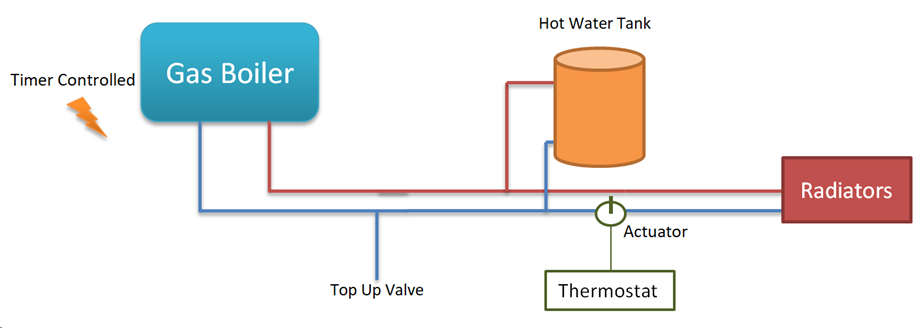
After some digging, I got to this simple diagram of the basic setup:

As you can see, the thermostat doesn’t directly influence the boiler at all – instead it controls the actuator, which in turn allows hot water to flow, or not, through the radiator loop.

Taking a multimeter to the two wires in the Thermostat, I could see that it was in fact switching – 240V between the two when turned off vs 0V between the two terminals when it was on.

So with the thermostat basically functional, I then moved on to the Actuator (SZ2301) – this is a basic 2 port actuator. When there is current applied it opens, and when the current is stopped a spring pushes it back closed – generally speaking these things either work or they don’t.

But… on closer inspection, I found that someone had set the manual lever to flushing – basically forcing the valve open at all times. I moved it back to the “normal” position, and bingo – the thermostat could now control the flow of hot water through the radiators.


Next Steps

Now that that little niggle is sorted, I’m looking for a HA type solution to allow me to manage it all a bit better.

I’m also starting to use OpenHab for some of my other devices, so integration into that setup is essential.

TBC…

Updating an old firmware on a Dell R710

I recently purchased a Dell R710 as part of a buildout for my homelab, and as part of that process, wanted to update all the software. This consists of;

  • BIOS – running 6.0.4, current is 6.4 so not too bad
  • iDRAC – running 1.10, current is 2.85, so a good leap
  • PERC6 – no idea
  • Lifecycle Controller – no idea

Given that the only OS installed is ESXi I had a bit of googling to figure this one out.

In theory the Lifecycle Controller has an Platform Update option that will just do all this for you… unfortunately this seemed to be missing on mine.

To get everything up and running, the following process worked for me;

  1. Download, and extract the firmimg.d6 file from the iDRAC updater. This will allow your iDRAC to updated to something modern enough not to give certificate/security/browser errors. Use the iDRAC firmware update option to get this installed
  2. Use the iDRAC firmware update page to load the USC/LC repair package (.usc extension)
  3. Reload and the Lifecycle Controller will now have a Platform Update option – use that to update everything else via FTP from dells website

NOTE: The Lifecycle controller uses the inbuilt NIC rather then the iDRAC ethernet interface

Enabling telnet access on DCS-7110

Very nice outdoor bullet camera that the D-Link DCS-7110 is, managing it is a pain as the main web interface still uses Active-X, and seems to be coded to IE6. Fortunately, it is actually running linux under the hood, so if you know what you are doing, you can edit the configuration directly.

Step 1 is to enable the telnet server, by using this link:

http://<camera-ip>/cgi-bin/admin/mod_inetd.cgi?telnet=on

Now we can telnet onto the device using the same credentials as the web

[user.network][~]=> telnet A.B.C.D
Trying A.B.C.D...
Connected to A.B.C.D.
Escape character is '^]'.

Network-Camera login: <username>
Password:
~ #
~ # ls
back.tar.gz imgbufmgr s0 s1 s2 s3 s4
~ # cd s0
~/s0 # ls

All the interesting config that I could see lives under /etc

~/s0 # cd /
/ # ls
bin drivers home linuxrc proc sbin tmp usr www
dev etc lib mnt root sys tmpfs var

When you are done, be sure to disable the telnet server again, and reboot the camera for the changes to take effect.

http://<camera-ip>/cgi-bin/admin/mod_inetd.cgi?telnet=off


> telnet A.B.C.D
Trying A.B.C.D...
telnet: connect to address A.B.C.D: Connection refused
telnet: Unable to connect to remote host

Proper lock screen behaviour on OS X

I’ve been working with a MacBook for some time now, but had a constant irritation that there didn’t seem to be a way to lock the screen out of the box. Many point to ‘Sleep’ as an option, but that takes down all my SSH sessions. Likewise having a passworded screen saver is not great simply because for it to be effective e.g. when I step away, then the timer needs to be short, which is very annoying when you are working on something without moving the keyboard or mouse.

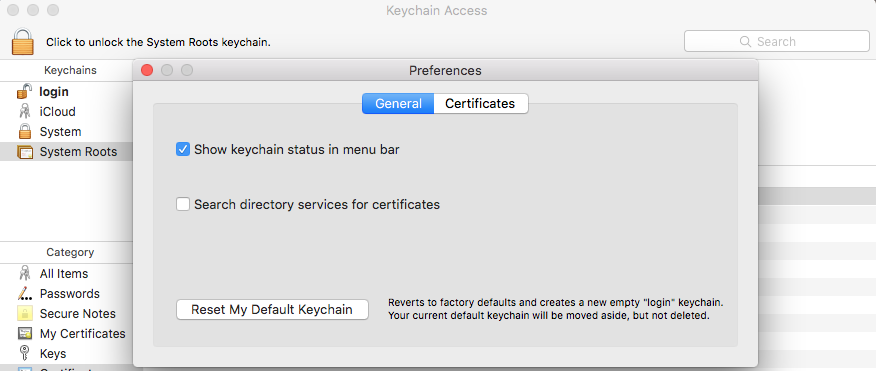
Thankfully I now found the solution, which is surprisingly well hidden. In the Keychain Access preferences, we have an interesting box we can tick:

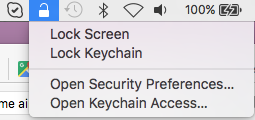
Keychain Access PreferencesTick the box ‘Show keychain status in the menu bar’. This now gives us a handy little menu with the option ‘Lock screen’.

OS X - Lock ScreenSo there you have it, the laptop is locked but the network sessions stay up. Windows + L would be even better, but you can’t have everything.

The Day My Nexus 5 Died

Today was not a good day. Woke up with my Nexus 5 stuck on the ‘Google’ boot screen. I had been seeing some stability issues lately (apps freezing, occasional reboot) but was planning on re-installing in order to go to 5.0.1 anyway when disaster struck.

Troubleshooting

After a great deal of rebooting and playing I got to the loading screen (spinning coloured dots). And there it stayed. Concluding that something had gone seriously wrong I decided to do an re-install of the factory image.

flashboot flash boot boot.img
sending 'bootloader' (2579 KB)...
OKAY [  0.294s]
writing 'bootloader'...
FAILED (remote: flash write failure)

Somewhat concerned at this point I tried different machines, cables, etc. but it seemed that flashboot was unable to write anything to any of the partitions:

Colin:hammerhead-lrx22c colinmacgiollaeain$ sudo fastboot flash bootloader bootloader-hammerhead-hhz12d.img
target reported max download size of 1073741824 bytes
sending 'bootloader' (2579 KB)...
OKAY [  0.296s]
writing 'bootloader'...
FAILED (remote: flash write failure)
finished. total time: 0.476s
Colin:hammerhead-lrx22c colinmacgiollaeain$ fastboot erase boot
erasing 'boot'...
FAILED (remote: failed to erase partition)
finished. total time: 0.218s
Colin:hammerhead-lrx22c colinmacgiollaeain$ fastboot erase cache
******** Did you mean to fastboot format this partition?
erasing 'cache'...
FAILED (remote: failed to erase partition)
finished. total time: 0.217s
Colin:hammerhead-lrx22c colinmacgiollaeain$ fastboot erase recovery
erasing 'recovery'...
FAILED (remote: failed to erase partition)
finished. total time: 0.215s
Colin:hammerhead-lrx22c colinmacgiollaeain$ fastboot erase system
******** Did you mean to fastboot format this partition?
erasing 'system'...
FAILED (remote: failed to erase partition)
finished. total time: 0.212s
...
target reported max download size of 1073741824 bytes
archive does not contain 'boot.sig'
archive does not contain 'recovery.sig'
archive does not contain 'system.sig'
archive does not contain 'vendor.img'
Creating filesystem with parameters:
Size: 29236371456
Block size: 4096
Blocks per group: 32768
Inodes per group: 8192
Inode size: 256
Journal blocks: 32768
Label:
Blocks: 7137786
Block groups: 218
Reserved block group size: 1024
Created filesystem with 11/1785856 inodes and 156120/7137786 block
Cannot read image.

At this point I was going with the working assumption that the NAND was dead or at least not writable any more. To confirm I did an OEM lock (it was unlocked) and rebooted. The little padlock icon remained unlocked.

Google Support

At this point I dug out my receipts and was relieved to see that the device (purchased through Google Play) was under 1 year old, so a warranty replacement is still an option. Going to the appropriate place in Play Support raised a second issue – I have no other phone, and they want a call back number. Something of a gap there I think…

Eventually I found a list of actual phone numbers for Google Play Support, that let you talk to an actual human being! There I hit problem #2.

For Ireland there is a 1800 freephone number (and no other number listed). This is a big problem as all office phones are routed through the US and Skype doesn’t support Irish freephone numbers. Why can’t I dial freephone numbers internationally e.g. +353 1800 ### ###? Because of an idiotic decision, the freephone numbers start with ‘1’, as does Dublin when dialing internationally (01-### #### -> +353 1 ### ###) and the B-number analysis will attempt to connect you to a random number in Dublin.

Fortunately, Skype does allow you to dial freephone numbers in the UK, so that’s what I did. Note: you will need either the IMEI (printed on a sticker on the back of the phone) or the original order number (very long number) for support to find your phone. The serial number won’t work. After describing my issue (and I’m sure blowing the support script out of the water) it was agreed that my issue sounded like a hardware fault, and so an advanced replacement would be in order.

The advanced replacement works like this:

  • You receive a time limited (24 hours) link to the Google Play store
  • On clicking the link, it is like buying a device – you fill in the credit card information (just an authorisation), shipping information, etc. and the order is processed
  • Once you receive the refurbished (no new phones anymore, you get a refurbished “like-new” device) you have 7 days to return the defective phone (free shipping).
  • When it reaches the depot the authorisation on the credit card will be removed (assuming the phone actually had a hardware fault)

Logging IRC Chats

I like to keep track of some of the developers chat in the #opencontrail IRC but wanted it logged to my linux server so I installed the IRSSI CLI IRC client and use that to record everything going on so I can review later.

irssi
/set nick flat_planet
/set autolog on
/set autolog_path ~/irclogs/$tag/$0/%Y-%m-%d.log
/connect irc.freenode.net
/join #opencontrail

Either run this in a screen or leave the terminal running and the output of the chat log will be stored in
~/irclogs/freenode/#opencontrail/YYYY-MM-DD.log

Since this also logs people coming and going a grep -v 'has joined|has quit|has left' can make the whole thing more readable