Monthly Archives: May 2014

/etc/hosts and Signalware – DFdaemon issues

While doing an install of Signalware’s SIGTRAN stack (SignalWare 9.0 SP6) I had big problems getting it to actually work. The menu install process ran as expected, but the node wasn’t commissioned and therefore the go.omni process wouldn’t start, as the DFconvert step was failing.

It turns out the root cause was a problem with DFdaemon (this is a service that has something to do with maintaining the file system used by Ulticom). The service was running, but when I tried DFdaemon_status it was timing out.

Eventually killed off the service (init kept restarting it) by commenting out the contents of the init file and kill -15 1 a few times, and ran it manually in debug mode:

root@server init]# DFdaemon -d
16:49:11  0 DFdaemon::main           : using port 10600
16:49:11  0 Platform                 : ************* CE_c *************
Name:   server
mCeIndex:       0
mLanCount:      0
Current LAN index:      0
Current status: DOWN
Synchronization status: SYNC_REQD
Pending status request list:
EMPTY

oluCEList:      8
OluCe 0:
OluCe 0:
OluCe 0:
OluCe 0:
OluCe 0:
OluCe 0:
OluCe 0:
OluCe 0:
-------------

16:49:11  0 MessageQueue::MessageQue :
16:49:11  0 UDPmsgQueue_c::UDPmsgQue : Recv buffer : 524288
16:49:11  0 UDPmsgQueue_c::UDPmsgQue : Send buffer : 524288
16:49:11  0 DFfileList_c::initEntrie : reach the end of /opt/apps/ulcm/sls0479/dffile

16:49:11  0 UDPmsgQueue_c::startComm :
16:49:11  0 UDPmsgQueue_c::MessageQu : begin thread
16:49:11  0 global                   : DFdaemon started
16:49:11  0 DFtaskQueue_c::main      : begin thread
16:49:11  0 UDPmsgQueue_c::MessageQu : begin thread
16:49:11  0 SDFS::main               : begin thread
16:49:11  0 DFfileList_c::main       : begin thread
16:49:11  0 HealthCheck::main        : begin thread
16:49:11  0 HealthCheck::main        : wakeup before sleep
16:49:11  0 SDFS::main               : wakeup before sleep(1000)
16:49:11  0 HealthCheck::main        : wakeup after sleep
16:49:11  0 HealthCheck::main        : wakeup before sleep
16:49:12  0 SDFS::main               : wakeup after sleep
16:49:12  0 HealthCheck::main        : wakeup after sleep
16:49:12  0 HealthCheck::main        : wakeup before sleep
16:49:12  0 SDFS::main               : wakeup before sleep(1000)
16:49:12  0 HealthCheck::main        : wakeup after sleep
16:49:12  0 HealthCheck::main        : wakeup before sleep
16:49:13  0 HealthCheck::main        : wakeup after sleep
16:49:13  0 HealthCheck::main        : wakeup before sleep
16:49:13  0 SDFS::main               : wakeup after sleep
16:49:13  0 SDFS::main               : wakeup before sleep(1000)
16:49:13  0 HealthCheck::main        : wakeup after sleep
...
16:49:40  0 HealthCheck::main        : wakeup after sleep
16:49:40  0 HealthCheck::main        : wakeup before sleep
16:49:40  0 SDFS::main               : wakeup after sleep
16:49:40  0 SDFS::main               : wakeup before sleep(1000)
16:49:40  0 UDPmsgQueue_c::MessageQu : Received message from unknown sender, IP address: ::ffff:127.0.0.1    <<---- DFdaemon_status
16:49:40  0 HealthCheck::main        : wakeup after sleep
16:49:40  0 HealthCheck::main        : wakeup before sleep
16:49:41  0 HealthCheck::main        : wakeup after sleep
16:49:41  0 HealthCheck::main        : wakeup before sleep
16:49:41  0 SDFS::main               : wakeup after sleep
16:49:41  0 SDFS::main               : wakeup before sleep(1000)
16:49:41  0 HealthCheck::main        : wakeup after sleep
16:49:41  0 HealthCheck::main        : wakeup before sleep

It seems that for some reason the localhost entry for IPv6 was causing a problem. The entry that was part of the server build looked like this:

127.0.0.1   localhost localhost.localdomain localhost4 localhost4.localdomain4
::1         localhost

It should be like this:

127.0.0.1   localhost localhost.localdomain localhost4 localhost4.localdomain4
::1         localhost localhost.localdomain localhost6 localhost6.localdomain6

With that DFconvert ran and the rest of the process was fine.

Internet of Things – Potential Architectures & Drawbacks

The Internet-of-Things or IoT (terrible name since everyone knows that IoT stands for Inter-operability Testing) seems to be quite the buzzword around lately – replacing the previous version which of course was Machine-to-Machine [M2M]. Nest and other home telemetry/automation tools seem to be quite the cliche-du-jour for the digirati.

Consider what Nest actually does – local (in house) temperature compared with external (nearest location/airport) temperature and a few interesting algorithms to handle temperature differentials, learn preferences, awareness of presence and away type scenarios. Of course  given that it seems to automatically download updates, I’m sure it’s logging and submitting lots of information ‘to improve the product’

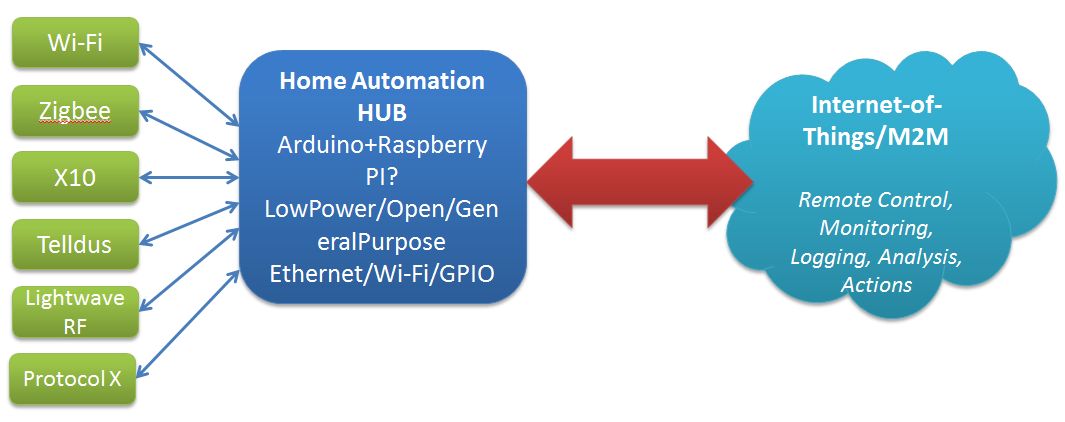
Likewise, we have hubs finally coming onstream to try and manage all the possible combinations of hardware and software for home sensors and everything else (or so they promise).

Think home sensors/lightbulbs/whatever – currently we have a plethora of specs to choose from for household comms and telemetry: X10, Zigbee, Z-Wave, Lightwave RF. Telldus, etc. Currently each manufacturer has their own choice of spec, controller software, etc.

Fortunately the Open Source/Open Hardware groups are are already experimenting with options to handle this – a good example is the Home Automation Hub (HAH) project which sets out to turn an Orange Livebox router into a home automation server, with an extra bit of hardware that – like the TellStick – allows it to control a range of gadgetry, and even keep an eye on energy consumption too. Likewise the dovado routers I’ve raved about before have the beginnings of some interesting Home Automation features with integration with Telldus sticks and the use of GPS to determine sunrise and sunset times for the location.

Open Source Open Hardware Hub

Home Hub - Internet of ThingsKey features as I see them are:

  • Compact
  • Reliable
  • Minimum Downtime
  • Low power
  • Open

Publish & Subscribe

So, assuming that we can get all these sensors talking to our hub, and that data recording (and potentially taking local actions based on that – heating, lighting, etc.) what do we do with it.

The hobbiest answer is to put it up on a website for your own entertainment. The more interesting options are open to the hub provider, and I see a few possible approaches here:

  1. Act as a relationship broker: making partnerships with different consumers of the telemetry e.g. allow the hub to submit information of the users choice to projects of their interest e.g. SmartCities, utility providers, etc.
  2. Act as a centralised clearing house: store all users data, sell it in bulk (users are the product) and plan to be bought at some point by Google/IBM/whoever
  3. Act as a centralised broker – grouping your users according to, for example, energy usage patterns and negotiating (optional) bulk deals from utility providers. For example, contacting the Power company and saying here is aggregate usage data for 30k ‘night owls’ – can we get a special deal, since they are offsetting the base load cost, but not adding to peak loads.


Providers/Website subscribing to the date

Decoding TCAP in Wireshark

Just jotting this down as a quick note, as I had some problems getting Wireshark (not it’s fault) to decode a SIGTRAN trace I was working on.

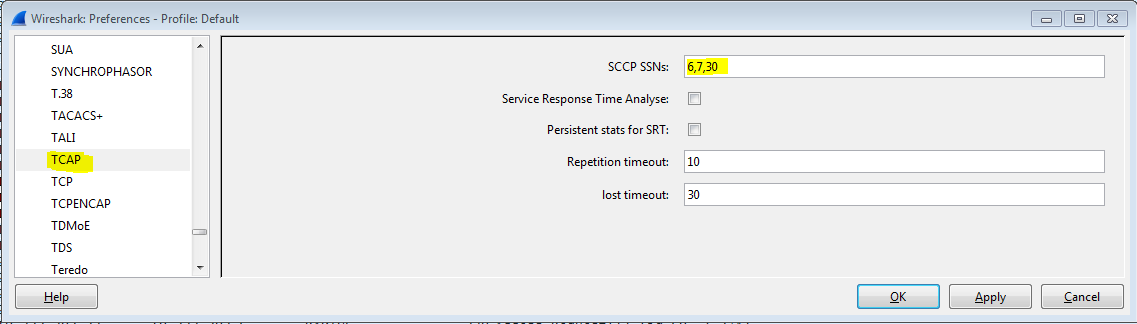
Normally you have to configure TCAP to know what Subsystem Numbers [SSN] to handle on the SCCP layer e.g. 7 for VLR, 8 for MSC, etc. and this is done under Edit -> Preferences -> Protocols -> TCAP

TCAP SSN Config

Unfortunately my trace had a bug – there was no SSN in the response message so Wireshark was only decoding up to the SCCP layer.

SSN Not Present

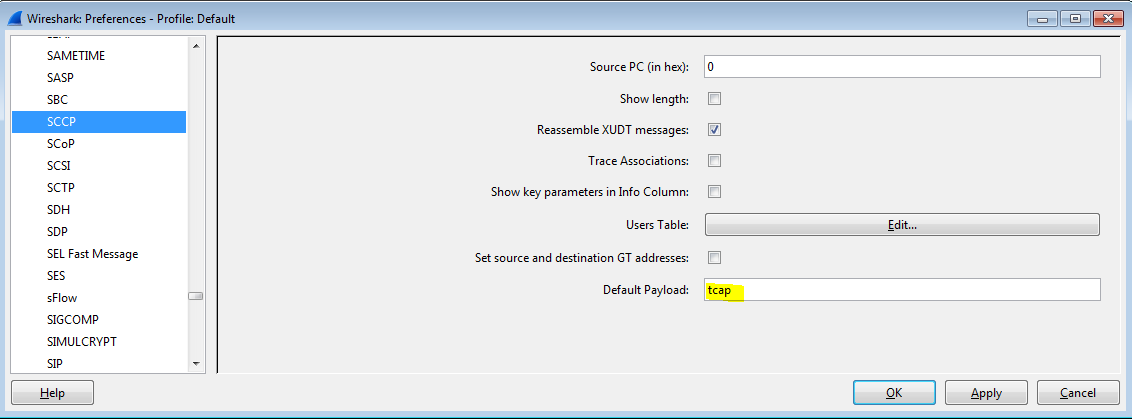
You can handle this case by instructing SCCP to decode as TCAP by default.

SCCP Default Payload