Monthly Archives: May 2016

Taking from /home to grow the root partition

After a recent move from Wheezy to Jessie, the root partition was looking a little full – to the point where the GUI wasn’t working due to a lack of /tmp space. So needed to take care of that while troubleshooting other issues.

# df -h
Filesystem             Size  Used Avail Use% Mounted on
/dev/dm-0              9.1G  8.4G  176M  99% /
udev                    10M     0   10M   0% /dev
tmpfs                  402M  6.5M  396M   2% /run
tmpfs                 1005M   68K 1005M   1% /dev/shm
tmpfs                  5.0M  4.0K  5.0M   1% /run/lock
tmpfs                 1005M     0 1005M   0% /sys/fs/cgroup
/dev/mapper/thor-home  904G  511G  347G  60% /home
/dev/sde1              228M   47M  170M  22% /boot
tmpfs                  201M     0  201M   0% /run/user/1024
tmpfs                  201M  8.0K  201M   1% /run/user/1000

Given that there is plenty of room on the /home partition and it’s all built on LVM, reallocating space from one to the other is fairly straightforward.

While you can grow an EXT4 filesystem while it is mounted, you can’t shrink one – and given that /home is constantly in use it was easier just to reboot into maintenance mode and take care of things that way.

# Unmount the home partition
umount /mnt/home
# Check the filesystem to make sure it is clean
e2fsck -F /dev/mapper/thor-home

# Shrink the filesystem to the desired size - in this case I'm reducing it to 880G
resize2fs -p /dev/mapper/thor-home 880G

# Shrink the logical volume to match
lvreduce -L 880G /dev/mapper/thor-home

# Check the file system again. If there are problems because the partition is too small, we
# can still recover by using lvextend until it succeeds e.g. lvextend -L +1G /dev/mapper/thor-home
e2fsck -F /dev/mapper/thor-home

That was the dangerous part. Extending the root filesystem to use the newly freed space is quite simple, but this time we are first growing the logical volume, then expanding the filesystem

# Extend the logical volume to use all the free space
lvextend -l +100%FREE /dev/mapper/thor-root
# Expand the filesystem
resize2fs -p /dev/mapper/thor-root

At this point a scan of the filesystem is a good idea, but unfortunately we can’t do that to a mounted filesystem, so instead we can trigger the check on reboot

touch /forcefsck

But in the meantime we can see that the root partition now has plenty of space

# df -h
Filesystem             Size  Used Avail Use% Mounted on
/dev/dm-0               47G  8.8G   36G  20% /
udev                    10M     0   10M   0% /dev
tmpfs                  402M  6.5M  396M   2% /run
tmpfs                 1005M   68K 1005M   1% /dev/shm
tmpfs                  5.0M  4.0K  5.0M   1% /run/lock
tmpfs                 1005M     0 1005M   0% /sys/fs/cgroup
/dev/mapper/thor-home  867G  506G  317G  62% /home
/dev/sdb1              228M   47M  170M  22% /boot
tmpfs                  201M     0  201M   0% /run/user/1024
tmpfs                  201M  4.0K  201M   1% /run/user/1000

Realtek RTL2832U on Linux (Debian)

So, now that I’d dipped my toe in the water with the RTL2832U on Win10, I actually planned on permanently integrating it into my media setup with is based on a RPI3 running OpenElec and a Debian server providing backend storage.

This turned out to be one of those good news bad news situations. The good news is that the dongle has kernel support, the bad news was that Wheezy was still on 3.2 which was lacking this support. After a failed attempt to compile the driver, followed by a failed attempt to compile the kernel (stupid linux-headers not found!) I just went ahead and upgraded the box to Jessie (Linux 3.16.0-4-amd64 #1 SMP Debian 3.16.7-ckt25-1 (2016-03-06) x86_64 GNU/Linux).

A long update, upgrade, dist-upgrade later and the dongle was in and recognised

[    1.196017] usb 8-1: Manufacturer: Realtek
[   19.650428] usb 8-1: dvb_usb_v2: found a 'Realtek RTL2832U reference design' in warm state
[   19.717623] usb 8-1: dvb_usb_v2: will pass the complete MPEG2 transport stream to the software demuxer
[   19.717658] DVB: registering new adapter (Realtek RTL2832U reference design)
[   19.721246] usb 8-1: DVB: registering adapter 0 frontend 0 (Realtek RTL2832 (DVB-T))...
[   20.007861] i2c i2c-9: rtl2832_sdr: Realtek RTL2832 SDR attached
[   20.015340] input: Realtek RTL2832U reference design as /devices/pci0000:00/0000:00:1d.7/usb8/8-1/rc/rc0/input6
[   20.015348] rc0: Realtek RTL2832U reference design as /devices/pci0000:00/0000:00:1d.7/usb8/8-1/rc/rc0
[   20.104268] input: MCE IR Keyboard/Mouse (dvb_usb_rtl28xxu) as /devices/virtual/input/input7
[   20.104356] usb 8-1: dvb_usb_v2: schedule remote query interval to 400 msecs
[   20.117509] usb 8-1: dvb_usb_v2: 'Realtek RTL2832U reference design' successfully initialized and connected
[   20.117602] usbcore: registered new interface driver dvb_usb_rtl28xxu
[   20.160507] rc rc0: lirc_dev: driver ir-lirc-codec (dvb_usb_rtl28xxu) registered at minor = 0

Next step…

Installing tvheadend

My original plan was to just have the dongle running directly connected to the RPI but power was a concern (no powered hub) and since my linux server is always running anyway, why not install the backend software there and have the tvheadend client running on the RPI/OpenELEC side of things?

Installation isn’t actually that straightforward but can be broken down into a few steps

  1. Install the package
    This involves adding the tvheadend repository to your sources list and you will add a user account/password as part of the install process

    sudo apt-key adv --keyserver hkp://keyserver.ubuntu.com:80 --recv-keys 379CE192D401AB61
    echo "deb https://dl.bintray.com/tvheadend/deb <strong>jessie stable</strong>" | sudo tee -a /etc/apt/sources.list
    sudo apt-get update
    sudo apt-get install tvheadend
  2. Configure via the web interface at <IP Address>:9981
    1. Check that your dongle shows up under Configuration -> DVB Inputs -> TV Adapters
    2. Under Configuration -> DVB Inputs -> Networks, add a DVB-T network (for Ireland) and select from the list of Pre-defined MUXs (Ireland-WoodcockHill for me)
      create-dvbT-network
    3. Back under Configuration -> DVB Inputs -> Networks, map the newly created network to the dongle
      hardware-network-mapping-DVB-T
    4. Under Muxes, the scan status for the added muxes will start at ‘Idle’ then eventually start scanning and find your channels
    5. You should see the Services start to be listed as they are discovered, and at this point under Configuration -> Channel, you can map the service to a channel
      channel-config-DVB-T
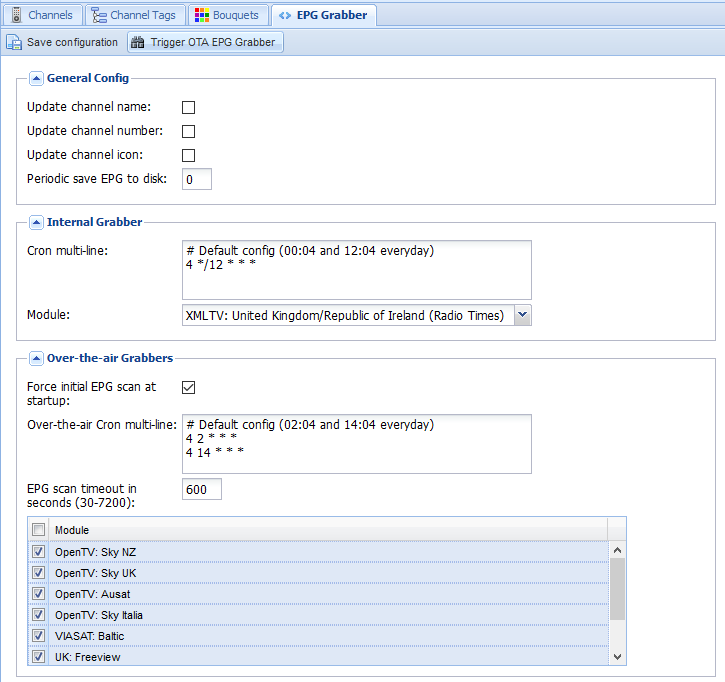
    6. Last step on the backend side is to enable the EPG. I have both the OTA grabber and the Radio Times for UK/Ireland enabled and we are doneEPG-grabber-DVB-T
      EPG-DVB-T

On the OpenELEC frontend, much simpler.

Install the add-on from under PVR, configure it with the hostname, username, and password, and under Settings -> TV, Enable live TV. Sorted!

Realtek RTL2832U TV USB Dongle and Windows 10

I recently got RTL2832U+R820T USB2.0 Digital DVB-T SDR+DAB+FM HDTV TV Tuner Receiver Stick from eBay. For about €6 it was worth a punt.

Had an interesting problem with windows 10 and the drivers though. Microsoft insist on installing an out-of-date driver (version 64.0001.0220.2009) which looks like it is working, but when scanning for DVB channels, it finds nothing.

The correct version should be 64.1.801.2012 and this is what is provided on the included CD. The problem is that Windows 10, in its wisdom decides to ‘update’ to the older driver as soon as it can.

The current (nasty) workaround is to;

  1. Uninstall the device and delete the driver (Device Manager)
  2. Block device driver updates (System -> System Properties -> Hardware -> Device Installation Settings
  3. Set ‘Never install driver software from Windows Update
  4. Install the driver from the CD
  5. Insert the dongle and scan

All channels were found and working perfectly (FM, and DAB also appeared as devices now).

ZFS One Year On – First Repair

Having moved to ZFS after my little RAID/XFS problem last year, with weekly scrubs of the array, I’ve just had my first read error and repair. From the system log;

[1691578.161114] ata7.00: exception Emask 0x0 SAct 0x3 SErr 0x0 action 0x0
[1691578.161121] ata7.00: irq_stat 0x40000008
[1691578.161128] ata7.00: failed command: READ FPDMA QUEUED
[1691578.161138] ata7.00: cmd 60/b0:00:d8:c8:1b/00:00:66:00:00/40 tag 0 ncq 90112 in
[1691578.161140]          res 41/40:b0:e0:c8:1b/00:00:66:00:00/00 Emask 0x409 (media error) <F>
[1691578.161146] ata7.00: status: { DRDY ERR }
[1691578.161150] ata7.00: error: { UNC }
[1691578.162924] ata7.00: configured for UDMA/133
[1691578.162945] sd 6:0:0:0: [sdf] Unhandled sense code
[1691578.162949] sd 6:0:0:0: [sdf]  Result: hostbyte=DID_OK driverbyte=DRIVER_SENSE
[1691578.162955] sd 6:0:0:0: [sdf]  Sense Key : Medium Error [current] [descriptor]
[1691578.162963] Descriptor sense data with sense descriptors (in hex):
[1691578.162967]         72 03 11 04 00 00 00 0c 00 0a 80 00 00 00 00 00
[1691578.162982]         66 1b c8 e0
[1691578.162989] sd 6:0:0:0: [sdf]  Add. Sense: Unrecovered read error - auto reallocate failed
[1691578.162998] sd 6:0:0:0: [sdf] CDB: Read(10): 28 00 66 1b c8 d8 00 00 b0 00
[1691578.163013] end_request: I/O error, dev sdf, sector 1713096928
[1691578.163040] ata7: EH complete

And looking at ZFS;

sudo zpool status
[sudo] password for :
pool: storage
state: ONLINE
scan: scrub repaired 88K in 11h7m with 0 errors on Sun May  1 12:37:48 2016
config:

NAME        STATE     READ WRITE CKSUM
storage     ONLINE       0     0     0
raidz1-0  ONLINE       0     0     0
sdf     ONLINE       0     0     0
sdc     ONLINE       0     0     0
sdh     ONLINE       0     0     0
sdj     ONLINE       0     0     0
raidz1-1  ONLINE       0     0     0
sdb     ONLINE       0     0     0
sdd     ONLINE       0     0     0
sdi     ONLINE       0     0     0
sdk     ONLINE       0     0     0

errors: No known data errors

Kind of wondering how much life that drive has left – should I replace now??