Tag Archives: Ireland

Vodafone Ireland – SIP Ports Blocked

Was working at the parents place for a few days and was appalled to find that, on what is sold as a home broadband connection (LTE-based), they have the SIP ports blocked.

Skype worked just fine, as always, but my work phone was unable to register with the VoIP server. Tunnel everything through the corp VPN (we use split tunnels by default – a much better option) and all worked as expected.

Just need to modify the routing so that traffic to the SIP server also uses the VPN. Minor annoyance, but still, WHY?!

Realtek RTL2832U on Linux (Debian)

So, now that I’d dipped my toe in the water with the RTL2832U on Win10, I actually planned on permanently integrating it into my media setup with is based on a RPI3 running OpenElec and a Debian server providing backend storage.

This turned out to be one of those good news bad news situations. The good news is that the dongle has kernel support, the bad news was that Wheezy was still on 3.2 which was lacking this support. After a failed attempt to compile the driver, followed by a failed attempt to compile the kernel (stupid linux-headers not found!) I just went ahead and upgraded the box to Jessie (Linux 3.16.0-4-amd64 #1 SMP Debian 3.16.7-ckt25-1 (2016-03-06) x86_64 GNU/Linux).

A long update, upgrade, dist-upgrade later and the dongle was in and recognised

[    1.196017] usb 8-1: Manufacturer: Realtek
[   19.650428] usb 8-1: dvb_usb_v2: found a 'Realtek RTL2832U reference design' in warm state
[   19.717623] usb 8-1: dvb_usb_v2: will pass the complete MPEG2 transport stream to the software demuxer
[   19.717658] DVB: registering new adapter (Realtek RTL2832U reference design)
[   19.721246] usb 8-1: DVB: registering adapter 0 frontend 0 (Realtek RTL2832 (DVB-T))...
[   20.007861] i2c i2c-9: rtl2832_sdr: Realtek RTL2832 SDR attached
[   20.015340] input: Realtek RTL2832U reference design as /devices/pci0000:00/0000:00:1d.7/usb8/8-1/rc/rc0/input6
[   20.015348] rc0: Realtek RTL2832U reference design as /devices/pci0000:00/0000:00:1d.7/usb8/8-1/rc/rc0
[   20.104268] input: MCE IR Keyboard/Mouse (dvb_usb_rtl28xxu) as /devices/virtual/input/input7
[   20.104356] usb 8-1: dvb_usb_v2: schedule remote query interval to 400 msecs
[   20.117509] usb 8-1: dvb_usb_v2: 'Realtek RTL2832U reference design' successfully initialized and connected
[   20.117602] usbcore: registered new interface driver dvb_usb_rtl28xxu
[   20.160507] rc rc0: lirc_dev: driver ir-lirc-codec (dvb_usb_rtl28xxu) registered at minor = 0

Next step…

Installing tvheadend

My original plan was to just have the dongle running directly connected to the RPI but power was a concern (no powered hub) and since my linux server is always running anyway, why not install the backend software there and have the tvheadend client running on the RPI/OpenELEC side of things?

Installation isn’t actually that straightforward but can be broken down into a few steps

  1. Install the package
    This involves adding the tvheadend repository to your sources list and you will add a user account/password as part of the install process

    sudo apt-key adv --keyserver hkp://keyserver.ubuntu.com:80 --recv-keys 379CE192D401AB61
    echo "deb https://dl.bintray.com/tvheadend/deb <strong>jessie stable</strong>" | sudo tee -a /etc/apt/sources.list
    sudo apt-get update
    sudo apt-get install tvheadend
  2. Configure via the web interface at <IP Address>:9981
    1. Check that your dongle shows up under Configuration -> DVB Inputs -> TV Adapters
    2. Under Configuration -> DVB Inputs -> Networks, add a DVB-T network (for Ireland) and select from the list of Pre-defined MUXs (Ireland-WoodcockHill for me)
      create-dvbT-network
    3. Back under Configuration -> DVB Inputs -> Networks, map the newly created network to the dongle
      hardware-network-mapping-DVB-T
    4. Under Muxes, the scan status for the added muxes will start at ‘Idle’ then eventually start scanning and find your channels
    5. You should see the Services start to be listed as they are discovered, and at this point under Configuration -> Channel, you can map the service to a channel
      channel-config-DVB-T
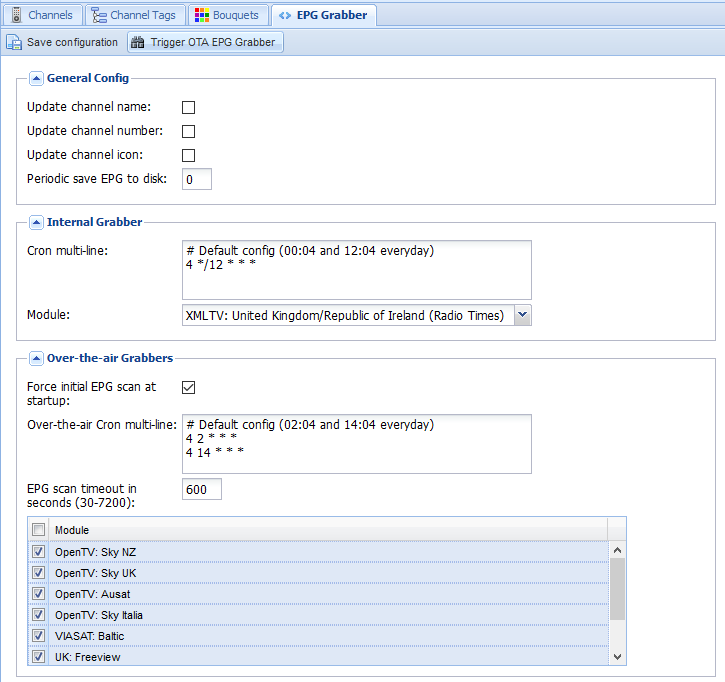
    6. Last step on the backend side is to enable the EPG. I have both the OTA grabber and the Radio Times for UK/Ireland enabled and we are doneEPG-grabber-DVB-T
      EPG-DVB-T

On the OpenELEC frontend, much simpler.

Install the add-on from under PVR, configure it with the hostname, username, and password, and under Settings -> TV, Enable live TV. Sorted!

UPC Ireland – Tiers of Service and NAT

The 120Mbps Tier

As a long time and very happy UPC customer (120Mb unlimited package) I was quite pleased with the service offered – to local speedtest server 10ms RTT, 118Mbps down, 10Mbps up, generous ‘fair-use’ limits and most importantly a public IP address.

Ideally, I’d like to use my own modem/router but instead I’m stuck with the Thompson TWG870, though to be fair it’s not the worst in the world. Not sure when, if ever, the firmware has ever been updated but all the important settings are at least accessible.

The 60Mbps Tier

With a new job I’m based in Limerick at least some of the time so made the decision to put in the basic package (60Mbps, 30Gb cap) and not bother with TV service. Installation was fine but no self-install so ended out having to sit at home for the scheduled installation window… 09:00 – 18:00 – they do make it easy for themselves.

Once installed and the tech out the door I had a poke at the new box. This one seems to be infamous as the Technicolor 7200 – clearly one of the cheapest cable modem/Wireless APs ever built. Prettier interface but fewer configuration options. Also issues with the WiFi connections to a Mac (not the only router to have this problem to be fair – I blame Apple).

Horizon WiFree

Interestingly the default internal IP range for the network is 192.168.1.0/24. When I tried to switch it to the more conventional 192.168.1.0/24 I was told that that address range is already in use. It seems that Horizon Wi-Free is configured to use the 192.168.1.0/24 subnet and that portion of the configuration is hidden away somewhere with the only options being to turn it on or off.

Public IPs

As I stated above something I love about the service I had was the public IP address. Making full use of the options that gives you I have a number of self-hosted ‘cloud’ services running on a Linux box I keep running – file store, VPN, Media Library, Document backup, etc. For the new gaff I have a RaspberryPi B+ that I use to run RASPBMC and a few other small services, but just by default had intended to make that internet accessible – sadly it was not to be.

It seems that the lowest tier of UPC has you running through a NAT system at some point. So while I have the port forwarding setup on the router, nothing reaches the Pi. It also seems to have some very aggressive ageing of flows running – had to set SSH keepalives to <60 seconds or the connections were constantly dropping. Poking at the IP address my connections seem to be originating from I see that there are two different pools in use (not unexpected in any case e.g. Dublin vs. rest of country).

Lowest Tier (60Mbps)


[colinmac@thor][~]=> dig +answer -x 188.141.a.b

; <<>> DiG 9.8.4-rpz2+rl005.12-P1 <<>> +answer -x 188.141.a.b
;; global options: +cmd
;; Got answer:
;; ->>HEADER<<- opcode: QUERY, status: NOERROR, a.bid: 22797
;; flags: qr rd ra; QUERY: 1, ANSWER: 1, AUTHORITY: 0, ADDITIONAL: 0

;; QUESTION SECTION:
;115.82.141.188.in-addr.arpa.   IN      PTR

;; ANSWER SECTION:
115.82.141.188.in-addr.arpa. 86389 IN   PTR     188-141-82-115.dynamic.upc.ie.

;; Query time: 15 msec
;; SERVER: 89.101.160.5#53(89.101.160.5)
;; WHEN: Tue Aug 26 09:04:24 2014
;; MSG SIZE  rcvd: 88

Notice the Pointer Record has the dynamic.upc.ie

Middle Tier (120Mbps)


[colinmac@thor][~]=> dig +answer -x 109.255.x.y

; <<>> DiG 9.8.4-rpz2+rl005.12-P1 <<>> +answer -x 109.255.x.y
;; global options: +cmd
;; Got answer:
;; ->>HEADER<<- opcode: QUERY, status: NXDOMAIN, id: 54912
;; flags: qr rd ra; QUERY: 1, ANSWER: 0, AUTHORITY: 1, ADDITIONAL: 0

;; QUESTION SECTION:
;7.123.255.109.in-addr.arpa.    IN      PTR

;; AUTHORITY SECTION:
255.109.in-addr.arpa.   600     IN      SOA     ns1.upc.biz. hostmaster.chello.at. 2010071503 86400 7200 2592000 7200

;; Query time: 33 msec
;; SERVER: 89.101.160.5#53(89.101.160.5)
;; WHEN: Tue Aug 26 09:05:04 2014
;; MSG SIZE  rcvd: 111

Whereas for the higher tier we have the Start Of Authority record pointing back towards the older chello and our nameserver is sitting within a biz domain.

Will add more to this post later 🙂