Tag Archives: SDN

OpenContrail – Service Chaining

This post is to cover one of the most (to my mind) interesting and powerful features of OpenContrail at the moment which is the service chaining. As part of the NVF approach we are looking to virtualise services (read boxes) that are already part of current networks.

The basic idea is to get away from services as appliances e.g. Firewall, Load Balancer, DPI, etc. are added to the network as boxes/appliances – when more capacity is required you add bigger boxes, and when you hit the largest size of box available from the vendor you either buy more or wait for the ‘next-generation’ platform to be released.

While there are good reasons for the box/appliance approach:

  • Simpler troubleshooting for TAC
  • Tested and verified performance levels – will do X pps for average packet size of Y
  • Easy scoping of scale – we have N Mbps of traffic, what do we need to DPI this at the current levels of growth

if we are going down the SDN/NFV route obviously this approach will not work anymore since you have a virtualised appliance living somewhere in a data center, and ideally there is no contention/undercapacity where that appliance is living. As the demands scale up more appliances are activated to handle the new load, and as demand drops resources can be released back into the pool.

Traditional Service Chains

Standard network deployments consist of service chains, though they are not very flexible or dynamic. Consider the path a typical webserver would take to reach the Internet. From the internet, through a gateway towards a firewall (typically providing NAT services). From there through a Load Balancer and then to the server farm. Typically each link in the chain is a logically separated path e.g. a VLAN.

traditional service chain

Dynamic Service Chaining

The more ideal approach is to have the different services e.g. Firewall, NAT, etc. provided on virtualised appliances that can also be hosted in our data center and scaled as required. These services can be added and removed from the traffic path as required, either by the customer or the hosting provider. Consider the use case of having vCPE [virtualised Customer Premises Equipment] – a simple box is installed on the customer site and all configuration and services and be added and removed in the Data Center.

One potential offer could be of a basic unfiltered connection, with firewall and DPI as a basic services package for €N per month, with other optional services on top of that. A simple web front end could effectively provide an ‘app store’ for network services, with pre-packaged services available for quick and easy deployment.

service chaining - outlineService Chaining in Contrail

Network Policies allow the tenant to define what traffic is allowed to flow between which networks. As part of the policy configuration a set of service instances can also be included, to be applied in the order in which they are configured e.g. svc1, svc2, svc3 will have Network A -> svc1_vm -> svc2_vm -> svc3_vm -> Network B, with the reverse path also created automatically.

This is achieved through manipulation (automatically) of the BGP Next-Hops between the created routing instances (also automatic).

service chaining - using the routing instancesService Instance

The Service Instance is simply a virtual machine that is providing the service. A most basic example would be a linux VM acting as a router between two virtual networks (not required of course since policies can do this for us, but any service that a linux server can provide can be chained). The convention is that there is a Left interface attached to the source network and a right interface attached to the destination network. We typically also include a 3rd interface on a Management interface to allow for the service VMs to be managed out-of-band of the traffic flow.

Configuring Service Chaining

This requires 3 elements:

  1. Service Template
  2. Service Instance
  3. Service Policy

 Service Template

The service templates are defined within the Domain and can be used, and re-used, across Projects as many times as required. Main points for Template configuration are:

Service type – main types are:

  • transparent – used for non-routed L2 services e.g. L2 Firewall
  • In-Network – provides gateway services and the traffic is routed e.g. HTTP Proxy, NAT, LB
  • In-Network NAT – same as In-Network but the return traffic doesn’t need to be routed back to the source network

Image – the GLANCE VM image that is used to provide the service

Service Instance

The service instance is the actual instantiation of the template. The main point is to add the correct virtual networks to the interfaces e.g. VN_source to Left interface and VN_destination to the Right interface.

Service Policy

The service policy allows the traffic between the virtual networks and instructs the system to chain that traffic through the service instances  – in-order.

OpenStack Nova Upgrade & RabbitMQ

I had occasion to upgrade my Contrail cluster from 1.03 -> 1.04. While this was hampered by network issues in the lab (the witch hunt for the guilty party messing with cables is ongoing) I came out of it with a problem on one of the two compute hosts (the working one wasn’t upgraded due to the network issue).

/var/log/nova/compute.log provided this little gem:

2014-04-03 14:36:38.068 ERROR nova.openstack.common.rpc.impl_qpid [req-9becc8bb-e75a-4700-b289-a188a98a2645 None None] Unable to connect to AMQP server: client: 0-10, server: 9-1. Sleeping 60 seconds

As I understand it, RabbitMQ only supports 0-9-1 (running on the controller), but it looks like the client (vRouter side) is running 0-10-0 (QPID) – these are not compatible. Turns out on that the OpenStack side openstack-nova-compute was now configured to use QPID rather then RabbitMQ:

rpc_backend = nova.openstack.common.rpc.impl_qpid
...
qpid_hostname = x.y.x.230

Edit /etc/nova/nova.conf to have:

rpc_backend = nova.openstack.common.rpc.impl_kombu
...
rabbit_host = x.y.x.230

and restart the openstack-nova-compute service and we are in business.

Something else worth noting is that if you switch the RPC backend and start getting:

2014-04-04 13:26:28.659 ERROR nova.openstack.common.rpc.common [req-f0ea9acc-f6e0-46e2-81f6-1e4b23f0bd2a None None] AMQP server on localhost:5672 is unreachable: [Errno 111] ECONNREFUSED. Trying again in 15 seconds.

in your log (multi-node setup here with separate messaging server) then you have made the mistake, as I did, of assuming that the rabbit_host at the end of the file is parsed – it isn’t! Make sure your configuration is before the [keystone_authtoken] block e.g.

volume_api_class = nova.volume.cinder.API
enabled_apis=ec2,osapi_compute,metadata
auth_strategy=keystone
#qpid_hostname = x.y.z.230
glance_host = x.y.z.230
quantum_url_timeout = 300
novncproxy_base_url = http://10.3.8.230:5999/vnc_auto.html
vncserver_enabled = true
vncserver_listen = x.y.z.231
vncserver_proxyclient_address = x.y.z.231
security_group_api = quantum
heal_instance_info_cache_interval = 0
libvirt_cpu_mode = none
rabbit_host = x.y.z.230


[keystone_authtoken]
admin_tenant_name = service
admin_user = nova
admin_password = 154c7f845c59fe7b9a78
auth_host = x.y.z.230
auth_port = 35357
auth_protocol = http
signing_dir = /tmp/keystone-signing-nova

Contrail Discovery Service

Configuration nodes also provide a discovery service that the clients can use to locate the service providers (i.e. other nodes providing a particular service).  It is used as a directory service. e.g. the control nodes are designed to scale horizontally: the vrouter agent can use the discovery service to determine which control-nodes to connect to (as that list may change as the cluster grows).

For example, when the vRouter agent in a compute node wants to connect to a control node (to be more precise: to an active-active pair of Control VM’s) it uses service discovery to discover the IP address of the control node. The clients use local configuration, DHCP or DNS to locate the service discovery server.

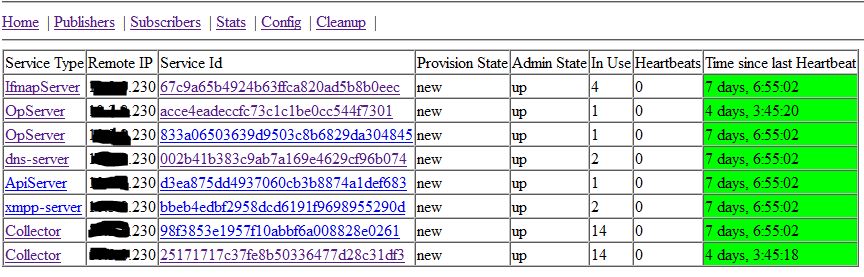
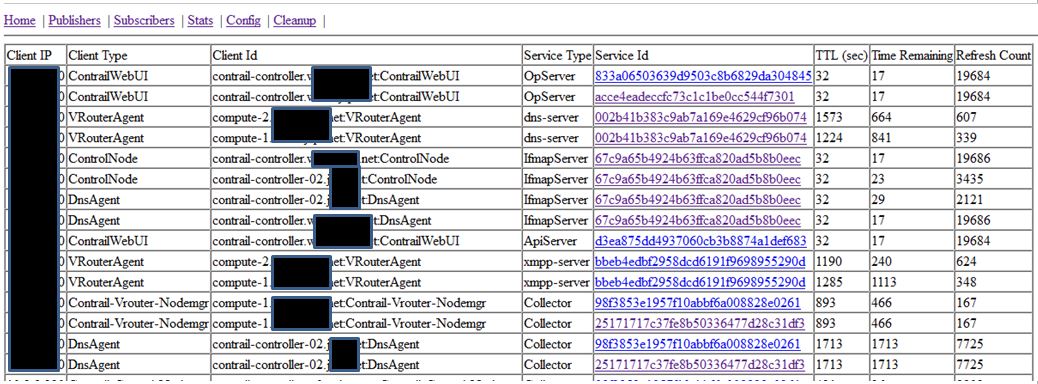
Service providers e.g. DNS, IF-MAP, etc. register with the discovery service as they come online, and anything requiring the use of the services subscribes. Usefully for debugging node issues you can take a look at the discovery service, by connecting to the server at port 5998 e.g. http://x.y.z.230:5998/services and see what services are registered:

contrail-discovery-publishersAnd who are using them:

contrail-discovery-clientsSo you can see, for example, that the the vRouters are subscribed to the XMPP service, and the dns-server.

As more services/nodes are brought online they are registered with the discovery service and will be used. Likewise, if a service stops responding to heartbeats, the discovery will remove that service from the active list, and the clients will use the alternatives.

Contrail Setup – vRouter Provisioning Failure on new install

The importance of basic system configuration

As there is a tendency to happen, my contrail lab got completely hosed by someone (shared accounts are going to be disabled going forward!) and I decided to take advantage and rebuild it using separate admin and control/traffic interfaces – closer to production type environment. This also had the benefit that I could connect to the lab MX router and therefore have ‘public’ routable addresses.

Imagine my surprise when a completely clean install failed 🙁 This was especially surprising since the procedure hand worked before. Having spend a day pounding my head against the wall and blaming everything from VMware, to typos in the testbed.py file, to Gremlins, I found the problem.

Target Setup

The desired setup is as follows:
Controller node – running config management, analytics, control, etc.
Admin IP: a.b.c.230
Control/Dataplane: x.y.z.230

2 x Compute Hosts – running nova-compute and vRouter
Admin IP: a.b.c.231 – 232
Control/Dataplane: x.y.z.231 – 232

Problem – vRouter Provisioning Stalls/Fails

During the fab setup_all the setup process was stalling at the point when it was adding the vRouter (compute host). Even left overnight, this failed to progress.

[[email protected]] out: [localhost] local: ifconfig p2p2p0 | grep mtu | awk '{ print $NF }'
[[email protected]] out: [localhost] local: ifconfig p2p2p0 | grep MTU | sed 's/.*MTU.\([0-9]\+\).*/\1/g'
[[email protected]] out: [localhost] local: sudo mv /tmp/tmpG4fUw3/ifcfg-vhost0 /etc/sysconfig/network-scripts/ifcfg-vhost0
[[email protected]] out: [localhost] local: sudo cp /etc/sysconfig/network-scripts/ifcfg-p2p2p0 /etc/sysconfig/network-scripts/ifcfg-p2p2p0.rpmsave
[[email protected]] out: [localhost] local: sudo mv /tmp/tmpG4fUw3/ifcfg-p2p2p0 /etc/contrail/
[[email protected]] out: [localhost] local: sudo chkconfig network on
[[email protected]] out: [localhost] local: sudo chkconfig supervisor-vrouter on
[[email protected]] out: [[email protected]] run: source /opt/contrail/api-venv/bin/activate && python /opt/contrail/utils/provision_vrouter.py --host_name compute-1.lab.flat-planet.net --host_ip x.y.z.231 --api_server_ip x.y.z.230 --oper add --admin_user admin --admin_password secret123 --admin_tenant_name admin
[[email protected]] out: [[email protected]] out:
[[email protected]] out: [[email protected]] out:
[[email protected]] out: [[email protected]] out:

Looking through the contents of /var/log/contrail/ I saw that the Query Engine was reporting issues:

[root@contrail-controller contrail]# cat /var/log/contrail/qe.log
Pre exec cmd:/usr/bin/contrail_qe_pre
log4cplus:ERROR No appenders could be found for logger (root).
log4cplus:ERROR Please initialize the log4cplus system properly.
2014-03-13 Thu 16:55:22:109.910 GMT contrail-controller.lab.flat-planet.net [Thread 47816409982496, Pid 9400]: http-server-port 8091
2014-03-13 Thu 16:55:22:110.018 GMT contrail-controller.lab.flat-planet.net [Thread 47816409982496, Pid 9400]: Endpoint 0.0.0.0:0
2014-03-13 Thu 16:55:22:110.034 GMT contrail-controller.lab.flat-planet.net [Thread 47816409982496, Pid 9400]: Collectors 1
2014-03-13 Thu 16:55:22:110.051 GMT contrail-controller.lab.flat-planet.net [Thread 47816409982496, Pid 9400]: SANDESH: ROLE   : Generator
2014-03-13 Thu 16:55:22:110.063 GMT contrail-controller.lab.flat-planet.net [Thread 47816409982496, Pid 9400]: SANDESH: MODULE : QueryEngine
...
2014-03-13 Thu 16:55:22:113.246 GMT contrail-controller.lab.flat-planet.net [Thread 47816409982496, Pid 9400]: Db_Init: TTransportException what: connect() failed: Connection refused
Thrift: Thu Mar 13 16:55:22 2014 TSocket::open() connect() <Host: x.y.z.230 Port: 9160>Connection refused
2014-03-13 Thu 16:55:22:113.353 GMT contrail-controller.lab.flat-planet.net [Thread 47816409982496, Pid 9400]: Sandesh: Send: FAILED: 2014-Mar-13 16:55:22.113282 QeInit [SYS_WARN]: QELog: initialization of database failed. retrying 0 time src/query_engine/query.cc 1048
2014-03-13 Thu 16:55:27:113.648 GMT contrail-controller.lab.flat-planet.net [Thread 47816409982496, Pid 9400]: Db_Init: TTransportException what: connect() failed: Connection refused
Thrift: Thu Mar 13 16:55:27 2014 TSocket::open() connect() <Host: x.y.z.230 Port: 9160>Connection refused

Port 9160 is where our contrail-database (cassandra) lives – so the problem is that the provisioning script cannot connect to the system database in order to complete the provisioning.

[root@contrail-controller utils]# service contrail-database status
contrail-database                FATAL      Exited too quickly (process log may have details)
[root@contrail-controller utils]# service contrail-database start
contrail-database: ERROR (abnormal termination)
[root@contrail-controller utils]#

The problem here is that the process dies before logging any errors so at this point I have no clue as to why this is happening. Fortunately there was an already running system elsewhere (can also be found if you retained your console logs for the install) so I could get the exact command used to fire up the DB and see where it is going wrong.

[root@contrail-controller cassandra]# java -ea -javaagent:/usr/share/cassandra/lib/jamm-0.2.5.jar -XX:+UseThreadPriorities -XX:ThreadPriorityPolicy=42 -Xms8192M -Xmx8192M -Xmn2048M -XX:+HeapDumpOnOutOfMemoryError -Xss180k -XX:+UseParNewGC -XX:+UseConcMarkSweepGC -XX:+CMSParallelRemarkEnabled -XX:SurvivorRatio=8 -XX:MaxTenuringThreshold=1 -XX:CMSInitiatingOccupancyFraction=75 -XX:+UseCMSInitiatingOccupancyOnly -XX:+PrintGCDetails -XX:+PrintGCDateStamps -XX:+PrintHeapAtGC -XX:+PrintTenuringDistribution -XX:+PrintGCApplicationStoppedTime -XX:+PrintPromotionFailure -XX:PrintFLSStatistics=1 -Xloggc:/var/log/cassandra/gc-1393935278.log -Djava.net.preferIPv4Stack=true -Dcom.sun.management.jmxremote.port=7199 -Dcom.sun.management.jmxremote.ssl=false -Dcom.sun.management.jmxremote.authenticate=false -Dlog4j.configuration=log4j-server.properties -Dlog4j.defaultInitOverride=true -Dcassandra-foreground=yes -cp /etc/cassandra/conf:/usr/share/java/jna.jar:/usr/share/cassandra/lib/antlr-3.2.jar:/usr/share/cassandra/lib/apache-cassandra-1.2.11.jar:/usr/share/cassandra/lib/apache-cassandra-clientutil-1.2.11.jar:/usr/share/cassandra/lib/apache-cassandra-thrift-1.2.11.jar:/usr/share/cassandra/lib/avro-1.4.0-fixes.jar:/usr/share/cassandra/lib/avro-1.4.0-sources-fixes.jar:/usr/share/cassandra/lib/commons-cli-1.1.jar:/usr/share/cassandra/lib/commons-codec-1.2.jar:/usr/share/cassandra/lib/commons-lang-2.6.jar:/usr/share/cassandra/lib/compress-lzf-0.8.4.jar:/usr/share/cassandra/lib/concurrentlinkedhashmap-lru-1.3.jar:/usr/share/cassandra/lib/guava-13.0.1.jar:/usr/share/cassandra/lib/high-scale-lib-1.1.2.jar:/usr/share/cassandra/lib/jackson-core-asl-1.9.2.jar:/usr/share/cassandra/lib/jackson-mapper-asl-1.9.2.jar:/usr/share/cassandra/lib/jamm-0.2.5.jar:/usr/share/cassandra/lib/jbcrypt-0.3m.jar:/usr/share/cassandra/lib/jline-1.0.jar:/usr/share/cassandra/lib/json-simple-1.1.jar:/usr/share/cassandra/lib/libthrift-0.7.0.jar:/usr/share/cassandra/lib/log4j-1.2.16.jar:/usr/share/cassandra/lib/lz4-1.1.0.jar:/usr/share/cassandra/lib/metrics-core-2.2.0.jar:/usr/share/cassandra/lib/netty-3.6.6.Final.jar:/usr/share/cassandra/lib/servlet-api-2.5-20081211.jar:/usr/share/cassandra/lib/slf4j-api-1.7.2.jar:/usr/share/cassandra/lib/slf4j-log4j12-1.7.2.jar:/usr/share/cassandra/lib/snakeyaml-1.6.jar:/usr/share/cassandra/lib/snappy-java-1.0.5.jar:/usr/share/cassandra/lib/snaptree-0.1.jar:/usr/share/cassandra/lib/stress.jar org.apache.cassandra.service.CassandraDaemon
Error: Exception thrown by the agent : java.net.MalformedURLException: Local host name unknown: java.net.UnknownHostException: contrail-controller.lab.flat-planet.net: contrail-controller.lab.flat-planet.net

Turns out that when cassandra is being fired up, it uses the FQDN rather then an IP address when binding to the network socket, and of course I didn’t have the FQDN in /etc/hosts or in the nameserver. Quick edit later:

[root@contrail-controller cassandra]# vi /etc/hosts

127.0.0.1   localhost localhost.localdomain localhost4 localhost4.localdomain4
::1         localhost localhost.localdomain localhost6 localhost6.localdomain6
x.y.z.230 contrail-controller.lab.flat-planet.net

And we are in business

[root@contrail-controller cassandra]# service contrail-database start
contrail-database: started

[root@contrail-controller cassandra]# contrail-status
vRouter is NOT PRESENT
vRouter agent is NOT PRESENT
== Contrail Control ==
supervisor-control:           active
contrail-control              active
contrail-control-nodemgr      active
supervisor-dns:               active
contrail-dns                  active
contrail-named                active
== Contrail Analytics ==
supervisor-analytics:         active
contrail-analytics-nodemgr    active
contrail-collector            active
contrail-opserver             active
contrail-qe                   active
redis-query                   active
redis-sentinel                active
redis-uve                     active
== Contrail Config ==
supervisor-config:            active
contrail-api:0                active
contrail-config-nodemgr       active
contrail-discovery:0          active
contrail-schema               active
contrail-svc-monitor          active
contrail-zookeeper            active
ifmap                         active
redis-config                  active
== Contrail Web UI ==
supervisor-webui:             active
contrail-webui                active
contrail-webui-middleware     active
redis-webui                   active
== Contrail Database ==
supervisord-contrail-database:active
contrail-database             active

Run the fab setup_all command again and everything provisions as it should and we have a working contrail cluster. My testbed.py file is available here as a reference.

Removing a vRouter

I had occasion to shrink my Contrail compute side today, and it occurred to me that while I could just pull the plug, this would result in a persistent alarm in the dashboard, mourning the loss of the old node. Since this is not an uncommon occurrence, I found a procedure to do this:

      1. On the confuration node (cfg-mgt) remove the vRouter
        fab detach_vrouter
      2. Stop openstack-nova-compute service in the node to be removed
        [root@hostname ~]# openstack-status
        openstack-nova-compute:       active
        [root@hostname ~]# service openstack-nova-compute stop
        Stopping openstack-nova-compute:                           [  OK  ]
      3. Remove to-be-removed compute-node from openstack node’s compute-list
        nova-manage service disable --host=<host ID> --service=nova-compute
      4. Run provision_vrouter.py command to delete this node
        source /opt/contrail/api-venv/bin/activate && python
        /opt/contrail/utils/provision_vrouter.py --host_name <host ID> --host_ip a.b.c.d --api_server_ip a.b.c.x --oper del --admin_user <ADMIN USER> --admin_password <ADMIN PASSWORD> --admin_tenant_name admin

Growing your Contrail system

As I’ve been experimenting with OpenStack/Contrail I’ve had occasion to add in a new compute node (vRouter). Since documentation for adding any nodes to an already running system seems a bit thin on the ground, I thought I’d share some of the things I’ve seen to help others along the way.

Base Configuration for New Contrail Nodes

To add any new node there are a few steps you should take to speed things along.

  1. Base host configuration
    • Install CentOS6.4 on the host – simplest way is to install off the current ISO (currently builder-386-x86_64-DVD.iso) though RPM packages are also available
    • Configure networking e.g. hostname, IP addresses, DNS, etc.
  2. Update your testbed.py (located in /opt/contrail/utils/fabfile/testbeds/ ) file on the configuration node, and make sure that your new node is reachable from the config node.
    • Add the OAM IP address
    • Add the new host to the all_hosts parameter
    • Configure the roles of the new host
    • Add the new node into env.hostnames
    • Add the new node into env.ostypes
  3. Run the fab command to provision the new node (this varies depending on the type of node you want to configure (see below)

Provisioning different node types

This assumes that the previous steps have been completed, in some way shape or form. All the commands here should be issued on the Configuration Node, from the /opt/contrail/utils/ directory

New Compute Node (vRouter)

fab add_vrouter_node:[email protected]

where a.b.c.d is the OAM/MGMT address of the new node and root is the user account.

New controller node

fab install_control_node:[email protected]
fab setup_control_node:[email protected]

This required me to manually add the new control node as a BGP peer in the Contrail WebUI as a final step. I suspect that the command fab prov_control_bgp is also required, but not sure at the moment. Also, when configuring be sure that the name for the node matches the FQDN from earlier steps.

Complete fab <command> set for Contrail

add_images
add_static_route                             Add static route in the node...
add_vrouter_node                             Adds one/more new compute no...
agent_restart
all_command
all_crash
all_ping
all_reboot
all_reimage
all_version
api_restart
attach_logs_cores                            Attach the logs, core-files,...
backup_install_repo                          Backup contrail install repo...
backup_install_repo_node                     Backup contrail install repo...
bash_autocomplete_systemd
cfgm_status
check_and_kill_zookeeper
check_ssh
compute_crash
compute_provision
compute_reboot
compute_status
config_demo
contrail_version
control_crash
control_restart
control_status
copy
copy_dir
copy_install_pkgs
create_bond                                  Crete the bond interface bas...
create_install_repo                          Creates contrail install rep...
create_install_repo_node                     Creates contrail install rep...
create_ovf
database_restart
database_status
demo_fixup
detach_vrouter_node                          Detaches one/more compute no...
get_cassandra_logs
install_and_setup_all                        Installs and provisions all ...
install_cfgm                                 Installs config pkgs in all ...
install_cfgm_node                            Installs config pkgs in one ...
install_collector                            Installs analytics pkgs in a...
install_collector_node                       Installs analytics pkgs in o...
install_contrail                             Installs required contrail p...
install_control                              Installs control pkgs in all...
install_control_node                         Installs control pkgs in one...
install_database                             Installs database pkgs in al...
install_database_node                        Installs database pkgs in on...
install_deb_all                              Installs any deb in all node...
install_img_agent
install_interface_name                       Installs interface name pack...
install_interface_name_node                  Installs interface name pack...
install_openstack                            Installs openstack pkgs in a...
install_openstack_node                       Installs openstack pkgs in o...
install_pkg_all                              Installs any rpm/deb package...
install_pkg_node                             Installs any rpm/deb in one ...
install_rpm_all                              Installs any rpm in all node...
install_vrouter                              Installs vrouter pkgs in all...
install_vrouter_node                         Installs vrouter pkgs in one...
install_webui                                Installs webui pkgs in all n...
install_webui_node                           Installs webui pkgs in one o...
install_without_openstack                    Installs required contrail p...
net_list
prov_control_bgp
prov_encap_type
prov_external_bgp
prov_metadata_services
prov_vmware_compute_vm
reboot_node
reimage_and_setup_test
remove_startup_files
reset_config                                 Reset api-server and opensta...
restart_cfgm                                 starts the contrail config s...
restart_collector                            starts the contrail collecto...
restart_control                              starts the contrail control ...
restart_database                             startops the contrail databa...
restart_openstack                            startops the contrail openst...
restart_openstack_compute                    startops the contrail openst...
restart_vrouter                              starts the contrail compute ...
restart_webui                                starts the contrail webui se...
run_sanity
run_setup_demo
schema_restart
setup_all                                    Provisions required contrail...
setup_all_debian                             Provisions required contrail...
setup_all_with_images
setup_cfgm                                   Provisions config services i...
setup_cfgm_node                              Provisions config services i...
setup_collector                              Provisions collector service...
setup_collector_node                         Provisions collector service...
setup_control                                Provisions control services ...
setup_control_node                           Provisions control services ...
setup_database                               Provisions database services...
setup_database_node                          Provisions database services...
setup_interface                              Configure the IP address and...
setup_openstack                              Provisions openstack service...
setup_openstack_node                         Provisions openstack service...
setup_test_env
setup_vrouter                                Provisions vrouter services ...
setup_vrouter_node                           Provisions vrouter services ...
setup_webui                                  Provisions webui services in...
setup_webui_node                             Provisions webui services in...
setup_without_openstack                      Provisions required contrail...
start_clients
start_servers
start_traffic
start_vnc
stop_cfgm                                    stops the contrail config se...
stop_collector                               stops the contrail collector...
stop_control                                 stops the contrail control s...
stop_database                                stops the contrail database ...
stop_glance_in_compute
stop_vrouter                                 stops the contrail vrouter s...
stop_webui                                   stops the contrail webui ser...
sudo_cmd
tar_logs_cores
test
uninstall_contrail                           Uninstall contrail and opens...
uninstall_database
uninstall_database_node
update_keystone_log                          Temporary workaround to upda...
upgrade
upgrade_all                                  Upgrades all the contrail rp...
upgrade_api_venv_packages
upgrade_cfgm                                 Upgrades config pkgs in all ...
upgrade_cfgm_node                            Upgrades config pkgs in one ...
upgrade_collector                            Upgrades analytics pkgs in a...
upgrade_collector_node                       Upgrades analytics pkgs in o...
upgrade_contrail                             Upgrades all the  contrail p...
upgrade_control                              Upgrades control pkgs in all...
upgrade_control_node                         Upgrades control pkgs in one...
upgrade_database                             Upgrades the contrail databa...
upgrade_database_node                        Upgrades database pkgs in on...
upgrade_openstack                            Upgrades openstack pkgs in a...
upgrade_openstack_node                       Upgrades openstack pkgs in o...
upgrade_pkgs                                 Upgrades the pramiko and pyc...
upgrade_pkgs_node                            Upgrades the pramiko/pcrypto...
upgrade_rpm_all                              Upgrades any rpm in all node...
upgrade_rpm_cfgm                             Upgrades any rpm in cfgm nod...
upgrade_rpm_collector                        Upgrades any rpm in collecto...
upgrade_rpm_compute                          Upgrades any rpm in compute ...
upgrade_rpm_control                          Upgrades any rpm in control ...
upgrade_rpm_database                         Upgrades any rpm in database...
upgrade_rpm_openstack                        Upgrades any rpm in openstac...
upgrade_rpm_webui                            Upgrades any rpm in webui no...
upgrade_venv_packages
upgrade_vrouter                              Upgrades vrouter pkgs in all...
upgrade_vrouter_node                         Upgrades vrouter pkgs in one...
upgrade_webui                                Upgrades webui pkgs in all n...
upgrade_webui_node                           Upgrades webui pkgs in one o...
upgrade_without_openstack                    Upgrades all the  contrail p...
verify_cfgm
verify_collector
verify_compute
verify_control
verify_database
verify_openstack
verify_webui
virsh_cleanup
virsh_cmd
wait_till_all_up                             Waits for given nodes to go ...
zoolink                                      Creates /usr/bin/zookeeper l...