Tag Archives: vRouter

OpenStack Nova Upgrade & RabbitMQ

I had occasion to upgrade my Contrail cluster from 1.03 -> 1.04. While this was hampered by network issues in the lab (the witch hunt for the guilty party messing with cables is ongoing) I came out of it with a problem on one of the two compute hosts (the working one wasn’t upgraded due to the network issue).

/var/log/nova/compute.log provided this little gem:

2014-04-03 14:36:38.068 ERROR nova.openstack.common.rpc.impl_qpid [req-9becc8bb-e75a-4700-b289-a188a98a2645 None None] Unable to connect to AMQP server: client: 0-10, server: 9-1. Sleeping 60 seconds

As I understand it, RabbitMQ only supports 0-9-1 (running on the controller), but it looks like the client (vRouter side) is running 0-10-0 (QPID) – these are not compatible. Turns out on that the OpenStack side openstack-nova-compute was now configured to use QPID rather then RabbitMQ:

rpc_backend = nova.openstack.common.rpc.impl_qpid
...
qpid_hostname = x.y.x.230

Edit /etc/nova/nova.conf to have:

rpc_backend = nova.openstack.common.rpc.impl_kombu
...
rabbit_host = x.y.x.230

and restart the openstack-nova-compute service and we are in business.

Something else worth noting is that if you switch the RPC backend and start getting:

2014-04-04 13:26:28.659 ERROR nova.openstack.common.rpc.common [req-f0ea9acc-f6e0-46e2-81f6-1e4b23f0bd2a None None] AMQP server on localhost:5672 is unreachable: [Errno 111] ECONNREFUSED. Trying again in 15 seconds.

in your log (multi-node setup here with separate messaging server) then you have made the mistake, as I did, of assuming that the rabbit_host at the end of the file is parsed – it isn’t! Make sure your configuration is before the [keystone_authtoken] block e.g.

volume_api_class = nova.volume.cinder.API
enabled_apis=ec2,osapi_compute,metadata
auth_strategy=keystone
#qpid_hostname = x.y.z.230
glance_host = x.y.z.230
quantum_url_timeout = 300
novncproxy_base_url = http://10.3.8.230:5999/vnc_auto.html
vncserver_enabled = true
vncserver_listen = x.y.z.231
vncserver_proxyclient_address = x.y.z.231
security_group_api = quantum
heal_instance_info_cache_interval = 0
libvirt_cpu_mode = none
rabbit_host = x.y.z.230


[keystone_authtoken]
admin_tenant_name = service
admin_user = nova
admin_password = 154c7f845c59fe7b9a78
auth_host = x.y.z.230
auth_port = 35357
auth_protocol = http
signing_dir = /tmp/keystone-signing-nova

Contrail Discovery Service

Configuration nodes also provide a discovery service that the clients can use to locate the service providers (i.e. other nodes providing a particular service).  It is used as a directory service. e.g. the control nodes are designed to scale horizontally: the vrouter agent can use the discovery service to determine which control-nodes to connect to (as that list may change as the cluster grows).

For example, when the vRouter agent in a compute node wants to connect to a control node (to be more precise: to an active-active pair of Control VM’s) it uses service discovery to discover the IP address of the control node. The clients use local configuration, DHCP or DNS to locate the service discovery server.

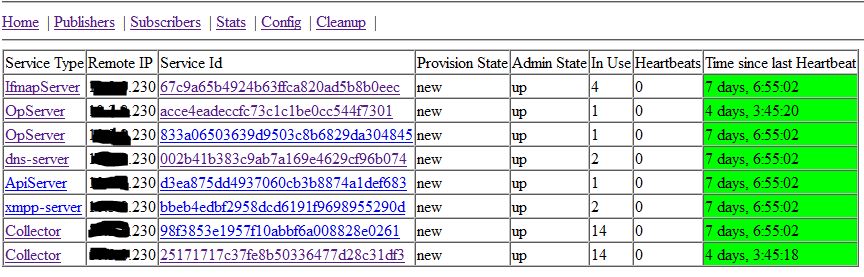
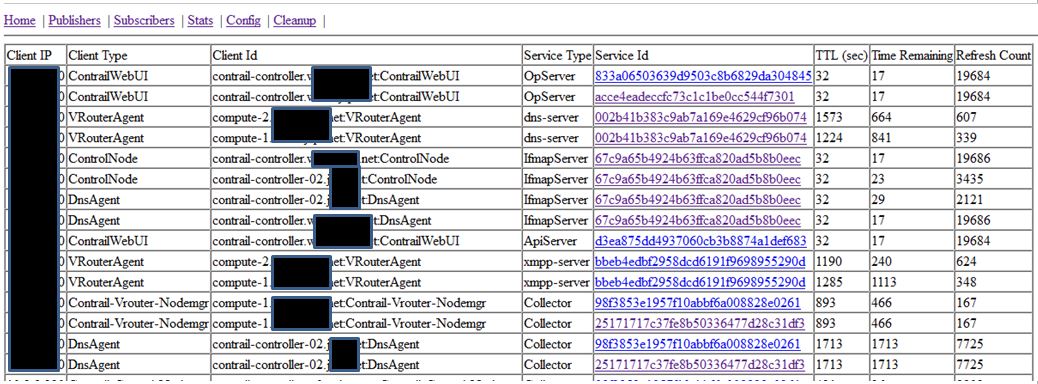
Service providers e.g. DNS, IF-MAP, etc. register with the discovery service as they come online, and anything requiring the use of the services subscribes. Usefully for debugging node issues you can take a look at the discovery service, by connecting to the server at port 5998 e.g. http://x.y.z.230:5998/services and see what services are registered:

contrail-discovery-publishersAnd who are using them:

contrail-discovery-clientsSo you can see, for example, that the the vRouters are subscribed to the XMPP service, and the dns-server.

As more services/nodes are brought online they are registered with the discovery service and will be used. Likewise, if a service stops responding to heartbeats, the discovery will remove that service from the active list, and the clients will use the alternatives.

Removing a vRouter

I had occasion to shrink my Contrail compute side today, and it occurred to me that while I could just pull the plug, this would result in a persistent alarm in the dashboard, mourning the loss of the old node. Since this is not an uncommon occurrence, I found a procedure to do this:

      1. On the confuration node (cfg-mgt) remove the vRouter
        fab detach_vrouter
      2. Stop openstack-nova-compute service in the node to be removed
        [root@hostname ~]# openstack-status
        openstack-nova-compute:       active
        [root@hostname ~]# service openstack-nova-compute stop
        Stopping openstack-nova-compute:                           [  OK  ]
      3. Remove to-be-removed compute-node from openstack node’s compute-list
        nova-manage service disable --host=<host ID> --service=nova-compute
      4. Run provision_vrouter.py command to delete this node
        source /opt/contrail/api-venv/bin/activate && python
        /opt/contrail/utils/provision_vrouter.py --host_name <host ID> --host_ip a.b.c.d --api_server_ip a.b.c.x --oper del --admin_user <ADMIN USER> --admin_password <ADMIN PASSWORD> --admin_tenant_name admin