Author Archives: colinmac

Hass.io and a custom relay

While I’m currently OpenHab based, I was looking into Hass.io as an option, but that does leave the challenge of getting my WiFi controlled relays to work correctly.

This turns out to be fairly simple in the end, by using the platform command-line option + CURL

switch:
   - platform: command_line
     switches:
        relay1:
          command_on: '/usr/bin/curl -X GET http://<ip address>/relay/on'
          command_off: '/usr/bin/curl -X GET http://<ip address>/relay/off'
          command_state: '/usr/bin/curl -X GET http://<ip address>/relay/state'
          value_template: '{{ value == "ON" }}'
          friendly_name: My Relay

Wifi Controlled Relay and OpenHab

Items used:

  • LOLIN D1 mini V3.1.0 (ESP8266)
  • LOLIN Relay Shield V2.0.0
// Load Wi-Fi library
#include <ESP8266WiFi.h>

// Replace with your network credentials
const char* ssid     = "mySSID";
const char* password = "VerySecret";

// Set web server port number to 80
WiFiServer server(80);

// Variable to store the HTTP request
String header;

// Auxiliary variables to store the current output state
String relayState = "OFF";
// we will have the relay on 5
const int relay = 5;


void setup() {
  Serial.begin(115200);
  // Initialize the output variables as outputs
  pinMode(relay, OUTPUT);
  // set the relay off by default
  digitalWrite(relay, LOW);
  pinMode(LED_BUILTIN, OUTPUT);     // Initialize the LED_BUILTIN pin as an output
  // we match the LED state to the relay state
  digitalWrite(LED_BUILTIN, HIGH);  // High is off, low is on

  // Connect to Wi-Fi network with SSID and password
  Serial.print("Connecting to ");
  Serial.println(ssid);
  WiFi.begin(ssid, password);
  while (WiFi.status() != WL_CONNECTED) {
    delay(500);
    Serial.print(".");
  }
  // Print local IP address and start web server
  Serial.println("");
  Serial.println("WiFi connected.");
  Serial.println("IP address: ");
  Serial.println(WiFi.localIP());
  server.begin();
}
void loop(){
  WiFiClient client = server.available();   // Listen for incoming clients

  if (client) {                             // If a new client connects,
    Serial.println("New Client.");          // print a message out in the serial port
    String currentLine = "";                // make a String to hold incoming data from the client
    while (client.connected()) {            // loop while the client's connected
      if (client.available()) {             // if there's bytes to read from the client,
        char c = client.read();             // read a byte, then
        Serial.write(c);                    // print it out the serial monitor
        header += c;
        if (c == '\n') {                    // if the byte is a newline character
          // if the current line is blank, you got two newline characters in a row.
          // that's the end of the client HTTP request, so send a response:
          if (currentLine.length() == 0) {
            // HTTP headers always start with a response code (e.g. HTTP/1.1 200 OK)
            // and a content-type so the client knows what's coming, then a blank line:
            client.println("HTTP/1.1 200 OK");
            client.println("Content-type:text/plain");
            client.println("Connection: close");


            // turns the GPIOs on and off
            if (header.indexOf("GET /relay/on") >= 0) {
              Serial.println("Relay on");
              relayState = "ON";
              digitalWrite(LED_BUILTIN, LOW);  // High is off, low is on
              digitalWrite(relay, HIGH);
            } else if (header.indexOf("GET /relay/off") >= 0) {
              Serial.println("Relay off");
              relayState = "OFF";
              digitalWrite(relay, LOW);
              digitalWrite(LED_BUILTIN, HIGH);  // High is off, low is on
            }
            else if (header.indexOf("GET /relay/status") >= 0) {
              Serial.print("Sending status: ");
              Serial.println(relayState);
              
              client.println();
              client.print(relayState);
              client.println();
              
            }
            client.println();
            break;
          } else { // if you got a newline, then clear currentLine
            currentLine = "";
          }
        } else if (c != '\r') {  // if you got anything else but a carriage return character,
          currentLine += c;      // add it to the end of the currentLine
        }
      }
    }
    // Clear the header variable
    header = "";
    // Close the connection
    delay(1);
    client.stop();
    Serial.println("Client disconnected.");
    Serial.println("");
  }
}        
  

Now for the OpenHab side

Here, I’m making use of the HTTP binding (and the REGEX mapping), and we basically have 3 calls we need to handle

  • On
  • Off
  • Status

And so our items definition is simple to handle those 3 cases:

Switch MyRelay "MyRelay" <switch> ( gSwitches, gRelay ) { http=">[ON:GET:http://<IP Address>/relay/on] >[OFF:GET:http://<IP Address>/relay/off] <[http://<IP Address>/relay/status:10000:REGEX((.*))]"}

And that is basically it – I can now control the on/off of my relays, and check on the current status.

Conclusion / Finishing Thoughts

Some obvious points to consider are:

  • Lack of security – anything that can reach the IPs of the relays can manipulate their state
  • Lack of rate limiting – a follow up from the 1st point is that we don’t do any cooldowns or rate limiting to prevent accident or maliciousness from repeatedly toggling the relays, potentially damaging the relay and worse, the appliance
  • Updating the relays – requires them to be disconnected and connected via USB to a PC/programmer

OpenWeatherMap and OpenHab

With the end of the YahooWeather API, I signed up for some API keys from OpenWeatherMap’s free tier, but had real trouble getting the default weather binding to work. After many wasted hours puzzling over the following error message, I eventually found this thread.

[ERROR] [nal.provider.AbstractWeatherProvider] - OPENWEATHERMAP[home]: Can't retreive weather data: Invalid API key. Please see http://openweathermap.org/faq#error401 for more info.

The error is correct, but uninformative – the issue is that default binding is calling on the “paid for” API rather then the free one, so yes my free API key is invalid for the API call I’m making. Unfortunately that is less then informative when testing your API keys in a browser and receiving valid JSON!!

The solution for me was to add org.openhab.binding.weather-1.13.0-SNAPSHOT.jar to my addons directory, then using the following weather.items I was up and running:

Group gWeather

// atmosphere
Number   Humidity		  "Humidity [%d %%]"	 (gWeather) {weather="locationId=home, type=atmosphere, property=humidity"}
Number   Visibility		  "Visibility [%.2f km]" (gWeather) {weather="locationId=home, type=atmosphere, property=visibility"}
Number   Visibility_Mph   "Visibility [%.2f mi]" (gWeather) {weather="locationId=home, type=atmosphere, property=visibility, unit=mph"}
Number   Pressure		  "Pressure [%.2f mb]"   (gWeather) {weather="locationId=home, type=atmosphere, property=pressure"}
Number   Pressure_Inches  "Pressure [%.2f in]"   (gWeather) {weather="locationId=home, type=atmosphere, property=pressure, unit=inches"}
String   Pressure_Trend   "Pressuretrend [%s]"   (gWeather) {weather="locationId=home, type=atmosphere, property=pressureTrend"}
Number   Ozone            "Ozone [%d ppm]"		 (gWeather) {weather="locationId=home, type=atmosphere, property=ozone"}
Number   UV_Index         "UV Index"              (gWeather){weather="locationId=home, type=atmosphere, property=uvIndex, scale=0"}

// clouds
Number   Clouds   "Clouds [%.0f %%]"  (gWeather) {weather="locationId=home, type=clouds, property=percent"}

// condition
String   Condition        "Condition [%s]"     (gWeather) {weather="locationId=home, type=condition, property=text"}
String   Condition_ID     "Condition id [%s]"  (gWeather) {weather="locationId=home, type=condition, property=id"}
DateTime ObservationTime  "Observation time [%1$td.%1$tm.%1$tY %1$tH:%1$tM]"  (gWeather) {weather="locationId=home, type=condition, property=observationTime"}
DateTime LastUpdate       "Last update [%1$td.%1$tm.%1$tY %1$tH:%1$tM]"      (gWeather)  {weather="locationId=home, type=condition, property=lastUpdate"}
String   CommonId         "Common id [%s]"     (gWeather) {weather="locationId=home, type=condition, property=commonId"}
Image    LocalCurrentConditionIcon "Icon" (gWeather) { weather="locationId=home, type=condition, property=icon-id" }

// precipitation
Number   Rain          "Rain [%.2f mm/h]"  (gWeather) {weather="locationId=home, type=precipitation, property=rain"}
Number   Rain_Inches   "Rain [%.2f in/h]"  (gWeather) {weather="locationId=home, type=precipitation, property=rain, unit=inches"}
Number   Snow          "Snow [%.2f mm/h]"  (gWeather) {weather="locationId=home, type=precipitation, property=snow"}
Number   Snow_Inches   "Snow [%.2f in/h]"  (gWeather) {weather="locationId=home, type=precipitation, property=snow, unit=inches"}
Number   Precip_Probability   "Precip probability [%d %%]"  (gWeather) {weather="locationId=home, type=precipitation, property=probability"}
// new total property in 1.8, only Wunderground
Number   Precip_Total         "Precip total [%d mm]"  (gWeather) {weather="locationId=home, type=precipitation, property=total"}
Number   Precip_Total_Inches  "Precip total [%d in]"  (gWeather) {weather="locationId=home, type=precipitation, property=total, unit=inches"}

// temperature
Number   Temperature      "Temperature [%.2f °C]"      (gWeather) {weather="locationId=home, type=temperature, property=current"}
Number   Temperature_F    "Temperature [%.2f °F]"      (gWeather) {weather="locationId=home, type=temperature, property=current, unit=fahrenheit"}
Number   Temp_Feel        "Temperature feel [%.2f °C]" (gWeather) {weather="locationId=home, type=temperature, property=feel"}
Number   Temp_Feel_F      "Temperature feel [%.2f °F]" (gWeather) {weather="locationId=home, type=temperature, property=feel, unit=fahrenheit"}
Number   Temp_Dewpoint    "Dewpoint [%.2f °C]"         (gWeather) {weather="locationId=home, type=temperature, property=dewpoint"}
Number   Temp_Dewpoint_F  "Dewpoint [%.2f °F]"         (gWeather) {weather="locationId=home, type=temperature, 
property=dewpoint, unit=fahrenheit"}
// min and max values only available in forecasts
Number   Temp_Min         "Temperature min [%.2f °C]"  (gWeather) {weather="locationId=home, type=temperature, property=min"}
Number   Temp_Min_F       "Temperature min [%.2f °F]"  (gWeather) {weather="locationId=home, type=temperature, property=min, unit=fahrenheit"}
Number   Temp_Max         "Temperature max [%.2f °C]"  (gWeather) {weather="locationId=home, type=temperature, property=max"}
Number   Temp_Max_F       "Temperature max [%.2f °F]"  (gWeather) {weather="locationId=home, type=temperature, property=max, unit=fahrenheit"}
String   Temp_MinMax      "Min/Max [%s °C]"            (gWeather) {weather="locationId=home, type=temperature, property=minMax"}
String   Temp_MinMax_F    "Min/Max [%s °F]"            (gWeather) {weather="locationId=home, type=temperature, property=minMax, unit=fahrenheit"}

// wind
Number   Wind_Speed           "Windspeed [%.2f km/h]"   (gWeather) {weather="locationId=home, type=wind, property=speed"}
Number   Wind_Speed_Beaufort  "Windspeed Beaufort [%d]" (gWeather) {weather="locationId=home, type=wind, property=speed, unit=beaufort"}
Number   Wind_Speed_Knots     "Windspeed [%.2f kn]"     (gWeather) {weather="locationId=home, type=wind, property=speed, unit=knots"}
Number   Wind_Speed_Mps       "Windspeed [%.2f mps]"    (gWeather) {weather="locationId=home, type=wind, property=speed, unit=mps"}
Number   Wind_Speed_Mph       "Windspeed [%.2f mph]"    (gWeather) {weather="locationId=home, type=wind, property=speed, unit=mph"}
String	 Wind_Direction       "Wind direction [%s]"     (gWeather) {weather="locationId=home, type=wind, property=direction"}
Number   Wind_Degree          "Wind degree [%.0f °]"    (gWeather) {weather="locationId=home, type=wind, property=degree"}
Number   Wind_Gust            "Wind gust [%.2f km/h]"   (gWeather) {weather="locationId=home, type=wind, property=gust"}
Number   Wind_Gust_Beaufort   "Wind gust Beaufort [%d]" (gWeather) {weather="locationId=home, type=wind, property=gust, unit=beaufort"}
Number   Wind_Gust_Knots      "Wind gust [%.2f kn]"     (gWeather) {weather="locationId=home, type=wind, property=gust, unit=knots"}
Number   Wind_Gust_Mps        "Wind gust [%.2f mps]"    (gWeather) {weather="locationId=home, type=wind, property=gust, unit=mps"}
Number   Wind_Gust_Mph        "Wind gust [%.2f mph]"    (gWeather) {weather="locationId=home, type=wind, property=gust, unit=mph"}
Number   Wind_Chill           "Wind chill [%.2f °C]"    (gWeather) {weather="locationId=home, type=wind, property=chill"}
Number   Wind_Chill_F         "Wind chill [%.2f °F]"    (gWeather) {weather="locationId=home, type=wind, property=chill, unit=fahrenheit"}

OpenHab – Boost Button on the Basic UI

While I’ve been adding simple on/off controls and rules controlling timers for my heating, I noticed something that was missing was the idea of a 1+ hour boost button, so I decided to create one.

The standard pattern for building this type of thing is to create a “dummy” Switch – one not bound to any channel, and make use of that + timers in the rules to handle the off transition. In my sitemap however, I was aiming to have a push button type setup, rather then a toggle.

One pattern I found for this made use of an additional dummy Switch to store the state, and use the “visibility” options in the sitemap to show the “on” or “running” buttons depending on that state. While nice, I prefer not to have a second dummy variable, so I don’t 🙂

Define the item

First I define the “dummy” switch:

Group gVirtual

Switch HeaterTimer "1 Hour Boost" <temperature> (gHeating, gVirtual, gSwitches)

The rules

Then I define my rules for this switch:

var Timer boostTimer = null

rule "One Hour Heat On"
when
    Item HeaterTimer received command
then
    Heating.sendCommand(ON)
    postUpdate(HeaterTimer, ON)
    if(boostTimer === null || boostTimer.hasTerminated){
        boostTimer = createTimer(now.plusHours(1), [| 
            Heating.sendCommand(OFF)
            postUpdate(HeaterTimer, OFF)
            boostTimer = null
        ])
    }
    else{
        boostTimer.reschedule(now.plusHours(1)) // if pressed a second time keep it on for another hour from now
    }
end

So what I’m doing here is triggering on the HeaterTimer receiving a command, then I turn the heating on, and update the state of HeaterTimer to ‘On’.

If the timer is equal to null, or has ended, I create a timer set at 1 hour from now, and when the timer triggers I switch the heating off, update the state, and set the timer to null.

If we have an command, and the timer is already running e.g. I pushed the button again, then I reschedule to 1 hour from now.

Now for the sitemap

   Frame label="Heating" {
      Switch item=HeaterTimer mappings=[ON="Boost"] icon="fire-off" visibility=[HeaterTimer == OFF, HeaterTimer == "NULL"]
      Switch item=HeaterTimer mappings=[ON="Running"] icon="fire-on" visibility=[HeaterTimer == ON]

   }

This is where it gets a little interesting.

The first switch is showing an ON/Boost button, with the icon in the off state. This is only visible if the HeatingTimer is OFF, or equal to “NULL”.

Why the second/NULL check?

When the “dummy” switch is created, it is created with a null state – my persistence config will restore the state if we ever reload, but for the very first time, we need to handle the lack of ON/OFF state. You could update the sitemap after the first time you use it to remove the NULL comparison as it will only be used once. The other option is to only add the visibility options after you run for the first time.

The second switch should be obvious now – we have a “Running” button, that if you push it, will add 1 hour from now (remember the rules) to the timer.

Preparing for some Home Automation – Heating

Today I decided to start planning for the install of some home automation kit, specifically related to heating, but while planning on that I decided to take a closer look at a problem I’ve been having for some time – the thermostat hasn’t been doing very much.

This is a standard dial thermostat – and as you would expect, the numbers on the dial are a little off (~6°C) compared to the actual temperature. This isn’t the actual issue, since once you find the comfortable point, it doesn’t really matter what the reading on the dial is.

The issue I was having was that, regardless of the thermostat position, the radiators were always on (except in the rooms with thermostatic valves) – I had managed before the summer by running with the timer on the boiler, and reducing the boiler temperature.

This has the side effect of (1) the boiler operating less efficiently, and (2) I can’t use it for heating the hot water as the temperature isn’t high enough.

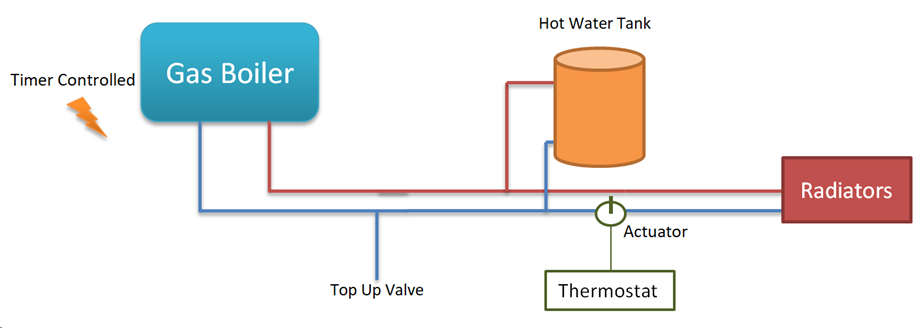
After some digging, I got to this simple diagram of the basic setup:

As you can see, the thermostat doesn’t directly influence the boiler at all – instead it controls the actuator, which in turn allows hot water to flow, or not, through the radiator loop.

Taking a multimeter to the two wires in the Thermostat, I could see that it was in fact switching – 240V between the two when turned off vs 0V between the two terminals when it was on.

So with the thermostat basically functional, I then moved on to the Actuator (SZ2301) – this is a basic 2 port actuator. When there is current applied it opens, and when the current is stopped a spring pushes it back closed – generally speaking these things either work or they don’t.

But… on closer inspection, I found that someone had set the manual lever to flushing – basically forcing the valve open at all times. I moved it back to the “normal” position, and bingo – the thermostat could now control the flow of hot water through the radiators.


Next Steps

Now that that little niggle is sorted, I’m looking for a HA type solution to allow me to manage it all a bit better.

I’m also starting to use OpenHab for some of my other devices, so integration into that setup is essential.

TBC…

DHCP, Linux bridges and VMware

I do a lot of testing with eve-ng which is in turn running on a VM within ESXi. Naturally I have a Distributed V-Switch, with multiple uplinks for redundancy.

EVE-NG version: 2.0.3-92
Platform: ESXi 6.5
Security config on hypervisor:

  • Promiscuous mode Accept
  • MAC address changes Accept
  • Forged transmits Accept

Unfortunately this seems to break DHCP for reasons I can’t quite fathom. If we look at the topology we are working with:

The DHCP server is hosted on the same hypervisor/dvSwitch, but for some crazy reason, the DHCP Response never makes it across the bridge within the EVE-NG VM.

brctl show
bridge name     bridge id               STP enabled     interfaces
pnet2           8000.000c2976c6ca       no              eth2
                                                        vunl0_1_0
                                                        vunl0_2_1
                                                        vunl0_3_0
                                                        vunl0_4_0
tcpdump -i vunl0_2_1
tcpdump: verbose output suppressed, use -v or -vv for full protocol decode
listening on vunl0_2_1, link-type EN10MB (Ethernet), capture size 262144 bytes
11:05:32.267298 IP 0.0.0.0.bootpc > 255.255.255.255.bootps: BOOTP/DHCP, Request from 50:00:00:cb:38:c2 (oui Unknown), length 300
11:05:32.267602 IP 0.0.0.0.bootpc > 255.255.255.255.bootps: BOOTP/DHCP, Request from 50:00:00:cb:38:c2 (oui Unknown), length 300
11:05:34.265517 IP 0.0.0.0.bootpc > 255.255.255.255.bootps: BOOTP/DHCP, Request from 50:00:00:01:00:00 (oui Unknown), length 300
11:05:34.265784 IP 0.0.0.0.bootpc > 255.255.255.255.bootps: BOOTP/DHCP, Request from 50:00:00:01:00:00 (oui Unknown), length 300
tcpdump -i pnet2 port bootps -n
tcpdump: verbose output suppressed, use -v or -vv for full protocol decode
listening on pnet2, link-type EN10MB (Ethernet), capture size 262144 bytes
11:07:32.903789 IP 0.0.0.0.68 > 255.255.255.255.67: BOOTP/DHCP, Request from 50:00:00:cb:38:c2, length 300
11:07:32.904151 IP 0.0.0.0.68 > 255.255.255.255.67: BOOTP/DHCP, Request from 50:00:00:cb:38:c2, length 300
11:07:32.944639 IP 172.168.1.3.67 > 172.168.1.243.68: BOOTP/DHCP, Reply, length 308
11:07:32.944679 IP 172.168.1.3.67 > 172.168.1.243.68: BOOTP/DHCP, Reply, length 308
11:07:32.944695 IP 172.168.1.3.67 > 172.168.1.243.68: BOOTP/DHCP, Reply, length 308
11:07:32.944817 IP 172.168.1.3.67 > 172.168.1.243.68: BOOTP/DHCP, Reply, length 308
11:07:34.499852 IP 0.0.0.0.68 > 255.255.255.255.67: BOOTP/DHCP, Request from 50:00:00:01:00:00, length 300
11:07:34.500099 IP 0.0.0.0.68 > 255.255.255.255.67: BOOTP/DHCP, Request from 50:00:00:01:00:00, length 300
11:07:34.500326 IP 172.168.1.3.67 > 172.168.1.240.68: BOOTP/DHCP, Reply, length 308
11:07:34.500409 IP 172.168.1.3.67 > 172.168.1.240.68: BOOTP/DHCP, Reply, length 308
11:07:34.500434 IP 172.168.1.3.67 > 172.168.1.240.68: BOOTP/DHCP, Reply, length 308
11:07:34.500508 IP 172.168.1.3.67 > 172.168.1.240.68: BOOTP/DHCP, Reply, length 308

Seems this issue has been seen before here.

Note that eth0 doing a DHCP request works fine, but the request coming via eth2 dies on the eth2 side of the bridge.

A workaround is to disable the redundant uplinks, which allows the DHCP Response to work as expected.

Setting up Awesome Miner for XMRPool

While playing around with Monero mining I decided to give Awesome Miner a try.

While trying to provision the XMRPool.net pool, I had a bit of trouble getting it working.

[2018-01-22 17:02:25] Using JSON-RPC 2.0
[2018-01-22 17:02:26] NVML GPU monitoring enabled.
[2018-01-22 17:02:26] NVAPI GPU monitoring enabled.
[2018-01-22 17:02:26] 1 miner thread started, using 'cryptonight' algorithm.
[2018-01-22 17:02:26] HTTP request failed: Empty reply from server


The issue is that you need to instruct it to use the stratum protocol, so the server URL should be constructed as follows:

stratum+tcp://<Server URL>:<Port>

So the pool config will look like this:


And with that we are up and running:

[2018-01-22 17:06:25] Using JSON-RPC 2.0
[2018-01-22 17:06:25] Starting on stratum+tcp://mine.xmrpool.net:5557
[2018-01-22 17:06:26] NVML GPU monitoring enabled.
[2018-01-22 17:06:26] NVAPI GPU monitoring enabled.
[2018-01-22 17:06:26] 1 miner thread started, using 'cryptonight' algorithm.
[2018-01-22 17:06:26] Stratum difficulty set to 5000 (5)
[2018-01-22 17:06:26] GPU #0: Gigabyte GTX 1070, 7454 MB available, 15 SMX
[2018-01-22 17:06:26] GPU #0: 960 threads (9.875) with 60 blocks
[2018-01-22 17:06:27] API open to the network in read-only mode on port 4028
[2018-01-22 17:06:54] accepted: 1/1 (diff 5.108), 34.67 H/s yes!

Updating VCSA

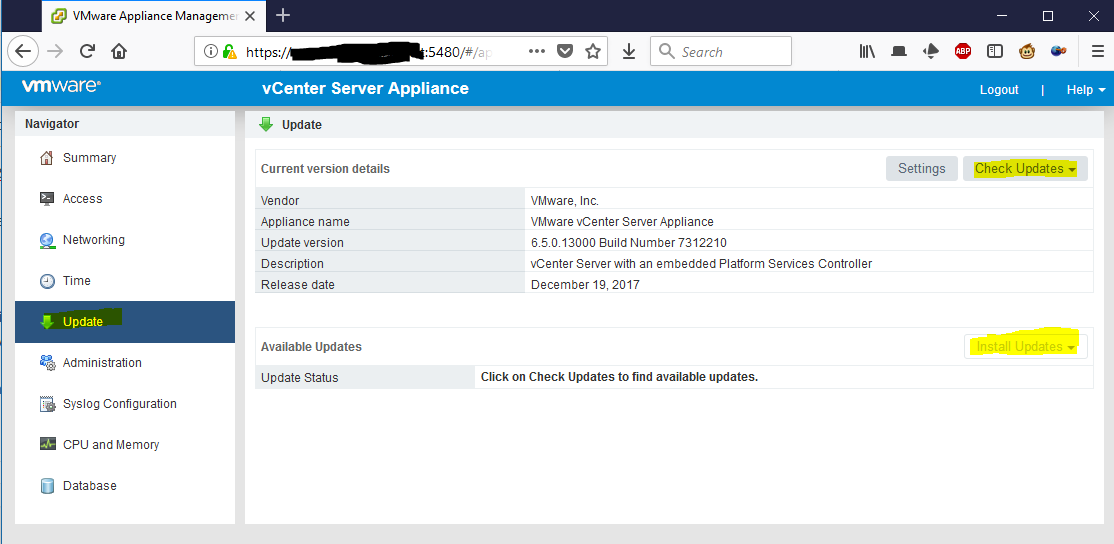
Fairly simple to update the vCenter Server Appliance, but I had a bit of hunting to track it down myself. Main point is to connect to your VCSA on port 5480. Authentication is using your root account not the SSO one.

As always, be sure to take a backup before you do this.

Once signed in, click Update, Check for Updates. Check Repository (note that VCSA will need internet connectivity for this).

Then under available updates, click install updates, install all updates, and reboot when prompted.

iperf Testing on Arista EOS

One of the many useful tools included with Arista EOS is iperf(2.0.5) which allows the switch to generate test TCP or UDP traffic. Something to note is that the total generated traffic is limited by the both the CPU capacity and the link between the CPU and the forwarding hardware, so do not expect this to be capable of linerate testing. This is useful for functional testing only.

For the client side, just drop to the bash shell, and point it towards the iperf server

L1#bash
Arista Networks EOS shell
[admin@L1 ~]$ iperf
Usage: iperf [-s|-c host] [options]
Try `iperf --help' for more information.
[admin@L1 ~]$ iperf  -c 172.16.0.4
------------------------------------------------------------
Client connecting to 172.16.0.4, TCP port 5001
TCP window size: 22.5 KByte (default)
------------------------------------------------------------
[  3] local 172.16.12.1 port 51455 connected with 172.16.0.4 port 5001
[ ID] Interval       Transfer     Bandwidth
[  3]  0.0-28.6 sec   384 KBytes   110 Kbits/sec

Running the IPerf server (traffic is from client to server) on the switch requires a little more work. By default iperf uses the port TCP/5001 in server mode for inbound connections. But Arista blocks this port by default as part of the Control Plane Policer. Therefore you have to temporarily add an iptables rule in the EOS shell to allow access to port TCP/5001.

[admin@L1 ~]$ sudo iptables -I INPUT -p tcp -m tcp --dport 5001 -j ACCEPT

This can later be undone by

[admin@L1 ~]$ sudo iptables -D INPUT -p tcp -m tcp --dport 5001 -j ACCEPT

Once you have the port open, start iperf in server mode and you will see reports of the incoming connections.

[admin@L2 ~]$ iperf -s -i 5
------------------------------------------------------------
Server listening on TCP port 5001
TCP window size: 85.3 KByte (default)
------------------------------------------------------------
[  4] local 172.16.0.4 port 5001 connected with 172.16.12.1 port 51455
[ ID] Interval       Transfer     Bandwidth
[  4]  0.0- 5.0 sec  55.1 KBytes  90.4 Kbits/sec
[  4]  5.0-10.0 sec  59.4 KBytes  97.3 Kbits/sec
[  4] 10.0-15.0 sec  58.0 KBytes  95.0 Kbits/sec
[  4] 15.0-20.0 sec  67.9 KBytes   111 Kbits/sec
[  4] 20.0-25.0 sec  65.0 KBytes   107 Kbits/sec
[  4] 25.0-30.0 sec  18.4 KBytes  30.1 Kbits/sec
[  4]  0.0-31.7 sec   384 KBytes  99.3 Kbits/sec

Note that these results are in a virtualized, simulated environment. The amount of traffic that a real switch can generate is much higher.