Tag Archives: simple things

UPC – Moving House and Cable TV ‘No Signal’

I recently moved from Dublin to Limerick and brought my UPC kit with me – simple change of address and should have been no hassle. While the broadband worked fine, the set-top box was reporting ‘No Signal’. Being a networking guy when I have a piece of equipment (in this case Cisco/UPC-branded Mediabox ) reporting ‘No Signal’ I assume there is a L1 problem, and that it isn’t actually getting a signal.

Turns out I was wrong.

You are warned when moving that you may have to enter an activation code from time to time, which UPC helpfully list here. Turns out that different regions are using different frequency blocks, and once the initial setup is done and the activation code entered the device only scans the set of frequencies it was using previously, not the full possible range.

The solution: A Factory Reset

All DVR settings, etc. are preserved, but the device will re-initialise and scan the full set of channels. Once it does that it will find the signal and prompt you for the activation code. Enter the one appropriate to your region and you are sorted.

/etc/hosts and Signalware – DFdaemon issues

While doing an install of Signalware’s SIGTRAN stack (SignalWare 9.0 SP6) I had big problems getting it to actually work. The menu install process ran as expected, but the node wasn’t commissioned and therefore the go.omni process wouldn’t start, as the DFconvert step was failing.

It turns out the root cause was a problem with DFdaemon (this is a service that has something to do with maintaining the file system used by Ulticom). The service was running, but when I tried DFdaemon_status it was timing out.

Eventually killed off the service (init kept restarting it) by commenting out the contents of the init file and kill -15 1 a few times, and ran it manually in debug mode:

root@server init]# DFdaemon -d
16:49:11  0 DFdaemon::main           : using port 10600
16:49:11  0 Platform                 : ************* CE_c *************
Name:   server
mCeIndex:       0
mLanCount:      0
Current LAN index:      0
Current status: DOWN
Synchronization status: SYNC_REQD
Pending status request list:
EMPTY

oluCEList:      8
OluCe 0:
OluCe 0:
OluCe 0:
OluCe 0:
OluCe 0:
OluCe 0:
OluCe 0:
OluCe 0:
-------------

16:49:11  0 MessageQueue::MessageQue :
16:49:11  0 UDPmsgQueue_c::UDPmsgQue : Recv buffer : 524288
16:49:11  0 UDPmsgQueue_c::UDPmsgQue : Send buffer : 524288
16:49:11  0 DFfileList_c::initEntrie : reach the end of /opt/apps/ulcm/sls0479/dffile

16:49:11  0 UDPmsgQueue_c::startComm :
16:49:11  0 UDPmsgQueue_c::MessageQu : begin thread
16:49:11  0 global                   : DFdaemon started
16:49:11  0 DFtaskQueue_c::main      : begin thread
16:49:11  0 UDPmsgQueue_c::MessageQu : begin thread
16:49:11  0 SDFS::main               : begin thread
16:49:11  0 DFfileList_c::main       : begin thread
16:49:11  0 HealthCheck::main        : begin thread
16:49:11  0 HealthCheck::main        : wakeup before sleep
16:49:11  0 SDFS::main               : wakeup before sleep(1000)
16:49:11  0 HealthCheck::main        : wakeup after sleep
16:49:11  0 HealthCheck::main        : wakeup before sleep
16:49:12  0 SDFS::main               : wakeup after sleep
16:49:12  0 HealthCheck::main        : wakeup after sleep
16:49:12  0 HealthCheck::main        : wakeup before sleep
16:49:12  0 SDFS::main               : wakeup before sleep(1000)
16:49:12  0 HealthCheck::main        : wakeup after sleep
16:49:12  0 HealthCheck::main        : wakeup before sleep
16:49:13  0 HealthCheck::main        : wakeup after sleep
16:49:13  0 HealthCheck::main        : wakeup before sleep
16:49:13  0 SDFS::main               : wakeup after sleep
16:49:13  0 SDFS::main               : wakeup before sleep(1000)
16:49:13  0 HealthCheck::main        : wakeup after sleep
...
16:49:40  0 HealthCheck::main        : wakeup after sleep
16:49:40  0 HealthCheck::main        : wakeup before sleep
16:49:40  0 SDFS::main               : wakeup after sleep
16:49:40  0 SDFS::main               : wakeup before sleep(1000)
16:49:40  0 UDPmsgQueue_c::MessageQu : Received message from unknown sender, IP address: ::ffff:127.0.0.1    <<---- DFdaemon_status
16:49:40  0 HealthCheck::main        : wakeup after sleep
16:49:40  0 HealthCheck::main        : wakeup before sleep
16:49:41  0 HealthCheck::main        : wakeup after sleep
16:49:41  0 HealthCheck::main        : wakeup before sleep
16:49:41  0 SDFS::main               : wakeup after sleep
16:49:41  0 SDFS::main               : wakeup before sleep(1000)
16:49:41  0 HealthCheck::main        : wakeup after sleep
16:49:41  0 HealthCheck::main        : wakeup before sleep

It seems that for some reason the localhost entry for IPv6 was causing a problem. The entry that was part of the server build looked like this:

127.0.0.1   localhost localhost.localdomain localhost4 localhost4.localdomain4
::1         localhost

It should be like this:

127.0.0.1   localhost localhost.localdomain localhost4 localhost4.localdomain4
::1         localhost localhost.localdomain localhost6 localhost6.localdomain6

With that DFconvert ran and the rest of the process was fine.

Internet of Things – Potential Architectures & Drawbacks

The Internet-of-Things or IoT (terrible name since everyone knows that IoT stands for Inter-operability Testing) seems to be quite the buzzword around lately – replacing the previous version which of course was Machine-to-Machine [M2M]. Nest and other home telemetry/automation tools seem to be quite the cliche-du-jour for the digirati.

Consider what Nest actually does – local (in house) temperature compared with external (nearest location/airport) temperature and a few interesting algorithms to handle temperature differentials, learn preferences, awareness of presence and away type scenarios. Of course  given that it seems to automatically download updates, I’m sure it’s logging and submitting lots of information ‘to improve the product’

Likewise, we have hubs finally coming onstream to try and manage all the possible combinations of hardware and software for home sensors and everything else (or so they promise).

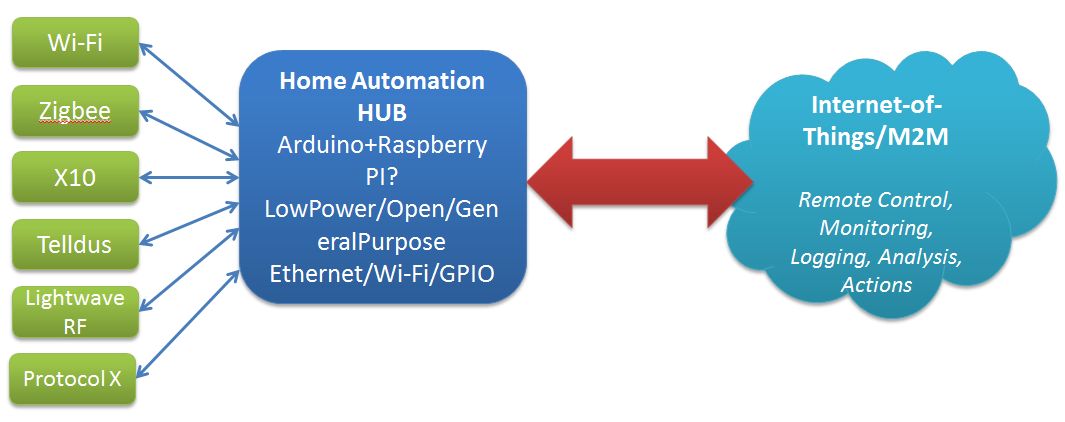
Think home sensors/lightbulbs/whatever – currently we have a plethora of specs to choose from for household comms and telemetry: X10, Zigbee, Z-Wave, Lightwave RF. Telldus, etc. Currently each manufacturer has their own choice of spec, controller software, etc.

Fortunately the Open Source/Open Hardware groups are are already experimenting with options to handle this – a good example is the Home Automation Hub (HAH) project which sets out to turn an Orange Livebox router into a home automation server, with an extra bit of hardware that – like the TellStick – allows it to control a range of gadgetry, and even keep an eye on energy consumption too. Likewise the dovado routers I’ve raved about before have the beginnings of some interesting Home Automation features with integration with Telldus sticks and the use of GPS to determine sunrise and sunset times for the location.

Open Source Open Hardware Hub

Home Hub - Internet of ThingsKey features as I see them are:

  • Compact
  • Reliable
  • Minimum Downtime
  • Low power
  • Open

Publish & Subscribe

So, assuming that we can get all these sensors talking to our hub, and that data recording (and potentially taking local actions based on that – heating, lighting, etc.) what do we do with it.

The hobbiest answer is to put it up on a website for your own entertainment. The more interesting options are open to the hub provider, and I see a few possible approaches here:

  1. Act as a relationship broker: making partnerships with different consumers of the telemetry e.g. allow the hub to submit information of the users choice to projects of their interest e.g. SmartCities, utility providers, etc.
  2. Act as a centralised clearing house: store all users data, sell it in bulk (users are the product) and plan to be bought at some point by Google/IBM/whoever
  3. Act as a centralised broker – grouping your users according to, for example, energy usage patterns and negotiating (optional) bulk deals from utility providers. For example, contacting the Power company and saying here is aggregate usage data for 30k ‘night owls’ – can we get a special deal, since they are offsetting the base load cost, but not adding to peak loads.


Providers/Website subscribing to the date

Decoding TCAP in Wireshark

Just jotting this down as a quick note, as I had some problems getting Wireshark (not it’s fault) to decode a SIGTRAN trace I was working on.

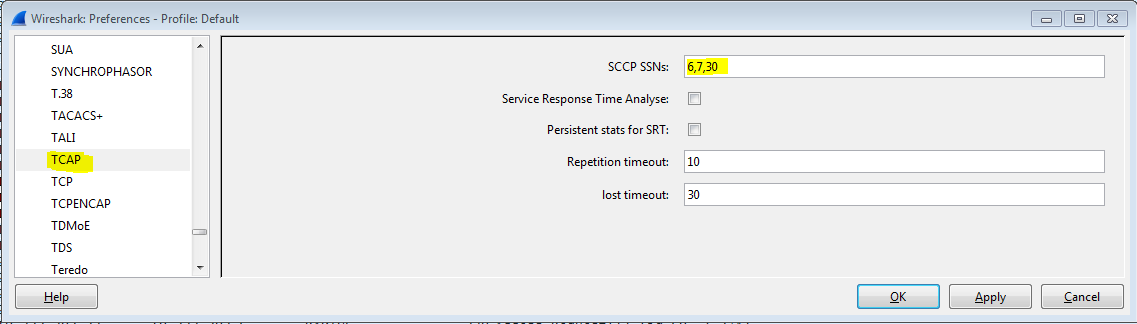
Normally you have to configure TCAP to know what Subsystem Numbers [SSN] to handle on the SCCP layer e.g. 7 for VLR, 8 for MSC, etc. and this is done under Edit -> Preferences -> Protocols -> TCAP

TCAP SSN Config

Unfortunately my trace had a bug – there was no SSN in the response message so Wireshark was only decoding up to the SCCP layer.

SSN Not Present

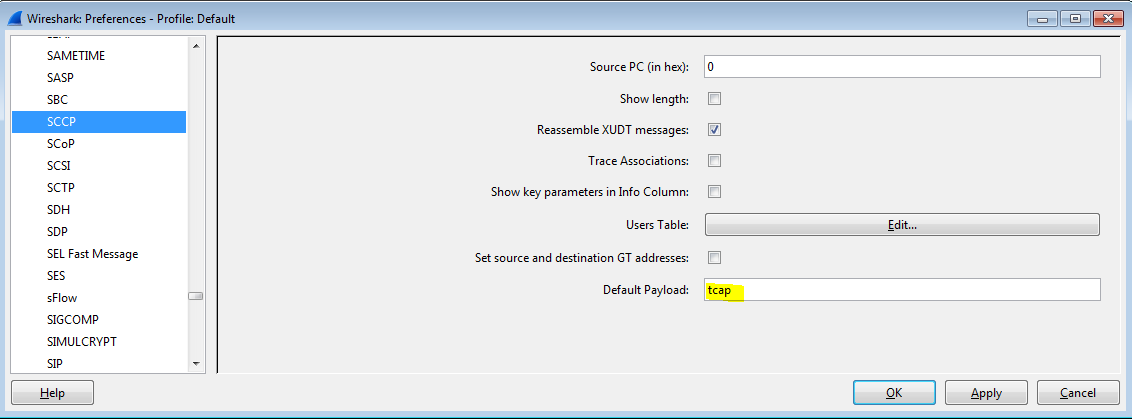
You can handle this case by instructing SCCP to decode as TCAP by default.

SCCP Default Payload

Checking the current version of Nova

It seems there is nothing along the lines of /etc/release to tell us what version of nova-compute we are actually running, but you can extract the required information. On the compute host:

[root@compute-1 ~]# nova-manage shell python
Python 2.6.6 (r266:84292, Jan 22 2014, 09:42:36)
[GCC 4.4.7 20120313 (Red Hat 4.4.7-4)] on linux2
Type "help", "copyright", "credits" or "license" for more information.
(InteractiveConsole)
>>> from nova import version
>>> version.version_string()
'2013.1'
>>>

Raspberry Pi – Getting SMB to work

I just got a new Raspberry Pi Model B and am planning on playing with it as a Media Center system. Getting the basics up and running took a little more work then I expected as I didn’t have neither HDMI/DVI converter nor USB Keyboard (PS/2 rules).

I had a pre-formatted SDCard ready to roll but when I attached the network cable and power unfortunately the device didn’t connect to the network – plugging it into the TV I saw that the it was stopping at the NOOBS loader. This allows you to get the Pi up and running easily, without network access, and to select and install from a menu of Operating Systems. Kind of conflicted about how good an idea this is to the typical linux/electronics hobbiest. Effectively this acts like a recovery partition after the first install.

Plug in a mouse, select Raspbian (as I usually work on Debian) and a few mins later the install is complete. Reboot and complete the setup and it was networked. Once I found the IP I updated and upgraded all the packages and installed XRDP for remote desktop access.

At this point I wanted to check that SMB would work – it wouldn’t 🙁

pi@raspberrypi ~ $ sudo mkdir /mnt/Media
pi@raspberrypi ~ $ sudo vi /etc/fstab
pi@raspberrypi ~ $ mount /mnt/Media
mount: only root can mount //192.168.1.8/samba on /mnt/Media
pi@raspberrypi ~ $ sudo !!
sudo mount /mnt/Media
mount error: cifs filesystem not supported by the system
mount error(19): No such device
Refer to the mount.cifs(8) manual page (e.g. man mount.cifs)
pi@raspberrypi ~ $ cd /mnt
pi@raspberrypi /mnt $ ls
Media
pi@raspberrypi /mnt $ mount -t cifs -o user=xxxx //192.168.1.8/samba /mnt/Media
mount: only root can do that
pi@raspberrypi /mnt $ sudo !!
sudo mount -t cifs -o user=xxxx//192.168.1.8/samba /mnt/Media
Password:
mount error: cifs filesystem not supported by the system
mount error(19): No such device
Refer to the mount.cifs(8) manual page (e.g. man mount.cifs)
pi@raspberrypi /mnt $ sudo modprobe cifs
libkmod: ERROR ../libkmod/libkmod.c:554 kmod_search_moddep: could not open moddep file '/lib/modules/3.6.11+/modules.dep.bin'

This was something of a puzzle as both cifs-utils and libsmbclient are installed. Turns out that the firmware was out of date – a quick rpi-update and reboot and problem solved!

pi@raspberrypi /mnt $ sudo rpi-update
*** Raspberry Pi firmware updater by Hexxeh, enhanced by AndrewS
*** Performing self-update
% Total    % Received % Xferd  Average Speed   Time    Time     Time  Current
Dload  Upload   Total   Spent    Left  Speed
100   135  100   135    0     0    240      0 --:--:-- --:--:-- --:--:--   323
100  7177  100  7177    0     0   7315      0 --:--:-- --:--:-- --:--:--  7315
*** Relaunching after update
*** Raspberry Pi firmware updater by Hexxeh, enhanced by AndrewS
*** ARM/GPU split is now defined in /boot/config.txt using the gpu_mem option!
*** We're running for the first time
*** Setting up firmware (this may take a few minutes)
Cloning into '//root/.rpi-firmware'...
remote: Counting objects: 3378, done.
remote: Compressing objects: 100% (2610/2610), done.
Receiving objects: 100% (3378/3378), 25.96 MiB | 1.20 MiB/s, done.
remote: Total 3378 (delta 1608), reused 1117 (delta 504)
Resolving deltas: 100% (1608/1608), done.
...

Link

An EMC systems engineer has written a blog post about the VMAX FAST VP array. While it’s full of good advice, he unintentionally sums up everything that’s wrong with many applications in IT today: the knobs.

This is a problem I’ve seem more then once – the box has many nerd-knobs and therefore people feel they have to fiddle with them. Once they start to do that, inevitably something goes wrong and the performance drops. Then they start to fiddle some more to try and ‘fix’ it, until there are so many knobs turned it is impossible to maintain/troubleshoot.


Contrail Setup – vRouter Provisioning Failure on new install

The importance of basic system configuration

As there is a tendency to happen, my contrail lab got completely hosed by someone (shared accounts are going to be disabled going forward!) and I decided to take advantage and rebuild it using separate admin and control/traffic interfaces – closer to production type environment. This also had the benefit that I could connect to the lab MX router and therefore have ‘public’ routable addresses.

Imagine my surprise when a completely clean install failed 🙁 This was especially surprising since the procedure hand worked before. Having spend a day pounding my head against the wall and blaming everything from VMware, to typos in the testbed.py file, to Gremlins, I found the problem.

Target Setup

The desired setup is as follows:
Controller node – running config management, analytics, control, etc.
Admin IP: a.b.c.230
Control/Dataplane: x.y.z.230

2 x Compute Hosts – running nova-compute and vRouter
Admin IP: a.b.c.231 – 232
Control/Dataplane: x.y.z.231 – 232

Problem – vRouter Provisioning Stalls/Fails

During the fab setup_all the setup process was stalling at the point when it was adding the vRouter (compute host). Even left overnight, this failed to progress.

[[email protected]] out: [localhost] local: ifconfig p2p2p0 | grep mtu | awk '{ print $NF }'
[[email protected]] out: [localhost] local: ifconfig p2p2p0 | grep MTU | sed 's/.*MTU.\([0-9]\+\).*/\1/g'
[[email protected]] out: [localhost] local: sudo mv /tmp/tmpG4fUw3/ifcfg-vhost0 /etc/sysconfig/network-scripts/ifcfg-vhost0
[[email protected]] out: [localhost] local: sudo cp /etc/sysconfig/network-scripts/ifcfg-p2p2p0 /etc/sysconfig/network-scripts/ifcfg-p2p2p0.rpmsave
[[email protected]] out: [localhost] local: sudo mv /tmp/tmpG4fUw3/ifcfg-p2p2p0 /etc/contrail/
[[email protected]] out: [localhost] local: sudo chkconfig network on
[[email protected]] out: [localhost] local: sudo chkconfig supervisor-vrouter on
[[email protected]] out: [[email protected]] run: source /opt/contrail/api-venv/bin/activate && python /opt/contrail/utils/provision_vrouter.py --host_name compute-1.lab.flat-planet.net --host_ip x.y.z.231 --api_server_ip x.y.z.230 --oper add --admin_user admin --admin_password secret123 --admin_tenant_name admin
[[email protected]] out: [[email protected]] out:
[[email protected]] out: [[email protected]] out:
[[email protected]] out: [[email protected]] out:

Looking through the contents of /var/log/contrail/ I saw that the Query Engine was reporting issues:

[root@contrail-controller contrail]# cat /var/log/contrail/qe.log
Pre exec cmd:/usr/bin/contrail_qe_pre
log4cplus:ERROR No appenders could be found for logger (root).
log4cplus:ERROR Please initialize the log4cplus system properly.
2014-03-13 Thu 16:55:22:109.910 GMT contrail-controller.lab.flat-planet.net [Thread 47816409982496, Pid 9400]: http-server-port 8091
2014-03-13 Thu 16:55:22:110.018 GMT contrail-controller.lab.flat-planet.net [Thread 47816409982496, Pid 9400]: Endpoint 0.0.0.0:0
2014-03-13 Thu 16:55:22:110.034 GMT contrail-controller.lab.flat-planet.net [Thread 47816409982496, Pid 9400]: Collectors 1
2014-03-13 Thu 16:55:22:110.051 GMT contrail-controller.lab.flat-planet.net [Thread 47816409982496, Pid 9400]: SANDESH: ROLE   : Generator
2014-03-13 Thu 16:55:22:110.063 GMT contrail-controller.lab.flat-planet.net [Thread 47816409982496, Pid 9400]: SANDESH: MODULE : QueryEngine
...
2014-03-13 Thu 16:55:22:113.246 GMT contrail-controller.lab.flat-planet.net [Thread 47816409982496, Pid 9400]: Db_Init: TTransportException what: connect() failed: Connection refused
Thrift: Thu Mar 13 16:55:22 2014 TSocket::open() connect() <Host: x.y.z.230 Port: 9160>Connection refused
2014-03-13 Thu 16:55:22:113.353 GMT contrail-controller.lab.flat-planet.net [Thread 47816409982496, Pid 9400]: Sandesh: Send: FAILED: 2014-Mar-13 16:55:22.113282 QeInit [SYS_WARN]: QELog: initialization of database failed. retrying 0 time src/query_engine/query.cc 1048
2014-03-13 Thu 16:55:27:113.648 GMT contrail-controller.lab.flat-planet.net [Thread 47816409982496, Pid 9400]: Db_Init: TTransportException what: connect() failed: Connection refused
Thrift: Thu Mar 13 16:55:27 2014 TSocket::open() connect() <Host: x.y.z.230 Port: 9160>Connection refused

Port 9160 is where our contrail-database (cassandra) lives – so the problem is that the provisioning script cannot connect to the system database in order to complete the provisioning.

[root@contrail-controller utils]# service contrail-database status
contrail-database                FATAL      Exited too quickly (process log may have details)
[root@contrail-controller utils]# service contrail-database start
contrail-database: ERROR (abnormal termination)
[root@contrail-controller utils]#

The problem here is that the process dies before logging any errors so at this point I have no clue as to why this is happening. Fortunately there was an already running system elsewhere (can also be found if you retained your console logs for the install) so I could get the exact command used to fire up the DB and see where it is going wrong.

[root@contrail-controller cassandra]# java -ea -javaagent:/usr/share/cassandra/lib/jamm-0.2.5.jar -XX:+UseThreadPriorities -XX:ThreadPriorityPolicy=42 -Xms8192M -Xmx8192M -Xmn2048M -XX:+HeapDumpOnOutOfMemoryError -Xss180k -XX:+UseParNewGC -XX:+UseConcMarkSweepGC -XX:+CMSParallelRemarkEnabled -XX:SurvivorRatio=8 -XX:MaxTenuringThreshold=1 -XX:CMSInitiatingOccupancyFraction=75 -XX:+UseCMSInitiatingOccupancyOnly -XX:+PrintGCDetails -XX:+PrintGCDateStamps -XX:+PrintHeapAtGC -XX:+PrintTenuringDistribution -XX:+PrintGCApplicationStoppedTime -XX:+PrintPromotionFailure -XX:PrintFLSStatistics=1 -Xloggc:/var/log/cassandra/gc-1393935278.log -Djava.net.preferIPv4Stack=true -Dcom.sun.management.jmxremote.port=7199 -Dcom.sun.management.jmxremote.ssl=false -Dcom.sun.management.jmxremote.authenticate=false -Dlog4j.configuration=log4j-server.properties -Dlog4j.defaultInitOverride=true -Dcassandra-foreground=yes -cp /etc/cassandra/conf:/usr/share/java/jna.jar:/usr/share/cassandra/lib/antlr-3.2.jar:/usr/share/cassandra/lib/apache-cassandra-1.2.11.jar:/usr/share/cassandra/lib/apache-cassandra-clientutil-1.2.11.jar:/usr/share/cassandra/lib/apache-cassandra-thrift-1.2.11.jar:/usr/share/cassandra/lib/avro-1.4.0-fixes.jar:/usr/share/cassandra/lib/avro-1.4.0-sources-fixes.jar:/usr/share/cassandra/lib/commons-cli-1.1.jar:/usr/share/cassandra/lib/commons-codec-1.2.jar:/usr/share/cassandra/lib/commons-lang-2.6.jar:/usr/share/cassandra/lib/compress-lzf-0.8.4.jar:/usr/share/cassandra/lib/concurrentlinkedhashmap-lru-1.3.jar:/usr/share/cassandra/lib/guava-13.0.1.jar:/usr/share/cassandra/lib/high-scale-lib-1.1.2.jar:/usr/share/cassandra/lib/jackson-core-asl-1.9.2.jar:/usr/share/cassandra/lib/jackson-mapper-asl-1.9.2.jar:/usr/share/cassandra/lib/jamm-0.2.5.jar:/usr/share/cassandra/lib/jbcrypt-0.3m.jar:/usr/share/cassandra/lib/jline-1.0.jar:/usr/share/cassandra/lib/json-simple-1.1.jar:/usr/share/cassandra/lib/libthrift-0.7.0.jar:/usr/share/cassandra/lib/log4j-1.2.16.jar:/usr/share/cassandra/lib/lz4-1.1.0.jar:/usr/share/cassandra/lib/metrics-core-2.2.0.jar:/usr/share/cassandra/lib/netty-3.6.6.Final.jar:/usr/share/cassandra/lib/servlet-api-2.5-20081211.jar:/usr/share/cassandra/lib/slf4j-api-1.7.2.jar:/usr/share/cassandra/lib/slf4j-log4j12-1.7.2.jar:/usr/share/cassandra/lib/snakeyaml-1.6.jar:/usr/share/cassandra/lib/snappy-java-1.0.5.jar:/usr/share/cassandra/lib/snaptree-0.1.jar:/usr/share/cassandra/lib/stress.jar org.apache.cassandra.service.CassandraDaemon
Error: Exception thrown by the agent : java.net.MalformedURLException: Local host name unknown: java.net.UnknownHostException: contrail-controller.lab.flat-planet.net: contrail-controller.lab.flat-planet.net

Turns out that when cassandra is being fired up, it uses the FQDN rather then an IP address when binding to the network socket, and of course I didn’t have the FQDN in /etc/hosts or in the nameserver. Quick edit later:

[root@contrail-controller cassandra]# vi /etc/hosts

127.0.0.1   localhost localhost.localdomain localhost4 localhost4.localdomain4
::1         localhost localhost.localdomain localhost6 localhost6.localdomain6
x.y.z.230 contrail-controller.lab.flat-planet.net

And we are in business

[root@contrail-controller cassandra]# service contrail-database start
contrail-database: started

[root@contrail-controller cassandra]# contrail-status
vRouter is NOT PRESENT
vRouter agent is NOT PRESENT
== Contrail Control ==
supervisor-control:           active
contrail-control              active
contrail-control-nodemgr      active
supervisor-dns:               active
contrail-dns                  active
contrail-named                active
== Contrail Analytics ==
supervisor-analytics:         active
contrail-analytics-nodemgr    active
contrail-collector            active
contrail-opserver             active
contrail-qe                   active
redis-query                   active
redis-sentinel                active
redis-uve                     active
== Contrail Config ==
supervisor-config:            active
contrail-api:0                active
contrail-config-nodemgr       active
contrail-discovery:0          active
contrail-schema               active
contrail-svc-monitor          active
contrail-zookeeper            active
ifmap                         active
redis-config                  active
== Contrail Web UI ==
supervisor-webui:             active
contrail-webui                active
contrail-webui-middleware     active
redis-webui                   active
== Contrail Database ==
supervisord-contrail-database:active
contrail-database             active

Run the fab setup_all command again and everything provisions as it should and we have a working contrail cluster. My testbed.py file is available here as a reference.

Securing simple telemetry submission with HTTP Header Enrichment

As part of an ongoing side project involving my newly acquired Arduino, I’ve been thinking about datalogging, and specifically network based data logging – the goal being to have all the sensor data available for analysis, graphing, etc. I’ve decided to do this on my own server to get familiar with RRD, and PHP again rather then using a Web-based service like Xively.

Also given that Google values a thermostat company, Nest,  at $3.2bn the temperature and other sensor data is clearly valuable in someone’s mind 🙂

As I sketched up a very simple GET submission of the data to a PHP page, it occurred to me that I didn’t want just anybody to be able to submit sensor data. So the question is ‘How can I allow a very simple datalogger to send in data, but block all others?’. For me one possible approach is HTTP Header Enrichment.

HTTP Header Enrichment is most commonly used by mobile operators to add interesting custom fields to HTTP Header requests, usually at the GGSN or just after in the Services Gateway. The typical application is to add the MSISDN or IMSI to HTTP requests going to internal self-service portals so that sign-in is not required from a mobile device.

Typical format used for this is X-something. This is not a formal requirement, as RFC2616 basically allows most things to be used in the headers, but was borrowed from RFC2047 Section 5 (since deprecated). This is a convention, not a requirement but it is one that I will use here.

Basically the approach is to have the server side code check for the custom header, and its value and if it matches what the client sends, then log the data. If not, then return HTTP 404 – Page Not Found.

<?php
$auth_key="my_shared_secret";

if($auth_key == $_SERVER['HTTP_X_AUTH_KEY']){

// Code to handle sensor data

}
else {
   error_log("Auth Key Incorrect. Received value was $_SERVER['HTTP_X_AUTH_KEY']\n");
   header('HTTP/1.0 404 Not Found');
   exit;
}
>

$_SERVER is an array containing information such as headers, paths, and script locations. The entries in this array are created by the web server. There is no guarantee that every web server will provide any of these; servers may omit some, or provide others not listed here. HTTP_ is also added automatically as a prefix, and the hyphens (-) are replaced with underscores (_).

So on the client (arduino side) the code segment looks like:

   client.print("GET /path/file.php?t=");
   client.print(t1);
   client.print("&v=");
   client.print(v1);
   client.println(" HTTP/1.1");
   client.println("User-agent: Arduino Uno");
   client.println("Host: flat-planet.net");
   client.println("X-AUTH-KEY: my_shared_secret");
   client.println("Accept: text/html"); 
   client.println();

so we are sending X-AUTH-KEY and that is available to the server as HTTP_X_AUTH_KEY. As long as they match, all will work fine, and remember that X-AUTH-KEY can be anything, just ensure that it is meaningful for you.

Multiple interfaces in CentOS

I had an issue with CentOS6.4 – two network interfaces were configured eth0 - 10.x.y.z and eth1 - 192.168.x.y. eth0 is being used for SSH access, but as soon as eth1 was brought up the node became unreachable from anything except the local subnet.

Source was 10.x.y.230 and they are on the same switch:

[root@controller etc]# ping 10.x.y.234
PING 10.3.8.234 (10.x.y.234) 56(84) bytes of data.
64 bytes from 10.x.y.234: icmp_seq=1 ttl=64 time=1.33 ms
64 bytes from 10.x.y.234: icmp_seq=2 ttl=64 time=0.298 ms
64 bytes from 10.x.y.234: icmp_seq=3 ttl=64 time=0.277 ms
64 bytes from 10.x.y.234: icmp_seq=4 ttl=64 time=0.270 ms

But ping from any other subnet and nothing… Turns out that you have to be very specific when configuring the default gateway in /etc/sysconfig/network. It seems that both the default gateway and the gateway interface are required, to get the route added properly.

[root@node-2 ~]# cat /etc/sysconfig/network
NETWORKING=yes
HOSTNAME=node-2.fqdn.net
GATEWAY=10.x.y.1
GATEWAYDEV=eth0

And now our route is correctly added

[root@node-2 ~]# route
Kernel IP routing table
Destination     Gateway         Genmask         Flags Metric Ref    Use Iface
10.x.y.0        *               255.255.255.0   U     0      0        0 eth0
192.168.1.0     *               255.255.255.0   U     0      0        0 eth1
link-local      *               255.255.0.0     U     1002   0        0 eth0
link-local      *               255.255.0.0     U     1003   0        0 eth1
default         10.x.y.1        0.0.0.0         UG    0      0        0 eth0