Tag Archives: linux

Handling bad RAM in Linux

After some recent hardware upgrades, I was getting some strange crashes (different to the freeze that accompanies the intermittently-failing HDD that I’m trying to hunt down), specifically referring to Bad swap offsets and Bad page maps.

Given that I fired up memtest86+ and let it do it’s thing… and  it turns out that I have a few chunks of dodgy RAM. RMA time – though be sure to try swapping the RAM around and make sure the problem follows the stick and not the slot.!

Memtest86But to keep everything up and running in the meantime I decided to use memmap to block off that chunk of memory while linux is booting. To do this modify /etc/default/grub:

GRUB_DEFAULT=0
GRUB_TIMEOUT=5
GRUB_DISTRIBUTOR=`lsb_release -i -s 2> /dev/null || echo Debian`
GRUB_CMDLINE_LINUX_DEFAULT="quiet memmap=1440M\\\$2048M"
GRUB_CMDLINE_LINUX=""

Basically what we are doing here is telling linux to block off 1440M of RAM, starting at 2048M. Then run sudo update-grub, reload and you will see your ‘free -m’ memory drop to about 6.5G.

This should tide you over, and prevent some random crashes until replacement RAM arrives

Taking from /home to grow the root partition

After a recent move from Wheezy to Jessie, the root partition was looking a little full – to the point where the GUI wasn’t working due to a lack of /tmp space. So needed to take care of that while troubleshooting other issues.

# df -h
Filesystem             Size  Used Avail Use% Mounted on
/dev/dm-0              9.1G  8.4G  176M  99% /
udev                    10M     0   10M   0% /dev
tmpfs                  402M  6.5M  396M   2% /run
tmpfs                 1005M   68K 1005M   1% /dev/shm
tmpfs                  5.0M  4.0K  5.0M   1% /run/lock
tmpfs                 1005M     0 1005M   0% /sys/fs/cgroup
/dev/mapper/thor-home  904G  511G  347G  60% /home
/dev/sde1              228M   47M  170M  22% /boot
tmpfs                  201M     0  201M   0% /run/user/1024
tmpfs                  201M  8.0K  201M   1% /run/user/1000

Given that there is plenty of room on the /home partition and it’s all built on LVM, reallocating space from one to the other is fairly straightforward.

While you can grow an EXT4 filesystem while it is mounted, you can’t shrink one – and given that /home is constantly in use it was easier just to reboot into maintenance mode and take care of things that way.

# Unmount the home partition
umount /mnt/home
# Check the filesystem to make sure it is clean
e2fsck -F /dev/mapper/thor-home

# Shrink the filesystem to the desired size - in this case I'm reducing it to 880G
resize2fs -p /dev/mapper/thor-home 880G

# Shrink the logical volume to match
lvreduce -L 880G /dev/mapper/thor-home

# Check the file system again. If there are problems because the partition is too small, we
# can still recover by using lvextend until it succeeds e.g. lvextend -L +1G /dev/mapper/thor-home
e2fsck -F /dev/mapper/thor-home

That was the dangerous part. Extending the root filesystem to use the newly freed space is quite simple, but this time we are first growing the logical volume, then expanding the filesystem

# Extend the logical volume to use all the free space
lvextend -l +100%FREE /dev/mapper/thor-root
# Expand the filesystem
resize2fs -p /dev/mapper/thor-root

At this point a scan of the filesystem is a good idea, but unfortunately we can’t do that to a mounted filesystem, so instead we can trigger the check on reboot

touch /forcefsck

But in the meantime we can see that the root partition now has plenty of space

# df -h
Filesystem             Size  Used Avail Use% Mounted on
/dev/dm-0               47G  8.8G   36G  20% /
udev                    10M     0   10M   0% /dev
tmpfs                  402M  6.5M  396M   2% /run
tmpfs                 1005M   68K 1005M   1% /dev/shm
tmpfs                  5.0M  4.0K  5.0M   1% /run/lock
tmpfs                 1005M     0 1005M   0% /sys/fs/cgroup
/dev/mapper/thor-home  867G  506G  317G  62% /home
/dev/sdb1              228M   47M  170M  22% /boot
tmpfs                  201M     0  201M   0% /run/user/1024
tmpfs                  201M  4.0K  201M   1% /run/user/1000

Realtek RTL2832U on Linux (Debian)

So, now that I’d dipped my toe in the water with the RTL2832U on Win10, I actually planned on permanently integrating it into my media setup with is based on a RPI3 running OpenElec and a Debian server providing backend storage.

This turned out to be one of those good news bad news situations. The good news is that the dongle has kernel support, the bad news was that Wheezy was still on 3.2 which was lacking this support. After a failed attempt to compile the driver, followed by a failed attempt to compile the kernel (stupid linux-headers not found!) I just went ahead and upgraded the box to Jessie (Linux 3.16.0-4-amd64 #1 SMP Debian 3.16.7-ckt25-1 (2016-03-06) x86_64 GNU/Linux).

A long update, upgrade, dist-upgrade later and the dongle was in and recognised

[    1.196017] usb 8-1: Manufacturer: Realtek
[   19.650428] usb 8-1: dvb_usb_v2: found a 'Realtek RTL2832U reference design' in warm state
[   19.717623] usb 8-1: dvb_usb_v2: will pass the complete MPEG2 transport stream to the software demuxer
[   19.717658] DVB: registering new adapter (Realtek RTL2832U reference design)
[   19.721246] usb 8-1: DVB: registering adapter 0 frontend 0 (Realtek RTL2832 (DVB-T))...
[   20.007861] i2c i2c-9: rtl2832_sdr: Realtek RTL2832 SDR attached
[   20.015340] input: Realtek RTL2832U reference design as /devices/pci0000:00/0000:00:1d.7/usb8/8-1/rc/rc0/input6
[   20.015348] rc0: Realtek RTL2832U reference design as /devices/pci0000:00/0000:00:1d.7/usb8/8-1/rc/rc0
[   20.104268] input: MCE IR Keyboard/Mouse (dvb_usb_rtl28xxu) as /devices/virtual/input/input7
[   20.104356] usb 8-1: dvb_usb_v2: schedule remote query interval to 400 msecs
[   20.117509] usb 8-1: dvb_usb_v2: 'Realtek RTL2832U reference design' successfully initialized and connected
[   20.117602] usbcore: registered new interface driver dvb_usb_rtl28xxu
[   20.160507] rc rc0: lirc_dev: driver ir-lirc-codec (dvb_usb_rtl28xxu) registered at minor = 0

Next step…

Installing tvheadend

My original plan was to just have the dongle running directly connected to the RPI but power was a concern (no powered hub) and since my linux server is always running anyway, why not install the backend software there and have the tvheadend client running on the RPI/OpenELEC side of things?

Installation isn’t actually that straightforward but can be broken down into a few steps

  1. Install the package
    This involves adding the tvheadend repository to your sources list and you will add a user account/password as part of the install process

    sudo apt-key adv --keyserver hkp://keyserver.ubuntu.com:80 --recv-keys 379CE192D401AB61
    echo "deb https://dl.bintray.com/tvheadend/deb <strong>jessie stable</strong>" | sudo tee -a /etc/apt/sources.list
    sudo apt-get update
    sudo apt-get install tvheadend
  2. Configure via the web interface at <IP Address>:9981
    1. Check that your dongle shows up under Configuration -> DVB Inputs -> TV Adapters
    2. Under Configuration -> DVB Inputs -> Networks, add a DVB-T network (for Ireland) and select from the list of Pre-defined MUXs (Ireland-WoodcockHill for me)
      create-dvbT-network
    3. Back under Configuration -> DVB Inputs -> Networks, map the newly created network to the dongle
      hardware-network-mapping-DVB-T
    4. Under Muxes, the scan status for the added muxes will start at ‘Idle’ then eventually start scanning and find your channels
    5. You should see the Services start to be listed as they are discovered, and at this point under Configuration -> Channel, you can map the service to a channel
      channel-config-DVB-T
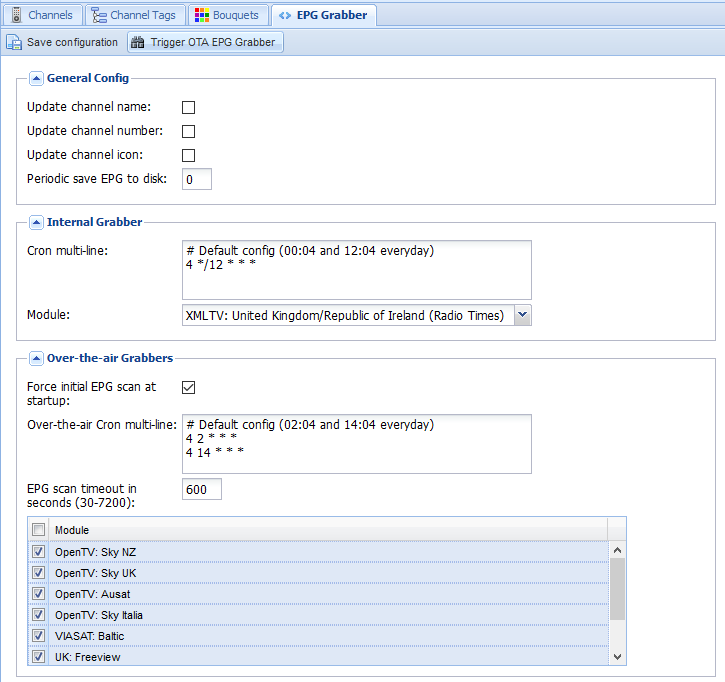
    6. Last step on the backend side is to enable the EPG. I have both the OTA grabber and the Radio Times for UK/Ireland enabled and we are doneEPG-grabber-DVB-T
      EPG-DVB-T

On the OpenELEC frontend, much simpler.

Install the add-on from under PVR, configure it with the hostname, username, and password, and under Settings -> TV, Enable live TV. Sorted!

Realtek RTL2832U TV USB Dongle and Windows 10

I recently got RTL2832U+R820T USB2.0 Digital DVB-T SDR+DAB+FM HDTV TV Tuner Receiver Stick from eBay. For about €6 it was worth a punt.

Had an interesting problem with windows 10 and the drivers though. Microsoft insist on installing an out-of-date driver (version 64.0001.0220.2009) which looks like it is working, but when scanning for DVB channels, it finds nothing.

The correct version should be 64.1.801.2012 and this is what is provided on the included CD. The problem is that Windows 10, in its wisdom decides to ‘update’ to the older driver as soon as it can.

The current (nasty) workaround is to;

  1. Uninstall the device and delete the driver (Device Manager)
  2. Block device driver updates (System -> System Properties -> Hardware -> Device Installation Settings
  3. Set ‘Never install driver software from Windows Update
  4. Install the driver from the CD
  5. Insert the dongle and scan

All channels were found and working perfectly (FM, and DAB also appeared as devices now).

ZFS One Year On – First Repair

Having moved to ZFS after my little RAID/XFS problem last year, with weekly scrubs of the array, I’ve just had my first read error and repair. From the system log;

[1691578.161114] ata7.00: exception Emask 0x0 SAct 0x3 SErr 0x0 action 0x0
[1691578.161121] ata7.00: irq_stat 0x40000008
[1691578.161128] ata7.00: failed command: READ FPDMA QUEUED
[1691578.161138] ata7.00: cmd 60/b0:00:d8:c8:1b/00:00:66:00:00/40 tag 0 ncq 90112 in
[1691578.161140]          res 41/40:b0:e0:c8:1b/00:00:66:00:00/00 Emask 0x409 (media error) <F>
[1691578.161146] ata7.00: status: { DRDY ERR }
[1691578.161150] ata7.00: error: { UNC }
[1691578.162924] ata7.00: configured for UDMA/133
[1691578.162945] sd 6:0:0:0: [sdf] Unhandled sense code
[1691578.162949] sd 6:0:0:0: [sdf]  Result: hostbyte=DID_OK driverbyte=DRIVER_SENSE
[1691578.162955] sd 6:0:0:0: [sdf]  Sense Key : Medium Error [current] [descriptor]
[1691578.162963] Descriptor sense data with sense descriptors (in hex):
[1691578.162967]         72 03 11 04 00 00 00 0c 00 0a 80 00 00 00 00 00
[1691578.162982]         66 1b c8 e0
[1691578.162989] sd 6:0:0:0: [sdf]  Add. Sense: Unrecovered read error - auto reallocate failed
[1691578.162998] sd 6:0:0:0: [sdf] CDB: Read(10): 28 00 66 1b c8 d8 00 00 b0 00
[1691578.163013] end_request: I/O error, dev sdf, sector 1713096928
[1691578.163040] ata7: EH complete

And looking at ZFS;

sudo zpool status
[sudo] password for :
pool: storage
state: ONLINE
scan: scrub repaired 88K in 11h7m with 0 errors on Sun May  1 12:37:48 2016
config:

NAME        STATE     READ WRITE CKSUM
storage     ONLINE       0     0     0
raidz1-0  ONLINE       0     0     0
sdf     ONLINE       0     0     0
sdc     ONLINE       0     0     0
sdh     ONLINE       0     0     0
sdj     ONLINE       0     0     0
raidz1-1  ONLINE       0     0     0
sdb     ONLINE       0     0     0
sdd     ONLINE       0     0     0
sdi     ONLINE       0     0     0
sdk     ONLINE       0     0     0

errors: No known data errors

Kind of wondering how much life that drive has left – should I replace now??

Supporting Multiple Subnets from a single DHCP Server

This took a bit of google work to piece together how it works, so just posting it here so others can benefit. The basic scenario is as follows:

  1. I have a number of subnets that I need to assign addresses to
  2. I have a single server with only one interface and it lives on my management network

DHCP Relay SetupSince the server isn’t on each of the subnets I’m going to make user of the UDP Helper functionality built into most routers/L3 switches today. If a DHCP client outside the DHCP server’s subnet broadcasts an address request, it is the helper that forwards the message to the DHCP server. The server then chooses an address and sends the client a unicast message, using the helper to send the message back to the client’s subnet.

The address is reserved for a limited time while the DHCP server waits for a response. If the client responds with another broadcast message, the DHCP server distributes the address.

Router config

This is incredibly simple. On each SVI, simply add the ip helper-address:

interface vlan 10
ip address 10.0.10.1/24
ip helper-address 10.10.10.200
interface vlan 20
ip address 10.0.20.1/24
ip helper-address 10.10.10.200
interface vlan 30
ip address 10.0.30.1/24
ip helper-address 10.10.10.200

Of course, your router should be able to reach the helper address.

DHCP Server Config

This was actually the harder part to hunt down. Basically we just define our subnets without using the “shared-network” statement

authoritative;

# this is the most important line. It specifies the method
# to use to connect to the DNS server and update it.
ddns-update-style none;
ddns-domainname "example.com";
ignore client-updates;


option domain-name              "example.com";
option domain-name-servers      8.8.8.8,8.8.4.4;
option time-offset              0;
option ntp-servers              10.10.10.200;
one-lease-per-client off;
default-lease-time 86400;
max-lease-time 604800;
option ip-forwarding off;


# Subnet for internal hosts
    subnet 10.0.10.0 netmask 255.255.255.0 {
        range 10.0.10.2 10.0.10.254;
        option routers                  10.0.10.1;
        option subnet-mask              255.255.255.0;
    }

subnet 10.0.20.0 netmask 255.255.255.0 {
        range 10.0.20.2 10.0.20.254;
        option routers                  10.0.20.1;
        option subnet-mask              255.255.255.0;
    }
subnet 10.0.30.0 netmask 255.255.255.0 {
        range 10.0.30.2 10.0.30.254;
        option routers                  10.0.30.1;
        option subnet-mask              255.255.255.0;
    }

The server will select the correct subnet, based on the GIADDR (Gateway IP Address) contained in the request e.g. the DHCP Request reaching the server from vlan10 will have GIADDR = 10.0.10.1

Editing MKV flags to stop subtitles

When viewing some mkv files you end to find in some cases that the soft subtitles are enabled by default. To disable, follow this

Check the current  file info:

mkvinfo <filename>.mkv
+ EBML head
|+ EBML version: 1
|+ EBML read version: 1
|+ EBML maximum ID length: 4
|+ EBML maximum size length: 8
|+ Doc type: matroska
|+ Doc type version: 2
|+ Doc type read version: 2
+ Segment, size 4687414538
|+ Seek head (subentries will be skipped)
|+ Segment tracks
| + A track
|  + Track number: 1 (track ID for mkvmerge & mkvextract: 0)
|  + Track UID: 1280263319
|  + Track type: video
|  + Forced flag: 1
|  + Lacing flag: 0
|  + MinCache: 1
|  + Codec ID: V_MPEG4/ISO/AVC
|  + CodecPrivate, length 40 (h.264 profile: High @L4.1)
|  + Default duration: 41.708ms (23.976 frames/fields per second for a video track)
|  + Video track
|   + Pixel width: 1280
|   + Pixel height: 688
|   + Display width: 1280
|   + Display height: 688
|   + Interlaced: 0
|  + Enabled: 1
|  + Default flag: 1
|  + Timecode scale: 1
|  + Max BlockAddition ID: 0
|  + Codec decode all: 1
| + A track
|  + Track number: 2 (track ID for mkvmerge & mkvextract: 1)
|  + Track UID: 1577341855
|  + Track type: audio
|  + Forced flag: 1
|  + Codec ID: A_DTS
|  + Audio track
|   + Sampling frequency: 48000
|   + Channels: 2
|  + Content encodings
|   + Content encoding
|    + Content compression
|     + Algorithm: 3 (header removal)
|     + Settings: length 4, data: 0x7f 0xfe 0x80 0x01
|    + Order: 0
|    + Scope: 1 (1: all frames)
|    + Type: 0 (compression)
|  + Enabled: 1
|  + Default flag: 1
|  + Lacing flag: 1
|  + MinCache: 0
|  + Timecode scale: 1
|  + Max BlockAddition ID: 0
|  + Codec decode all: 1
| + A track
|  + Track number: 3 (track ID for mkvmerge & mkvextract: 2)
|  + Track UID: 957802682
|  + Track type: subtitles
|  + Forced flag: 1
|  + Lacing flag: 0
|  + Codec ID: S_TEXT/UTF8
|  + Language: rum
|  + Enabled: 1
|  + Default flag: 1
|  + MinCache: 0
|  + Timecode scale: 1
|  + Max BlockAddition ID: 0
|  + Codec decode all: 1
|+ EbmlVoid (size: 3734)
|+ Segment information
| + Timecode scale: 1000000
| + Muxing application: libebml v1.0.0 + libmatroska v1.0.0
| + Writing application: mkvmerge v4.1.1 ('Bouncin' Back') built on Jul  3 2010 22:54:08
| + Duration: 5985.440s (01:39:45.440)
| + Date: Tue Feb  8 11:55:23 2011 UTC
| + Segment UID: 0xb4 0xc9 0x7c 0x1f 0x34 0xa2 0x1a 0x42 0xae 0x1c 0x29 0x97 0xe3 0x7d 0xc3 0xb3
|+ EbmlVoid (size: 1351)
|+ Cluster

So we want to disable, and remove the default flag, as well as the forced one

mkvpropedit <filename>.mkv --edit track:3 --set flag-default=0
mkvpropedit <filename>.mkv --edit track:3 --set flag-forced=0
mkvpropedit <filename>.mkv --edit track:3 --set flag-enabled=0
mkvinfo <filename>.mkv
+ EBML head
|+ EBML version: 1
...
| + A track
|  + Track number: 3 (track ID for mkvmerge & mkvextract: 2)
|  + Track UID: 957802682
|  + Track type: subtitles
|  + Forced flag: 0
|  + Lacing flag: 0
|  + Codec ID: S_TEXT/UTF8
|  + Language: rum
|  + Enabled: 0
|  + Default flag: 0

Horizon Wi-Free Access on Linux

Horizon Wi-Free is an 802.1x authenticated network service intended to allow UPC customers to use WiFi Offload via UPC broadband routers. Essentially almost all UPC modems are broadcasting a “Horizon Wi-Free” SSID, and authenticating via 802.1x in the backend.

Note: You cannot connect to Horizon Wi-Free through your own router, so you will have to test against another customer’s one! I believe the idea behind this is to prevent you using the ‘roaming’ network while at home.

Configuring wpa_supplicant.conf

Main points here are:

  • SSID: this should be “Horizon Wi-Free”
  • parwise and group = CCMP
  • EAP: This needs to be PEAP as a username and password are required
  • identity: this is your UPC Wi-Free username
  • password: the Wi-Free password, not your web account password
  • ca_cert: This cert is to verify that we are actually connecting to a network belonging to UPC (see below)
  • phase2: This must be MSCHAPV2
network={
   ssid="Horizon Wi-Free"
   key_mgmt=WPA-EAP
   pairwise=CCMP
   group=CCMP
   eap=PEAP
   identity="username"
   password="my_secret_password"
   ca_cert="/etc/cert/liberty_global.pem"
   phase1="peapver=0"
   phase2="MSCHAPV2"
   id_str="horizon-free-wifi"
}


Getting the CA Cert for Network Verification

This step was a little more work then expected, as I had to track down a copy of the CA cert. The easiest way is to download the .mobileconfig file intended for iOS and extract the required cert chain:

wget http://www.upc.ie/horizonwifreedevicesetup/applesecurity/

[user.local][~/Downloads]=&gt; openssl pkcs7 -inform DER -print_certs -in ./HorizonWi-Freev1.mobileconfig
&nbsp;
subject=/O=AlphaSSL/CN=AlphaSSL CA - G2
issuer=/C=BE/O=GlobalSign nv-sa/OU=Root CA/CN=GlobalSign Root CA
-----BEGIN CERTIFICATE-----
MIIELzCCAxegAwIBAgILBAAAAAABL07hNwIwDQYJKoZIhvcNAQEFBQAwVzELMAkG
A1UEBhMCQkUxGTAXBgNVBAoTEEdsb2JhbFNpZ24gbnYtc2ExEDAOBgNVBAsTB1Jv
b3QgQ0ExGzAZBgNVBAMTEkdsb2JhbFNpZ24gUm9vdCBDQTAeFw0xMTA0MTMxMDAw
MDBaFw0yMjA0MTMxMDAwMDBaMC4xETAPBgNVBAoTCEFscGhhU1NMMRkwFwYDVQQD
ExBBbHBoYVNTTCBDQSAtIEcyMIIBIjANBgkqhkiG9w0BAQEFAAOCAQ8AMIIBCgKC
AQEAw/BliN8b3caChy/JC7pUxmM/RnWsSxQfmHKLHBD/CalSbi9l32WEP1+Bstjx
T9fwWrvJr9Ax3SZGKpme2KmjtrgHxMlx95WE79LqH1Sg5b7kQSFWMRBkfR5jjpxx
XDygLt5n3MiaIPB1yLC2J4Hrlw3uIkWlwi80J+zgWRJRsx4F5Tgg0mlZelkXvhpL
OQgSeTObZGj+WIHdiAxqulm0ryRPYeDK/Bda0jxyq6dMt7nqLeP0P5miTcgdWPh/
UzWO1yKIt2F2CBMTaWawV1kTMQpwgiuT1/biQBXQHQFyxxNYalrsGYkWPODIjYYq
+jfwNTLd7OX+gI73BWe0i0J1NQIDAQABo4IBIzCCAR8wDgYDVR0PAQH/BAQDAgEG
MBIGA1UdEwEB/wQIMAYBAf8CAQAwHQYDVR0OBBYEFBTqGVXwDg0yxh90M7eOZhpM
EjEeMEUGA1UdIAQ+MDwwOgYEVR0gADAyMDAGCCsGAQUFBwIBFiRodHRwczovL3d3
dy5hbHBoYXNzbC5jb20vcmVwb3NpdG9yeS8wMwYDVR0fBCwwKjAooCagJIYiaHR0
cDovL2NybC5nbG9iYWxzaWduLm5ldC9yb290LmNybDA9BggrBgEFBQcBAQQxMC8w
LQYIKwYBBQUHMAGGIWh0dHA6Ly9vY3NwLmdsb2JhbHNpZ24uY29tL3Jvb3RyMTAf
BgNVHSMEGDAWgBRge2YaRQ2XyolQL30EzTSo//z9SzANBgkqhkiG9w0BAQUFAAOC
AQEABjBCm89JAn6J6fWDWj0C87yyRt5KUO65mpBz2qBcJsqCrA6ts5T6KC6y5kk/
UHcOlS9o82U8nxTyaGCStvwEDfakGKFpYA3jnWhbvJ4LOFmNIdoj+pmKCbkfpy61
VWxH50Hs5uJ/r1VEOeCsdO5l0/qrUUgw8T53be3kD0CY7kd/jbZYJ82Sb2AjzAKb
WSh4olGd0Eqc5ZNemI/L7z/K/uCvpMlbbkBYpZItvV1lVcW/fARB2aS1gOmUYAIQ
OGoICNdTHC2Tr8kTe9RsxDrE+4CsuzpOVHrNTrM+7fH8EU6f9fMUvLmxMc72qi+l
+MPpZqmyIJ3E+LgDYqeF0RhjWw==
-----END CERTIFICATE-----

subject=/OU=Domain Control Validated/CN=*.upcbroadband.com
issuer=/O=AlphaSSL/CN=AlphaSSL CA - G2
-----BEGIN CERTIFICATE-----
MIIEtzCCA5+gAwIBAgISESEulCUW/1LPLh5Wj7dtRUYSMA0GCSqGSIb3DQEBBQUA
MC4xETAPBgNVBAoTCEFscGhhU1NMMRkwFwYDVQQDExBBbHBoYVNTTCBDQSAtIEcy
MB4XDTEzMDExNjEyMzY0M1oXDTE1MDExNzEyMzY0M1owQDEhMB8GA1UECxMYRG9t
YWluIENvbnRyb2wgVmFsaWRhdGVkMRswGQYDVQQDDBIqLnVwY2Jyb2FkYmFuZC5j
b20wggEiMA0GCSqGSIb3DQEBAQUAA4IBDwAwggEKAoIBAQCh0AMi+hy7flw92BCL
dXuXeFVFGSE9nXnzhspXIPVTkMMGHfZrkbxw3DzTrLD490X3o3UcQ8gxwU80jf7I
71wpxaXLdUxAFk2IpgSb6hAtOiBGtioTx8/5ZxlGW+c1JPb6ompslyY4fe4f9y3k
9u6cIKAzttnTNLCOe1IUIfy1HjjDm3/lzVuuV4N7eu/bYtPE6RB8xpm/3lK2cRCB
T8ueRokeU3Wiq3mZSKenT54rw+3kWBFfAAKVjyNHctQHlrtzSal28JQJ/tVLhhOM
sDO0kss0y+U0wbzjc/sfjBHDaNxboTc4C9MwzEScNrn9WH8qj/xT+nHTFBITiqSh
1EF5AgMBAAGjggG7MIIBtzAOBgNVHQ8BAf8EBAMCBaAwTQYDVR0gBEYwRDBCBgor
BgEEAaAyAQoKMDQwMgYIKwYBBQUHAgEWJmh0dHBzOi8vd3d3Lmdsb2JhbHNpZ24u
Y29tL3JlcG9zaXRvcnkvMC8GA1UdEQQoMCaCEioudXBjYnJvYWRiYW5kLmNvbYIQ
dXBjYnJvYWRiYW5kLmNvbTAJBgNVHRMEAjAAMB0GA1UdJQQWMBQGCCsGAQUFBwMB
BggrBgEFBQcDAjA6BgNVHR8EMzAxMC+gLaArhilodHRwOi8vY3JsMi5hbHBoYXNz
bC5jb20vZ3MvZ3NhbHBoYWcyLmNybDB/BggrBgEFBQcBAQRzMHEwPAYIKwYBBQUH
MAKGMGh0dHA6Ly9zZWN1cmUyLmFscGhhc3NsLmNvbS9jYWNlcnQvZ3NhbHBoYWcy
LmNydDAxBggrBgEFBQcwAYYlaHR0cDovL29jc3AyLmdsb2JhbHNpZ24uY29tL2dz
YWxwaGFnMjAdBgNVHQ4EFgQUidh6RCyiMnWkZqNJ+NrOP9APjIswHwYDVR0jBBgw
FoAUFOoZVfAODTLGH3Qzt45mGkwSMR4wDQYJKoZIhvcNAQEFBQADggEBABMneGO7
KOzZ7pEB4NN9rHDizfz+3fauF68WQz9V3+byP53mwZWgfpX80nxi1uD3qGzgaNUB
mgenNxrsvziw1aiDAgMiwc+uhN8BYh/cezfp+pe2qBnyeu2CJBQ9tLIyyBp7cCl3
PGNSBhXr4xBxsfVV+4xqk7aLkG9aVelPIrQWokwPZ5VWBxjSAmrWipvPRfzb7IeA
DVM9W1ZhxyDY1D7d6F56Q0WTTNAsV/nWv9sNOlkME9lpF4ytpvxNHLHgO7cKvgr/
lTZMhfRdQB9Djn3OJ22O5AratklkkxJquvIAOYHvg6GEhWk+IFbg2Lkrn6tuPwB5
W24J6nCgFx/jzvc=
-----END CERTIFICATE-----

Throw these into a file and get openssl to verify:

[user@machine][~]=&gt; openssl verify liberty_global.pem
liberty_global.pem: OK

While the theory behind this is sound, unfortunately there was an issue when I attempted to test the connection:

SSL: SSL_connect:SSLv3 read server hello A
TLS: Certificate verification failed, error 19 (self signed certificate in certificate chain) depth 2 for '/C=NL/O=Liberty Global Operations B.V./OU=Root CA0001/CN=Liberty Global Root Certification Authority'
wlan1: CTRL-EVENT-EAP-TLS-CERT-ERROR reason=1 depth=2 subject='/C=NL/O=Liberty Global Operations B.V./OU=Root CA0001/CN=Liberty Global Root Certification Authority' err='self signed certificate in certificate chain'
SSL: (where=0x4008 ret=0x230)
SSL: SSL3 alert: write (local SSL3 detected an error):fatal:unknown CA
SSL: (where=0x1002 ret=0xffffffff)
SSL: SSL_connect:error in SSLv3 read server certificate B
OpenSSL: openssl_handshake - SSL_connect error:14090086:SSL routines:SSL3_GET_SERVER_CERTIFICATE:certificate verify failed
SSL: 7 bytes pending from ssl_out
SSL: Failed - tls_out available to report error
SSL: 7 bytes left to be sent out (of total 7 bytes)

Apparently OpenSSL blows a fuse when pointed at the CA cert, as it seemingly tries to authenticate the CA cert against a higher authority – since this is a root cert that is not possible. Apparently I’m not the first to see this little problem.

Quick workaround is to disable the CA Cert setting in the wpa_supplicants file and we are in business:

SSL: SSL_connect:SSLv3 read server hello A
TLS: tls_verify_cb - preverify_ok=1 err=19 (self signed certificate in certificate chain) ca_cert_verify=0 depth=2 buf='/C=NL/O=Liberty Global Operations B.V./OU=Root CA0001/CN=Liberty Global Root Certification Authority'
wlan1: CTRL-EVENT-EAP-PEER-CERT depth=2 subject='/C=NL/O=Liberty Global Operations B.V./OU=Root CA0001/CN=Liberty Global Root Certification Authority'
TLS: tls_verify_cb - preverify_ok=1 err=19 (self signed certificate in certificate chain) ca_cert_verify=0 depth=2 buf='/C=NL/O=Liberty Global Operations B.V./OU=Root CA0001/CN=Liberty Global Root Certification Authority'
wlan1: CTRL-EVENT-EAP-PEER-CERT depth=2 subject='/C=NL/O=Liberty Global Operations B.V./OU=Root CA0001/CN=Liberty Global Root Certification Authority'
TLS: tls_verify_cb - preverify_ok=1 err=19 (self signed certificate in certificate chain) ca_cert_verify=0 depth=1 buf='/C=NL/O=Liberty Global Operations B.V./OU=HORIZON Service Operator CA0001/CN=Liberty Global HORIZON Service Operator Certification Authority'
wlan1: CTRL-EVENT-EAP-PEER-CERT depth=1 subject='/C=NL/O=Liberty Global Operations B.V./OU=HORIZON Service Operator CA0001/CN=Liberty Global HORIZON Service Operator Certification Authority'
TLS: tls_verify_cb - preverify_ok=1 err=19 (self signed certificate in certificate chain) ca_cert_verify=0 depth=0 buf='/CN=Liberty Global WiFi/OU=HORIZON/O=Liberty Global Operations B.V./C=NL'
wlan1: CTRL-EVENT-EAP-PEER-CERT depth=0 subject='/CN=Liberty Global WiFi/OU=HORIZON/O=Liberty Global Operations B.V./C=NL'
SSL: (where=0x1001 ret=0x1)
SSL: SSL_connect:SSLv3 read server certificate A
SSL: (where=0x1001 ret=0x1)
SSL: SSL_connect:SSLv3 read server done A
SSL: (where=0x1001 ret=0x1)
SSL: SSL_connect:SSLv3 write client key exchange A
SSL: (where=0x1001 ret=0x1)
SSL: SSL_connect:SSLv3 write change cipher spec A
SSL: (where=0x1001 ret=0x1)
SSL: SSL_connect:SSLv3 write finished A
SSL: (where=0x1001 ret=0x1)
SSL: SSL_connect:SSLv3 flush data
SSL: (where=0x1002 ret=0xffffffff)
SSL: SSL_connect:error in SSLv3 read finished A
SSL: SSL_connect - want more data
SSL: 318 bytes pending from ssl_out
SSL: 318 bytes left to be sent out (of total 318 bytes)
EAP: method process -&gt; ignore=FALSE methodState=MAY_CONT decision=FAIL
EAP: EAP entering state SEND_RESPONSE
EAP: EAP entering state IDLE
EAPOL: SUPP_BE entering state RESPONSE
EAPOL: txSuppRsp
TX EAPOL: dst=54:88:0e:b8:5d:79
TX EAPOL - hexdump(len=332): 01 00 01 48 02 07 01 48 19 80 00 00 01 3e 16 03 01 01 06 10 00 01 02 01 00 75 1a fa 59 f4 52 82 d3 c2 c4 da 8e 12 6b 25 ab bd 77 93 3c a4 0f bb a0 34 bf f9 63 d0 4c 8a 2d 5d 71 11 24 a6 33 71 8e 8f b9 87 36 18 21 b8 c0 09 11 3a 59 6a 6a 77 65 b3 75 69 24 75 8f be ef 2b 07 2c 20 78 89 84 6e 54 dd f0 34 80 d8 39 cf 6b 5c 10 cb cf 99 90 d5 12 7f 5d 08 17 49 79 28 d1 23 11 c5 dc 2f a7 19 2c e2 c4 5d 4b 35 18 93 dc c5 e9 6d 82 40 ff 13 a6 19 79 dd fb c6 20 e6 0a 02 4f 24 90 3b 5c ea 6a 1b 80 16 85 9e ab 04 51 b4 ac dd dd a5 59 b1 84 12 89 65 a9 64 82 f7 7f f2 6c 48 5d 0f e7 7d c8 5b 60 ee 8a 41 98 55 4e c2 92 55 8e b1 0a dd 55 d5 4f 7b 2d 0a 4a 8b df 1a e1 cf 12 0d cd c5 3e 45 18 e9 69 cb 96 5a 9e 69 cd 4d 72 63 07 ab ab c0 c4 a1 04 e1 2f ad 12 a9 c9 82 9c 1b fe 8e a1 d7 48 6c 6e dd 90 08 5d 8a 5f 0b 54 eb b0 4e e8 17 04 45 64 2e 67 6d 14 03 01 00 01 01 16 03 01 00 28 11 ea 76 36 ea 35 2f 95 eb f3 ff 22 9e 41 31 17 08 f9 e5 53 48 b1 96 c9 f7 6d a3 9b 25 f7 7a cb b3 a9 5d 8f f2 9e 9e 02
EAPOL: SUPP_BE entering state RECEIVE
wlan1: RX EAPOL from 54:88:0e:b8:5d:79
RX EAPOL - hexdump(len=63): 01 00 00 39 01 08 00 39 19 00 14 03 01 00 01 01 16 03 01 00 28 03 7e 2e d8 7e ce 49 a8 3e 53 d3 90 47 40 b3 c7 00 f2 00 7d d0 23 ae ba 9a 27 2d cd aa 0b 7f 68 52 48 f6 4a 58 f6 11 89 00 00
EAPOL: Received EAP-Packet frame
EAPOL: SUPP_BE entering state REQUEST
EAPOL: getSuppRsp
EAP: EAP entering state RECEIVED
EAP: Received EAP-Request id=8 method=25 vendor=0 vendorMethod=0
EAP: EAP entering state METHOD
SSL: Received packet(len=57) - Flags 0x00
SSL: (where=0x1001 ret=0x1)
SSL: SSL_connect:SSLv3 read finished A
SSL: (where=0x20 ret=0x1)
SSL: (where=0x1002 ret=0x1)
SSL: 0 bytes pending from ssl_out
SSL: No Application Data included
SSL: No data to be sent out
EAP-PEAP: TLS done, proceed to Phase 2
EAP-PEAP: using label 'client EAP encryption' in key derivation
EAP-PEAP: Derived key - hexdump(len=64): [REMOVED]
SSL: Building ACK (type=25 id=8 ver=0)
EAP: method process -&gt; ignore=FALSE methodState=MAY_CONT decision=FAIL
EAP: EAP entering state SEND_RESPONSE
EAP: EAP entering state IDLE
EAPOL: SUPP_BE entering state RESPONSE
EAPOL: txSuppRsp
TX EAPOL: dst=54:88:0e:b8:5d:79
TX EAPOL - hexdump(len=10): 01 00 00 06 02 08 00 06 19 00
EAPOL: SUPP_BE entering state RECEIVE
wlan1: RX EAPOL from 54:88:0e:b8:5d:79
RX EAPOL - hexdump(len=41): 01 00 00 23 01 09 00 23 19 00 17 03 01 00 18 ee f5 c3 a9 be 73 08 05 92 fd e0 52 73 8b 2a 53 a5 d9 64 8d cc 3c 20 f6 00 00
EAPOL: Received EAP-Packet frame
EAPOL: SUPP_BE entering state REQUEST
EAPOL: getSuppRsp
EAP: EAP entering state RECEIVED
EAP: Received EAP-Request id=9 method=25 vendor=0 vendorMethod=0
EAP: EAP entering state METHOD
SSL: Received packet(len=35) - Flags 0x00
EAP-PEAP: received 29 bytes encrypted data for Phase 2
EAP-PEAP: Decrypted Phase 2 EAP - hexdump(len=1): 01
EAP-PEAP: received Phase 2: code=1 identifier=9 length=5
EAP-PEAP: Phase 2 Request: type=1
EAP: using real identity - hexdump_ascii(len=8):
63 6f 6c 69 6e 6d 61 63                           colinmac
EAP-PEAP: Encrypting Phase 2 data - hexdump(len=13): [REMOVED]
SSL: 66 bytes left to be sent out (of total 66 bytes)
EAP: method process -&gt; ignore=FALSE methodState=MAY_CONT decision=FAIL
EAP: EAP entering state SEND_RESPONSE
EAP: EAP entering state IDLE
EAPOL: SUPP_BE entering state RESPONSE
EAPOL: txSuppRsp
TX EAPOL: dst=54:88:0e:b8:5d:79
TX EAPOL - hexdump(len=76): 01 00 00 48 02 09 00 48 19 00 17 03 01 00 18 0c 6d 84 e3 05 5a ed 21 51 24 0a f4 f3 c6 c7 49 df 39 c5 27 ad 3e cd 8d 17 03 01 00 20 46 a2 79 7f 71 23 e0 91 8a b0 24 11 c8 0f 48 44 09 78 ba ec 81 29 c8 dd 61 9e f1 42 87 92 ec b1
EAPOL: SUPP_BE entering state RECEIVE
EAPOL: startWhen --&gt; 0
wlan1: RX EAPOL from 54:88:0e:b8:5d:79
RX EAPOL - hexdump(len=65): 01 00 00 3b 01 0a 00 3b 19 00 17 03 01 00 30 26 88 61 ea ad c4 b0 dd 63 c9 18 29 ee 80 d1 0a 69 ab f4 b1 e9 2a 1e 26 26 37 22 4c 2e 3a 4a 15 43 43 62 3f 11 f9 4e df a3 f3 a8 d2 c4 71 68 bc 00 00
EAPOL: Received EAP-Packet frame
EAPOL: SUPP_BE entering state REQUEST
EAPOL: getSuppRsp
EAP: EAP entering state RECEIVED
EAP: Received EAP-Request id=10 method=25 vendor=0 vendorMethod=0
EAP: EAP entering state METHOD
SSL: Received packet(len=59) - Flags 0x00
EAP-PEAP: received 53 bytes encrypted data for Phase 2
EAP-PEAP: Decrypted Phase 2 EAP - hexdump(len=25): 1a 01 0a 00 18 10 ef 8b 8c 7b 1e 81 00 f8 0c c9 af 89 fd f6 2e 38 46 45 31
EAP-PEAP: received Phase 2: code=1 identifier=10 length=29
EAP-PEAP: Phase 2 Request: type=26
EAP-PEAP: Selected Phase 2 EAP vendor 0 method 26
EAP-MSCHAPV2: RX identifier 10 mschapv2_id 10
EAP-MSCHAPV2: Received challenge
EAP-MSCHAPV2: Authentication Servername - hexdump_ascii(len=3):
46 45 31                                          FE1
EAP-MSCHAPV2: Generating Challenge Response
Get randomness: len=16 entropy=21
MSCHAPV2: Identity - hexdump_ascii(len=8):
63 6f 6c 69 6e 6d 61 63                           colinmac
MSCHAPV2: Username - hexdump_ascii(len=8):
63 6f 6c 69 6e 6d 61 63                           colinmac
MSCHAPV2: auth_challenge - hexdump(len=16): ef 8b 8c 7b 1e 81 00 f8 0c c9 af 89 fd f6 2e 38
MSCHAPV2: peer_challenge - hexdump(len=16): 67 d4 8e 8e e8 48 22 57 9d be b7 2e 73 83 49 44
MSCHAPV2: username - hexdump_ascii(len=8):
63 6f 6c 69 6e 6d 61 63                           colinmac
MSCHAPV2: password - hexdump_ascii(len=16): [REMOVED]
MSCHAPV2: NT Response - hexdump(len=24): 10 79 02 a5 f2 bf eb 3e 3a 61 f8 2f 8d 32 35 56 4e 35 78 61 8a ef f7 95
MSCHAPV2: Auth Response - hexdump(len=20): 32 2c 46 ee 9d 2d c6 75 34 e7 df ca fa 35 2b 76 8a 5a 42 d9
MSCHAPV2: Master Key - hexdump(len=16): [REMOVED]
EAP-MSCHAPV2: TX identifier 10 mschapv2_id 10 (response)
EAP-PEAP: Encrypting Phase 2 data - hexdump(len=67): [REMOVED]
SSL: 122 bytes left to be sent out (of total 122 bytes)
EAP: method process -&gt; ignore=FALSE methodState=MAY_CONT decision=FAIL
EAP: EAP entering state SEND_RESPONSE
EAP: EAP entering state IDLE
EAPOL: SUPP_BE entering state RESPONSE
EAPOL: txSuppRsp
TX EAPOL: dst=54:88:0e:b8:5d:79
TX EAPOL - hexdump(len=132): 01 00 00 80 02 0a 00 80 19 00 17 03 01 00 18 55 ca 7a 1f a1 5d 3a 0a fc 0d db 15 36 2c 6b af 4b 79 39 4c 40 45 62 83 17 03 01 00 58 c1 08 63 3f a0 5e 42 9a 7f 41 9f bf a3 c7 ae 76 50 17 67 6e 94 ea 41 d8 91 70 04 90 b2 8d dd 8d 18 7f 4b f5 67 7a 4f 1a b3 da 86 4d 24 b6 bf 87 ac 0b 31 05 56 39 2e ec 7a 67 65 8f 3a 99 6c 6e d1 53 02 49 02 d6 19 20 cf 19 33 6a c1 05 5e 75 76 b7 c0 e2 dc fb 49 04
EAPOL: SUPP_BE entering state RECEIVE
wlan1: RX EAPOL from 54:88:0e:b8:5d:79
RX EAPOL - hexdump(len=89): 01 00 00 53 01 0b 00 53 19 00 17 03 01 00 48 6b ee 0f 37 d5 50 c5 65 30 01 05 78 12 a5 e5 e1 81 80 dd c4 ee 6c f3 d6 7c ab fd 1b 92 42 5c 8b fb 5d 8d 0d 2f 7b 82 86 2b 72 71 f8 8d 91 ae ef e0 4a d2 17 d1 c4 4b e2 6d 36 ae d2 fd 88 a7 96 b8 45 b5 69 e4 54 5f 12 00 00
EAPOL: Received EAP-Packet frame
EAPOL: SUPP_BE entering state REQUEST
EAPOL: getSuppRsp
EAP: EAP entering state RECEIVED
EAP: Received EAP-Request id=11 method=25 vendor=0 vendorMethod=0
EAP: EAP entering state METHOD
SSL: Received packet(len=83) - Flags 0x00
EAP-PEAP: received 77 bytes encrypted data for Phase 2
EAP-PEAP: Decrypted Phase 2 EAP - hexdump(len=47): 1a 03 0a 00 2e 53 3d 33 32 32 43 34 36 45 45 39 44 32 44 43 36 37 35 33 34 45 37 44 46 43 41 46 41 33 35 32 42 37 36 38 41 35 41 34 32 44 39
EAP-PEAP: received Phase 2: code=1 identifier=11 length=51
EAP-PEAP: Phase 2 Request: type=26
EAP-MSCHAPV2: RX identifier 11 mschapv2_id 10
EAP-MSCHAPV2: Received success
EAP-MSCHAPV2: Success message - hexdump_ascii(len=0):
EAP-MSCHAPV2: Authentication succeeded
EAP-PEAP: Encrypting Phase 2 data - hexdump(len=6): [REMOVED]
SSL: 58 bytes left to be sent out (of total 58 bytes)
EAP: method process -&gt; ignore=FALSE methodState=MAY_CONT decision=FAIL
EAP: EAP entering state SEND_RESPONSE
EAP: EAP entering state IDLE
EAPOL: SUPP_BE entering state RESPONSE
EAPOL: txSuppRsp
TX EAPOL: dst=54:88:0e:b8:5d:79
TX EAPOL - hexdump(len=68): 01 00 00 40 02 0b 00 40 19 00 17 03 01 00 18 39 d5 bf 6d ab 16 a3 06 c3 c3 25 b2 73 e5 67 a7 67 d9 d7 aa a8 8e 23 51 17 03 01 00 18 79 03 52 49 f6 02 7e 4d a5 7f 9d 2c 1b b5 29 b5 aa 31 8a 1e 5b ed a5 d9
EAPOL: SUPP_BE entering state RECEIVE
wlan1: RX EAPOL from 54:88:0e:b8:5d:79
RX EAPOL - hexdump(len=49): 01 00 00 2b 01 0c 00 2b 19 00 17 03 01 00 20 13 ba 7a c4 11 66 26 d0 30 0c 03 18 f1 b7 de 1e 21 22 6e 19 0a ff e9 46 de 42 dc bf d7 81 11 24 00 00
EAPOL: Received EAP-Packet frame
EAPOL: SUPP_BE entering state REQUEST
EAPOL: getSuppRsp
EAP: EAP entering state RECEIVED
EAP: Received EAP-Request id=12 method=25 vendor=0 vendorMethod=0
EAP: EAP entering state METHOD
SSL: Received packet(len=43) - Flags 0x00
EAP-PEAP: received 37 bytes encrypted data for Phase 2
EAP-PEAP: Decrypted Phase 2 EAP - hexdump(len=11): 01 0c 00 0b 21 80 03 00 02 00 01
EAP-PEAP: received Phase 2: code=1 identifier=12 length=11
EAP-PEAP: Phase 2 Request: type=33
EAP-TLV: Received TLVs - hexdump(len=6): 80 03 00 02 00 01
EAP-TLV: Result TLV - hexdump(len=2): 00 01
EAP-TLV: TLV Result - Success - EAP-TLV/Phase2 Completed
EAP-PEAP: Encrypting Phase 2 data - hexdump(len=11): [REMOVED]
SSL: 66 bytes left to be sent out (of total 66 bytes)
EAP: method process -&gt; ignore=FALSE methodState=DONE decision=UNCOND_SUCC
EAP: EAP entering state SEND_RESPONSE
EAP: EAP entering state IDLE
EAPOL: SUPP_BE entering state RESPONSE
EAPOL: txSuppRsp
TX EAPOL: dst=54:88:0e:b8:5d:79
TX EAPOL - hexdump(len=76): 01 00 00 48 02 0c 00 48 19 00 17 03 01 00 18 73 64 46 7d 38 e3 b0 07 de 23 4c 48 10 ac 96 c0 39 23 61 d5 34 03 14 af 17 03 01 00 20 01 9c d7 1c 26 ff f6 77 cf c0 d5 42 f3 56 b4 d0 9d b5 09 d5 77 b2 37 dc 40 41 c5 4c 09 fa 0c 4f
EAPOL: SUPP_BE entering state RECEIVE
wlan1: RX EAPOL from 54:88:0e:b8:5d:79
RX EAPOL - hexdump(len=10): 01 00 00 04 03 0c 00 04 00 00
EAPOL: Received EAP-Packet frame
EAPOL: SUPP_BE entering state REQUEST
EAPOL: getSuppRsp
EAP: EAP entering state RECEIVED
EAP: Received EAP-Success
EAP: EAP entering state SUCCESS
wlan1: CTRL-EVENT-EAP-SUCCESS EAP authentication completed successfully

Otherwise, the proper way is to install the cert into the system

 

Raspberry Pi’s Hardware Random Number Generator

Given all the OpenSSH/Diffie-Hellman issues seen lately, I was regenerating all my certs to  longer ones, which on the RPi is a bit of a job. Afterwards I discovered that the RPi actually has a hardware RNG. To make use if this awesome tool:

Install the kernel module

sudo modprobe bcm2708-rng

Make sure it is always available by adding it to /etc/modules

bcm2708-rng

Install some cool RNG tools.

sudo apt-get install rng-tools

The hardware device should now be available to root as /dev/hwrng

Testing how random is random

We have the basic rngtest available to use courtesy of rng-tools – there are far harsher ones e.g. dieharder but they take a while to run. Testing for true randomness is quite hard – you need a vast number of tests, and even then we would expect a few failed tests for truly random input.

In this case I had 2 failed tests out of 1000, which is reasonable.

sudo cat /dev/hwrng | rngtest -c 1000
rngtest 2-unofficial-mt.14
Copyright (c) 2004 by Henrique de Moraes Holschuh
This is free software; see the source for copying conditions.  There is NO warranty; not even for MERCHANTABILITY or FITNESS FOR A PARTICULAR PURPOSE.

rngtest: starting FIPS tests...
rngtest: bits received from input: 20000032
rngtest: FIPS 140-2 successes: 998
rngtest: FIPS 140-2 failures: 2
rngtest: FIPS 140-2(2001-10-10) Monobit: 0
rngtest: FIPS 140-2(2001-10-10) Poker: 0
rngtest: FIPS 140-2(2001-10-10) Runs: 1
rngtest: FIPS 140-2(2001-10-10) Long run: 1
rngtest: FIPS 140-2(2001-10-10) Continuous run: 0
rngtest: input channel speed: (min=35.153; avg=859.670; max=1627604.167)Kibits/s
rngtest: FIPS tests speed: (min=401.935; avg=3276.347; max=7317.816)Kibits/s
rngtest: Program run time: 29046630 microseconds

In comparison with the linux /dev/random number generator it’s not bad at all. The linux /dev/random passed all the tests but took far longer – look at the difference between the input channel speed 233.256kibits/s vs. 859.670kibits/s.

sudo cat /dev/random | rngtest -c 1000
rngtest 2-unofficial-mt.14
Copyright (c) 2004 by Henrique de Moraes Holschuh
This is free software; see the source for copying conditions.  There is NO warranty; not even for MERCHANTABILITY or FITNESS FOR A PARTICULAR PURPOSE.

rngtest: starting FIPS tests...
rngtest: bits received from input: 20000032
rngtest: FIPS 140-2 successes: 1000
rngtest: FIPS 140-2 failures: 0
rngtest: FIPS 140-2(2001-10-10) Monobit: 0
rngtest: FIPS 140-2(2001-10-10) Poker: 0
rngtest: FIPS 140-2(2001-10-10) Runs: 0
rngtest: FIPS 140-2(2001-10-10) Long run: 0
rngtest: FIPS 140-2(2001-10-10) Continuous run: 0
rngtest: input channel speed: (min=97.034; avg=233.256; max=428.947)Kibits/s
rngtest: FIPS tests speed: (min=836.349; avg=5252.286; max=7274.209)Kibits/s
rngtest: Program run time: 87562313 microseconds

Persistent Reverse-SSH Tunnels with autossh and screen

I’ve been working to manage my place remotely as I tend to have irregular hours. As a pilot I put in a Raspberry Pi and got a Belkin WeMo Switch. I had two problems with this setup;

  1. The internet connection is NAT-ed
  2. The Belkin cloud-y manager thing doesn’t seem to work (neither does IFTTT)

My solution was to use the RPi to manage the WeMo, and to have a reverse-ssh tunnel between the RPi and my public server.

  1. Ensure that passwordless SSH is working between the RPi and the server – plenty of guides online about how to do this.
  2. Open a screen session
  3. Use autossh to open and maintain the tunnel
$ autossh -M 65500 -o ServerAliveInterval=20 -R 11141:localhost:22 [email protected]

Autossh will use ports 65500 and 65501 to send echo data over and back between server and host, and opening an ssh session on the public server to local port 11141 will tunnel back to the SSH port on the RPi

ssh -p 11141 [email protected]

While this works fine, there is a potential issue – if the RPi is rebooted/looses power for any reason, the tunnel will be gone so we need to automate the setup so that it will be fired up upon boot – we will use a crontab entry for this:

@reboot /usr/bin/screen -S reverse-ssh-tunnel -d -m autossh -M 65500 -i /home/pi/.ssh/id_rsa -o "ServerAliveInterval 20" -o "ServerAliveCountMax 3" -R 11141:localhost:22 [email protected]

This cron entry will open a screen on reboot with “reverse-ssh-tunnel” as the title, and issue the autossh command. Reboot the RPi to test and you should be good to go.

Simples 🙂